Solved Installing .Net 1.1 in Windows 7 Pro fails

Perhaps the difference is SP1? .net 1.1 applications should work with .net 3.5 and above, so ultimately it will be the programs coding. I understand the issue is getting .net 1.1 on your system regardless, and while I see issues with people getting it done on x64, it is supposedly doable. Whether these instructions were pre SP1 I don't know.

How to Install .net framework 1.1 in Windows 7 64-bit? - Microsoft Community

A Guy
 

My Computer My Computer

At a glance

Windows 10 Home x64INTEL Core i5-750 Quad-Core 3.37GHzHyperX Fury Black Series 8GB (2 x 4GB) 1866MhzEVGA GeForce GTX 750 Superclocked 1GB 128-Bit...
Computer type
PC/Desktop
OS
Windows 10 Home x64
CPU
INTEL Core i5-750 Quad-Core 3.37GHz
Motherboard
ASUS P7P55D
Memory
HyperX Fury Black Series 8GB (2 x 4GB) 1866Mhz
Graphics Card(s)
EVGA GeForce GTX 750 Superclocked 1GB 128-Bit GDDR5
Monitor(s) Displays
LG 32MA68HY 32" IPS
Screen Resolution
1920 x 1080
Hard Drives
Samsung 840 Evo 120GB, SEAGATE 500GB Barracuda® 7200.12, SATA 3 Gb/s, 7200 RPM, 16MB cache
PSU
ANTEC TruePower New TP-550, 80 PLUS, 550W
Case
ANTEC Three Hundred Illusion
Cooling
COOLER MASTER Hyper 212 Plus, 4 x 120mm 1 x 140mm Noctua's
Internet Speed
85 + Mbps
Antivirus
Avast
Browser
Vivaldi
Aaron Stebner is a .NET guru and well respected in the MS community. There's very little risk using the .NET cleanup tool, but it is a fair amount of work / time. If you DO back off .NET, turn off automatic Windows update for the duration of your exercise.


Remember to turn AUTOMATIC UPDATES back on afterwards.​
... Before I try Aaron Stebner's cleanup tool, which looks risky, I will try Process Monitor and other approaches that others in this thread have kindly suggested.
Have you tried turning off DEP and installing 1.1 perpost 18?
Remember to turn DEP back on afterwards.​
If you don't feel comfortable temporarily turning off DEP just to install (test...) .NET 1.x then here's an alternative: Creating an administrative install point for the .NET Framework, a service pack and a hotfix

This seems to be more work than just simply turning off DEP and installing .NET 1.x given that this might not resolve the issue. We won't know until you try it in your environment.

Bill
 

My Computer My Computer

At a glance

x64 (6.3.9600) Win8.1 Pro & soon dual boot x6...AMD A6-3420M APU with Radeon(tm) HD Graphics6.00 GBAMD Radeon(TM) HD 6520G
Computer type
Laptop
Computer Manufacturer/Model Number
HP Pavilion dv6-6c10us
OS
x64 (6.3.9600) Win8.1 Pro & soon dual boot x64 (6.1.7601) Win7_SP1 HomePrem
CPU
AMD A6-3420M APU with Radeon(tm) HD Graphics
Motherboard
Hewlett-Packard 1805
Memory
6.00 GB
Graphics Card(s)
AMD Radeon(TM) HD 6520G
Sound Card
(1) AMD High Definition Audio Device (2) IDT High Definiti
Monitor(s) Displays
HP W2072a 20" LCD (1600 x 900) @ 60 Hz
Screen Resolution
1366 x 768 x 32 bits (4294967296 colors) @ 60 Hz
Hard Drives
ST640LM0 00 HM641JI SATA Disk Device
Keyboard
Logitech k520 wireless KB
Mouse
Logitech m320 wireless mouse (bundled with KB)
Internet Speed
15/5 | 54 MB Wireless 'n'
Antivirus
Realtime: Defender or Avast | On-demand: Malwarebytes, ESET
Browser
IE 11 on Win8, IE 10 on win 7
Other Info
Media: [Gimp, Audacity, VLC] || Comm: [WEmail 2012, Skype] || Productivity: [OpenOffice,| Textpad] || Utils: [Sysinternals, cCleaner, Speccy, Defraggler]
.Net 1.1 now installed, finally

I'm back, and I finally got .Net Framework 1.1 to install under Win 7 Pro, using the well known Procedure that calls for creating a C:\DotNet folder. To recap, previously I had done everything according to the 8-step instructions, but in step 8 - run netfx.msi - the process failed to complete, went through a rollback, and 1.1 was nowhere to be found.

I worked with Process Monitor (ProcMon) for a while; but it created mountains of data that, even with a lot of filtering, I couldn't make sense out of. I installed Visual Studio 2010 (it was on my pre-clean system), hoping it might bring 1.1 along with it. It didn't.

So, to make the "DotNet" process work I deleted all temp files in my user profile, as well as a lot of other Win temp files, rebooted, turned off Norton's anti-virus, and ran netfx.msi from the command prompt as administrator. Bingo, it worked! .Net 1.1 now shows up in CP Programs & Features; and netfx_setupverifier sees and validates it.

This info appeared in a Visual Studio forum thread, for which I am grateful. These additional steps may not be needed on every system; nevertheless I strongly recommend that the ubiquitous "DotNet" procedure be updated to include them.

Thanks for everyone's help, and I hope I've made a contribution.
 

My Computer My Computer

At a glance

Windows 7 Pro 32-bitIntel 3GHz dual-core4GBIntel on-board chip, no separate card
Computer type
PC/Desktop
Computer Manufacturer/Model Number
custom build
OS
Windows 7 Pro 32-bit
CPU
Intel 3GHz dual-core
Motherboard
Intel 5 yrs old
Memory
4GB
Graphics Card(s)
Intel on-board chip, no separate card
Hard Drives
Seagate 500 GB
Western Digital 500 GB
Antivirus
Norton Internet Security Suite
Browser
FireFox as default; also IE9
Glad you got it sorted, confirmed the method works, and added what may be necessary if people have errors. Is your appliacation working after all that? :)

A Guy
 

My Computer My Computer

At a glance

Windows 10 Home x64INTEL Core i5-750 Quad-Core 3.37GHzHyperX Fury Black Series 8GB (2 x 4GB) 1866MhzEVGA GeForce GTX 750 Superclocked 1GB 128-Bit...
Computer type
PC/Desktop
OS
Windows 10 Home x64
CPU
INTEL Core i5-750 Quad-Core 3.37GHz
Motherboard
ASUS P7P55D
Memory
HyperX Fury Black Series 8GB (2 x 4GB) 1866Mhz
Graphics Card(s)
EVGA GeForce GTX 750 Superclocked 1GB 128-Bit GDDR5
Monitor(s) Displays
LG 32MA68HY 32" IPS
Screen Resolution
1920 x 1080
Hard Drives
Samsung 840 Evo 120GB, SEAGATE 500GB Barracuda® 7200.12, SATA 3 Gb/s, 7200 RPM, 16MB cache
PSU
ANTEC TruePower New TP-550, 80 PLUS, 550W
Case
ANTEC Three Hundred Illusion
Cooling
COOLER MASTER Hyper 212 Plus, 4 x 120mm 1 x 140mm Noctua's
Internet Speed
85 + Mbps
Antivirus
Avast
Browser
Vivaldi
Could this been part of the problem? (Norton's anti-virus)
 

My Computer My Computer

At a glance

Windows 10 Pro. 64/ version 1709 Windows 7 Pr...Intel i7-6800K @ 4.3Corsair Platinum 16 gig @2400EVGA GTX 1070 OC
Computer type
PC/Desktop
Computer Manufacturer/Model Number
Home made Desktop
OS
Windows 10 Pro. 64/ version 1709 Windows 7 Pro/64
CPU
Intel i7-6800K @ 4.3
Motherboard
ASUS X-99 Deluxe II
Memory
Corsair Platinum 16 gig @2400
Graphics Card(s)
EVGA GTX 1070 OC
Monitor(s) Displays
Asus 27" LED LCD/VE278Q
Screen Resolution
1920-1080 or 1280-720 HDMI
Hard Drives
INTEL SSD 730-240 Gb Sata 3.0/
PSU
EVGA Platium 1200W
Case
Phanteks Luxe Tempered Glass 8 fans/ one radiator
Cooling
XSPC/ Water Cooled CPU
Keyboard
Das 4 Professional
Mouse
Logitech M705/MX Anywhere 2-S
Internet Speed
100 mbits
Antivirus
Microsoft Security Essentials/ Malwarebytes Premium 3.0/ SAS
Browser
I.E. 11 default/Firefox/ ISP Time Warner Cable/Spectrum
Other Info
LG BluRay Burner/
Sound system-KLipsch-THX/
Icy Dock ssd Hot Swap bays.
Unfortunately my Excel application that utilizes Sterling Trader Pro still doesn't work - it crashes as soon as the DDE links try to update. I'm working with Sterling tech support to try to figure this out. They have no problem running a small Excel test file I created that uses exactly the same linking mechanism as the big file; so it's gotta be some glytch in my system.

.Net 1.1 shows up in CP P&F and in Revo Uninstaller Pro. However, it appears as 0 bytes with no version stated. Is this normal? Could it signal that something isn't quite right with the installation, even though netfx_setupverifier says the installation is OK? .Net 1.1 showed up the same way on my "pre-clean" system as well. I know that 2.0, 3.0, and 3.5 don't show up in CP P&F (or Revo) because they are considered to be part of the OS. But what's the story for 1.1?
 

My Computer My Computer

At a glance

Windows 7 Pro 32-bitIntel 3GHz dual-core4GBIntel on-board chip, no separate card
Computer type
PC/Desktop
Computer Manufacturer/Model Number
custom build
OS
Windows 7 Pro 32-bit
CPU
Intel 3GHz dual-core
Motherboard
Intel 5 yrs old
Memory
4GB
Graphics Card(s)
Intel on-board chip, no separate card
Hard Drives
Seagate 500 GB
Western Digital 500 GB
Antivirus
Norton Internet Security Suite
Browser
FireFox as default; also IE9
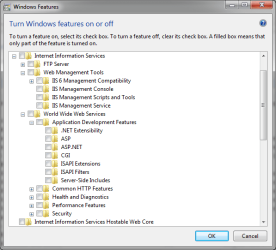
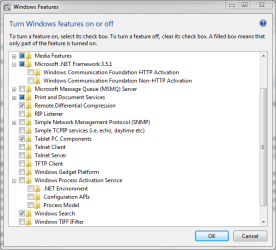
Take a look at Windows features in CP->P&F. I don't have the definitve answer, but it might help to toggle the checkboxes that are .NET related.

Ask Sterling what is ticked on their test machine. Use thier working environment to compare configurations.
 

Attachments

  • net1b.PNG
    net1b.PNG
    16.1 KB · Views: 26
  • net1.PNG
    net1.PNG
    18.3 KB · Views: 26
Last edited:

My Computer My Computer

At a glance

x64 (6.3.9600) Win8.1 Pro & soon dual boot x6...AMD A6-3420M APU with Radeon(tm) HD Graphics6.00 GBAMD Radeon(TM) HD 6520G
Computer type
Laptop
Computer Manufacturer/Model Number
HP Pavilion dv6-6c10us
OS
x64 (6.3.9600) Win8.1 Pro & soon dual boot x64 (6.1.7601) Win7_SP1 HomePrem
CPU
AMD A6-3420M APU with Radeon(tm) HD Graphics
Motherboard
Hewlett-Packard 1805
Memory
6.00 GB
Graphics Card(s)
AMD Radeon(TM) HD 6520G
Sound Card
(1) AMD High Definition Audio Device (2) IDT High Definiti
Monitor(s) Displays
HP W2072a 20" LCD (1600 x 900) @ 60 Hz
Screen Resolution
1366 x 768 x 32 bits (4294967296 colors) @ 60 Hz
Hard Drives
ST640LM0 00 HM641JI SATA Disk Device
Keyboard
Logitech k520 wireless KB
Mouse
Logitech m320 wireless mouse (bundled with KB)
Internet Speed
15/5 | 54 MB Wireless 'n'
Antivirus
Realtime: Defender or Avast | On-demand: Malwarebytes, ESET
Browser
IE 11 on Win8, IE 10 on win 7
Other Info
Media: [Gimp, Audacity, VLC] || Comm: [WEmail 2012, Skype] || Productivity: [OpenOffice,| Textpad] || Utils: [Sysinternals, cCleaner, Speccy, Defraggler]
~~~
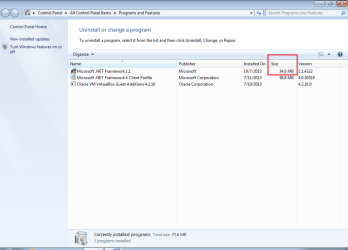
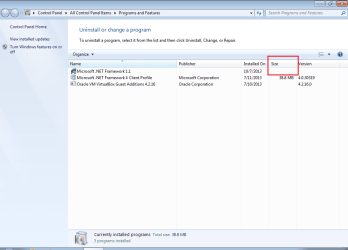
.Net 1.1 shows up in CP P&F and in Revo Uninstaller Pro. However, it appears as 0 bytes with no version stated.
~~~
I can only speak to CP P&F:

After installing .NET 1.1...
...but before installing .NET 1.1's SP1:

1.1-1-before-SP1.png


After installing .NET 1.1's SP1:

1.1-2-after-SP1.png
 

My Computer My Computer

At a glance

W7 Pro SP1 64biti78GBIntel HD Graphics
Computer type
Laptop
Computer Manufacturer/Model Number
Employer provided Dell Latitude
OS
W7 Pro SP1 64bit
CPU
i7
Memory
8GB
Graphics Card(s)
Intel HD Graphics
Hard Drives
crappy SSD
Antivirus
Employer mandated Symantec Endpoint Protection
Browser
Pale Moon 64bit, IE11 64bit & Chrome 64bit
Thanks to all who have responded throughout this thread.

Unfortunately, although your help got .Net 1.1 installed under Win 7 Pro, I have been unable to make my Excel trading application work again with Sterling Trader Pro. Even their tech support is stumped. So rather than pursue this apparent dead end I now plan to convert my application from DDE to RTD. RTD is a much newer technology, and Sterling recommends it. Their program provides the installation option of choosing RTD to access the stock market feed instead of DDE, and does not require .Net 1.1 for RTD.

Does Seven Forums have one or more tutorials on RTD? I've found your tutorials to be very useful, and have saved several of them. I'm new to RTD, so I'm looking for instruction and guidance.

Thanks
 

My Computer My Computer

At a glance

Windows 7 Pro 32-bitIntel 3GHz dual-core4GBIntel on-board chip, no separate card
Computer type
PC/Desktop
Computer Manufacturer/Model Number
custom build
OS
Windows 7 Pro 32-bit
CPU
Intel 3GHz dual-core
Motherboard
Intel 5 yrs old
Memory
4GB
Graphics Card(s)
Intel on-board chip, no separate card
Hard Drives
Seagate 500 GB
Western Digital 500 GB
Antivirus
Norton Internet Security Suite
Browser
FireFox as default; also IE9
I did not see any tutorials on RTD on this forum.

You can write one for us in a few months :-)
 

My Computer My Computer

At a glance

W7 Pro SP1 64biti78GBIntel HD Graphics
Computer type
Laptop
Computer Manufacturer/Model Number
Employer provided Dell Latitude
OS
W7 Pro SP1 64bit
CPU
i7
Memory
8GB
Graphics Card(s)
Intel HD Graphics
Hard Drives
crappy SSD
Antivirus
Employer mandated Symantec Endpoint Protection
Browser
Pale Moon 64bit, IE11 64bit & Chrome 64bit
I will gladly contribute a tutorial on Excel RTD, if and when I can ever get the Sterling Excel RTD Add-in to activate in Excel 2010 on my PC. So far everything I've tried, with much help from Sterling tech support, has failed. My machine must be cursed!

I will start a new thread on this issue, since it appears to be unrelated to this thread's original issue (installing .Net 1.1 on Win 7).

Thanks for everyone's help.
 

My Computer My Computer

At a glance

Windows 7 Pro 32-bitIntel 3GHz dual-core4GBIntel on-board chip, no separate card
Computer type
PC/Desktop
Computer Manufacturer/Model Number
custom build
OS
Windows 7 Pro 32-bit
CPU
Intel 3GHz dual-core
Motherboard
Intel 5 yrs old
Memory
4GB
Graphics Card(s)
Intel on-board chip, no separate card
Hard Drives
Seagate 500 GB
Western Digital 500 GB
Antivirus
Norton Internet Security Suite
Browser
FireFox as default; also IE9
Back
Top