
Installing new 4TB Hard Drive with GPT won't format

Nope, eSata means external Sata.

Have you run cmd as admin and enter "sfc /scannow"?

Tried Partition Wizard's bootable media or Disk Management in Safe Mode?
 

My Computer My Computer

At a glance

Windows 7 Ultimate x64 SP1AMD Phenom 2 1090T2x8GB Kingston HyperX Fury Black 1600Mhz Unga...MSI GTX 970 Gaming 4G
Computer type
PC/Desktop
Computer Manufacturer/Model Number
Custom Build
OS
Windows 7 Ultimate x64 SP1
CPU
AMD Phenom 2 1090T
Motherboard
Gigabyte GA-890FXA-UD5
Memory
2x8GB Kingston HyperX Fury Black 1600Mhz Unganged
Graphics Card(s)
MSI GTX 970 Gaming 4G
Sound Card
Realtek On-Board HD 7.1 Audio / Logitech G35
Monitor(s) Displays
3xAcer GD245HQ
Screen Resolution
1920x1080
Hard Drives
Samsung 850 Pro 512GB SSD - OS /
WD Caviar Black SATA 3 - 1 TBx2 - Dynamic RAID 0 /
WD Caviar Green SATA 2 - 640GBx2 - Dynamic RAID 0 /
WD Caviar Green SATA 2 - 640GB - Internal Backup /
Seagate Barracude SATA 3 - 3TB - External Backup/ Sync
PSU
HighPower 1000W
Case
Cooler Master HAF 932
Cooling
Noctua NH-D14
Keyboard
Logitech G19
Mouse
Logitech G500
Internet Speed
100/4 Mbit Cable (100GB quota)
Antivirus
ZoneAlarm Extreme Security / MBAM Pro / MBAE Free / SAS Free
Browser
IE 11 - Firefox - Chrome
Other Info
Logitech F710/ G27/ G940/ Z5500 // TrackIR 5 // Nvidia 3D Surround Vision
No, but I'll give it a shot after this 2nd minitool attempt finished.

Do I need to run it on the OS HD or on the 4TB Hd?
 

My Computer My Computer

At a glance

Windows 7 Home Premium 64 biti5 2.9GHz8GbOn board
Computer type
PC/Desktop
Computer Manufacturer/Model Number
custom build
OS
Windows 7 Home Premium 64 bit
CPU
i5 2.9GHz
Motherboard
Intel 667
Memory
8Gb
Graphics Card(s)
On board
Hard Drives
60GB SSD
1TB Data
4TB SSHD Problematic Seagate
Run sfc scannow while logged in to your regular account, it will check system files.
 

My Computer My Computer

At a glance

Windows 7 Ultimate x64 SP1AMD Phenom 2 1090T2x8GB Kingston HyperX Fury Black 1600Mhz Unga...MSI GTX 970 Gaming 4G
Computer type
PC/Desktop
Computer Manufacturer/Model Number
Custom Build
OS
Windows 7 Ultimate x64 SP1
CPU
AMD Phenom 2 1090T
Motherboard
Gigabyte GA-890FXA-UD5
Memory
2x8GB Kingston HyperX Fury Black 1600Mhz Unganged
Graphics Card(s)
MSI GTX 970 Gaming 4G
Sound Card
Realtek On-Board HD 7.1 Audio / Logitech G35
Monitor(s) Displays
3xAcer GD245HQ
Screen Resolution
1920x1080
Hard Drives
Samsung 850 Pro 512GB SSD - OS /
WD Caviar Black SATA 3 - 1 TBx2 - Dynamic RAID 0 /
WD Caviar Green SATA 2 - 640GBx2 - Dynamic RAID 0 /
WD Caviar Green SATA 2 - 640GB - Internal Backup /
Seagate Barracude SATA 3 - 3TB - External Backup/ Sync
PSU
HighPower 1000W
Case
Cooler Master HAF 932
Cooling
Noctua NH-D14
Keyboard
Logitech G19
Mouse
Logitech G500
Internet Speed
100/4 Mbit Cable (100GB quota)
Antivirus
ZoneAlarm Extreme Security / MBAM Pro / MBAE Free / SAS Free
Browser
IE 11 - Firefox - Chrome
Other Info
Logitech F710/ G27/ G940/ Z5500 // TrackIR 5 // Nvidia 3D Surround Vision
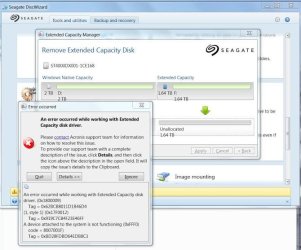
sfc still needs to be run but I have managed to get a way around to use the seagate drive wizard again.

I have initialised both partitions using disk manager, and went in to disk manager to delete the extended disk capacity hoping to get into one. Then I get this message -connected device is not functioning, anyone know how to decrypt that message?

as the seagate disk wizard managed to split it.
 

Attachments

  • unnamed (1).jpg
    unnamed (1).jpg
    47.4 KB · Views: 30
Last edited:

My Computer My Computer

At a glance

Windows 7 Home Premium 64 biti5 2.9GHz8GbOn board
Computer type
PC/Desktop
Computer Manufacturer/Model Number
custom build
OS
Windows 7 Home Premium 64 bit
CPU
i5 2.9GHz
Motherboard
Intel 667
Memory
8Gb
Graphics Card(s)
On board
Hard Drives
60GB SSD
1TB Data
4TB SSHD Problematic Seagate
Running sfc /scannnow came up with

"There is a system repair pending which require rebood to complete. Restart Windows and run sfc again" resbooting it only brought me to the same spot.

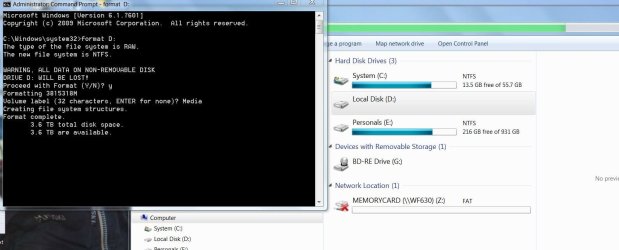
BTW I managed to format it via usb command prompt
diskpart says all disk healthy
but unable to login to windows - just a black screen. Now I know how get windows back - Clean command on the 4TB disk but then I'll just continue in a loop.

I tried "refresh your PC with the windows 7 recovery disk it came back it "there was a problem refreshing your PC. No changes were made"
 

My Computer My Computer

At a glance

Windows 7 Home Premium 64 biti5 2.9GHz8GbOn board
Computer type
PC/Desktop
Computer Manufacturer/Model Number
custom build
OS
Windows 7 Home Premium 64 bit
CPU
i5 2.9GHz
Motherboard
Intel 667
Memory
8Gb
Graphics Card(s)
On board
Hard Drives
60GB SSD
1TB Data
4TB SSHD Problematic Seagate
When booting via USB windows moved to G drive, and this seems to work. still waiting on the scan. ...at least it just says it will take some times but no other error message so far.
sfc /scannow /offbootdir=G:\ /offwindir=G:\windows

hope it works, :banghead::banghead::banghead:

UPDATE:

And it didnt work....... (as in I could not login to the windows). However, I can confirm I can use the 4tb from command prompt, I can copy and delete files from and to it. Now how to make the windows work without me have to unitialise the GPT 4tb HD again ....as I know when I do that, I get windows but unable to use the disk.
 
Last edited:

My Computer My Computer

At a glance

Windows 7 Home Premium 64 biti5 2.9GHz8GbOn board
Computer type
PC/Desktop
Computer Manufacturer/Model Number
custom build
OS
Windows 7 Home Premium 64 bit
CPU
i5 2.9GHz
Motherboard
Intel 667
Memory
8Gb
Graphics Card(s)
On board
Hard Drives
60GB SSD
1TB Data
4TB SSHD Problematic Seagate
I think this is where the system does not like it when the format has been completed it just keep getting stuck at this point. I tried to format it via dos to make it transparent. I have also run CHKDSK but all is good.

Notice: My computer unable to complete its processing and MS Dos unable to finish its cycle to come up with another prompt.
 

Attachments

  • Format stuck..JPG
    Format stuck..JPG
    91.2 KB · Views: 2

My Computer My Computer

At a glance

Windows 7 Home Premium 64 biti5 2.9GHz8GbOn board
Computer type
PC/Desktop
Computer Manufacturer/Model Number
custom build
OS
Windows 7 Home Premium 64 bit
CPU
i5 2.9GHz
Motherboard
Intel 667
Memory
8Gb
Graphics Card(s)
On board
Hard Drives
60GB SSD
1TB Data
4TB SSHD Problematic Seagate
Back
Top