
Installing on an SSD

wakeboardr116

New member
Member
VIP
Local time
6:57 PM
Messages
138
Location
Edmond, OK
I tried to search but couldn't really find anything on the subject. I just got a 64gb SSD and am getting ready to put it in my machine and do a clean install. Is there anything special I need to do before or during the install? I've heard a couple things like reformating or aligning the partition? Do I need to do any of these things?

Also, once its finished I know you are supposed to disable defrag and windows should turn it off automatically, but is there anything else I need to check and turn off?

Any help would be greatly appreciated. Thanks
 

My Computer

Computer Manufacturer/Model Number
Dell XPS 430
OS
Windows 7 Professional x64 6.1 Build 7600
CPU
Intel Core 2 Quad Q9400 2.66Ghz
Motherboard
Dell Inc. 0G254H
Memory
8GB DDR3 PC3-10700H (1333Mhz)
Graphics Card(s)
Visiontek ATI Radeon HD4850
Sound Card
Intel® 7.1 channel High Definition Audio
Monitor(s) Displays
Asus VH222H 22"
Screen Resolution
1920x1080
Hard Drives
OS: Kingston SSDNow V Series SNV425-S2BD/64GB

Data: Western Digital Caviar Blue 320GB, 7200 RPM
PSU
Dell 425watt PSU
Case
Dell XPS 430
Cooling
Stock
Keyboard
Microsoft Wireless Keyboard 1000
Mouse
Microsoft Wireless Optical Mouse 2000
Internet Speed
20Mb/s Down 5Mb/s Up
Other Info
Logitech X-540 5.1 Channel Surround Sound System
I tried to search but couldn't really find anything on the subject. I just got a 64gb SSD and am getting ready to put it in my machine and do a clean install. Is there anything special I need to do before or during the install? I've heard a couple things like reformating or aligning the partition? Do I need to do any of these things?

Also, once its finished I know you are supposed to disable defrag and windows should turn it off automatically, but is there anything else I need to check and turn off?

Any help would be greatly appreciated. Thanks
Have you seen this thread?

http://www.sevenforums.com/tutorials/70822-ssd-tweaks-optimizations-windows-7-a.html

Cheers!
Robert
 

My Computer

OS
...
I tried to search but couldn't really find anything on the subject. I just got a 64gb SSD and am getting ready to put it in my machine and do a clean install. Is there anything special I need to do before or during the install? I've heard a couple things like reformating or aligning the partition? Do I need to do any of these things?

Also, once its finished I know you are supposed to disable defrag and windows should turn it off automatically, but is there anything else I need to check and turn off?

Any help would be greatly appreciated. Thanks
Have you seen this thread?

http://www.sevenforums.com/tutorials/70822-ssd-tweaks-optimizations-windows-7-a.html

Cheers!
Robert

Thanks. No I hadn't seen that thread before or I just overlooked it. It seems to have alot of great information on after you have installed the SSD. I'm wondering more about what I need to do to install it. Can I just plug it in right out of the box and install windows, or should I do anything to prepare the drive? Like reformating to a certain setup or realigning the partition and such. Also should I set it up as ATA or AHCI? I'm pretty new to this so I don't know what alot of these terms mean.

Thanks again
 

My Computer

Computer Manufacturer/Model Number
Dell XPS 430
OS
Windows 7 Professional x64 6.1 Build 7600
CPU
Intel Core 2 Quad Q9400 2.66Ghz
Motherboard
Dell Inc. 0G254H
Memory
8GB DDR3 PC3-10700H (1333Mhz)
Graphics Card(s)
Visiontek ATI Radeon HD4850
Sound Card
Intel® 7.1 channel High Definition Audio
Monitor(s) Displays
Asus VH222H 22"
Screen Resolution
1920x1080
Hard Drives
OS: Kingston SSDNow V Series SNV425-S2BD/64GB

Data: Western Digital Caviar Blue 320GB, 7200 RPM
PSU
Dell 425watt PSU
Case
Dell XPS 430
Cooling
Stock
Keyboard
Microsoft Wireless Keyboard 1000
Mouse
Microsoft Wireless Optical Mouse 2000
Internet Speed
20Mb/s Down 5Mb/s Up
Other Info
Logitech X-540 5.1 Channel Surround Sound System
After you install the SSD, it will only showin Disk Management - probably as RAW space. I suggest you initialize it (right click on the left side where it says Disk0, Disk1, etc). Then right click on the right side and create a primary, active partition, make a quick format and assign a drive letter.
Alignment, switching defrag off, etc. will be done by the Win7 installer. It also switches Superfetch off that I always switch back on.
ATA AHCI is fine. It is supposed to give you a smidget more performance - although I run mine as IDE.
 

My Computer

Computer Manufacturer/Model Number
HP, Dell, Gateway, Toshiba - 4 laptops and 2 desktops
OS
Vista, Windows7, Mint Mate, Zorin, Windows 8
CPU
from 1.6GHz Duo to i7
Monitor(s) Displays
2x HP w2207
Hard Drives
5x HDD, 7x SSD, 12x Externals
Keyboard
with trackball - no mices
Mouse
Trackball mice
Internet Speed
DSL 6000
OK thanks a bunch. I figured the windows installer would do most of whats needed but just wanted to make sure. Time to hurry up and eat dinner so I can get going on setting it up.
 

My Computer

Computer Manufacturer/Model Number
Dell XPS 430
OS
Windows 7 Professional x64 6.1 Build 7600
CPU
Intel Core 2 Quad Q9400 2.66Ghz
Motherboard
Dell Inc. 0G254H
Memory
8GB DDR3 PC3-10700H (1333Mhz)
Graphics Card(s)
Visiontek ATI Radeon HD4850
Sound Card
Intel® 7.1 channel High Definition Audio
Monitor(s) Displays
Asus VH222H 22"
Screen Resolution
1920x1080
Hard Drives
OS: Kingston SSDNow V Series SNV425-S2BD/64GB

Data: Western Digital Caviar Blue 320GB, 7200 RPM
PSU
Dell 425watt PSU
Case
Dell XPS 430
Cooling
Stock
Keyboard
Microsoft Wireless Keyboard 1000
Mouse
Microsoft Wireless Optical Mouse 2000
Internet Speed
20Mb/s Down 5Mb/s Up
Other Info
Logitech X-540 5.1 Channel Surround Sound System
I have installed Win7 Pro on SSD's (OCZ Vertex, Crucial RealSSD, and currently Intel X25M 160GB). All I have done is make sure the SSD is connected to SATA port 0 to begin with. This is important for your BIOS to see the drive. I believe it can be 0, 1, or 2. but for one SSD, port 0 is best to begin.

Before installing SSD in your computer, go to BIOS and select AHCI or IDE in BIOS for your SATA connection. Boot to your Win7 install disc, and just run setup, no need to format, just select the SSD, and go. Win7 will automatically format and align the drive.

Like I said, after doing this for many SSD's, it is all you need to do.

Great Windows 7 and SSD tweaks here: (also a great forum in general, lots of great guides and info).
Guide * Windows 7 Ultimate Tweaks & Utilities *
 

My Computer

Computer Manufacturer/Model Number
OEM
OS
Windows 7 Pro x64
CPU
Core i7 920 @ 3.8GHz
Motherboard
EVGA X58 Classified
Memory
OCZ DDR3 1600 (PC3 12800)
Graphics Card(s)
EVGA NVIDIA GTX 280 SLi
Sound Card
Creative Pro PCIe
Monitor(s) Displays
Sharp Aquos 37" HDTV
Screen Resolution
1920x1080p
Hard Drives
Three Intel X25M 160GB RAID 0 / One 640GB WD Drive (storage)
PSU
Corsair HX1000W
Case
Cooler Master HAF 932
Cooling
Noctua NH-U12P SE1366
Keyboard
Razer Lycosa
Mouse
Razer DeathAdder
Well I got it installed and up and running. I think I've got just about everything set up like it should. Defrag and superfetch are off. Is there anything else I should turn off or disable?


Oh and SSD's are AMAZING! My restart time is now 30seconds flat. It was 70sec on my old drive.
 

My Computer

Computer Manufacturer/Model Number
Dell XPS 430
OS
Windows 7 Professional x64 6.1 Build 7600
CPU
Intel Core 2 Quad Q9400 2.66Ghz
Motherboard
Dell Inc. 0G254H
Memory
8GB DDR3 PC3-10700H (1333Mhz)
Graphics Card(s)
Visiontek ATI Radeon HD4850
Sound Card
Intel® 7.1 channel High Definition Audio
Monitor(s) Displays
Asus VH222H 22"
Screen Resolution
1920x1080
Hard Drives
OS: Kingston SSDNow V Series SNV425-S2BD/64GB

Data: Western Digital Caviar Blue 320GB, 7200 RPM
PSU
Dell 425watt PSU
Case
Dell XPS 430
Cooling
Stock
Keyboard
Microsoft Wireless Keyboard 1000
Mouse
Microsoft Wireless Optical Mouse 2000
Internet Speed
20Mb/s Down 5Mb/s Up
Other Info
Logitech X-540 5.1 Channel Surround Sound System
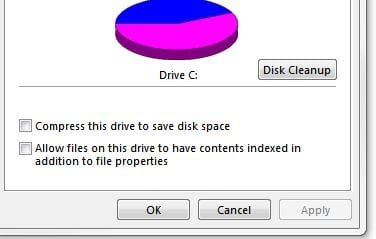
Go to your drives properties and uncheck indexing.

Oh and SSD's are AMAZING! My restart time is now 30seconds flat. It was 70sec on my old drive.

Aren't they great, photoshop here opens in 2-3 seconds!
 

Attachments

  • drive.JPG
    drive.JPG
    18.3 KB · Views: 271

My Computer

Computer Manufacturer/Model Number
self built
OS
Windows 7 Professional 64
CPU
i7 860
Motherboard
ASUS P7P55D-E Pro /onboard SATA 6Gb/s USB 3.0
Memory
8GB Corsair CMX4GX3M2A1600C9 DDR3 1600
Graphics Card(s)
(2) Nvidia EVGA GTX 470 SLI
Sound Card
Onboard VIA VT1828S 8 channels
Monitor(s) Displays
ASUS VW266H 25.5" HDMI Widescreen LCD and HP vs19 LCD 19"
Screen Resolution
1920 x 1200 : 1280 X 1024 dual
Hard Drives
Intel X25-M 80GB SSD (boot)
Seagate Barracuda 80GB
Western Digital Caviar Black 500GB
Asus DRW-24B1ST/BLK/B/AS
PSU
COOLER MASTER Silent Pro 1000W
Case
LIAN LI Lancool PC-K62
Cooling
Prolimatech Megahalems with Scythe "ULTRA KAZE" 120
Keyboard
Saitek
Mouse
Microsoft Optical comfort mouse 3000
Internet Speed
Comcast Ultra tier 30/5
Got it. Thanks


I haven't gotten all my programs and stuff reinstalled yet but I can't wait to see how fast things open up and run on it.
 

My Computer

Computer Manufacturer/Model Number
Dell XPS 430
OS
Windows 7 Professional x64 6.1 Build 7600
CPU
Intel Core 2 Quad Q9400 2.66Ghz
Motherboard
Dell Inc. 0G254H
Memory
8GB DDR3 PC3-10700H (1333Mhz)
Graphics Card(s)
Visiontek ATI Radeon HD4850
Sound Card
Intel® 7.1 channel High Definition Audio
Monitor(s) Displays
Asus VH222H 22"
Screen Resolution
1920x1080
Hard Drives
OS: Kingston SSDNow V Series SNV425-S2BD/64GB

Data: Western Digital Caviar Blue 320GB, 7200 RPM
PSU
Dell 425watt PSU
Case
Dell XPS 430
Cooling
Stock
Keyboard
Microsoft Wireless Keyboard 1000
Mouse
Microsoft Wireless Optical Mouse 2000
Internet Speed
20Mb/s Down 5Mb/s Up
Other Info
Logitech X-540 5.1 Channel Surround Sound System
have fun
 

My Computer

Computer Manufacturer/Model Number
custom build
OS
windows seven , windows xp pro and ubuntu
CPU
amd phenom 2 x3 720 (unlocked forth core) @3.4 gig
Motherboard
gigabyte ma790xt-ud4p
Memory
4 gigs corsair 1333
Graphics Card(s)
zotac nivida geforce 7200 gs and nividia mx400
Sound Card
diamond xtream sound 7.1
Monitor(s) Displays
viewsonic 17gs and hp m70
Hard Drives
western digital wd5000aads 500 gig 7200 rpm sata 2
western digital wd800jb 80 gig 7200 rpm pata
maxor 91366u4 12 gig 7200 rpm pata
seagate st320413a 20 gig 5400 rpm pata
PSU
Dynamo 500w ATX power supply
Case
raidmax tornado mid-tower
Cooling
air cooled
Keyboard
ge smart office
Mouse
inland usb mouse
Internet Speed
6 meg
You may want to test with Superfetch turned on. I found this to be faster - but there are differing opinions on that.
 

My Computer

Computer Manufacturer/Model Number
HP, Dell, Gateway, Toshiba - 4 laptops and 2 desktops
OS
Vista, Windows7, Mint Mate, Zorin, Windows 8
CPU
from 1.6GHz Duo to i7
Monitor(s) Displays
2x HP w2207
Hard Drives
5x HDD, 7x SSD, 12x Externals
Keyboard
with trackball - no mices
Mouse
Trackball mice
Internet Speed
DSL 6000
You may want to test with Superfetch turned on. I found this to be faster - but there are differing opinions on that.

Win7 will, by default, set Superfetch to manual after the first run of WEI.

It is also recomended by many to do so if Win7 doesnt do it on its own.


I used to do leave it manual. However, after some testing, I have since changed my tune and whole-heartedly agree with whs.

After 1 week of superfetch enabled, I could start telling the difference.
It does help, even with SSDs.

I think the reason for it is simple. While the SSD is much faster than the traditional HD, it still isn't as fast as RAM, which is where Superfetch & Prefetch help.

Also, the writes it does do are quite insignificant. I think that whole thing is a bit overblown TBH. at least when it comes to SF & PF.

Agree or disagree, its food for thought.
 

My Computer

Computer Manufacturer/Model Number
Custom (Self Build)
OS
Windows 7 Home Premium 64bit
CPU
Intel Core i7 2700k
Motherboard
eVGA P67 SLI
Memory
8GB Mushkin Redline Ridgebacks @1866
Graphics Card(s)
EVGA GTX570 SC
Sound Card
XiFi Titanium HD
Monitor(s) Displays
LG W2453V
Screen Resolution
1920x1080
Hard Drives
Intel 320 80GB -- Intel X25-V 40GB --WD Black 1TB x2 -- WD Blue 640GB
PSU
Seasonic x750
Case
Corsair 600T SE White
Cooling
eVGA Superclocked CPU Cooler
Keyboard
Saitek Cyborg
Antivirus
Kaspersky
Browser
IE
Other Info
LG BD/DVD
I think the reason for it is simple. While the SSD is much faster than the traditional HD, it still isn't as fast as RAM, which is where Superfetch & Prefetch help.
Exactly!
 

My Computer

Computer Manufacturer/Model Number
HP, Dell, Gateway, Toshiba - 4 laptops and 2 desktops
OS
Vista, Windows7, Mint Mate, Zorin, Windows 8
CPU
from 1.6GHz Duo to i7
Monitor(s) Displays
2x HP w2207
Hard Drives
5x HDD, 7x SSD, 12x Externals
Keyboard
with trackball - no mices
Mouse
Trackball mice
Internet Speed
DSL 6000
Yep, I turned my Superfetch back on also.
 

My Computer

Computer Manufacturer/Model Number
self built
OS
Windows 7 Professional 64
CPU
i7 860
Motherboard
ASUS P7P55D-E Pro /onboard SATA 6Gb/s USB 3.0
Memory
8GB Corsair CMX4GX3M2A1600C9 DDR3 1600
Graphics Card(s)
(2) Nvidia EVGA GTX 470 SLI
Sound Card
Onboard VIA VT1828S 8 channels
Monitor(s) Displays
ASUS VW266H 25.5" HDMI Widescreen LCD and HP vs19 LCD 19"
Screen Resolution
1920 x 1200 : 1280 X 1024 dual
Hard Drives
Intel X25-M 80GB SSD (boot)
Seagate Barracuda 80GB
Western Digital Caviar Black 500GB
Asus DRW-24B1ST/BLK/B/AS
PSU
COOLER MASTER Silent Pro 1000W
Case
LIAN LI Lancool PC-K62
Cooling
Prolimatech Megahalems with Scythe "ULTRA KAZE" 120
Keyboard
Saitek
Mouse
Microsoft Optical comfort mouse 3000
Internet Speed
Comcast Ultra tier 30/5
When it comes to SSDs, some people worry too much about the "damage" the write operations could have on the SSD. I think this fear is exaggerated. Even with frequent write operations, the SSDs will last longer than we care to keep them (which is probably an average of 3 to 4 years).
So keeping Superfetch, the Page file, etc. away from the SSD is counterproductive in my book. Besides, both afore mentioned operations do infrequent writes and in big blocks. They do a lot more reads.
 

My Computer

Computer Manufacturer/Model Number
HP, Dell, Gateway, Toshiba - 4 laptops and 2 desktops
OS
Vista, Windows7, Mint Mate, Zorin, Windows 8
CPU
from 1.6GHz Duo to i7
Monitor(s) Displays
2x HP w2207
Hard Drives
5x HDD, 7x SSD, 12x Externals
Keyboard
with trackball - no mices
Mouse
Trackball mice
Internet Speed
DSL 6000
These are all interesting points. Right now it is performing great even with superfetch off. I might turn it back on to see if I notice any difference.
 

My Computer

Computer Manufacturer/Model Number
Dell XPS 430
OS
Windows 7 Professional x64 6.1 Build 7600
CPU
Intel Core 2 Quad Q9400 2.66Ghz
Motherboard
Dell Inc. 0G254H
Memory
8GB DDR3 PC3-10700H (1333Mhz)
Graphics Card(s)
Visiontek ATI Radeon HD4850
Sound Card
Intel® 7.1 channel High Definition Audio
Monitor(s) Displays
Asus VH222H 22"
Screen Resolution
1920x1080
Hard Drives
OS: Kingston SSDNow V Series SNV425-S2BD/64GB

Data: Western Digital Caviar Blue 320GB, 7200 RPM
PSU
Dell 425watt PSU
Case
Dell XPS 430
Cooling
Stock
Keyboard
Microsoft Wireless Keyboard 1000
Mouse
Microsoft Wireless Optical Mouse 2000
Internet Speed
20Mb/s Down 5Mb/s Up
Other Info
Logitech X-540 5.1 Channel Surround Sound System
These are all interesting points. Right now it is performing great even with superfetch off. I might turn it back on to see if I notice any difference.
No wonder you are happy. SSDs are so much faster than the spinners. If it suits you as is, no need to change anything.
 

My Computer

Computer Manufacturer/Model Number
HP, Dell, Gateway, Toshiba - 4 laptops and 2 desktops
OS
Vista, Windows7, Mint Mate, Zorin, Windows 8
CPU
from 1.6GHz Duo to i7
Monitor(s) Displays
2x HP w2207
Hard Drives
5x HDD, 7x SSD, 12x Externals
Keyboard
with trackball - no mices
Mouse
Trackball mice
Internet Speed
DSL 6000
I leave superfetch turned on with my SSD drive. I cannot say I noticed things really improving with it on..but I certainly have not seen performance go down.

I'm not concerned with the lifespan of my SSD at all. I'm sure it will long outlast it's useful size life.
 

My Computer

Computer Manufacturer/Model Number
Self-Built in July 2009
OS
Windows 7 Ultimate x64
CPU
Intel Q9550 2.83Ghz OC'd to 3.40Ghz
Motherboard
Gigabyte GA-EP45-UD3R rev. 1.1, F12 BIOS
Memory
8GB G.Skill PI DDR2-800, 4-4-4-12 timings
Graphics Card(s)
EVGA 1280MB Nvidia GeForce GTX570
Sound Card
Realtek ALC899A 8 channel onboard audio
Monitor(s) Displays
23" Acer x233H
Screen Resolution
1920x1080
Hard Drives
Intel X25-M 80GB Gen 2 SSD
Western Digital 1TB Caviar Black, 32MB cache. WD1001FALS
PSU
Corsair 620HX modular
Case
Antec P182
Cooling
stock
Keyboard
ABS M1 Mechanical
Mouse
Logitech G9 Laser Mouse
Internet Speed
15/2 cable modem
Other Info
Windows and Linux enthusiast. Logitech G35 Headset.
Well so far everything is running great. Reads are very fast programs open quicker than ever. I have noticed though that it seems like the write speed has gotten slower so I decided to run a benchmark and test it out. My write speeds have dropped from 110's down to the 20's?!?!?!?! What could have caused this? Is there any way to fix it?
 

My Computer

Computer Manufacturer/Model Number
Dell XPS 430
OS
Windows 7 Professional x64 6.1 Build 7600
CPU
Intel Core 2 Quad Q9400 2.66Ghz
Motherboard
Dell Inc. 0G254H
Memory
8GB DDR3 PC3-10700H (1333Mhz)
Graphics Card(s)
Visiontek ATI Radeon HD4850
Sound Card
Intel® 7.1 channel High Definition Audio
Monitor(s) Displays
Asus VH222H 22"
Screen Resolution
1920x1080
Hard Drives
OS: Kingston SSDNow V Series SNV425-S2BD/64GB

Data: Western Digital Caviar Blue 320GB, 7200 RPM
PSU
Dell 425watt PSU
Case
Dell XPS 430
Cooling
Stock
Keyboard
Microsoft Wireless Keyboard 1000
Mouse
Microsoft Wireless Optical Mouse 2000
Internet Speed
20Mb/s Down 5Mb/s Up
Other Info
Logitech X-540 5.1 Channel Surround Sound System
NVM. From now on I'll stick to reading advice on this forum only. I read on another one to turn off write caching. As soon as I turned that back on my speeds jumped right back up to where they were.
 

My Computer

Computer Manufacturer/Model Number
Dell XPS 430
OS
Windows 7 Professional x64 6.1 Build 7600
CPU
Intel Core 2 Quad Q9400 2.66Ghz
Motherboard
Dell Inc. 0G254H
Memory
8GB DDR3 PC3-10700H (1333Mhz)
Graphics Card(s)
Visiontek ATI Radeon HD4850
Sound Card
Intel® 7.1 channel High Definition Audio
Monitor(s) Displays
Asus VH222H 22"
Screen Resolution
1920x1080
Hard Drives
OS: Kingston SSDNow V Series SNV425-S2BD/64GB

Data: Western Digital Caviar Blue 320GB, 7200 RPM
PSU
Dell 425watt PSU
Case
Dell XPS 430
Cooling
Stock
Keyboard
Microsoft Wireless Keyboard 1000
Mouse
Microsoft Wireless Optical Mouse 2000
Internet Speed
20Mb/s Down 5Mb/s Up
Other Info
Logitech X-540 5.1 Channel Surround Sound System
Back
Top