Installing on an SSD

There is a lot of questionable "advice" floating around. The only measures I took was to disable defrag and delete the hibernation file. Write caching, Page file, Superfetch etc. I let intact. And after 6 months I have seen hardly any degradation as you can see here:
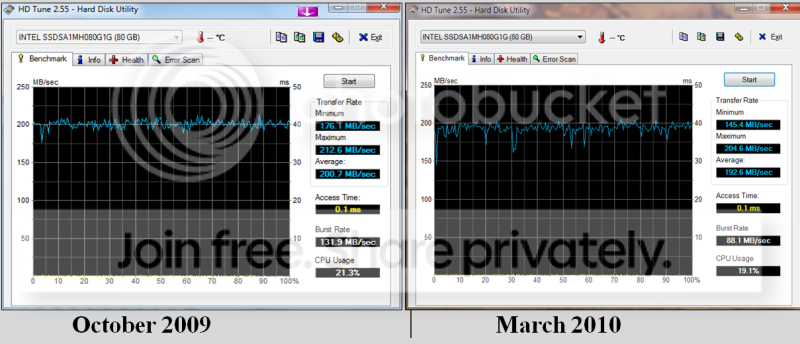
SSD_after_5_months.png


People are too worried about "damage" that write operations may cause to the SSD. I do not think this fear is warrented. The SSDs will last the 3 or 4 years that we keep them.
 

My Computer

Computer Manufacturer/Model Number
HP, Dell, Gateway, Toshiba - 4 laptops and 2 desktops
OS
Vista, Windows7, Mint Mate, Zorin, Windows 8
CPU
from 1.6GHz Duo to i7
Monitor(s) Displays
2x HP w2207
Hard Drives
5x HDD, 7x SSD, 12x Externals
Keyboard
with trackball - no mices
Mouse
Trackball mice
Internet Speed
DSL 6000
sorry for asking in your thread but how do you know if the firmware is up to date, because i will also just be installing the SSD and putting windows staight on it.
 

My Computer

Computer type
PC/Desktop
Computer Manufacturer/Model Number
Custom Build
OS
Windows 8 Pro 64 bit
CPU
Intel Core i7 3770K @ 4.2 GHz
Motherboard
Gigabyte Z77X-D3H
Memory
8GB Corsair XMS3 1333mhz 2x4GB
Graphics Card(s)
Gigabyte Radeon HD 7970 OC WindForce
Sound Card
VIA High Definition Audio
Monitor(s) Displays
Dell S2740L
Screen Resolution
1920x1080
Hard Drives
Samsung 250GB 840 Pro (2.5) (OS+Aps)
Toshiba DT01ACA100 1TB 7200RPM (3.5) (Games)
PSU
Coolmaster Silent ProM 600W
Case
Coolermaster HAF 912 Plus
Cooling
Cooler Master Hyper 612S
Keyboard
Logitech Wireless Keyboard
Mouse
Thermaltake TteSPORTS Theron Gaming Mouse
Internet Speed
50-60Mbs (DL) 12-20Mbs (UL) BT Infinity FTTC
Antivirus
Bitdefender Anti Virus Plus 2015
Browser
Google Chrome
Other Info
Samsung SH-B083L 8x Blu-Ray Reader
sorry for asking in your thread but how do you know if the firmware is up to date, because i will also just be installing the SSD and putting windows staight on it.

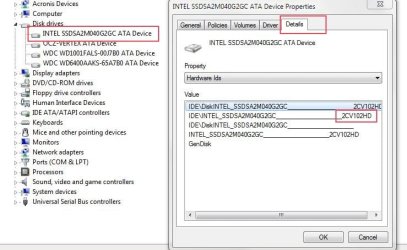
Device manager --> Drive Properties
As shown here to get FW revision. then just check the official site (of your particualr drive) for current FW number
 

Attachments

  • Capture2.jpg
    Capture2.jpg
    49.3 KB · Views: 341

My Computer

Computer Manufacturer/Model Number
Custom (Self Build)
OS
Windows 7 Home Premium 64bit
CPU
Intel Core i7 2700k
Motherboard
eVGA P67 SLI
Memory
8GB Mushkin Redline Ridgebacks @1866
Graphics Card(s)
EVGA GTX570 SC
Sound Card
XiFi Titanium HD
Monitor(s) Displays
LG W2453V
Screen Resolution
1920x1080
Hard Drives
Intel 320 80GB -- Intel X25-V 40GB --WD Black 1TB x2 -- WD Blue 640GB
PSU
Seasonic x750
Case
Corsair 600T SE White
Cooling
eVGA Superclocked CPU Cooler
Keyboard
Saitek Cyborg
Antivirus
Kaspersky
Browser
IE
Other Info
LG BD/DVD
sorry for asking in your thread but how do you know if the firmware is up to date, because i will also just be installing the SSD and putting windows staight on it.

Device manager --> Drive Properties
As shown here to get FW revision

ok, should i first then install it and boot into windows on my HDD and install it as an second drive do what i need to do, then restart and install windows on it that way?
 

My Computer

Computer type
PC/Desktop
Computer Manufacturer/Model Number
Custom Build
OS
Windows 8 Pro 64 bit
CPU
Intel Core i7 3770K @ 4.2 GHz
Motherboard
Gigabyte Z77X-D3H
Memory
8GB Corsair XMS3 1333mhz 2x4GB
Graphics Card(s)
Gigabyte Radeon HD 7970 OC WindForce
Sound Card
VIA High Definition Audio
Monitor(s) Displays
Dell S2740L
Screen Resolution
1920x1080
Hard Drives
Samsung 250GB 840 Pro (2.5) (OS+Aps)
Toshiba DT01ACA100 1TB 7200RPM (3.5) (Games)
PSU
Coolmaster Silent ProM 600W
Case
Coolermaster HAF 912 Plus
Cooling
Cooler Master Hyper 612S
Keyboard
Logitech Wireless Keyboard
Mouse
Thermaltake TteSPORTS Theron Gaming Mouse
Internet Speed
50-60Mbs (DL) 12-20Mbs (UL) BT Infinity FTTC
Antivirus
Bitdefender Anti Virus Plus 2015
Browser
Google Chrome
Other Info
Samsung SH-B083L 8x Blu-Ray Reader
SSD on new computer

I am building a new super computer and want to use an Intel SSD as the boot drive containing only the Windows 7 OS, with storage on two RAID-configured SATA hard drives. Is there a way to make a system image of my old computer whereby I can retain all of my applications on the new computer? Or will I have to reinstall all of the software?
 

My Computer

Computer Manufacturer/Model Number
Home built
OS
Windows 7 Ultimate
CPU
Inteli5
Motherboard
ASUS
Memory
4
Graphics Card(s)
Radeon
Sound Card
???
Monitor(s) Displays
Samsung/Gatewau
Hard Drives
Western Digital
PSU
?
Case
?
Cooling
?
Nelsomw, That will not work. You have to reinstall Windows and all programs on the new computer.
 

My Computer

Computer Manufacturer/Model Number
HP, Dell, Gateway, Toshiba - 4 laptops and 2 desktops
OS
Vista, Windows7, Mint Mate, Zorin, Windows 8
CPU
from 1.6GHz Duo to i7
Monitor(s) Displays
2x HP w2207
Hard Drives
5x HDD, 7x SSD, 12x Externals
Keyboard
with trackball - no mices
Mouse
Trackball mice
Internet Speed
DSL 6000
Back
Top