Solved Installing OS on two Internal Hard Drives

Unplug the XP SP3 250gb HD Drive, plug in the Windows 7 HD Drive & install.
 

My Computer My Computer

At a glance

ME/XP/Vista/Win7
OS
ME/XP/Vista/Win7
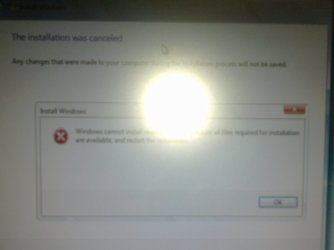
Ok so tried to do that and I get this error:


It says : Windows cannot install required files. Make sure all files required for installation are available, and restart the installation. What does this mean? does this mean the cd is bad? the last time I used the cd was 8 months ago.
 

Attachments

  • 10042011198.jpg
    10042011198.jpg
    206.3 KB · Views: 28

My Computer My Computer

At a glance

Windows 7 Professional 32 BitGenuine Intel(R) CPU T2080 @ 1.73GHz 1.73 GHz2GBATI Mobility Radeon X1400
Computer Manufacturer/Model Number
Dell Inspiron E 1505
OS
Windows 7 Professional 32 Bit
CPU
Genuine Intel(R) CPU T2080 @ 1.73GHz 1.73 GHz
Motherboard
DELL
Memory
2GB
Graphics Card(s)
ATI Mobility Radeon X1400
Sound Card
High Definition Audio Device
Screen Resolution
1280 by 800
Hard Drives
136 GB
Recovery 10 GB
Try reburning the DVD.
 

My Computer My Computer

At a glance

ME/XP/Vista/Win7
OS
ME/XP/Vista/Win7
Yeah I thought that would be the case. Unfortunately, I couldn't find the iso image of Windows 7 that I had previously downloaded so now I'm on a pretty slow VPN connection downloading which still has an hour left.

In the meantime, i left the pc as it was and I got another error message.:

rollback.exe - bad image

D:\Sources\unbcl.dll is either not designed to run on windows or it contains an error. Try installing the program ysing the original installation media or contact your system administrator or the software vendor for support.

It's the CD.
 

My Computer My Computer

At a glance

Windows 7 Professional 32 BitGenuine Intel(R) CPU T2080 @ 1.73GHz 1.73 GHz2GBATI Mobility Radeon X1400
Computer Manufacturer/Model Number
Dell Inspiron E 1505
OS
Windows 7 Professional 32 Bit
CPU
Genuine Intel(R) CPU T2080 @ 1.73GHz 1.73 GHz
Motherboard
DELL
Memory
2GB
Graphics Card(s)
ATI Mobility Radeon X1400
Sound Card
High Definition Audio Device
Screen Resolution
1280 by 800
Hard Drives
136 GB
Recovery 10 GB
Update:

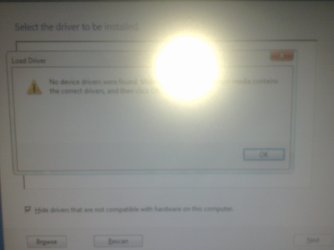
For some reason I couldn't burn the iso image to a cd/dvd so I decided to burn it onto a USB drive. I was able to start the installation process but it said no drivers found.

No device drivers were found. Make sure that the installation media contains the correct drivers, and then click ok.
 

Attachments

  • 10052011200.jpg
    10052011200.jpg
    188.2 KB · Views: 15

My Computer My Computer

At a glance

Windows 7 Professional 32 BitGenuine Intel(R) CPU T2080 @ 1.73GHz 1.73 GHz2GBATI Mobility Radeon X1400
Computer Manufacturer/Model Number
Dell Inspiron E 1505
OS
Windows 7 Professional 32 Bit
CPU
Genuine Intel(R) CPU T2080 @ 1.73GHz 1.73 GHz
Motherboard
DELL
Memory
2GB
Graphics Card(s)
ATI Mobility Radeon X1400
Sound Card
High Definition Audio Device
Screen Resolution
1280 by 800
Hard Drives
136 GB
Recovery 10 GB
Alright so I was finally able to install windows 7 after so many hours. Now, when I start the pc, it automatically starts windows 7 and doesnt give me options to boot the other hd with XP. I've checked the BIOS there and still i dont have that option.

my computer is dell dimension e510
 

My Computer My Computer

At a glance

Windows 7 Professional 32 BitGenuine Intel(R) CPU T2080 @ 1.73GHz 1.73 GHz2GBATI Mobility Radeon X1400
Computer Manufacturer/Model Number
Dell Inspiron E 1505
OS
Windows 7 Professional 32 Bit
CPU
Genuine Intel(R) CPU T2080 @ 1.73GHz 1.73 GHz
Motherboard
DELL
Memory
2GB
Graphics Card(s)
ATI Mobility Radeon X1400
Sound Card
High Definition Audio Device
Screen Resolution
1280 by 800
Hard Drives
136 GB
Recovery 10 GB
Press F12 at boot for one time boot options.
 

My Computer My Computer

At a glance

ME/XP/Vista/Win7
OS
ME/XP/Vista/Win7
Press F12 at boot for one time boot options.
after pressing F12, it gives me the option of onboard SATA hd but it loads 7. It still doesnt give me the option of choosing which OS to load.
 

My Computer My Computer

At a glance

Windows 7 Professional 32 BitGenuine Intel(R) CPU T2080 @ 1.73GHz 1.73 GHz2GBATI Mobility Radeon X1400
Computer Manufacturer/Model Number
Dell Inspiron E 1505
OS
Windows 7 Professional 32 Bit
CPU
Genuine Intel(R) CPU T2080 @ 1.73GHz 1.73 GHz
Motherboard
DELL
Memory
2GB
Graphics Card(s)
ATI Mobility Radeon X1400
Sound Card
High Definition Audio Device
Screen Resolution
1280 by 800
Hard Drives
136 GB
Recovery 10 GB
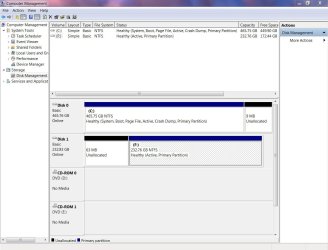
This is the latest Screenshot of disk mgmt
 

Attachments

  • disk mgmt.JPG
    disk mgmt.JPG
    110.3 KB · Views: 33

My Computer My Computer

At a glance

Windows 7 Professional 32 BitGenuine Intel(R) CPU T2080 @ 1.73GHz 1.73 GHz2GBATI Mobility Radeon X1400
Computer Manufacturer/Model Number
Dell Inspiron E 1505
OS
Windows 7 Professional 32 Bit
CPU
Genuine Intel(R) CPU T2080 @ 1.73GHz 1.73 GHz
Motherboard
DELL
Memory
2GB
Graphics Card(s)
ATI Mobility Radeon X1400
Sound Card
High Definition Audio Device
Screen Resolution
1280 by 800
Hard Drives
136 GB
Recovery 10 GB
Press F12 at boot for one time boot options.
after pressing F12, it gives me the option of onboard SATA hd but it loads 7. It still doesnt give me the option of choosing which OS to load.

onboard SATA hd 1 is Windows 7,
onboard SATA hd 2 is Windows XP,
 

My Computer My Computer

At a glance

ME/XP/Vista/Win7
OS
ME/XP/Vista/Win7

My Computer My Computer

At a glance

Windows 7 Professional 32 BitGenuine Intel(R) CPU T2080 @ 1.73GHz 1.73 GHz2GBATI Mobility Radeon X1400
Computer Manufacturer/Model Number
Dell Inspiron E 1505
OS
Windows 7 Professional 32 Bit
CPU
Genuine Intel(R) CPU T2080 @ 1.73GHz 1.73 GHz
Motherboard
DELL
Memory
2GB
Graphics Card(s)
ATI Mobility Radeon X1400
Sound Card
High Definition Audio Device
Screen Resolution
1280 by 800
Hard Drives
136 GB
Recovery 10 GB
I hope I don't have to reinstall everything again :(( It took me hours and hours
 

My Computer My Computer

At a glance

Windows 7 Professional 32 BitGenuine Intel(R) CPU T2080 @ 1.73GHz 1.73 GHz2GBATI Mobility Radeon X1400
Computer Manufacturer/Model Number
Dell Inspiron E 1505
OS
Windows 7 Professional 32 Bit
CPU
Genuine Intel(R) CPU T2080 @ 1.73GHz 1.73 GHz
Motherboard
DELL
Memory
2GB
Graphics Card(s)
ATI Mobility Radeon X1400
Sound Card
High Definition Audio Device
Screen Resolution
1280 by 800
Hard Drives
136 GB
Recovery 10 GB
NO, just use EasyBCD 2.0 in Win 7, you will be OK.
 

My Computer My Computer

At a glance

ME/XP/Vista/Win7
OS
ME/XP/Vista/Win7

My Computer My Computer

At a glance

Windows 7 Professional 32 BitGenuine Intel(R) CPU T2080 @ 1.73GHz 1.73 GHz2GBATI Mobility Radeon X1400
Computer Manufacturer/Model Number
Dell Inspiron E 1505
OS
Windows 7 Professional 32 Bit
CPU
Genuine Intel(R) CPU T2080 @ 1.73GHz 1.73 GHz
Motherboard
DELL
Memory
2GB
Graphics Card(s)
ATI Mobility Radeon X1400
Sound Card
High Definition Audio Device
Screen Resolution
1280 by 800
Hard Drives
136 GB
Recovery 10 GB
after pressing F12, it gives me the option of onboard SATA hd but it loads 7. It still doesnt give me the option of choosing which OS to load.

onboard SATA hd 1 is Windows 7,
onboard SATA hd 2 is Windows XP,

I still have only one option
onboard SATA hard drive

If I choose that, then it loads Windows 7

Can you click on the Onboard SATA choice at F12 to have it expand to show both HD's?
 
I know the problem is solved but I was just wondering if you can have a timer on this thing. Like for example, I have to press enter to load windows 7/xp, I mean it's not a problem for me, but what about non-techs? How can I add a timer that if I dont press enter in 10 seconds it will automatically load windows 7.
 

My Computer My Computer

At a glance

Windows 7 Professional 32 BitGenuine Intel(R) CPU T2080 @ 1.73GHz 1.73 GHz2GBATI Mobility Radeon X1400
Computer Manufacturer/Model Number
Dell Inspiron E 1505
OS
Windows 7 Professional 32 Bit
CPU
Genuine Intel(R) CPU T2080 @ 1.73GHz 1.73 GHz
Motherboard
DELL
Memory
2GB
Graphics Card(s)
ATI Mobility Radeon X1400
Sound Card
High Definition Audio Device
Screen Resolution
1280 by 800
Hard Drives
136 GB
Recovery 10 GB
Back
Top