Solved Installing OS on two Internal Hard Drives

Yes, go to Computer>properties and select from the left column Advanced Options, then Startup tab, set the timeout as low as 5 seconds which can still allow you to choose XP during boot since you'll know when you want to do that anyway.
 
Yes, go to Computer>properties and select from the left column Advanced Options, then Startup tab, set the timeout as low as 5 seconds which can still allow you to choose XP during boot since you'll know when you want to do that anyway.

Ok done Set to 7 seconds :party:
 

My Computer My Computer

At a glance

Windows 7 Professional 32 BitGenuine Intel(R) CPU T2080 @ 1.73GHz 1.73 GHz2GBATI Mobility Radeon X1400
Computer Manufacturer/Model Number
Dell Inspiron E 1505
OS
Windows 7 Professional 32 Bit
CPU
Genuine Intel(R) CPU T2080 @ 1.73GHz 1.73 GHz
Motherboard
DELL
Memory
2GB
Graphics Card(s)
ATI Mobility Radeon X1400
Sound Card
High Definition Audio Device
Screen Resolution
1280 by 800
Hard Drives
136 GB
Recovery 10 GB
Update: XP was running fine until yesterday. I recently got a virus from a dodgy site and now its refusing to start up.

It says, "Windows could not start because the following files are missing or corrupt:

<Windows root<\system32\ntoskrnl.exe
Please re-install a copy of the above file.

I can't log into safe mode or anything.


So my question is, should I remove my other physical drive which has Windows 7 running and try to fix this problem? Will my windows 7 boot also mess up if i leave it in and i try to resolve this problem?
 

My Computer My Computer

At a glance

Windows 7 Professional 32 BitGenuine Intel(R) CPU T2080 @ 1.73GHz 1.73 GHz2GBATI Mobility Radeon X1400
Computer Manufacturer/Model Number
Dell Inspiron E 1505
OS
Windows 7 Professional 32 Bit
CPU
Genuine Intel(R) CPU T2080 @ 1.73GHz 1.73 GHz
Motherboard
DELL
Memory
2GB
Graphics Card(s)
ATI Mobility Radeon X1400
Sound Card
High Definition Audio Device
Screen Resolution
1280 by 800
Hard Drives
136 GB
Recovery 10 GB
I would unplug the Win7 drive and try to disinfect XP. Later plug in only the Win7 drive to also check it for infection before starting it again.

To disinfect XP, attempt to boot into Safe Mode and install from stick or CD Malwarebytes
to run a Full Scan. If it won't boot into Safe Mode, download, burn to CD or write to flash stick, boot and run a full scan with Microsoft Standalone System Sweeper or FREE Bootable AntiVirus Rescue CDs.

Once clean, see if you can boot XP even in Safe Mode. If not, try a XP Repair Install
 
Did as you recommended!!

Although I used this instead of the link you gave me for repair install : How to Perform a Windows XP Repair Install

I didn't have the option for repair install so I had to go to recovery console and rebuild from there.

Edit: I'm still perplexed as to why we can't use SFC /SCANNOW from Recovery console

Does 7 have the same problem?
 

My Computer My Computer

At a glance

Windows 7 Professional 32 BitGenuine Intel(R) CPU T2080 @ 1.73GHz 1.73 GHz2GBATI Mobility Radeon X1400
Computer Manufacturer/Model Number
Dell Inspiron E 1505
OS
Windows 7 Professional 32 Bit
CPU
Genuine Intel(R) CPU T2080 @ 1.73GHz 1.73 GHz
Motherboard
DELL
Memory
2GB
Graphics Card(s)
ATI Mobility Radeon X1400
Sound Card
High Definition Audio Device
Screen Resolution
1280 by 800
Hard Drives
136 GB
Recovery 10 GB
Not in Win7: SFC -SCANNOW Run in Command Prompt at Boot

What was the result of AV scan of XP? Try bootrec /fixmbr and bootrec /fixboot from XP Repair Command line now to see if it will start with Win7 unplugged.

Next plug back in Win7 and boot into it (set first to boot in BIOS setup again), install EasyBCD and add XP from Add OS tab. If it is already listed in Easy, use Edit Boot Menu tab to delete it and then add it again on Add OS tab. Will it start?

If this fails, reinstall XP with Win7 HD unplugged. Do you need to rescue files before reinstall? Use Paragon Rescue CD.

After XP install, plug back in Win7, set it first to boot in BIOS setup, then if you want to boot XP tap the one-time BIOS Boot menu key at boot to trigger it instead.
 
Ok I'm having major issues now.

If I try to start up XP instead of Windows 7 when BOTH are PLUGGED in, I get the same ntoskrnl.exe error and the other hll.dll errors for XP. If I physically remove my windows 7 hd, and start XP, then it works but only till the log on screen where it tells me to activate windows and I say yes but it freezes and doesnt go anywhere.


Maybe I need to again just start windows 7 with xp unplugged and remove xp from startup using ACB or whatever that software is called and add it again?
 

My Computer My Computer

At a glance

Windows 7 Professional 32 BitGenuine Intel(R) CPU T2080 @ 1.73GHz 1.73 GHz2GBATI Mobility Radeon X1400
Computer Manufacturer/Model Number
Dell Inspiron E 1505
OS
Windows 7 Professional 32 Bit
CPU
Genuine Intel(R) CPU T2080 @ 1.73GHz 1.73 GHz
Motherboard
DELL
Memory
2GB
Graphics Card(s)
ATI Mobility Radeon X1400
Sound Card
High Definition Audio Device
Screen Resolution
1280 by 800
Hard Drives
136 GB
Recovery 10 GB
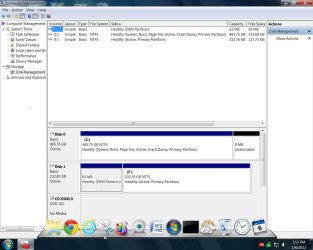
Can you post back a screenshot of your maximized Disk Management drive map with listings, using Snipping Tool in Start Menu, so we can see how it's now configured? Have both HD's plugged in.

Next try booting each separately via the BIOS.

Set preferred OS HD to boot first in BIOS setup, then if you want the other OS use the one-time BIOS Boot Menu key.

If you have a Windows Dual Boot menu now, remove it by installing EasyBCD to delete the other OS on Edit OS Menu tab.

You may need to rebuild XP boot by running bootrec /fixmbr and /fixboot from CD Repair command line. Do this with Win7 unplugged.
 
I think it would be better if I start it over again. I should start up Windows 7 remove all the other start up entries using EasyBCD editor. Then I should completely wipe my XP hard drive and install it again. Are there any softwares available to completely wipe off hard drive other than the one where you wipe off the hard drive when you try to install XP? Are there any optimization tools for hard drives?
 

My Computer My Computer

At a glance

Windows 7 Professional 32 BitGenuine Intel(R) CPU T2080 @ 1.73GHz 1.73 GHz2GBATI Mobility Radeon X1400
Computer Manufacturer/Model Number
Dell Inspiron E 1505
OS
Windows 7 Professional 32 Bit
CPU
Genuine Intel(R) CPU T2080 @ 1.73GHz 1.73 GHz
Motherboard
DELL
Memory
2GB
Graphics Card(s)
ATI Mobility Radeon X1400
Sound Card
High Definition Audio Device
Screen Resolution
1280 by 800
Hard Drives
136 GB
Recovery 10 GB
Just use the CD to Full Format during XP reinstall.

However it may only require having the two OS's boot separated so they can optimally boot via BIOS, so if you'll post back the requested screenshot I willl help you do this. There may be other anomalies you should know about before XP reinstall as well.
 
Here you go:

C Drive is Windows 7
F Drive is XP

P.S. Should I use diskpart to clean up my XP Hard dRive from Windows 7?
 

Attachments

  • disk mgmt.JPG
    disk mgmt.JPG
    123.6 KB · Views: 14

My Computer My Computer

At a glance

Windows 7 Professional 32 BitGenuine Intel(R) CPU T2080 @ 1.73GHz 1.73 GHz2GBATI Mobility Radeon X1400
Computer Manufacturer/Model Number
Dell Inspiron E 1505
OS
Windows 7 Professional 32 Bit
CPU
Genuine Intel(R) CPU T2080 @ 1.73GHz 1.73 GHz
Motherboard
DELL
Memory
2GB
Graphics Card(s)
ATI Mobility Radeon X1400
Sound Card
High Definition Audio Device
Screen Resolution
1280 by 800
Hard Drives
136 GB
Recovery 10 GB
As suspected XP is booting off of Win7 partition as depicted by it having the only System flag shown.

What I would try first is unplugging the Win7 HD, booting into XP CD Repair console to run
bootrec.exe /fixboot
bootrec.exe /fixmbr
Then reboot to see if it will start. If not try this: How To Repair or Replace Boot.ini in Windows XP

Once XP starts, power down to plug back in Win7 HD, set preferred HD to boot first in BIOS setup, boot other using Dell F12 one-time BIOS boot Menu key. You can remove any Dual Boot menu in Win7 using EasyBCD 2.0.
 
Tried to run those two commands but was unsuccessful. They were not recognized. I was able to start XP until the logon screen and then it told me to activate. I think I will just start all over again ( with the XP hard drive). Thanks for all your help!!!!
 

My Computer My Computer

At a glance

Windows 7 Professional 32 BitGenuine Intel(R) CPU T2080 @ 1.73GHz 1.73 GHz2GBATI Mobility Radeon X1400
Computer Manufacturer/Model Number
Dell Inspiron E 1505
OS
Windows 7 Professional 32 Bit
CPU
Genuine Intel(R) CPU T2080 @ 1.73GHz 1.73 GHz
Motherboard
DELL
Memory
2GB
Graphics Card(s)
ATI Mobility Radeon X1400
Sound Card
High Definition Audio Device
Screen Resolution
1280 by 800
Hard Drives
136 GB
Recovery 10 GB
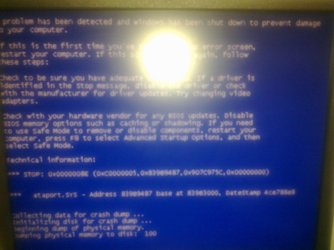
So I have a new problem now and it looks a bit more serious time. My sister installed a blackberry software on the computer in windows 7 which was last night, and suddenly i'm getting so many blue screen errors. If I try to run windows xp at boot, then it says load needed DLLs for kernel. Please contact your support person to report this problem. When in windows 7, after I browse for a couple of minutes, it gives me a blue screen and it restarts. Unfortunately, the blue screen only flashes so I dont get to see what its about. I thought the problem would have to do something with bad memory but I tried my old memory which was working fine and i get the same problem. I dont know how to approach this problem. Should I run system diagnostics in windows 7 first?

 

My Computer My Computer

At a glance

Windows 7 Professional 32 BitGenuine Intel(R) CPU T2080 @ 1.73GHz 1.73 GHz2GBATI Mobility Radeon X1400
Computer Manufacturer/Model Number
Dell Inspiron E 1505
OS
Windows 7 Professional 32 Bit
CPU
Genuine Intel(R) CPU T2080 @ 1.73GHz 1.73 GHz
Motherboard
DELL
Memory
2GB
Graphics Card(s)
ATI Mobility Radeon X1400
Sound Card
High Definition Audio Device
Screen Resolution
1280 by 800
Hard Drives
136 GB
Recovery 10 GB
I also have a system image on a external hard drive. I would like to only use that as my last resort. If I can solve this problem without resorting to that, that it will be really helpful.
 

My Computer My Computer

At a glance

Windows 7 Professional 32 BitGenuine Intel(R) CPU T2080 @ 1.73GHz 1.73 GHz2GBATI Mobility Radeon X1400
Computer Manufacturer/Model Number
Dell Inspiron E 1505
OS
Windows 7 Professional 32 Bit
CPU
Genuine Intel(R) CPU T2080 @ 1.73GHz 1.73 GHz
Motherboard
DELL
Memory
2GB
Graphics Card(s)
ATI Mobility Radeon X1400
Sound Card
High Definition Audio Device
Screen Resolution
1280 by 800
Hard Drives
136 GB
Recovery 10 GB
Actually scratch that, it says windows backup cannot run if your computer is in safe mode. If I log in without safe mode, I will not have enough time to recover with a system image.
 

My Computer My Computer

At a glance

Windows 7 Professional 32 BitGenuine Intel(R) CPU T2080 @ 1.73GHz 1.73 GHz2GBATI Mobility Radeon X1400
Computer Manufacturer/Model Number
Dell Inspiron E 1505
OS
Windows 7 Professional 32 Bit
CPU
Genuine Intel(R) CPU T2080 @ 1.73GHz 1.73 GHz
Motherboard
DELL
Memory
2GB
Graphics Card(s)
ATI Mobility Radeon X1400
Sound Card
High Definition Audio Device
Screen Resolution
1280 by 800
Hard Drives
136 GB
Recovery 10 GB
No I think I only have the Windows 7 in the system image. I am mostly concerned with Windows 7. I will do it tonight and let you know how it goes.
 

My Computer My Computer

At a glance

Windows 7 Professional 32 BitGenuine Intel(R) CPU T2080 @ 1.73GHz 1.73 GHz2GBATI Mobility Radeon X1400
Computer Manufacturer/Model Number
Dell Inspiron E 1505
OS
Windows 7 Professional 32 Bit
CPU
Genuine Intel(R) CPU T2080 @ 1.73GHz 1.73 GHz
Motherboard
DELL
Memory
2GB
Graphics Card(s)
ATI Mobility Radeon X1400
Sound Card
High Definition Audio Device
Screen Resolution
1280 by 800
Hard Drives
136 GB
Recovery 10 GB
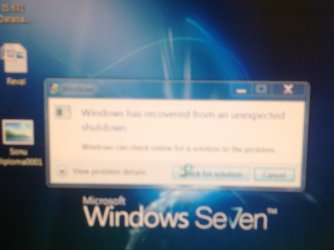
I've tried running sfc/scannow from system repair but it didnt find anything ( i tried 5 times). I havent dont system image yet. These are the errors I am getting.
 

Attachments

  • 04222012229.jpg
    04222012229.jpg
    290.8 KB · Views: 3
  • 04222012233.jpg
    04222012233.jpg
    373.5 KB · Views: 4

My Computer My Computer

At a glance

Windows 7 Professional 32 BitGenuine Intel(R) CPU T2080 @ 1.73GHz 1.73 GHz2GBATI Mobility Radeon X1400
Computer Manufacturer/Model Number
Dell Inspiron E 1505
OS
Windows 7 Professional 32 Bit
CPU
Genuine Intel(R) CPU T2080 @ 1.73GHz 1.73 GHz
Motherboard
DELL
Memory
2GB
Graphics Card(s)
ATI Mobility Radeon X1400
Sound Card
High Definition Audio Device
Screen Resolution
1280 by 800
Hard Drives
136 GB
Recovery 10 GB
Back
Top