Solved Installing OS on two Internal Hard Drives

You need to boot the Win7 DVD or Repair CD to Recover Using a System Image.

 
Ok so you're saying I should restore using a system image? There is nothing else I can do/try?
 

My Computer My Computer

At a glance

Windows 7 Professional 32 BitGenuine Intel(R) CPU T2080 @ 1.73GHz 1.73 GHz2GBATI Mobility Radeon X1400
Computer Manufacturer/Model Number
Dell Inspiron E 1505
OS
Windows 7 Professional 32 Bit
CPU
Genuine Intel(R) CPU T2080 @ 1.73GHz 1.73 GHz
Motherboard
DELL
Memory
2GB
Graphics Card(s)
ATI Mobility Radeon X1400
Sound Card
High Definition Audio Device
Screen Resolution
1280 by 800
Hard Drives
136 GB
Recovery 10 GB
The boot files may need to be repaired with that ataport.sys error.

Have you tried booting into System Recovery Options on the Win7 DVD or System Repair Disk to run Startup Repair a few times. If this fails to fix it, boot back into Options to open a Command Lines, type: bootrec.exe /fixboot, then Enter and bootrec.exe /fixmbr, Enter.
 
Yes. System repair says problems cannot be found.
 

My Computer My Computer

At a glance

Windows 7 Professional 32 BitGenuine Intel(R) CPU T2080 @ 1.73GHz 1.73 GHz2GBATI Mobility Radeon X1400
Computer Manufacturer/Model Number
Dell Inspiron E 1505
OS
Windows 7 Professional 32 Bit
CPU
Genuine Intel(R) CPU T2080 @ 1.73GHz 1.73 GHz
Motherboard
DELL
Memory
2GB
Graphics Card(s)
ATI Mobility Radeon X1400
Sound Card
High Definition Audio Device
Screen Resolution
1280 by 800
Hard Drives
136 GB
Recovery 10 GB
What happens after the bootrec commands are run?

The ataport.sys error can indicate an MBR-virus rootkit.win32.TDSS.tdl4. Use the TDSSkiller from Kapersky to remove this, then run a full scan with Malwarebytes in Safe Mode.

Afterwards try SFC again to repair any damaged system files.

The error can also be hardware. Test your RAM - Test with Memtest86+ for 5-6 passes or overnight.

If these fail to help post up your bugcheck file from the BSOD's in our Crashes forum, according to these
Blue Screen of Death (BSOD) Posting Instructions - Windows 7 Forums
 
So I ran the bootrec commands and it was completed successfully.

The Kaspersky tool found some mbr record and it cured it. But after I restarted my computer, it says invalid partition table.

The threat found is

Rootkit.Boot.Pihar.c
physical drive:\device\harddisk0\DR0
Malware object, high risk

If I remove it and then restart, then I will get a invalid partition table error and will have to go to system repair command prompt to do the bootrec
 

My Computer My Computer

At a glance

Windows 7 Professional 32 BitGenuine Intel(R) CPU T2080 @ 1.73GHz 1.73 GHz2GBATI Mobility Radeon X1400
Computer Manufacturer/Model Number
Dell Inspiron E 1505
OS
Windows 7 Professional 32 Bit
CPU
Genuine Intel(R) CPU T2080 @ 1.73GHz 1.73 GHz
Motherboard
DELL
Memory
2GB
Graphics Card(s)
ATI Mobility Radeon X1400
Sound Card
High Definition Audio Device
Screen Resolution
1280 by 800
Hard Drives
136 GB
Recovery 10 GB
You need to remove it and then run the TDSSkiller rootkit tool from Symantec to make sure it is gone.

Then you can run the bootrec commands and if necessary Startup Repair again.
 
It says

Can't cure MBR. Write standard boot code?

If you have installed custom bootloader (eg Acronis, Grub, Lilo), you will need to reinstall them after the treatment.
 

My Computer My Computer

At a glance

Windows 7 Professional 32 BitGenuine Intel(R) CPU T2080 @ 1.73GHz 1.73 GHz2GBATI Mobility Radeon X1400
Computer Manufacturer/Model Number
Dell Inspiron E 1505
OS
Windows 7 Professional 32 Bit
CPU
Genuine Intel(R) CPU T2080 @ 1.73GHz 1.73 GHz
Motherboard
DELL
Memory
2GB
Graphics Card(s)
ATI Mobility Radeon X1400
Sound Card
High Definition Audio Device
Screen Resolution
1280 by 800
Hard Drives
136 GB
Recovery 10 GB

My Computer My Computer

At a glance

Windows 7 Ultimate SP1 64-BitIntel Core i7 870 @ 2.93GHz8Gb Dual-Channel DDR3 @ 664MHznVidia GeForce GTX 460 1024MB dedicated RAM
Computer Manufacturer/Model Number
HP Pavilion Elite 495UK
OS
Windows 7 Ultimate SP1 64-Bit
CPU
Intel Core i7 870 @ 2.93GHz
Motherboard
MSI 2A9C (CPU1)
Memory
8Gb Dual-Channel DDR3 @ 664MHz
Graphics Card(s)
nVidia GeForce GTX 460 1024MB dedicated RAM
Sound Card
Realtek HD Audio
Monitor(s) Displays
HP2310i
Screen Resolution
1920 x 1080
Hard Drives
1x1954GB Hitachi HDS22020ALA 330 (RAID), 1x1954GB Hitachi External for backup and storage
PSU
460W
Case
HP Elite
Cooling
Air cooled
Keyboard
Logitech K750 solar-powered keyboard
Mouse
Logitech Wireless M180 mouse
Internet Speed
2Mb
Other Info
Pure Avanti Flow Internet Radio with iPod Dock, 64Gb iPod, HP USB Speakers, Sony MDR-V500 Headphones, Sony Vaio F-Series Laptop

My Computer My Computer

At a glance

Windows 7 Professional 32 BitGenuine Intel(R) CPU T2080 @ 1.73GHz 1.73 GHz2GBATI Mobility Radeon X1400
Computer Manufacturer/Model Number
Dell Inspiron E 1505
OS
Windows 7 Professional 32 Bit
CPU
Genuine Intel(R) CPU T2080 @ 1.73GHz 1.73 GHz
Motherboard
DELL
Memory
2GB
Graphics Card(s)
ATI Mobility Radeon X1400
Sound Card
High Definition Audio Device
Screen Resolution
1280 by 800
Hard Drives
136 GB
Recovery 10 GB
I agree you may need all three commands given in Method Two which seavixen linked.

These commands are automated in Startup Repair but sometimes corruption blocks it from running them so they must be run manually.

Make sure the Win7 partition or it's 100mb System Reserved partition (preferred) are marked Active so Repair knows where to look for, repair or rewrite the System boot files.
Partition - Mark as Active (Method Two)
Partition Wizard bootable CD
 
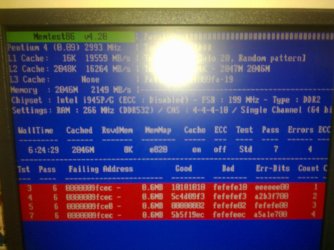
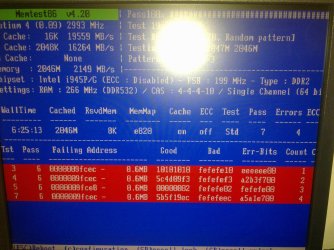
Ok so I am running the memory test for the past 10 and a half hours and it is still running. It has found about 5 errors.

This is the screenshot.
 

Attachments

  • 04232012234.jpg
    04232012234.jpg
    373.6 KB · Views: 5
  • 04232012237.jpg
    04232012237.jpg
    454.7 KB · Views: 3

My Computer My Computer

At a glance

Windows 7 Professional 32 BitGenuine Intel(R) CPU T2080 @ 1.73GHz 1.73 GHz2GBATI Mobility Radeon X1400
Computer Manufacturer/Model Number
Dell Inspiron E 1505
OS
Windows 7 Professional 32 Bit
CPU
Genuine Intel(R) CPU T2080 @ 1.73GHz 1.73 GHz
Motherboard
DELL
Memory
2GB
Graphics Card(s)
ATI Mobility Radeon X1400
Sound Card
High Definition Audio Device
Screen Resolution
1280 by 800
Hard Drives
136 GB
Recovery 10 GB
So does this mean there's a problem with memory? Right now I am on pass 12, and NO additional errors have been found.
 

My Computer My Computer

At a glance

Windows 7 Professional 32 BitGenuine Intel(R) CPU T2080 @ 1.73GHz 1.73 GHz2GBATI Mobility Radeon X1400
Computer Manufacturer/Model Number
Dell Inspiron E 1505
OS
Windows 7 Professional 32 Bit
CPU
Genuine Intel(R) CPU T2080 @ 1.73GHz 1.73 GHz
Motherboard
DELL
Memory
2GB
Graphics Card(s)
ATI Mobility Radeon X1400
Sound Card
High Definition Audio Device
Screen Resolution
1280 by 800
Hard Drives
136 GB
Recovery 10 GB
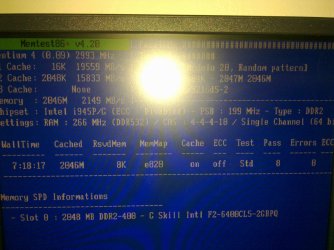
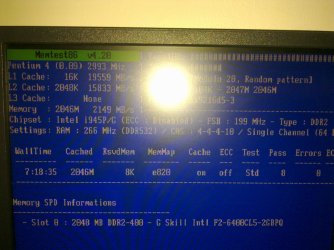
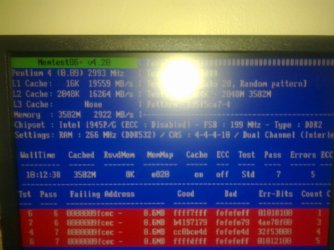
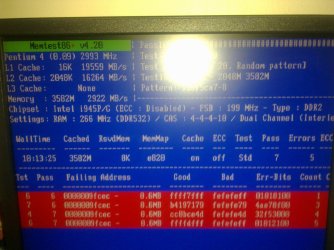
Now I am doing a separate ram test on each ram. After pass 7, it found about 4 errors. I will let it go to pass 8 and then test the other one over night.


EDIT: This are the following screeshots for one of my RAM. I will test the other one overnight.
 

Attachments

  • 04232012241.jpg
    04232012241.jpg
    398.6 KB · Views: 2
  • 04232012242.jpg
    04232012242.jpg
    555.8 KB · Views: 2
Last edited:

My Computer My Computer

At a glance

Windows 7 Professional 32 BitGenuine Intel(R) CPU T2080 @ 1.73GHz 1.73 GHz2GBATI Mobility Radeon X1400
Computer Manufacturer/Model Number
Dell Inspiron E 1505
OS
Windows 7 Professional 32 Bit
CPU
Genuine Intel(R) CPU T2080 @ 1.73GHz 1.73 GHz
Motherboard
DELL
Memory
2GB
Graphics Card(s)
ATI Mobility Radeon X1400
Sound Card
High Definition Audio Device
Screen Resolution
1280 by 800
Hard Drives
136 GB
Recovery 10 GB
After testing the other one, Memtest found no errors.


I also tried to use my computer with the spare memory I had before I bought this ones. But I had the same BSOD error. SO I don't know what's the issue. This just happened so suddenly. I am testing those ones right now and will post the results after a while. I think my last option is to post the BSOD report ( If I have adequate time before the BSOD comes) on this site and take it from thereon. I was going to RMA the RAM but I'm still not sure if they are entirely the problem.
 

Attachments

  • 04242012243857.jpg
    04242012243857.jpg
    438.3 KB · Views: 1
  • 04242012244857.jpg
    04242012244857.jpg
    428.8 KB · Views: 1

My Computer My Computer

At a glance

Windows 7 Professional 32 BitGenuine Intel(R) CPU T2080 @ 1.73GHz 1.73 GHz2GBATI Mobility Radeon X1400
Computer Manufacturer/Model Number
Dell Inspiron E 1505
OS
Windows 7 Professional 32 Bit
CPU
Genuine Intel(R) CPU T2080 @ 1.73GHz 1.73 GHz
Motherboard
DELL
Memory
2GB
Graphics Card(s)
ATI Mobility Radeon X1400
Sound Card
High Definition Audio Device
Screen Resolution
1280 by 800
Hard Drives
136 GB
Recovery 10 GB
I think I did but I'm not so sure. I think I had the same problem. Will go back home and run it again.

By the way, the errors that came up with one of the RAM sticks, what does that mean? Does that mean the RAM is bad? or it is a motherboard problem?
 

My Computer My Computer

At a glance

Windows 7 Professional 32 BitGenuine Intel(R) CPU T2080 @ 1.73GHz 1.73 GHz2GBATI Mobility Radeon X1400
Computer Manufacturer/Model Number
Dell Inspiron E 1505
OS
Windows 7 Professional 32 Bit
CPU
Genuine Intel(R) CPU T2080 @ 1.73GHz 1.73 GHz
Motherboard
DELL
Memory
2GB
Graphics Card(s)
ATI Mobility Radeon X1400
Sound Card
High Definition Audio Device
Screen Resolution
1280 by 800
Hard Drives
136 GB
Recovery 10 GB
It means to at least remove that RAM stick to run for awhile to see if the problem persists. If not then replace the stick.
 
Last edited:
But I replaced it with the older RAM that I had and it was a good RAM but still I got a BSOD error. So, surely the whole problem cannot be linked to RAM


EDIT: I forgot to mention that I have run a full scan of Malware Bytes in Safe mode and no viruses were found.
 

My Computer My Computer

At a glance

Windows 7 Professional 32 BitGenuine Intel(R) CPU T2080 @ 1.73GHz 1.73 GHz2GBATI Mobility Radeon X1400
Computer Manufacturer/Model Number
Dell Inspiron E 1505
OS
Windows 7 Professional 32 Bit
CPU
Genuine Intel(R) CPU T2080 @ 1.73GHz 1.73 GHz
Motherboard
DELL
Memory
2GB
Graphics Card(s)
ATI Mobility Radeon X1400
Sound Card
High Definition Audio Device
Screen Resolution
1280 by 800
Hard Drives
136 GB
Recovery 10 GB
It means to at least remove that RAM stick to run for awhile to see if the problem persists. If not then replace the stick.

So I tried running with the RAM that wasnt defected and I get the same BSOD. I tried running with the older RAM, and it also gives me a BSOD. Now I am going into safe mode so I can post the BSOD dump files.

EDIT: 1st try, it gives me a BSOD in safe mode. Hope I can muster enough time to post the BSOD dump
 

My Computer My Computer

At a glance

Windows 7 Professional 32 BitGenuine Intel(R) CPU T2080 @ 1.73GHz 1.73 GHz2GBATI Mobility Radeon X1400
Computer Manufacturer/Model Number
Dell Inspiron E 1505
OS
Windows 7 Professional 32 Bit
CPU
Genuine Intel(R) CPU T2080 @ 1.73GHz 1.73 GHz
Motherboard
DELL
Memory
2GB
Graphics Card(s)
ATI Mobility Radeon X1400
Sound Card
High Definition Audio Device
Screen Resolution
1280 by 800
Hard Drives
136 GB
Recovery 10 GB
Back
Top