Installing win 7 on new laptop with emmc

tsundere

New member
Local time
9:24 AM
Messages
21
I am trying to install 32-bit win 7 on a HP Stream c004tu that comes with a Samsung MBG4C eMmc harddrive, on win 8.1.

I can get up to booting the installation usb by changing bios settings, but after clicking 'install now' I get the dreaded 'load drivers - "A required CD/DVD drive device driver is missing. If you have a drive floppy disk, cd, dvd or usb flash drive please inset it now."' error message. After some research, I tried to get around it by changing usb ports and using different isos (the non-refresh media), but it didn't work. When I do diskpart->list disk, it says there are no disks.

I think this perhaps is a similar problem to mine and he solved it by adding emmc drivers to the bootable installation, presumably via this method.

The problem is I cannot find drivers for my emmc harddisk, and samsung's contact us link fails when I submit.

Looking in device manager, my current emmc driver is by microsoft but i am using 64-bit win 8 so I didn't think that would help. Help?
 
Last edited:

My Computer My Computer

Computer type
PC/Desktop
OS
win 7 32bit
For 3gb or less RAM use 32 bit, for more RAM use 64 bit. Follow Clean Reinstall Windows 7.

Most often the error means the installer is bad so confirm your ISO and burn it correctly as discussed in Step 1. Note if it's UEFI then a flash stick installer must be specially formatted as specified.

If it really needs the SATA driver which is rare then you should be able to insert it at the link in bottom corner of screen where you get that message. However your model only has 8.1 drivers posted. This doesn't mean you can't install Win7 as I've never seen a driver that couldn't be found (and our Drivers section can find them) but you may need to research the SATA controller make/model to find it's Windows 7 or 8/8.1 driver. HP Stream Notebook - 13-c004tu Software and Drivers | HP® Support

After confirming the media if problems persist thenTroubleshoot Windows 7 Installation Failures - Windows 7 Help Forums
 
Thanks for the reply. I have tried both the x86 and x64 isos after checking their md5 and using Rufus and windows usb tool. I always get that same error.. Do you know how to find my SATA controller?
 

My Computer My Computer

Computer type
PC/Desktop
OS
win 7 32bit
I am waiting for results of a single step indicating you completed Troubleshooting Windows 7 Installation Failures - Windows 7 Help Forums

Do not ignore or skip any steps given if you want a solution. In 90% of those cases of the solution is in the skipped steps. That tutorial solves almost all installation problems except those arising from having a UEFI BIOS and we haven't even heard yet whether you do. Do the steps.
 
I presume that I have a uEFI BIOS as I disabled UEFI and enabled legacy. I cannot do step 2 as there are no options about SATA/AHCI in my BIOS, i have very few options there. The hp support site has no firmware for the emmc harddrive. Harddrive is first in boot order, but I have to manually choose the boot drive with F9 everytime. Regarding step 4; Win 7 installation screen boots up and I have confirmed the md5, and tried Rufus and windows tool. I've also tried with a different usb stick. Both x64 (uefi) isos and x32(mbr bios) isos get the same error message. I have done steps 5 & 6 ("there are no fixed disks to show"). It seems I cannot do step 9 as it's not installed. I have tested my harddrive using the hp tool but not the RAM yet. (my laptop has no CD Drive, is there another way to do step 10?)
 
Last edited:

My Computer My Computer

Computer type
PC/Desktop
OS
win 7 32bit
There is no reason to disable UEFI as the new features of UEFI firmware are worth trying and keeping updated if there is a newer version to install.

So enable UEFI, carefully format the flash stick using only Option One of UEFI Bootable USB Flash Drive - Create in Windows making sure the settings don't jump around when adding the ISO,
then boot it as a UEFI device, delete all partitions during install, report back any verbatim errors or behavior.
 
Ok I have done that with the x64 iso and I get the same error ("A required CD/DVD drive device driver is missing. If you have a drive floppy disk, cd, dvd or usb flash drive please inset it now."). When doing diskpart->list disk I get "there are no fixed disks to show".
 

My Computer My Computer

Computer type
PC/Desktop
OS
win 7 32bit
Yes, in the boot options, Samsung MBG4C eMmc harddrive is listed. Do you think it's an issue of windows 7 not having the drivers to detect my weird hdd (it's more like an SD card). Although when I plug in other usb drives during the installation it doesn't detect them either (so sata controller problem?) Ok I will do that test now. As I don't have a CD Drive, I'll use rufus to burn that diagnostic iso to a usb
 

My Computer My Computer

Computer type
PC/Desktop
OS
win 7 32bit
I cannot find any downloads for the samsung mbg4gc
 

My Computer My Computer

Computer type
PC/Desktop
OS
win 7 32bit
Hi and welcome to SevenForums,
You might take some pictures of the security and boot option listing you have in the bios
Does sound like a secure boot issue not being able to install from a usb device :/
 

My Computer My Computer

Computer type
PC/Desktop
Computer Manufacturer/Model Number
Custom assembled by me :}
OS
Win-7-Pro64bit 7-H-Prem-64bit
CPU
i7-5930K 2nd i9-9940x both water blocked VRM's too
Motherboard
ASUS SABERTOOTH X99 2nd ASUS x299 Apex
Memory
Trident-z 3200C14 2nd Trident-z 3600C16
Graphics Card(s)
EVGA 1080ti ftw3 2nd Titan Xp both water blocked
Sound Card
Built-in Realtek
Monitor(s) Displays
1-AOC G2460PG 24"G-Sync 144Hz/ 2nd 1-ASUS VG248QE 24" 144Hz
Screen Resolution
1920 x 1080 144Hz
Hard Drives
2-Samsung M.2 Evo & Evo Plus
2-Samsung 850 EVO 500GB SSD's/ 3-2.5 W.D. Black 1tb-&3-1tb/3-3.5 WD Black 1tb hdd's
PSU
EVGA SuperNOVA 1000-P2 2nd 1200-P2
Case
2-Corsair Obsidian Series 450D Black ATX Mid Tower
Cooling
Custom water loops
Keyboard
Logitech G710+/ 2nd Logitech G910
Mouse
2-RedDragon M901 Perdition 16400 dpi Gaming mouse = wired
Internet Speed
Comcast Ping 19ms 89.31mbps download speed 6.12mbps upload
Antivirus
Malwarebytes Pro/ Superantispyware Pro
Browser
FireFox & Pale moon
Other Info
2nd ASUS X299 Apex/Intel i9-9940x with Custom water loop/7H-Prem-x64/Corsair 450D case/Ram Trident-z 3600C16 4x8gb / Samsung970Evo plus 500gb SSD/Dual ssd EZ swap evo/PSU EVGA SuperNova 1200w-P2 80+Platinum/GPU Titan Xp /8-ML-140 on push-pull on 2-280GTX rads
@gregrocker I have tried those things that you have said and i still got the same error. I have also tried all possible combinations of settings in bios.
 

My Computer My Computer

Computer type
PC/Desktop
OS
win 7 32bit
Hi
Might be time to show us the options you do see and have changed.
 

My Computer My Computer

Computer type
PC/Desktop
Computer Manufacturer/Model Number
Custom assembled by me :}
OS
Win-7-Pro64bit 7-H-Prem-64bit
CPU
i7-5930K 2nd i9-9940x both water blocked VRM's too
Motherboard
ASUS SABERTOOTH X99 2nd ASUS x299 Apex
Memory
Trident-z 3200C14 2nd Trident-z 3600C16
Graphics Card(s)
EVGA 1080ti ftw3 2nd Titan Xp both water blocked
Sound Card
Built-in Realtek
Monitor(s) Displays
1-AOC G2460PG 24"G-Sync 144Hz/ 2nd 1-ASUS VG248QE 24" 144Hz
Screen Resolution
1920 x 1080 144Hz
Hard Drives
2-Samsung M.2 Evo & Evo Plus
2-Samsung 850 EVO 500GB SSD's/ 3-2.5 W.D. Black 1tb-&3-1tb/3-3.5 WD Black 1tb hdd's
PSU
EVGA SuperNOVA 1000-P2 2nd 1200-P2
Case
2-Corsair Obsidian Series 450D Black ATX Mid Tower
Cooling
Custom water loops
Keyboard
Logitech G710+/ 2nd Logitech G910
Mouse
2-RedDragon M901 Perdition 16400 dpi Gaming mouse = wired
Internet Speed
Comcast Ping 19ms 89.31mbps download speed 6.12mbps upload
Antivirus
Malwarebytes Pro/ Superantispyware Pro
Browser
FireFox & Pale moon
Other Info
2nd ASUS X299 Apex/Intel i9-9940x with Custom water loop/7H-Prem-x64/Corsair 450D case/Ram Trident-z 3600C16 4x8gb / Samsung970Evo plus 500gb SSD/Dual ssd EZ swap evo/PSU EVGA SuperNova 1200w-P2 80+Platinum/GPU Titan Xp /8-ML-140 on push-pull on 2-280GTX rads
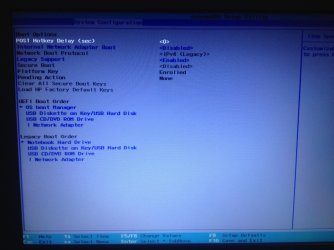
Yes, please take pictures of all settings pages in BIOS. Let us also see specific settings choices for any UEFI, EFI, Legacy BIOS, CSM, Secure Boot and BIOS Boot order settings.

Attach the pictures using the blue Manage Attachments button in reply box.
 
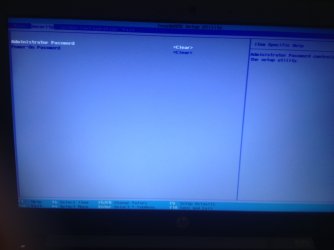
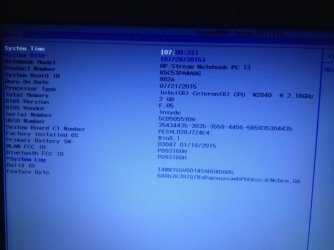
Sorry about the delay, here are the photos
 

Attachments

  • image.jpg
    image.jpg
    287.6 KB · Views: 4
Last edited:

My Computer My Computer

Computer type
PC/Desktop
OS
win 7 32bit
Invisible photos?
 

My Computers My Computers

System One System Two

  • Computer type
    PC/Desktop
    OS
    7 X64
    CPU
    i5 8400
    Motherboard
    gigabyte b365m ds3h
    Memory
    2x8gb 3200mhz
    Hard Drives
    various
    PSU
    pure power 11 400w cm
    Case
    Coolermaster
    Cooling
    cryorig m9i
  • Computer type
    PC/Desktop
    OS
    7x64
    CPU
    g5400
    Motherboard
    ga b365m ds3h
    Memory
    8gb ddr4 2400
    PSU
    xfx pro 450w
Here they are
 

Attachments

  • 323B0ECA-D7FD-40C8-9CA3-0F5F23B37526.jpg
    323B0ECA-D7FD-40C8-9CA3-0F5F23B37526.jpg
    862.3 KB · Views: 2
  • 5D42E700-DEB2-4763-8A6E-63D32BE144E9.jpg
    5D42E700-DEB2-4763-8A6E-63D32BE144E9.jpg
    772.7 KB · Views: 4

My Computer My Computer

Computer type
PC/Desktop
OS
win 7 32bit
Check the HP Support Downloads webpage for your model for newer UEFI Firmware or BIOS version than shown.

Set some time to access F12 Boot Menu from Post Hotkey Delay setting.

Now try via F12 to boot disk or UEFI formatted stick. Are there UEFI device options to boot for either? If not try disabling Legacy Support setting to see if they show up. What are the specific Legacy settings choices I asked you to show?
 
I have tried the latest bios (F.06) and still got the same error. There were no new options in the firmware whatsoever.

The 'secure boot' option has 2 parameters; enabled and disabled. If enabled, 'legacy support' becomes disabled and greyed out. Also network boot protocol has "ipv4 (UEFI)". If 'secure boot' is disabled, 'legacy support' can become enabled or disabled (only 2 parameters). If enabled network boot protocol becomes "ipv4". I have tried literally all of these permutations. Are there UEFI device options to boot for either? Yes, for both.
 

My Computer My Computer

Computer type
PC/Desktop
OS
win 7 32bit
Back
Top