Installing Windows 7 and 8.1 on the same system

rmk9785e

New member
Local time
9:21 AM
Messages
39
Location
SF bay Area
I recently purchased a Dell Inspiron 3847 with Windows 8.1 64 bit installed on its HDD. I wanted to use it as a dedicated Windows Media Center HTPC which comes bundled with Windows 7 Pro so I added a 128GB SSD as the boot device and installed Windows 7 Pro 64 bit. Is there any way to setup the system to have options to select one of these operating systems at every boot so I can occasionally boot from Windows 8.1 and keep it patched/current?
 

My Computer My Computer

Computer type
PC/Desktop
Computer Manufacturer/Model Number
Dell Inspiron I3847-3850BK
OS
Microsoft Windows 7 Professional 64-bit 7601 Multiprocessor Free Service Pack 1
CPU
Intel(R) Core(TM) i3-4150 CPU @ 3.50GHz
Motherboard
Dell Inc. 088DT1
Memory
8.00 GB
Graphics Card(s)
Intel(R) HD Graphics 4400
Sound Card
(1) Realtek High Definition Audio (2) Intel(R) Display Aud
Monitor(s) Displays
Samsung LCD TV, 3 HDMI ports
Screen Resolution
1920 x 1080 x 32 bits (4294967296 colors) @ 60 Hz
Hard Drives
C300-CTF C300-CTFDDAC128M SCSI Disk Device
PSU
220W
Case
Dell
Keyboard
Basic
Mouse
Basic
Internet Speed
Ethernet, 802.11b/g/n wireless LAN (Dell Wireless 1705)
Antivirus
Microsoft Security Essentials
Browser
Chrome Version 38.0.2125.101 m, IE 10.0.92
Other Info
Intel H81 Express chipset, in 1 card reader, DVD/CD burner, 1 PCI Express x16 & 2 PCI Express x1, HDMI output for HDTV. VGA. 8 USB ports (2 USB3, 6 USB2), Audio in/out jacks. 3-stack audio jacks supporting 5.1 surround sound. Windows Media Center.

My Computer My Computer

Computer type
PC/Desktop
Computer Manufacturer/Model Number
Dude Build
OS
Windows 10 Pro X64
CPU
Intel(R) Core(TM) i5-3570K CPU OC@ 4.5GHZ Turbo
Motherboard
MSI Z77A-G45 Gaming
Memory
8.00 GB DDR3 1600Mhz
Graphics Card(s)
MSI Gaming X GTX 1070
Sound Card
Realtek High Definition
Monitor(s) Displays
Dell S23O9W, HP L1710
Screen Resolution
DELL-1920 x 1080 HP-1280 x1024
Hard Drives
Crucial m4 256 SSD, WD 7200RPM 500GB WD 1TB
PSU
Seasonic X650 GOLD
Case
Zalman Z12
Cooling
Antec Kuhler 920
Keyboard
Logitech
Mouse
MSI DS100 Interceptor
Internet Speed
50 down and 5 up
Antivirus
MSE
Browser
Chrome, IE 11
Other Info
Logitech X-620 Speakers
Thank you so very much for pointing me to this detailed solution.
 

My Computer My Computer

Computer type
PC/Desktop
Computer Manufacturer/Model Number
Dell Inspiron I3847-3850BK
OS
Microsoft Windows 7 Professional 64-bit 7601 Multiprocessor Free Service Pack 1
CPU
Intel(R) Core(TM) i3-4150 CPU @ 3.50GHz
Motherboard
Dell Inc. 088DT1
Memory
8.00 GB
Graphics Card(s)
Intel(R) HD Graphics 4400
Sound Card
(1) Realtek High Definition Audio (2) Intel(R) Display Aud
Monitor(s) Displays
Samsung LCD TV, 3 HDMI ports
Screen Resolution
1920 x 1080 x 32 bits (4294967296 colors) @ 60 Hz
Hard Drives
C300-CTF C300-CTFDDAC128M SCSI Disk Device
PSU
220W
Case
Dell
Keyboard
Basic
Mouse
Basic
Internet Speed
Ethernet, 802.11b/g/n wireless LAN (Dell Wireless 1705)
Antivirus
Microsoft Security Essentials
Browser
Chrome Version 38.0.2125.101 m, IE 10.0.92
Other Info
Intel H81 Express chipset, in 1 card reader, DVD/CD burner, 1 PCI Express x16 & 2 PCI Express x1, HDMI output for HDTV. VGA. 8 USB ports (2 USB3, 6 USB2), Audio in/out jacks. 3-stack audio jacks supporting 5.1 surround sound. Windows Media Center.
You're welcome. Post back and let us know how it works for you.
 

My Computer My Computer

Computer type
PC/Desktop
Computer Manufacturer/Model Number
Dude Build
OS
Windows 10 Pro X64
CPU
Intel(R) Core(TM) i5-3570K CPU OC@ 4.5GHZ Turbo
Motherboard
MSI Z77A-G45 Gaming
Memory
8.00 GB DDR3 1600Mhz
Graphics Card(s)
MSI Gaming X GTX 1070
Sound Card
Realtek High Definition
Monitor(s) Displays
Dell S23O9W, HP L1710
Screen Resolution
DELL-1920 x 1080 HP-1280 x1024
Hard Drives
Crucial m4 256 SSD, WD 7200RPM 500GB WD 1TB
PSU
Seasonic X650 GOLD
Case
Zalman Z12
Cooling
Antec Kuhler 920
Keyboard
Logitech
Mouse
MSI DS100 Interceptor
Internet Speed
50 down and 5 up
Antivirus
MSE
Browser
Chrome, IE 11
Other Info
Logitech X-620 Speakers
Did you already install Win7, and if so did you unplug the WIn8 drive during 7 install? If so you can boot your choice of HD's via the BIOS Boot Priiority order (7) or if you want 8 the BIOS Boot menu key at boot. If this isn't to your liking you can add 8 to a Windows Boot Menu from Win7 using EasyBCD (click Download - no Name or Email required).

But let us see a screenshot of http://www.sevenforums.com/tutorial...nt-post-screen-capture-image.html#post2261610 first so we can be sure.
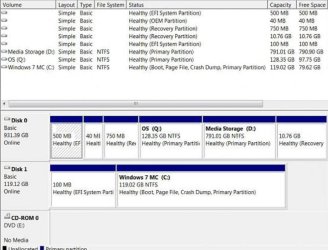
Yes, I unplugged the original Win8 HDD while installing Win7. Attached is the Disk management image. In BIOS boot options, the 1st boot device is [Internal ODD Device] and the 2nd boot device is [UEFI:Windows Boot M...].
I created a partition on the HDD to store my media and assigned it as the D drive. I believe the Win8 partition is the Q drive.
 

Attachments

  • Disk_Mgmt.JPG
    Disk_Mgmt.JPG
    117.9 KB · Views: 0

My Computer My Computer

Computer type
PC/Desktop
Computer Manufacturer/Model Number
Dell Inspiron I3847-3850BK
OS
Microsoft Windows 7 Professional 64-bit 7601 Multiprocessor Free Service Pack 1
CPU
Intel(R) Core(TM) i3-4150 CPU @ 3.50GHz
Motherboard
Dell Inc. 088DT1
Memory
8.00 GB
Graphics Card(s)
Intel(R) HD Graphics 4400
Sound Card
(1) Realtek High Definition Audio (2) Intel(R) Display Aud
Monitor(s) Displays
Samsung LCD TV, 3 HDMI ports
Screen Resolution
1920 x 1080 x 32 bits (4294967296 colors) @ 60 Hz
Hard Drives
C300-CTF C300-CTFDDAC128M SCSI Disk Device
PSU
220W
Case
Dell
Keyboard
Basic
Mouse
Basic
Internet Speed
Ethernet, 802.11b/g/n wireless LAN (Dell Wireless 1705)
Antivirus
Microsoft Security Essentials
Browser
Chrome Version 38.0.2125.101 m, IE 10.0.92
Other Info
Intel H81 Express chipset, in 1 card reader, DVD/CD burner, 1 PCI Express x16 & 2 PCI Express x1, HDMI output for HDTV. VGA. 8 USB ports (2 USB3, 6 USB2), Audio in/out jacks. 3-stack audio jacks supporting 5.1 surround sound. Windows Media Center.
Hello, have a look here on how to dual boot 7 and 8

Dual Boot Installation - Windows 8 and Windows 7 or Vista

Thanks Dude
d.png
 

My Computer My Computer

Computer type
Laptop
Computer Manufacturer/Model Number
Acer
OS
Windows 7 Home Premium 32bit
CPU
Intel Core i3-3217U CPU @ 1.89GHz 1.79 GHz
Motherboard
Aspire V5-471
Memory
4GB
Graphics Card(s)
Nvidia Geforce
Hard Drives
WD BLACK SERIES WD5000BPKX 500GB 7200 RPM 16MB Cache SATA 6.0Gb/s 2.5" Internal Notebook Hard Drive Bare D
Antivirus
Avast
Browser
Opera
Are you able to boot into Windows 8 now?

The BIOS boot for a secondary UEFI drive may not be achievable since it is booted by Windows Boot Manager.

Since both are UEFI installs which are to be booted from Windows Boot Manager unless you can find a wayin the BIOS to choose another HD to trigger its Windows Boot Manager, the best way for your to add Windows 8 to a Dual Boot menu may be to install EasyBCD (click Download - no Name or Email required) to add Windows 8.

Let us know how this goes.
 
Thank you. I don't have a second drive to boot option in BIOS. If I were to remove the Windows 7 SSD and boot from Windows 8, would I be able to use its boot manager to add the Win7 drive?
I'll give EasyBCD a try this week and provide update.
 

My Computer My Computer

Computer type
PC/Desktop
Computer Manufacturer/Model Number
Dell Inspiron I3847-3850BK
OS
Microsoft Windows 7 Professional 64-bit 7601 Multiprocessor Free Service Pack 1
CPU
Intel(R) Core(TM) i3-4150 CPU @ 3.50GHz
Motherboard
Dell Inc. 088DT1
Memory
8.00 GB
Graphics Card(s)
Intel(R) HD Graphics 4400
Sound Card
(1) Realtek High Definition Audio (2) Intel(R) Display Aud
Monitor(s) Displays
Samsung LCD TV, 3 HDMI ports
Screen Resolution
1920 x 1080 x 32 bits (4294967296 colors) @ 60 Hz
Hard Drives
C300-CTF C300-CTFDDAC128M SCSI Disk Device
PSU
220W
Case
Dell
Keyboard
Basic
Mouse
Basic
Internet Speed
Ethernet, 802.11b/g/n wireless LAN (Dell Wireless 1705)
Antivirus
Microsoft Security Essentials
Browser
Chrome Version 38.0.2125.101 m, IE 10.0.92
Other Info
Intel H81 Express chipset, in 1 card reader, DVD/CD burner, 1 PCI Express x16 & 2 PCI Express x1, HDMI output for HDTV. VGA. 8 USB ports (2 USB3, 6 USB2), Audio in/out jacks. 3-stack audio jacks supporting 5.1 surround sound. Windows Media Center.
Why do you need Windows 8? I'd just wipe the drive with Diskpart Clean Command and use it for storage.

If what you're asking is if you add Win8 to a Dual Boot menu from Win7 using EasyBCD can you unplug either drive and have the other still boot, normally you would but since every UEFI BIOS is different you'd need to test it to be sure.
 
So many people complicate Windows 8.x/Windows 7 installs. This nonsense of unplugging one drive, installing OS via bootable media, then plugging back in original drive; downloading some bcd software to add boot entry...
You just need 1 GUI tool(Disk Management) and 2 CLI tools(DISM, BCDBoot)

Really, best way to dual boot Win8/Win7 on a machine that has Win8/8.1 is to do the install all inside of Windows 8.

In diskmgmt.msc, shrink HDD down to size you want your Windows partition, or if installing on another HDD, format that HDD as NTFS.

Then put in your Windows 7 media into Optical Drive.
Then manually install Windows, thusly:

Assuming: C: is OS partition, D: is OS2 Partition, and E: is Optical drive with Win7 disk.

Open admin level CMD prompt and type: DISM /apply-image /imagefile:E:\sources\install.wim /index:2 /applydir:D:
allow that to complete, you'll get a progress bar; after it says completed, type BCDBOOT D:\windows /d, and you'll get "Boot files successfully created".

after that, restart PC and you should be two boot entries, Windows 8.1/Windows 7 and just select what you want to boot too; in msconfig in either install you can select which you want to be default.


Edit: Have to add, the /index switch in the DISM, you'd want to change that depending on the version of Windows you are activating. For x64 install (which is the only one that'll install in UEFI mode that Win8 would come with), is usually: 1: HomeBasic, 2: HomePremium, 3: Professional 4: Ultimate.
x86 is usually: 1: Starter, 2: HomeBasic, 3: HomePremium: 4: Professional
But you'd want to verify that with DISM /get-wiminfo /wimfile:E\sources\install.wim
 

My Computer My Computer

Computer type
Laptop
Computer Manufacturer/Model Number
Dell
OS
Windows 7 Home Premium x64
CPU
i5-480M
Memory
2x4GB
Hard Drives
1TB
Antivirus
None
Browser
Chrome
I`m sorry but.....Installing an OS from within another OS is hardly the best way to do it.
 

My Computer My Computer

Computer type
PC/Desktop
Computer Manufacturer/Model Number
Skylake Special #666
OS
Windows 10 Pro x64
CPU
Intel Core i7 6700K
Motherboard
Asus Sabertooth Z170 Mark 1
Memory
GSkill TridentZ RGB 16GB 3600 16-16-16-36
Graphics Card(s)
EVGA GTX 980 Ti SC x2
Sound Card
Realtek High Definition
Monitor(s) Displays
AOC G2460PG
Screen Resolution
1920 x 1080 144Hz
Hard Drives
Samsung 860 Pro 256GB, Seagate Barracuda 4TB x2
PSU
EVGA 1000 P2, EVGA White Custom Braided Cables
Case
Corsair Vengeance C70 Gunmetal Black
Cooling
Corsair H100i v2, Corsair ML120 x2, Thermal Grizzly Kryonaut
Keyboard
Logitech G910 Orion Spectrum
Mouse
Logitech G700s
Internet Speed
Verizon Fios Quantum Gateway 75/75
Antivirus
Windows Defender, Malwarebytes Free 3.8.3
Browser
Chrome
Other Info
Corsair SP120 x4, LG Blu-ray Drive, Durabrand HT-395 100 Watt Dolby Digital Amp, Corsair H2100 Wireless 7.1 Headset
The installer has configured a Dual Boot since Vista. We no longer use XP methods because of automation.

We also do not install an OS from within another because that locks out the C letter so that it isn't available for the new OS. But when installed from boot any multi-booted OS when it starts will see itself as C.

Had you been here since the earliest days of beta you would have witnessed these evolutions in how things are done, an exciting ride which led to these becoming the top tech forums in history. Believe me all of the changes were questioned and tested, weighed against all other options old and new, in tens of thousands of cases over the entire run of Win7.

Stick around as we continue to evolve. Show us your ideas in practice and if they are better then they will catch on. Nobody here has a closed mind.
 
We also do not install an OS from within another because that locks out the C letter so that it isn't available for the new OS. But when installed from boot any multi-booted OS when it starts will see itself as C.
C: will not be locked by the 2nd OS, that is what the /d flag in BCDBoot is for. /d preserves current boot entry, and adds the Windows install as a dual boot

bcdboot /d Specifies that the existing default windows boot entry should be preserved.

The 2nd OS will have C: has OS partition, and another drive letter will be assigned the the first installed OS.
If you don't use /d, then yes; your install will fail because that OS will be assigned letter D: or E: or some other letter and Windows doesn't like drive letter NOT on C:


I see no reason to unplug/install OS, then plug back in drive and mess with 3rd party BCDEdit utils; or even booting to install media and running the standard setup process to dual boot.
Being able to manually install 2nd OS inside a working OS so you can do other things makes more sense to me.

It's all preference on how it is done; I would be annoyed by the dual EFI partitions the OP has, but probably doesn't bother most folks.

Just want to note that it most certainly can be done without the issues you describe in above quoted.
 

My Computer My Computer

Computer type
Laptop
Computer Manufacturer/Model Number
Dell
OS
Windows 7 Home Premium x64
CPU
i5-480M
Memory
2x4GB
Hard Drives
1TB
Antivirus
None
Browser
Chrome
We've seen literally thousands of cases of the boot manager being derailed to another hard drive when it wasn't unplugged during install. The installer will place the boot files on the first Primary partition in order. The only way to avoid this is to have the target HD in DISK0, or see that any preceding partition is Logical which cannot receive boot files.

But as you can see this isn't easy to explain, so instead what's worked easiest is unplugging the other drive. This keeps them independently bootable as well, while having them configured into a Windows Dual Boot requires surgery to remove the one which isn't marked System Active. When unplugged each can boot itself, then if a BIOS Boot is not desired one can add the other to a Windows Boot Menu easily with EasyBCD (again, automation) while they remain independently bootable - the best of all possible outcomes.

The commands you would issue are given after this is already done. The C letter can no longer be issued without ruining the install, by any method we've ever seen here.
 
I apologize for having disappeared for such a long time. I've been using Windows 7 primarily with WMC and didn't try to boot it in Windows 8.1 until yesterday to patch it up and prepare for upgrade to Windows 10. I could only boot from Windows 8.1 by unplugging my Windows 7 drive. After installing all the patches for Windows 8.1, I shut the machine down and plugged the Windows 7 SSD before turning it on. It still wanted to boot from Windows 8.1 so I unplugged the HDD and it booted from Windows 7. Plugged in the HDD after that and the machines went through some FDISK activity and now it boots from Windows 7 SSD. I had to restore Windows 7 to a restore point to fix some corruption and then started running recovery on Windows 7 but cancelled it during the initial phase. During recovery, the system seemed to be aware of both OS'es on the two drives.
If I run the recovery to repair installation of Windows 7, will it start giving me options to boot (from F12) or will it mess up my system in any way? I'm asking this question because I don't understand UEFI as well.
Thoughts, ideas?
 

My Computer My Computer

Computer type
PC/Desktop
Computer Manufacturer/Model Number
Dell Inspiron I3847-3850BK
OS
Microsoft Windows 7 Professional 64-bit 7601 Multiprocessor Free Service Pack 1
CPU
Intel(R) Core(TM) i3-4150 CPU @ 3.50GHz
Motherboard
Dell Inc. 088DT1
Memory
8.00 GB
Graphics Card(s)
Intel(R) HD Graphics 4400
Sound Card
(1) Realtek High Definition Audio (2) Intel(R) Display Aud
Monitor(s) Displays
Samsung LCD TV, 3 HDMI ports
Screen Resolution
1920 x 1080 x 32 bits (4294967296 colors) @ 60 Hz
Hard Drives
C300-CTF C300-CTFDDAC128M SCSI Disk Device
PSU
220W
Case
Dell
Keyboard
Basic
Mouse
Basic
Internet Speed
Ethernet, 802.11b/g/n wireless LAN (Dell Wireless 1705)
Antivirus
Microsoft Security Essentials
Browser
Chrome Version 38.0.2125.101 m, IE 10.0.92
Other Info
Intel H81 Express chipset, in 1 card reader, DVD/CD burner, 1 PCI Express x16 & 2 PCI Express x1, HDMI output for HDTV. VGA. 8 USB ports (2 USB3, 6 USB2), Audio in/out jacks. 3-stack audio jacks supporting 5.1 surround sound. Windows Media Center.
What Recovery are you referring to? Recovery here means Factory Recovery to shipped condition, or Image Recovery using a System Image.

Compare the 7 install you have to the perfect one compiled in link beneath surf picture below. If it doesn't compare I'd go to the perfect install to enjoy best performance.

Did you ever add 7 to a Dual Boot menu using EasyBCD from 8 as suggested since your BIOS menu doesn't offer choice of hard drives? In this case the HD priority is a different setting.

Once 7 is bootable you can also Upgrade 8 to 10 with both drives plugged in and the installer should configure a Dual Boot. One may not be independently bootable then however, another reason to install with only one HD plugged in so all are independently bootable, then add secondary HD OS from Primary using EasyBCD which leaves each independently bootable, whereas the Windows installer only keeps the Primary self booting.
 
What Recovery are you referring to? Recovery here means Factory Recovery to shipped condition, or Image Recovery using a System Image.

Did you ever add 7 to a Dual Boot menu using EasyBCD from 8 as suggested since your BIOS menu doesn't offer choice of hard drives? In this case the HD priority is a different setting.

Perhaps I used incorrect terminology. I started Windows 7 reinstall process which saw both disk drives with their own operating systems. I cancelled it at that stage and the system booted to the existing Windows 7 installation.
To boot from Windows 8.1 and install BCD, I would have to disconnect the Windows 7 disk. Will BCD recognize it if I connect it afterwards? I just don't want to lose the ability to boot from Windows 7 and run WMC. Not understanding UEFI, I don't want to set it up in a way that I cannot return to my current setup where each OS is installed individually on its own drive.
 

My Computer My Computer

Computer type
PC/Desktop
Computer Manufacturer/Model Number
Dell Inspiron I3847-3850BK
OS
Microsoft Windows 7 Professional 64-bit 7601 Multiprocessor Free Service Pack 1
CPU
Intel(R) Core(TM) i3-4150 CPU @ 3.50GHz
Motherboard
Dell Inc. 088DT1
Memory
8.00 GB
Graphics Card(s)
Intel(R) HD Graphics 4400
Sound Card
(1) Realtek High Definition Audio (2) Intel(R) Display Aud
Monitor(s) Displays
Samsung LCD TV, 3 HDMI ports
Screen Resolution
1920 x 1080 x 32 bits (4294967296 colors) @ 60 Hz
Hard Drives
C300-CTF C300-CTFDDAC128M SCSI Disk Device
PSU
220W
Case
Dell
Keyboard
Basic
Mouse
Basic
Internet Speed
Ethernet, 802.11b/g/n wireless LAN (Dell Wireless 1705)
Antivirus
Microsoft Security Essentials
Browser
Chrome Version 38.0.2125.101 m, IE 10.0.92
Other Info
Intel H81 Express chipset, in 1 card reader, DVD/CD burner, 1 PCI Express x16 & 2 PCI Express x1, HDMI output for HDTV. VGA. 8 USB ports (2 USB3, 6 USB2), Audio in/out jacks. 3-stack audio jacks supporting 5.1 surround sound. Windows Media Center.
Your Disk Mgmt is a mess. You should know what every single one of those jumbled partitions is for and actively using it or Wipe the drive and create only the partitions you want.

If you're good with all that then install Easy to the drive that is set first to boot AND will start, add the other by drive letter Shown in Disk Mgmt ( or issue one) to see if it will boot. If not do the 8.1>10 Upgrade to see if it will configure Dual Boot.
 
Last edited:
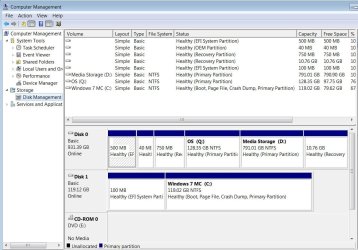
Thank you for your patience. Granted that my Disk Mgmt is a mess but I can only take credit for two actions in creating it:
1- Unplugged the 1TB HDD that came from the factory Windows 8.1 installed with all the partitions. I then plugged in a new SSD and installed Windows 7 on it before reconnecting the original HDD.
2- Created a partition on the HDD to store my WMC Media. I have no idea why there are three Recovery partitions on it.
I plan to upgrade from 8.1 to 10 once I have found a good replacement for WMC. In the meantime I'd like to be able to dual boot to test the WMC alternatives on 8.1. What's preferable in this instance- installing EasyBCD on Windows 7 or 8.1?
 

Attachments

  • Disk_Mgmt.JPG
    Disk_Mgmt.JPG
    69.9 KB · Views: 0

My Computer My Computer

Computer type
PC/Desktop
Computer Manufacturer/Model Number
Dell Inspiron I3847-3850BK
OS
Microsoft Windows 7 Professional 64-bit 7601 Multiprocessor Free Service Pack 1
CPU
Intel(R) Core(TM) i3-4150 CPU @ 3.50GHz
Motherboard
Dell Inc. 088DT1
Memory
8.00 GB
Graphics Card(s)
Intel(R) HD Graphics 4400
Sound Card
(1) Realtek High Definition Audio (2) Intel(R) Display Aud
Monitor(s) Displays
Samsung LCD TV, 3 HDMI ports
Screen Resolution
1920 x 1080 x 32 bits (4294967296 colors) @ 60 Hz
Hard Drives
C300-CTF C300-CTFDDAC128M SCSI Disk Device
PSU
220W
Case
Dell
Keyboard
Basic
Mouse
Basic
Internet Speed
Ethernet, 802.11b/g/n wireless LAN (Dell Wireless 1705)
Antivirus
Microsoft Security Essentials
Browser
Chrome Version 38.0.2125.101 m, IE 10.0.92
Other Info
Intel H81 Express chipset, in 1 card reader, DVD/CD burner, 1 PCI Express x16 & 2 PCI Express x1, HDMI output for HDTV. VGA. 8 USB ports (2 USB3, 6 USB2), Audio in/out jacks. 3-stack audio jacks supporting 5.1 surround sound. Windows Media Center.
Back
Top