
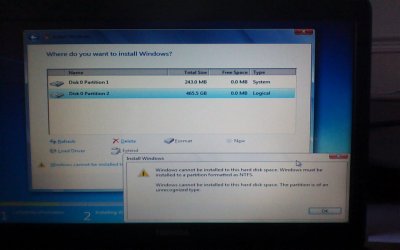
Installing windows 7 from usb but none of my partitions are formatted

dom979

New member
Member
Local time
9:17 PM
Messages
26
This is what comes up when I try, I am currently using Ubuntu 13.04 as my operating system until I can get my windows 7 to work again, please help.
 

Attachments

  • picture005.jpg
    picture005.jpg
    69.3 KB · Views: 9

My Computer My Computer

At a glance

Windows 7 home premium, Windows 7 Ultimate, U...i3-370m @2.40GHz4GB DDR3Intel Graphics Media Accelerator HD
Computer type
Laptop
Computer Manufacturer/Model Number
Toshiba Satellite C660-220
OS
Windows 7 home premium, Windows 7 Ultimate, Ubuntu 13.04, Windows 8 RT, Windows XP
CPU
i3-370m @2.40GHz
Memory
4GB DDR3
Graphics Card(s)
Intel Graphics Media Accelerator HD
Sound Card
Toshiba Bass Enhanced Sound System
Screen Resolution
1366 x 768
Hard Drives
500GB 5400rpm Toshiba MK5065GSNX
Internet Speed
5 MB/S down, 0.3 MB/S up
Antivirus
Microsoft Security Essentials
Browser
Google Chrome
Are you trying to wipe both partitions ?
 

My Computer My Computer

At a glance

Windows 7 Ultimate 32-Bit & Windows 7 Ultimat...Intel Core i7 CPU 950 @ 3.07GHzOCZ 6GB (3 x 2GB) 240-Pin DDR3 SDRAM DDR3 160...ATI Radeon HD 5700 Series
Computer Manufacturer/Model Number
Custom Built
OS
Windows 7 Ultimate 32-Bit & Windows 7 Ultimate 64-Bit
CPU
Intel Core i7 CPU 950 @ 3.07GHz
Motherboard
ASUS P6T DELUXE V2
Memory
OCZ 6GB (3 x 2GB) 240-Pin DDR3 SDRAM DDR3 1600 OCZ3X1600R2
Graphics Card(s)
ATI Radeon HD 5700 Series
Sound Card
OnBoard
Hard Drives
WD6400AACS-00M3B0 (640GB SATA )
PSU
CORSAIR 850w
Case
NZXT LEXA
Cooling
Intel Stock Heatsink Fan
Keyboard
Microsoft Wireless Laser Keyboard 7000
Mouse
Microsoft Wireless Laser Mouse 7000

My Computer My Computer

At a glance

Windows 7 home premium, Windows 7 Ultimate, U...i3-370m @2.40GHz4GB DDR3Intel Graphics Media Accelerator HD
Computer type
Laptop
Computer Manufacturer/Model Number
Toshiba Satellite C660-220
OS
Windows 7 home premium, Windows 7 Ultimate, Ubuntu 13.04, Windows 8 RT, Windows XP
CPU
i3-370m @2.40GHz
Memory
4GB DDR3
Graphics Card(s)
Intel Graphics Media Accelerator HD
Sound Card
Toshiba Bass Enhanced Sound System
Screen Resolution
1366 x 768
Hard Drives
500GB 5400rpm Toshiba MK5065GSNX
Internet Speed
5 MB/S down, 0.3 MB/S up
Antivirus
Microsoft Security Essentials
Browser
Google Chrome
Boot off the DVD or USB and do the following

Press enter when you see the screen that says Press any key to boot from cd or DVD…( image below )

windows-7-startup-repair-1.jpg


When you get to this screen ( image below )

212270d1337270227-clean-install-windows-7-step4.jpg


Press Shift and F10 . You will get a command prompt window . It should open up to X:\Sources . In there input these commands and press enter after each line .
Code:
DISKPART
LIST DISK
SELECT DISK 0
CLEAN
CREATE PRIMARY PARTITION 
SELECT PARTITION 1 
ACTIVE 
FORMAT FS=NTFS LABEL="Windows 7 OS" QUICK 
ASSIGN LETTER=C
EXIT
EXIT

Back on the image above press Install Now . Check the I accept the license terms box and click on Next. Click on the Custom (advanced) option. Then choose
Disk 0 Partition 1: Window (C:\) and click Next

When it reboots don't press any keys it will continue on its own
 

My Computer My Computer

At a glance

Windows 7 Ultimate 32-Bit & Windows 7 Ultimat...Intel Core i7 CPU 950 @ 3.07GHzOCZ 6GB (3 x 2GB) 240-Pin DDR3 SDRAM DDR3 160...ATI Radeon HD 5700 Series
Computer Manufacturer/Model Number
Custom Built
OS
Windows 7 Ultimate 32-Bit & Windows 7 Ultimate 64-Bit
CPU
Intel Core i7 CPU 950 @ 3.07GHz
Motherboard
ASUS P6T DELUXE V2
Memory
OCZ 6GB (3 x 2GB) 240-Pin DDR3 SDRAM DDR3 1600 OCZ3X1600R2
Graphics Card(s)
ATI Radeon HD 5700 Series
Sound Card
OnBoard
Hard Drives
WD6400AACS-00M3B0 (640GB SATA )
PSU
CORSAIR 850w
Case
NZXT LEXA
Cooling
Intel Stock Heatsink Fan
Keyboard
Microsoft Wireless Laser Keyboard 7000
Mouse
Microsoft Wireless Laser Mouse 7000
Boot off the DVD or USB and do the following

Press enter when you see the screen that says Press any key to boot from cd or DVD…( image below )

windows-7-startup-repair-1.jpg


When you get to this screen ( image below )

212270d1337270227-clean-install-windows-7-step4.jpg


Press Shift and F10 . You will get a command prompt window . It should open up to X:\Sources . In there input these commands and press enter after each line .
Code:
DISKPART
LIST DISK
SELECT DISK 0
CLEAN
CREATE PRIMARY PARTITION 
SELECT PARTITION 1 
ACTIVE 
FORMAT FS=NTFS LABEL="Windows 7 OS" QUICK 
ASSIGN LETTER=C
EXIT
EXIT

Back on the image above press Install Now . Check the I accept the license terms box and click on Next. Click on the Custom (advanced) option. Then choose
Disk 0 Partition 1: Window (C:\) and click Next

When it reboots don't press any keys it will continue on its own
thank you so much it's installing windows now
 

My Computer My Computer

At a glance

Windows 7 home premium, Windows 7 Ultimate, U...i3-370m @2.40GHz4GB DDR3Intel Graphics Media Accelerator HD
Computer type
Laptop
Computer Manufacturer/Model Number
Toshiba Satellite C660-220
OS
Windows 7 home premium, Windows 7 Ultimate, Ubuntu 13.04, Windows 8 RT, Windows XP
CPU
i3-370m @2.40GHz
Memory
4GB DDR3
Graphics Card(s)
Intel Graphics Media Accelerator HD
Sound Card
Toshiba Bass Enhanced Sound System
Screen Resolution
1366 x 768
Hard Drives
500GB 5400rpm Toshiba MK5065GSNX
Internet Speed
5 MB/S down, 0.3 MB/S up
Antivirus
Microsoft Security Essentials
Browser
Google Chrome
You're welcome .
 

My Computer My Computer

At a glance

Windows 7 Ultimate 32-Bit & Windows 7 Ultimat...Intel Core i7 CPU 950 @ 3.07GHzOCZ 6GB (3 x 2GB) 240-Pin DDR3 SDRAM DDR3 160...ATI Radeon HD 5700 Series
Computer Manufacturer/Model Number
Custom Built
OS
Windows 7 Ultimate 32-Bit & Windows 7 Ultimate 64-Bit
CPU
Intel Core i7 CPU 950 @ 3.07GHz
Motherboard
ASUS P6T DELUXE V2
Memory
OCZ 6GB (3 x 2GB) 240-Pin DDR3 SDRAM DDR3 1600 OCZ3X1600R2
Graphics Card(s)
ATI Radeon HD 5700 Series
Sound Card
OnBoard
Hard Drives
WD6400AACS-00M3B0 (640GB SATA )
PSU
CORSAIR 850w
Case
NZXT LEXA
Cooling
Intel Stock Heatsink Fan
Keyboard
Microsoft Wireless Laser Keyboard 7000
Mouse
Microsoft Wireless Laser Mouse 7000
On that screen you showed in your first post, select each partition and hit "Delete".
 

My Computer My Computer

At a glance

W10 Pro desktop, W11 laptop, W11 Pro tablet (...3.7Ghz 8700K i7, i7-11800H, i7-1065G716G desktop, 16G laptop, 4G tabletAMD Radeon RX580, RTX 3060, Intel Iris Plus
Computer type
PC/Desktop
Computer Manufacturer/Model Number
Home Built desktop, Dell G15 5511 Gaming laptop,MS Surface Pro 7 tablet
OS
W10 Pro desktop, W11 laptop, W11 Pro tablet (all 64-bit)
CPU
3.7Ghz 8700K i7, i7-11800H, i7-1065G7
Motherboard
ASUS TUF Z370-Pro Gaming in desktop
Memory
16G desktop, 16G laptop, 4G tablet
Graphics Card(s)
AMD Radeon RX580, RTX 3060, Intel Iris Plus
Sound Card
High Definition Audio (Built-in to mobo)
Monitor(s) Displays
Samsung U32J59 32" (2x), 15.6", 12"
Screen Resolution
3840x2160, 3840x2160, 1920x1080, 2160x1440
Hard Drives
500G SSD for OS; 2T, 10T & 15T HDDs for Data on Desktop, 1TB SSD laptop, 128G SSD tablet.
PSU
Corsair CX 750M
Case
Antec 100
Cooling
CM 212+
Keyboard
IBM Model M - used continuously since 1986
Mouse
Microsoft Pro IntelliMouse
Internet Speed
400M down 8M up
Antivirus
Windows Defender
Browser
FireFox
Other Info
Built my first computer (8Mhz 8088cpu, 640K RAM, 20MB HDD, 2 360K floppy drives) in 1985 and have been building them for myself, relatives and friends ever since.
strollin

He's already installing Windows .
 

My Computer My Computer

At a glance

Windows 7 Ultimate 32-Bit & Windows 7 Ultimat...Intel Core i7 CPU 950 @ 3.07GHzOCZ 6GB (3 x 2GB) 240-Pin DDR3 SDRAM DDR3 160...ATI Radeon HD 5700 Series
Computer Manufacturer/Model Number
Custom Built
OS
Windows 7 Ultimate 32-Bit & Windows 7 Ultimate 64-Bit
CPU
Intel Core i7 CPU 950 @ 3.07GHz
Motherboard
ASUS P6T DELUXE V2
Memory
OCZ 6GB (3 x 2GB) 240-Pin DDR3 SDRAM DDR3 1600 OCZ3X1600R2
Graphics Card(s)
ATI Radeon HD 5700 Series
Sound Card
OnBoard
Hard Drives
WD6400AACS-00M3B0 (640GB SATA )
PSU
CORSAIR 850w
Case
NZXT LEXA
Cooling
Intel Stock Heatsink Fan
Keyboard
Microsoft Wireless Laser Keyboard 7000
Mouse
Microsoft Wireless Laser Mouse 7000
strollin

He's already installing Windows .
I've installed windows now, but it won't find my wireless or wired networks. It says I will need to download the drivers of the internet to do this, how do I do this when I have no internet on it, and where would I find them? I have a Toshiba satellite C660-220 if that helps
 

My Computer My Computer

At a glance

Windows 7 home premium, Windows 7 Ultimate, U...i3-370m @2.40GHz4GB DDR3Intel Graphics Media Accelerator HD
Computer type
Laptop
Computer Manufacturer/Model Number
Toshiba Satellite C660-220
OS
Windows 7 home premium, Windows 7 Ultimate, Ubuntu 13.04, Windows 8 RT, Windows XP
CPU
i3-370m @2.40GHz
Memory
4GB DDR3
Graphics Card(s)
Intel Graphics Media Accelerator HD
Sound Card
Toshiba Bass Enhanced Sound System
Screen Resolution
1366 x 768
Hard Drives
500GB 5400rpm Toshiba MK5065GSNX
Internet Speed
5 MB/S down, 0.3 MB/S up
Antivirus
Microsoft Security Essentials
Browser
Google Chrome

My Computer My Computer

At a glance

Windows 7 Ultimate 32-Bit & Windows 7 Ultimat...Intel Core i7 CPU 950 @ 3.07GHzOCZ 6GB (3 x 2GB) 240-Pin DDR3 SDRAM DDR3 160...ATI Radeon HD 5700 Series
Computer Manufacturer/Model Number
Custom Built
OS
Windows 7 Ultimate 32-Bit & Windows 7 Ultimate 64-Bit
CPU
Intel Core i7 CPU 950 @ 3.07GHz
Motherboard
ASUS P6T DELUXE V2
Memory
OCZ 6GB (3 x 2GB) 240-Pin DDR3 SDRAM DDR3 1600 OCZ3X1600R2
Graphics Card(s)
ATI Radeon HD 5700 Series
Sound Card
OnBoard
Hard Drives
WD6400AACS-00M3B0 (640GB SATA )
PSU
CORSAIR 850w
Case
NZXT LEXA
Cooling
Intel Stock Heatsink Fan
Keyboard
Microsoft Wireless Laser Keyboard 7000
Mouse
Microsoft Wireless Laser Mouse 7000
Dom, when you re install Windows, you are wiping everything out, including drivers. Windows has a lot of drivers built in, but not all.

A good idea is to always get your network drivers before you begin an install.

In this case Vista has given you the link, now you have to find a working pc with internet access to download the drivers.

Put them on a flash stick or a cd.
 

My Computer My Computer

At a glance

Windows 10 Pro x64Intel Core i7 6700KGSkill TridentZ RGB 16GB 3600 16-16-16-36EVGA GTX 980 Ti SC x2
Computer type
PC/Desktop
Computer Manufacturer/Model Number
Skylake Special #666
OS
Windows 10 Pro x64
CPU
Intel Core i7 6700K
Motherboard
Asus Sabertooth Z170 Mark 1
Memory
GSkill TridentZ RGB 16GB 3600 16-16-16-36
Graphics Card(s)
EVGA GTX 980 Ti SC x2
Sound Card
Realtek High Definition
Monitor(s) Displays
AOC G2460PG
Screen Resolution
1920 x 1080 144Hz
Hard Drives
Samsung 860 Pro 256GB, Seagate Barracuda 4TB x2
PSU
EVGA 1000 P2, EVGA White Custom Braided Cables
Case
Corsair Vengeance C70 Gunmetal Black
Cooling
Corsair H100i v2, Corsair ML120 x2, Thermal Grizzly Kryonaut
Keyboard
Logitech G910 Orion Spectrum
Mouse
Logitech G700s
Internet Speed
Verizon Fios Quantum Gateway 75/75
Antivirus
Windows Defender, Malwarebytes Free 3.8.3
Browser
Chrome
Other Info
Corsair SP120 x4, LG Blu-ray Drive, Durabrand HT-395 100 Watt Dolby Digital Amp, Corsair H2100 Wireless 7.1 Headset
Strollin is correct that the way you should have proceeded is to Delete all partitions using the Drive Options links there at the bottom of the Drive Selection screen you pictured.

You also should have prepared so you'd know you are getting a perfect Clean Reinstall - Factory OEM Windows 7. Read over the steps now so you can compare what you did with what works best.

It explains that you need to put your wireless driver in the backup to get online to do all rounds of Important and Optional Windows Updates, after enabling Automatically deliver drivers via Windows Update (Step 3). This should supply most of the rest of the drivers by the time all Updates are installed with reboots.

After that import any drivers still missing in Device Manager from the Toshiba Support Downloads webpage for your model.
 
You guys have missed the post where the OP wrote windows is installing .
 

My Computer My Computer

At a glance

Windows 7 Ultimate 32-Bit & Windows 7 Ultimat...Intel Core i7 CPU 950 @ 3.07GHzOCZ 6GB (3 x 2GB) 240-Pin DDR3 SDRAM DDR3 160...ATI Radeon HD 5700 Series
Computer Manufacturer/Model Number
Custom Built
OS
Windows 7 Ultimate 32-Bit & Windows 7 Ultimate 64-Bit
CPU
Intel Core i7 CPU 950 @ 3.07GHz
Motherboard
ASUS P6T DELUXE V2
Memory
OCZ 6GB (3 x 2GB) 240-Pin DDR3 SDRAM DDR3 1600 OCZ3X1600R2
Graphics Card(s)
ATI Radeon HD 5700 Series
Sound Card
OnBoard
Hard Drives
WD6400AACS-00M3B0 (640GB SATA )
PSU
CORSAIR 850w
Case
NZXT LEXA
Cooling
Intel Stock Heatsink Fan
Keyboard
Microsoft Wireless Laser Keyboard 7000
Mouse
Microsoft Wireless Laser Mouse 7000
My post is for the record. These threads live on in Google searches to help countless others so need to have the Best Practices put on the record.

In this case the issue is solved as simply as Strollin's first advice to delete all partitions during install which cannot be emphasized enough. The chronic failure to do so results in seeing configurations with old partitions - often spread across multiple HD's which weren't unplugged - in a jumbled mess that cause many problems.

Your approach to wipe the HD is fine but adds an extra step best saved for failure diagnostics. The OP was not experiencing a failure except to install correctly at that screen.

Finally, when an OP every few days complains they have no wireless after reinstall, it is a sure sign they've made no preparations at all so need to be given the steps for Clean Reinstall - Factory OEM Windows 7 which pertains to most with wireless and can help them finish it up tolerably, or start over if they care to get it perfect.

:geek:
 
My post is for the record. These threads live on in Google searches to help countless others so need to have the Best Practices put on the record. ...:geek:
Exactly.
 

My Computer My Computer

At a glance

W10 Pro desktop, W11 laptop, W11 Pro tablet (...3.7Ghz 8700K i7, i7-11800H, i7-1065G716G desktop, 16G laptop, 4G tabletAMD Radeon RX580, RTX 3060, Intel Iris Plus
Computer type
PC/Desktop
Computer Manufacturer/Model Number
Home Built desktop, Dell G15 5511 Gaming laptop,MS Surface Pro 7 tablet
OS
W10 Pro desktop, W11 laptop, W11 Pro tablet (all 64-bit)
CPU
3.7Ghz 8700K i7, i7-11800H, i7-1065G7
Motherboard
ASUS TUF Z370-Pro Gaming in desktop
Memory
16G desktop, 16G laptop, 4G tablet
Graphics Card(s)
AMD Radeon RX580, RTX 3060, Intel Iris Plus
Sound Card
High Definition Audio (Built-in to mobo)
Monitor(s) Displays
Samsung U32J59 32" (2x), 15.6", 12"
Screen Resolution
3840x2160, 3840x2160, 1920x1080, 2160x1440
Hard Drives
500G SSD for OS; 2T, 10T & 15T HDDs for Data on Desktop, 1TB SSD laptop, 128G SSD tablet.
PSU
Corsair CX 750M
Case
Antec 100
Cooling
CM 212+
Keyboard
IBM Model M - used continuously since 1986
Mouse
Microsoft Pro IntelliMouse
Internet Speed
400M down 8M up
Antivirus
Windows Defender
Browser
FireFox
Other Info
Built my first computer (8Mhz 8088cpu, 640K RAM, 20MB HDD, 2 360K floppy drives) in 1985 and have been building them for myself, relatives and friends ever since.
Back
Top