Installing XP after installing 7

Pethegreat

New member
Local time
5:46 PM
Messages
9
I am attempting to get a dual boot set up with windows 7 64-bit and windows Xp 32-bit. I am running into a problem with installing XP that leaves me unable to complete an installation of windows XP.

I am following the guide posted on this site using the method described for the case in which you are installing windows XP after installing windows 7. I got to the point where I install XP. After I reboot to finish the install the installer tells me there is another OS on the hard drive and that it needs to delete it and start from square 1.

With the exception of buying a 2nd hard drive or wiping my current drive to install XP what do I have to do to fix this?
 

My Computer

OS
Windows 7
How many partitions do have on your HD?
 

My Computer

OS
ME/XP/Vista/Win7

My Computer

Computer Manufacturer/Model Number
Self Built
OS
Win 7 Ultimate 32bit
CPU
C2D E6600 2.4Ghz
Motherboard
Intel D965WH
Memory
4G Kingston KHX5400D2
Graphics Card(s)
EVGA GTX 570 HD SC (012-P3-1573-KR)
Sound Card
On-Board
Monitor(s) Displays
Samsung 226BW
Screen Resolution
1680 x 1050
Hard Drives
2 x 250 Seagate Barracuda
2 x 500 Seagate Barracuda (Raid1)
PSU
Corsair TX750W
Case
In-Win C589
Cooling
Stock Intel Cooling
I am attempting to get a dual boot set up with windows 7 64-bit and windows Xp 32-bit. I am running into a problem with installing XP that leaves me unable to complete an installation of windows XP.

I am following the guide posted on this site using the method described for the case in which you are installing windows XP after installing windows 7. I got to the point where I install XP. After I reboot to finish the install the installer tells me there is another OS on the hard drive and that it needs to delete it and start from square 1.

With the exception of buying a 2nd hard drive or wiping my current drive to install XP what do I have to do to fix this?


I am assuming you have two separate partitions one for win 7 and one for XP, right?
 

My Computer

Computer Manufacturer/Model Number
HP Pavillion dv-7 1005 Tx
OS
Win 8 Release candidate 8400
CPU
[email protected]
Memory
4 gigs
Graphics Card(s)
Nvidia 9600M
Sound Card
HD built-in
Monitor(s) Displays
17" Wxga
Screen Resolution
1440x900
Cooling
none
Internet Speed
45Mb down 5Mb up
Are you installing to the right partition?
 

My Computer

OS
ME/XP/Vista/Win7
See my first post above.
 

My Computer

Computer Manufacturer/Model Number
Self Built
OS
Win 7 Ultimate 32bit
CPU
C2D E6600 2.4Ghz
Motherboard
Intel D965WH
Memory
4G Kingston KHX5400D2
Graphics Card(s)
EVGA GTX 570 HD SC (012-P3-1573-KR)
Sound Card
On-Board
Monitor(s) Displays
Samsung 226BW
Screen Resolution
1680 x 1050
Hard Drives
2 x 250 Seagate Barracuda
2 x 500 Seagate Barracuda (Raid1)
PSU
Corsair TX750W
Case
In-Win C589
Cooling
Stock Intel Cooling
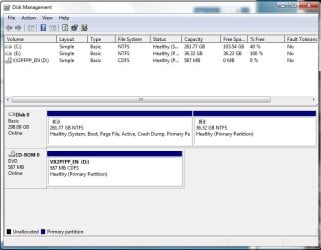
attachment.php

I reformatted the partition just before I took this shot.

I have used linux before so I do have some experience with dual booting.
 

Attachments

  • disks.jpg
    disks.jpg
    51.6 KB · Views: 47

My Computer

OS
Windows 7
Sorry,, I should pay closer attention to the post. My apologies.

You may need to try this after the initial install of Xp, before you complete the first restart...


  • Using your Windows 7 installation disc, boot to the command prompt at startup.
  • Type in these comands below, and press enter after each one.
    • bootrec /FixMbr
    • bootrec /FixBoot
    • bootrec /RebuildBcd
  • Exit the command prompt and restart the computer.
  • At this point, Windows 7 should boot up the same way before trying to install XP.
  • Continue to step 8 below and run EasyBCD from Windows 7 instead.
No, I do not know if this will resolve the issue. But you may need to do this first.
 

My Computer

Computer Manufacturer/Model Number
Self Built
OS
Win 7 Ultimate 32bit
CPU
C2D E6600 2.4Ghz
Motherboard
Intel D965WH
Memory
4G Kingston KHX5400D2
Graphics Card(s)
EVGA GTX 570 HD SC (012-P3-1573-KR)
Sound Card
On-Board
Monitor(s) Displays
Samsung 226BW
Screen Resolution
1680 x 1050
Hard Drives
2 x 250 Seagate Barracuda
2 x 500 Seagate Barracuda (Raid1)
PSU
Corsair TX750W
Case
In-Win C589
Cooling
Stock Intel Cooling
Sorry,, I should pay closer attention to the post. My apologies.
Meh. Better to keep things straight forward than to go over people's heads.

I am going to give it yet another shot. I will get back with a pass/fail in about 20 minutes.

edit: I got on my laptop and i saw your edit, tepid. I will try that.

edit2: got up to the first restart. Swap discs. On reboot bios give warning about boot order changing, hit f1 continue. I am loading w7 Cd right now.

edit3: ran the commands to fix the boot record. Only thing of note was this line out output

Code:
bootrec /RebuildBcr
Sucessfully scanned Windows Installations
Total identified windows installation: 0
I have run this before to get windows 7 working again and I have seen that line.

edit4: boot again using XP disc. Choose drive(the 37gb one) that I installed windows on. Windows gives me a warning that I am trying to install XP on a drive that already has an OS installed on it.

Back to square one with this.
 
Last edited:

My Computer

OS
Windows 7
Try removing the XP partition formatting to use the XP installer to format - it has a slightly different partition table.

The error is unusual. Please post back it's exact text.
 
Last edited:
How many partitions do have on your HD?
Two. One is listed as C(the one that has 7 on it) the other is listed as E(the one I am trying to install XP on)

Are your sure you don't have the 100MB 7 boot partition and a restore partition from the computer manufacturer? I've seen this dozens of times. Both have non-standard partition signatures and sometimes don't show up...

EDIT: Nevermind. It would have shown in disk management.
 

My Computer

Computer type
Laptop
Computer Manufacturer/Model Number
Apple
OS
El Capitan / Windows 10
CPU
i7-4980HQ
Memory
16GB
Graphics Card(s)
Iris 5200
edit4: boot again using XP disc. Choose drive(the 37gb one) that I installed windows on. Windows gives me a warning that I am trying to install XP on a drive that already has an OS installed on it.

Back to square one with this.

What type of Win XP disk are you use?

1)Retail
2)OEM
3)Pc Maker Recovery disk.
 

My Computer

OS
ME/XP/Vista/Win7
Try removing the XP partition formatting to use the XP installer to format - it has a slightly different partition table.

The error is unusual. Please post back it's exact text.
I used the XP installed to format the drive again.

What type of Win XP disk are you use?

1)Retail
2)OEM
3)Pc Maker Recovery disk.
My XP disc is a student version(university gives out free copies of XP)

My version of 7 is also a student version, but it was an upgrade. I did an upgrade from xp 64-bit to 7 64-bit if that is of any help here.
 

My Computer

OS
Windows 7
So you installed Win XP to partition 1, then upgraded to Win 7 installed on partition 2. is that right.
 

My Computer

OS
ME/XP/Vista/Win7
Back
Top