Insufficient Back-up Disk Space

glaustin

New member
Local time
2:56 PM
Messages
12
Hi Guys
I save my backup every week to a dedicated 1tb internal back-up disc (one of four HDDs). All of a sudden my weekly back-ups are not completing because of insufficient disc space (179gb available from 931GB). When I go into manage space to clear backups I have only 2 backups to chose from; both around 170gb.

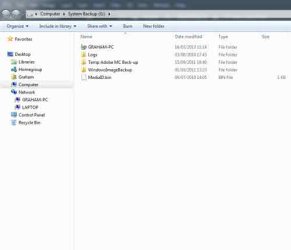
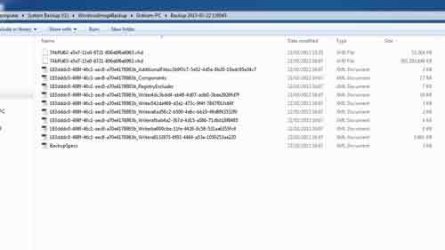
I looked at the HDD and I cannot work out why so much space has been accounted for. I can see three normal folders; "Logs" (196KB), "Temporary Adobe" (8.9GB) and "WindowsImageBackup" (365GB) and a fourth named after the PC (which indicates a "0" file size). In the WidowsImageBackup I can see only one file that accounts for 99% of the folder size.

Can anyone tell me please how to proceed and free up space and why only half of the allocated space seems to be showing?

Regards,
Graham
 

My Computer

Computer Manufacturer/Model Number
Custom
OS
win7 pro 64bit and XP Pro 32bit SP3
CPU
Intel(R) Core(TM) i7 CPU, 920 @ 2.67GHz, 2793 Mhz, 4
Motherboard
Gigabyte Technology EX58-UD4P
Memory
12gb
Graphics Card(s)
NVIDIA Quattro FX3800
Sound Card
Generic
Monitor(s) Displays
Benq
Hard Drives
Samsung HD 103UJ 1tb (x3)
PSU
1000w Silent ATX PSU with 24Pin, PCI-e
Case
Gigabyte Achillies
Cooling
CPU fan and 2 case fans
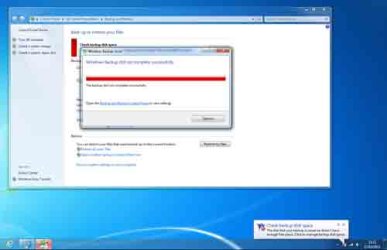
It would be helpful if you could post a screenshot of the error message.

Sometimes the problem is not in the destination disk but in one of the source disks not having enough room to create a shadow copy. Can you also post a screen shot of your disk management screen maximized.
 

My Computer

Computer type
Laptop
Computer Manufacturer/Model Number
Hewlett-Packard/G62-107SA Notebook
OS
Microsoft Windows 7 Home Premium 64-bit Service Pack 1
CPU
Intel(R) Core(TM) i3 CPU M 330 @ 2.13GHz
Motherboard
Hewlett-Packard 1425
Memory
8 GB DDR3
Graphics Card(s)
Intel(R) HD Graphics
Sound Card
Realtek High Definition Audio
Monitor(s) Displays
Builtin
Screen Resolution
1366 x 768 x 32 bits (4294967296 colors) @ 60 Hz
Hard Drives
250 GB SATA Hard Disk Drive 7200 rpm
2TB Seagate GoFlex USB 2 Drive
1TB Iomega Prestige USB 2 Drive
1.5TB Iomega Prestige USB 2 Drive (Samsung)
2TB WD MyBook Live NAS.
Mouse
Logitech Anywhere MX
Internet Speed
152 Mbs download 10 Mbs upload
Antivirus
Norton 360
Browser
Chrome
Hi
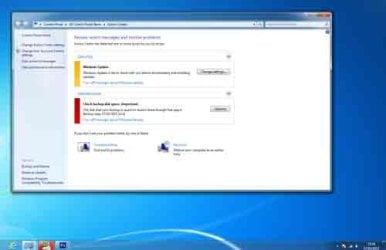
Many thanks. Do these help?
 

Attachments

  • Screen1.jpg
    Screen1.jpg
    8.1 KB · Views: 8
  • Screen2.jpg
    Screen2.jpg
    7.3 KB · Views: 6
  • Screen3.jpg
    Screen3.jpg
    8.1 KB · Views: 4
  • Screen4.jpg
    Screen4.jpg
    8.6 KB · Views: 4

My Computer

Computer Manufacturer/Model Number
Custom
OS
win7 pro 64bit and XP Pro 32bit SP3
CPU
Intel(R) Core(TM) i7 CPU, 920 @ 2.67GHz, 2793 Mhz, 4
Motherboard
Gigabyte Technology EX58-UD4P
Memory
12gb
Graphics Card(s)
NVIDIA Quattro FX3800
Sound Card
Generic
Monitor(s) Displays
Benq
Hard Drives
Samsung HD 103UJ 1tb (x3)
PSU
1000w Silent ATX PSU with 24Pin, PCI-e
Case
Gigabyte Achillies
Cooling
CPU fan and 2 case fans

My Computer

Computer type
Laptop
Computer Manufacturer/Model Number
Hewlett-Packard/G62-107SA Notebook
OS
Microsoft Windows 7 Home Premium 64-bit Service Pack 1
CPU
Intel(R) Core(TM) i3 CPU M 330 @ 2.13GHz
Motherboard
Hewlett-Packard 1425
Memory
8 GB DDR3
Graphics Card(s)
Intel(R) HD Graphics
Sound Card
Realtek High Definition Audio
Monitor(s) Displays
Builtin
Screen Resolution
1366 x 768 x 32 bits (4294967296 colors) @ 60 Hz
Hard Drives
250 GB SATA Hard Disk Drive 7200 rpm
2TB Seagate GoFlex USB 2 Drive
1TB Iomega Prestige USB 2 Drive
1.5TB Iomega Prestige USB 2 Drive (Samsung)
2TB WD MyBook Live NAS.
Mouse
Logitech Anywhere MX
Internet Speed
152 Mbs download 10 Mbs upload
Antivirus
Norton 360
Browser
Chrome
and a fourth named after the PC (which indicates a "0" file size).
Go into the Backup & Restore screen with your backup HDD connected then select "Manage Space" and you will get a more realistic idea of what is being used. In particular have a look at the size of your file/folder backup sets. These live in the folder with the PC name (don't believe the "0" filesize).
 

My Computer

Computer type
PC/Desktop
Computer Manufacturer/Model Number
Own build
OS
Windows 7x64 Home Premium SP1
CPU
Intel i7 2600k
Motherboard
ASUS P8Z68 Deluxe
Memory
G.Skill Ripjaws (DDR3-1600) 2x4GB
Graphics Card(s)
Nvidia GeForce GTS 450; Intel HD Graphics 3000(GT2+)
Monitor(s) Displays
Dell Ultrasharp IPS panel U2311H, Samsung SyncMaster P2350
Screen Resolution
1920x1080
Hard Drives
Samsung 850 Pro SSD 256GB, Samsung SSD 840 120GB, Seagates 1TB Barracuda ST31000528AS x2
PSU
Seasonic M12II 520W
Case
Lian Li Lancool PC-K60
Cooling
Case: 1x120mm, 3x140mm CPU: Hyper 212+
Keyboard
Logitech MK520 (wireless)
Mouse
Logitech MK520
Internet Speed
6-7 Mbps
Antivirus
Norton Security Premium, Malwarebytes on 2 (MSE on 3rd PC)
Browser
FireFox
Other Info
Audio: Logitech Z523 2.1
Back
Top