
Intall then partition with a new SSD?

lister

New member
Power User
Local time
9:01 PM
Messages
259
Hi there is some great advice and tutorials here that people have given -

I am switching from a traditional HDD to a SSD. Slight issue is that I dual boot with a shared partition...

So, my question....

Am I correct in assuming that once I have prepared the SSD by following this excellent tutorial - I need to firstly install windows - then - do the partitioning?

Thanks...
 

My Computer My Computer

At a glance

Windows 7 Panasonic CF F9 (used to have CF F8)
Computer Manufacturer/Model Number
Panasonic Toughbook CF F9
OS
Windows 7 Panasonic CF F9 (used to have CF F8)
When you do a custom install, you will be able to setup the partitions the way you like..
 

My Computer My Computer

At a glance

64-bit Windows 8.1 ProCore(TM) i5 CPU 4330 Haswell @ 3.20GHz12.00 GBIntel(R) HD Graphics
Computer type
PC/Desktop
Computer Manufacturer/Model Number
LENOVO K450 @3.0GHZ
OS
64-bit Windows 8.1 Pro
CPU
Core(TM) i5 CPU 4330 Haswell @ 3.20GHz
Motherboard
LENOVO
Memory
12.00 GB
Graphics Card(s)
Intel(R) HD Graphics
Sound Card
Intel HD integtrated
Monitor(s) Displays
HP 25' ISP Monitor
Screen Resolution
1900/1020
Hard Drives
(1) ST1000DM003-1CH162 (2) Generic STORAGE DEVICE USB Device (3) Generic STORAGE DEVICE USB Device
Internet Speed
100mb down/10mb up
thanks
 

My Computer My Computer

At a glance

Windows 7 Panasonic CF F9 (used to have CF F8)
Computer Manufacturer/Model Number
Panasonic Toughbook CF F9
OS
Windows 7 Panasonic CF F9 (used to have CF F8)
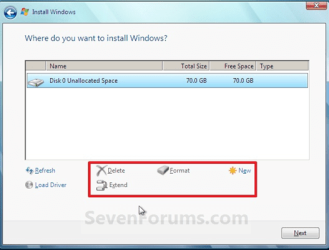
Use the installer Drive Options to create New partition(s) as you wish, then format before installing Win7 to first partition.
drive options.PNG

This will assure you receive the 100mb System Reserved partition which is optimal for Dual Booting windows.

however if you are dual booting Linux you may want to use the tutorial partitioning steps and create your second partition later in Disk Mgmt or using Linux CD.
 
Thanks for your helpful reply - i did read however that you should NOT create the 100mb partiton:

The below quote comes from here


"If you don't do "Step Two" below you will get the dreaded 100MB boot partition even if you use the "Drive Options" during the install to create and format a partition to install to."

Thanks! Just want to make sure!
 

My Computer My Computer

At a glance

Windows 7 Panasonic CF F9 (used to have CF F8)
Computer Manufacturer/Model Number
Panasonic Toughbook CF F9
OS
Windows 7 Panasonic CF F9 (used to have CF F8)
Hello again.


There is better info now that the new Windows 7 "System Reserved" partition is more help than hindrance and can be very useful; I now suggest that people do create the partition but at 200MB instead of the default 100MB as it affords more space for what it's intended for; do the "clean all" then use the info in Step Two #3 to create a 200MB SysResv partition if you choose to do so.
 

My Computer My Computer

At a glance

W 7 64-bit UltimateIntel Q9550 Yorkfield8GB Dominator 8500C5DATI : XFX 5870
Computer Manufacturer/Model Number
* BFK Customs *
OS
W 7 64-bit Ultimate
CPU
Intel Q9550 Yorkfield
Motherboard
ASUS P5Q Pro
Memory
8GB Dominator 8500C5D
Graphics Card(s)
ATI : XFX 5870
Sound Card
Realtek HD Audio 7-1
Monitor(s) Displays
1x 47" LCD HDMI & 3x 26" LCD HDMI
Screen Resolution
1920x1080P & 1920x1200
Hard Drives
1x 80GB Intel X25-M G2 SSD : 1x 500GB & 1x 640GB WD Caviar Black(s)
PSU
Corsair 620HX
Case
Cooler Master RC-690
Cooling
Tuniq Tower 120, 2x 140mm and 3x 120mm case fans
Keyboard
Microsoft 500
Mouse
Razer Diamondback 3G
Internet Speed
14 Mb/s
Other Info
1x Koutech 3Gb/s SATA HDD Hot Swap Rack
wow thanks for your swift reply and help!!!

Just to confirm - would you still suggest the above for a dual boot? thanks
 

My Computer My Computer

At a glance

Windows 7 Panasonic CF F9 (used to have CF F8)
Computer Manufacturer/Model Number
Panasonic Toughbook CF F9
OS
Windows 7 Panasonic CF F9 (used to have CF F8)
I would especially suggest it for a dual/multi boot, that's one of the great uses of the SysResv partition, it consolidates all the boot info in a single place so the different OSs can be removed at will and the other OS(s) will still boot; create it at 200MB would be best.
 

My Computer My Computer

At a glance

W 7 64-bit UltimateIntel Q9550 Yorkfield8GB Dominator 8500C5DATI : XFX 5870
Computer Manufacturer/Model Number
* BFK Customs *
OS
W 7 64-bit Ultimate
CPU
Intel Q9550 Yorkfield
Motherboard
ASUS P5Q Pro
Memory
8GB Dominator 8500C5D
Graphics Card(s)
ATI : XFX 5870
Sound Card
Realtek HD Audio 7-1
Monitor(s) Displays
1x 47" LCD HDMI & 3x 26" LCD HDMI
Screen Resolution
1920x1080P & 1920x1200
Hard Drives
1x 80GB Intel X25-M G2 SSD : 1x 500GB & 1x 640GB WD Caviar Black(s)
PSU
Corsair 620HX
Case
Cooler Master RC-690
Cooling
Tuniq Tower 120, 2x 140mm and 3x 120mm case fans
Keyboard
Microsoft 500
Mouse
Razer Diamondback 3G
Internet Speed
14 Mb/s
Other Info
1x Koutech 3Gb/s SATA HDD Hot Swap Rack
Back
Top