integrated webcam does not work after windows 7 install

Baileys28

New member
Local time
10:22 AM
Messages
9
Hello
I have installed windows 7 on my dv9040ea and in terms of drivers, I've followed exactly the guide explained by Daniel in the XP forum here:
Windows7 Upgrade Guide for dv6000/dv9000 models - HP Support Forum
However, my integrated webcam does not work! It neither shows a picture in MSN Live nor in the "Cyberlink Youcam", only the blue light next to the the webcam jumps on.
It is a pity. I'd love to use it again on live messenger.
Is there anyone who has an idea why or could help me finding it out? Thank you!
Daniela from Germany
 

My Computer

Computer Manufacturer/Model Number
HP Pavillion dv9040ea
OS
windows 7
CPU
AMD Turion64
Graphics Card(s)
Nvidia Geforce
Hard Drives
2x120GB
Hello
I have installed windows 7 on my dv9040ea and in terms of drivers, I've followed exactly the guide explained by Daniel in the XP forum here:
Windows7 Upgrade Guide for dv6000/dv9000 models - HP Support Forum
However, my integrated webcam does not work! It neither shows a picture in MSN Live nor in the "Cyberlink Youcam", only the blue light next to the the webcam jumps on.
It is a pity. I'd love to use it again on live messenger.
Is there anyone who has an idea why or could help me finding it out? Thank you!
Daniela from Germany


Probably just a driver issue. type device manager in search, find the webcam tab. Is it there? does it have a yellow traingle on it? are there any other "unknown" devices with yellow triangles on them?


Ken J+
 

My Computer

Computer Manufacturer/Model Number
HP Pavillion dv-7 1005 Tx
OS
Win 8 Release candidate 8400
CPU
[email protected]
Memory
4 gigs
Graphics Card(s)
Nvidia 9600M
Sound Card
HD built-in
Monitor(s) Displays
17" Wxga
Screen Resolution
1440x900
Cooling
none
Internet Speed
45Mb down 5Mb up
dear Ken
no there does not appear any kind of error in the device manager under the webcam. I've tried updating the driver through HP drivers but no success (there was no dedicated one for win7, so I took win vista).

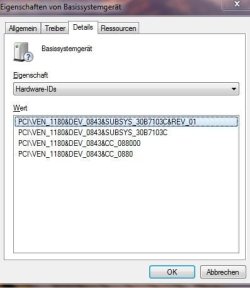
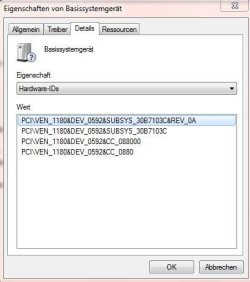
However, there are 2 other devices showing yellow triangle - error: "basic system device" under "other devices" - no idea what for they are.
 

My Computer

Computer Manufacturer/Model Number
HP Pavillion dv9040ea
OS
windows 7
CPU
AMD Turion64
Graphics Card(s)
Nvidia Geforce
Hard Drives
2x120GB
dear Ken
no there does not appear any kind of error in the device manager under the webcam. I've tried updating the driver through HP drivers but no success (there was no dedicated one for win7, so I took win vista).

However, there are 2 other devices showing yellow triangle - error: "basic system device" under "other devices" - no idea what for they are.


If you right click on the unknown device>properties>details>pull down the pull down menu>go to hardware IDS. copy the lines like I have showing and google it. That should tell you who the manufacturer is.

See Pic.


Ken J+
 
Last edited:

My Computer

Computer Manufacturer/Model Number
HP Pavillion dv-7 1005 Tx
OS
Win 8 Release candidate 8400
CPU
[email protected]
Memory
4 gigs
Graphics Card(s)
Nvidia 9600M
Sound Card
HD built-in
Monitor(s) Displays
17" Wxga
Screen Resolution
1440x900
Cooling
none
Internet Speed
45Mb down 5Mb up
thank you, understood. but when I type all this in google, the results are a mess to me.
see here:

Basissystemgerät1Info.jpg

Basissystemgerät2Info.jpg
 

My Computer

Computer Manufacturer/Model Number
HP Pavillion dv9040ea
OS
windows 7
CPU
AMD Turion64
Graphics Card(s)
Nvidia Geforce
Hard Drives
2x120GB
are you using 64 bit windows 7
 

My Computer

Computer Manufacturer/Model Number
Custom Built
OS
Windows 7 Ultimate 32 bit
CPU
AMD Athlon 64 X2 4200+ Overclocked to 3.0Ghz
Motherboard
Biostar TF560 A2+
Memory
2 Gigs of G.Skill DDR2 800
Graphics Card(s)
HIS ATI Radeon HD 2600 Pro With IceQ cooler
Sound Card
6.1 Channel Sound Blaster Live 24 Bit
Monitor(s) Displays
Dual 20.5 " LG Flatrons W2052TO
Screen Resolution
1152x864
Hard Drives
Dual 36 Gig 10,000 RPM Raptors
PSU
430 watt Seasonic 80%+ Dual 12v Rails 2x80mm fans
Case
CHIEFMAX YA-5X
Cooling
4-80mm case fans 1-140mm case fan freezer 64 Pro CPU cooler
Keyboard
Saitek Eclipse II
Mouse
A4Tech wireless battery free optical scroll mouse
Internet Speed
1.5 meg down 384 up
Other Info
Logisys LED fan/light controller and dual 16" LED sticks mounted inside top of case all fans are LED all lighting is blue
DVD RW and CD RW both and Memory card reader
That device is a Ricoh 5-in-1 card reader.
If you're using 32 bit Windows 7, install the drivers from this page:
Select software and drivers HP Pavilion dv6000z CTO Notebook PC - HP Customer Care (Australia - English)
If you're using 64 bit Windows 7, install from this page:
Select software and drivers HP Pavilion dv6000z CTO Notebook PC - HP Customer Care (Australia - English)

If you have 64 bit, you'll find that there aren't any drivers on that page for your webcam. Once you have the card reader drivers installed and recognised, go back into device manager, find any other yellow asterisks and post the hardware id info back here again :)

*edit* the Ricoh drivers are the same for all of the DV6000 models, not sure about the rest though so don't use the others unless yours is the DV6000Z. Please include the exact model nuber inyour next post if possible
 

My Computer

OS
XP Pro/Vista Ultimate (64)/Windows 7 Ultimate Signature Edition(64)
CPU
Core 2 Duo E8500 @ stock
Motherboard
Gigabyte EP45-UD3R
Memory
8Gb (4 X 2Gb) Corsair Dominator 1066Mhz DDR2
Graphics Card(s)
XFX ATI Radeon 4870 1Gb
Sound Card
Onboard 7.1
Monitor(s) Displays
BenQ E2200Hd, Asus VW161D, HP L1506
Screen Resolution
1920 X 1080
Hard Drives
Seagate 7200.12 500Gb
2 X Hitachi 1Tb
PSU
CoolerMaster 650 EPD
Case
Thermaltake
Cooling
2 X Noctua 120mm's, Stock Intel
Keyboard
Logitech
Mouse
Logitech
thank you orpheus, this was the clue. now there don't appear yellow triangles in the device manager any longer!

now how about getting the webcam working properly, any idea?
 

My Computer

Computer Manufacturer/Model Number
HP Pavillion dv9040ea
OS
windows 7
CPU
AMD Turion64
Graphics Card(s)
Nvidia Geforce
Hard Drives
2x120GB
thank you orpheus, this was the clue. now there don't appear yellow triangles in the device manager any longer!

now how about getting the webcam working properly, any idea?
You're welcome, no problem :)

are you using 64 bit windows 7
How about a clue for a clue? What OS version (32 or 64 bit) are you running?
Do you see anything in device manager when you expand the imaging devices section? If so, please right click it, select properties, details- "hardware id's" under property, then select all info ctrl+c & ctrl+v it back here :)
 

My Computer

OS
XP Pro/Vista Ultimate (64)/Windows 7 Ultimate Signature Edition(64)
CPU
Core 2 Duo E8500 @ stock
Motherboard
Gigabyte EP45-UD3R
Memory
8Gb (4 X 2Gb) Corsair Dominator 1066Mhz DDR2
Graphics Card(s)
XFX ATI Radeon 4870 1Gb
Sound Card
Onboard 7.1
Monitor(s) Displays
BenQ E2200Hd, Asus VW161D, HP L1506
Screen Resolution
1920 X 1080
Hard Drives
Seagate 7200.12 500Gb
2 X Hitachi 1Tb
PSU
CoolerMaster 650 EPD
Case
Thermaltake
Cooling
2 X Noctua 120mm's, Stock Intel
Keyboard
Logitech
Mouse
Logitech
of course, I am sorry, did not understand your intention.
I've got the 32 version of windows 7 home.
here you go:

USB\VID_05CA&PID_1870&REV_0100
USB\VID_05CA&PID_1870

:cool:
 

My Computer

Computer Manufacturer/Model Number
HP Pavillion dv9040ea
OS
windows 7
CPU
AMD Turion64
Graphics Card(s)
Nvidia Geforce
Hard Drives
2x120GB
orpheus or any one out there to help?

hello
how do I get my webcam properly working please?
 

My Computer

Computer Manufacturer/Model Number
HP Pavillion dv9040ea
OS
windows 7
CPU
AMD Turion64
Graphics Card(s)
Nvidia Geforce
Hard Drives
2x120GB

My Computer

OS
XP Pro/Vista Ultimate (64)/Windows 7 Ultimate Signature Edition(64)
CPU
Core 2 Duo E8500 @ stock
Motherboard
Gigabyte EP45-UD3R
Memory
8Gb (4 X 2Gb) Corsair Dominator 1066Mhz DDR2
Graphics Card(s)
XFX ATI Radeon 4870 1Gb
Sound Card
Onboard 7.1
Monitor(s) Displays
BenQ E2200Hd, Asus VW161D, HP L1506
Screen Resolution
1920 X 1080
Hard Drives
Seagate 7200.12 500Gb
2 X Hitachi 1Tb
PSU
CoolerMaster 650 EPD
Case
Thermaltake
Cooling
2 X Noctua 120mm's, Stock Intel
Keyboard
Logitech
Mouse
Logitech
Any solutions for dv9094 with w7 64-bit??
 

My Computer

OS
Windows 7 Ultimate 64-bit
Other Info
Hp pavillion dv9094ea dual-boot xp home OEM 32 bit/7 Ultimate 64 bit Full DVD
Solved it:D by installing wista 32-bit driver
 

My Computer

OS
Windows 7 Ultimate 64-bit
Other Info
Hp pavillion dv9094ea dual-boot xp home OEM 32 bit/7 Ultimate 64 bit Full DVD
i have the same problem but i cant find those drivers for my computer any help? hp dv9815nr thanks guys
 

My Computer

OS
windows 7 home premium 32 bit

My Computer

Computer Manufacturer/Model Number
Sony Vaio FZ21Z
OS
Windows 7 Ultimate x64 ®™
CPU
Intel Core 2 Duo (2.2 GHz)
Motherboard
Sony (Intel Chipset)
Memory
2x 2GB Corsair (667 MHz)
Graphics Card(s)
NVIDIA 8600M GS (256MB)
Sound Card
Sigmatel
Monitor(s) Displays
15.4" TFT X-Black
Screen Resolution
1280x800
Hard Drives
Western Digital 300GB Scorpio Black (7200rpm)
Mouse
Logitech Anywhere MX
Internet Speed
Sky 5MB
yeah but they dont have a web cam driver for my computer only the youcam software which if i download works but can not find my web cam.
 

My Computer

OS
windows 7 home premium 32 bit
Try the driver above posted by Orpheous, as it's the same series as yours.
 

My Computer

Computer Manufacturer/Model Number
Sony Vaio FZ21Z
OS
Windows 7 Ultimate x64 ®™
CPU
Intel Core 2 Duo (2.2 GHz)
Motherboard
Sony (Intel Chipset)
Memory
2x 2GB Corsair (667 MHz)
Graphics Card(s)
NVIDIA 8600M GS (256MB)
Sound Card
Sigmatel
Monitor(s) Displays
15.4" TFT X-Black
Screen Resolution
1280x800
Hard Drives
Western Digital 300GB Scorpio Black (7200rpm)
Mouse
Logitech Anywhere MX
Internet Speed
Sky 5MB

My Computer

Computer Manufacturer/Model Number
Sony Vaio FZ21Z
OS
Windows 7 Ultimate x64 ®™
CPU
Intel Core 2 Duo (2.2 GHz)
Motherboard
Sony (Intel Chipset)
Memory
2x 2GB Corsair (667 MHz)
Graphics Card(s)
NVIDIA 8600M GS (256MB)
Sound Card
Sigmatel
Monitor(s) Displays
15.4" TFT X-Black
Screen Resolution
1280x800
Hard Drives
Western Digital 300GB Scorpio Black (7200rpm)
Mouse
Logitech Anywhere MX
Internet Speed
Sky 5MB
Back
Top