Intel 845g and Windows 7

JackRick

New member
Local time
12:45 PM
Messages
8
Location
Avondale, Arizona
Hey guys I got a problem. I just installed W7 and it was flawless...except for the part where my screen resolution sucks. My graphics card is an Intel 845g. I have tried a lot of things but I just can't figure it out. The resolution is 640X480 and I can't adjust it. Please help.

thanks,

JackRick
 

My Computer

Computer Manufacturer/Model Number
IBM 8303M7U
OS
Windows 7
Memory
RAM 1.25 GB
Graphics Card(s)
Intel 845G
Sound Card
Intel 82801 DB/DBM AC '97 Audio Controller
Monitor(s) Displays
HP L1520
Screen Resolution
640X480 (Hoping to Change That)
Hard Drives
Samsung 200GB PATA HDD, Seagate 500GB SATA External HDD. 30GB PATA HDD.
Keyboard
Standard Microsoft Keyboard
Mouse
Logitech
Internet Speed
High Speed WiFi

My Computer

Computer Manufacturer/Model Number
Sony Vaio FZ21Z
OS
Windows 7 Ultimate x64 ®™
CPU
Intel Core 2 Duo (2.2 GHz)
Motherboard
Sony (Intel Chipset)
Memory
2x 2GB Corsair (667 MHz)
Graphics Card(s)
NVIDIA 8600M GS (256MB)
Sound Card
Sigmatel
Monitor(s) Displays
15.4" TFT X-Black
Screen Resolution
1280x800
Hard Drives
Western Digital 300GB Scorpio Black (7200rpm)
Mouse
Logitech Anywhere MX
Internet Speed
Sky 5MB
I have used the utility and this is the message that it gives me:
"An Intel device was detected but your operating system is not supported by this utility. Please visit Download Center to look for available software. "
 

My Computer

Computer Manufacturer/Model Number
IBM 8303M7U
OS
Windows 7
Memory
RAM 1.25 GB
Graphics Card(s)
Intel 845G
Sound Card
Intel 82801 DB/DBM AC '97 Audio Controller
Monitor(s) Displays
HP L1520
Screen Resolution
640X480 (Hoping to Change That)
Hard Drives
Samsung 200GB PATA HDD, Seagate 500GB SATA External HDD. 30GB PATA HDD.
Keyboard
Standard Microsoft Keyboard
Mouse
Logitech
Internet Speed
High Speed WiFi

My Computer

Computer Manufacturer/Model Number
Sony Vaio FZ21Z
OS
Windows 7 Ultimate x64 ®™
CPU
Intel Core 2 Duo (2.2 GHz)
Motherboard
Sony (Intel Chipset)
Memory
2x 2GB Corsair (667 MHz)
Graphics Card(s)
NVIDIA 8600M GS (256MB)
Sound Card
Sigmatel
Monitor(s) Displays
15.4" TFT X-Black
Screen Resolution
1280x800
Hard Drives
Western Digital 300GB Scorpio Black (7200rpm)
Mouse
Logitech Anywhere MX
Internet Speed
Sky 5MB
Welcome to seven forums. Sometimes your resolution will appear as it is do to the fact you need to install a driver for your monitor if one is avalible. This one is for XP 32bit if your running the 64 bit 7 you'll need to select XP 64bit. The driver will have to be installed in compatibility mode. http://www.sevenforums.com/tutorials/316-compatibility-mode.html Now this will only help if your monitor is reconized in device manager as standard VGA. Hope this will help. Fabe HP L1520 15 inch LCD Monitor- Download drivers and software - HP Business Support Center
 

My Computer

Computer Manufacturer/Model Number
Self Built
OS
Windows 7 ultimate 64 bit / XP Home sp3
CPU
intel Core 2 Duo E8400 3.0ghz
Motherboard
Asus P5ND bios 1401
Memory
8 gigs 1066 OCZ Fata1ty
Graphics Card(s)
EVGA GTX 580 Call of Duty Black Ops Edition
Sound Card
Creative Soundblaster Audigy 2zs
Monitor(s) Displays
Asus 24in LCD's 2MS X2
Screen Resolution
1920x1080p @60Hz
Hard Drives
WD Caviar 500 Black/ WD Caviar 200 Blue
PSU
OCZ 700W GameXtreme
Case
NZXT Apollo
Cooling
Corsair H50 CPU/120mm x3 /60mm x2 /Corsair Dominator Ram
Keyboard
Logitech Bluetooth Wireless MX5000
Mouse
Logitech Bluetooth Wireless MX1000
Internet Speed
Download 19.83 Upload 0.97
Other Info
Logitech Z2300 Speakers/ Bose Noise Cancelling Headphones/Avermedia PCI-e Hybrid TV Bravo/Epson NX415 all in one/ 4 Port Powered USB Hub/ LG 10x Bluray Burner /TSST Corp DVDRW External
@FZ21Z: I have looked in the Intel download center but my graphis card can no longer be used in W7. I was hoping to get around that.

@thefabe: I have tried running XP compatibility mode, unfortunately after I downloaded XP and Virtual PC I wasn't able to run it because my computer didn't meet the qualifications. My monitor in device manager is recognized at "Generic PnP Monitor." & finally I went to the HP website, downloaded the "adjust pattern utility" and got colored lines, circles, shades of grey and grids! :) was that suppossed to happen?

thanks for getting back to me so quickly. Hopefully we can find a way around this.
 

My Computer

Computer Manufacturer/Model Number
IBM 8303M7U
OS
Windows 7
Memory
RAM 1.25 GB
Graphics Card(s)
Intel 845G
Sound Card
Intel 82801 DB/DBM AC '97 Audio Controller
Monitor(s) Displays
HP L1520
Screen Resolution
640X480 (Hoping to Change That)
Hard Drives
Samsung 200GB PATA HDD, Seagate 500GB SATA External HDD. 30GB PATA HDD.
Keyboard
Standard Microsoft Keyboard
Mouse
Logitech
Internet Speed
High Speed WiFi
Well It obviously wasn't the driver, but just an adjustment tool. My error in not reading more carefully. Stil shouldn't hurt to run the utility and adjust you LCD. And as far as your onbaord your probably going to need to get a addon card. How old is your system? I also don't see what CPU you have. You can type sys info in the search box then click on system information to find out. Fabe
 

My Computer

Computer Manufacturer/Model Number
Self Built
OS
Windows 7 ultimate 64 bit / XP Home sp3
CPU
intel Core 2 Duo E8400 3.0ghz
Motherboard
Asus P5ND bios 1401
Memory
8 gigs 1066 OCZ Fata1ty
Graphics Card(s)
EVGA GTX 580 Call of Duty Black Ops Edition
Sound Card
Creative Soundblaster Audigy 2zs
Monitor(s) Displays
Asus 24in LCD's 2MS X2
Screen Resolution
1920x1080p @60Hz
Hard Drives
WD Caviar 500 Black/ WD Caviar 200 Blue
PSU
OCZ 700W GameXtreme
Case
NZXT Apollo
Cooling
Corsair H50 CPU/120mm x3 /60mm x2 /Corsair Dominator Ram
Keyboard
Logitech Bluetooth Wireless MX5000
Mouse
Logitech Bluetooth Wireless MX1000
Internet Speed
Download 19.83 Upload 0.97
Other Info
Logitech Z2300 Speakers/ Bose Noise Cancelling Headphones/Avermedia PCI-e Hybrid TV Bravo/Epson NX415 all in one/ 4 Port Powered USB Hub/ LG 10x Bluray Burner /TSST Corp DVDRW External
Intel Celeron CPU 1.70 GHz, 1694 MHz, 1Core, 1 Logic Processor.

Do you think that installing a driver that was compatible with Vista would help?
 

My Computer

Computer Manufacturer/Model Number
IBM 8303M7U
OS
Windows 7
Memory
RAM 1.25 GB
Graphics Card(s)
Intel 845G
Sound Card
Intel 82801 DB/DBM AC '97 Audio Controller
Monitor(s) Displays
HP L1520
Screen Resolution
640X480 (Hoping to Change That)
Hard Drives
Samsung 200GB PATA HDD, Seagate 500GB SATA External HDD. 30GB PATA HDD.
Keyboard
Standard Microsoft Keyboard
Mouse
Logitech
Internet Speed
High Speed WiFi
Run the installer in compatibility mode for Vista SP1.
 

My Computer

Computer Manufacturer/Model Number
Sony Vaio Z46GDU
OS
Windows 7 Ultimate x86-64
CPU
[email protected] 1066MHz FSB
Motherboard
Sony branded
Memory
6GB DDR3 1066MHz
Graphics Card(s)
9300M GS 256MB Dedicated (Speed) + Intel4500MHD (Stamina)
Sound Card
Realtek HD Audio
Monitor(s) Displays
13.1' WXGA
Screen Resolution
1600x900
Hard Drives
320GB 7200RPM w/ 16MB cache
Internet Speed
1MB/s
Ok I decided to get a graphics card. Do you think replacing it my old card with a GeForce 7300 GS will work?
 

My Computer

Computer Manufacturer/Model Number
IBM 8303M7U
OS
Windows 7
Memory
RAM 1.25 GB
Graphics Card(s)
Intel 845G
Sound Card
Intel 82801 DB/DBM AC '97 Audio Controller
Monitor(s) Displays
HP L1520
Screen Resolution
640X480 (Hoping to Change That)
Hard Drives
Samsung 200GB PATA HDD, Seagate 500GB SATA External HDD. 30GB PATA HDD.
Keyboard
Standard Microsoft Keyboard
Mouse
Logitech
Internet Speed
High Speed WiFi
Ok I decided to get a graphics card. Do you think replacing it my old card with a GeForce 7300 GS will work?


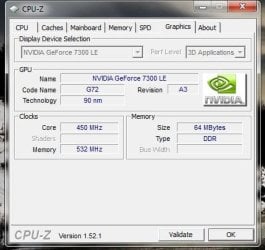
I have a gForce 7300 that works ok for me :)
 

Attachments

  • gForce_7300_GPU.JPG
    gForce_7300_GPU.JPG
    34 KB · Views: 40

My Computer

Computer type
PC/Desktop
Computer Manufacturer/Model Number
Built them myself, Science Experiments !
OS
Win7 Enterprise, Win7 x86 (Ult 7600), Win7 x64 Ult 7600, TechNet RTM on AMD x64 (2.8Ghz)
CPU
AMD fx8350 4ghz, AMD-32 2400mhz, AMD-64 3200mhz, AMDx64 2.8G
Motherboard
SIS 755, ECS-K8M890M-M (Ult 7600), GigaByte & others
Memory
2gb, 4gb on the Ult 7600, 4gb on Technet RTM, 32gb on FX8350
Graphics Card(s)
Draw my own Graphics, several nVidia cards
Sound Card
on motherboard
Monitor(s) Displays
19" flat scr, 28" I-Inc widescr,22" Emprex Widescr, 23" Acer
Screen Resolution
1280 x 1024, 1440 x 900, 1920 x 1080
Hard Drives
6 pata Ide HD's & 2 Sata HD's
added 80gb external on Ult 7600 computer,
numerous extra 1tb, 2TB, 3Tb SATA HD's
A collection of ext HD Docks w/ HDs
PSU
430w, 550w, 600w, 700, 800, etc
Case
All Generic Full Towers
Cooling
Open Air & a few fans, some w/ colored LEDs
Keyboard
Compaq & Dell recycled from GoodWill
Mouse
Made in China Optical Wired Mouse
Internet Speed
Fast Cable InterNet
Antivirus
AVG Free on 24 different Desktops, NO Problems!
Browser
IE 8 is preferred, but use FireFox sometimes
Other Info
Linksys Routers, switches, & Hubs
Too Many USB Flash Drives to count, Biggest is 64GB !
Eight computers in my home network.
Sixteen computers at my business network.
Linked via TeamViewer !
Lots of old used spare computer parts everywhere!
I have found a solution for this problem. I have a Dell Dimension (with a few upgrades, CPU, RAM) Got the xp graphics driver to run and it is working very well in Win7.32 for me. You should try this before going to buy a card. The built in 845 g will probably clock out better then the expansion card because of the PCI limitation. If you are still having this problem let me know and i can walk you through the driver install.

No Areo but video plays very well. note: Don't expect to play games with one of these machines today. But it make a great rig for some basic web stuff, word processing.
 

My Computer

Computer Manufacturer/Model Number
White Box
OS
Windows 7.64 Ult.
CPU
AMD Phenom II x3 550 (oc) 3.7ghz
Motherboard
MSI NF980-G65
Memory
4g OCZ 1600
Graphics Card(s)
PNY 8800gt
Sound Card
on board
Monitor(s) Displays
multiple
Hard Drives
850 Gig
PSU
Corsair TX750
Case
IN WIN Maelstrom
Cooling
AC air cooling
@rpgmoods: can you please explain what I have to do?

thanks
 

My Computer

Computer Manufacturer/Model Number
IBM 8303M7U
OS
Windows 7
Memory
RAM 1.25 GB
Graphics Card(s)
Intel 845G
Sound Card
Intel 82801 DB/DBM AC '97 Audio Controller
Monitor(s) Displays
HP L1520
Screen Resolution
640X480 (Hoping to Change That)
Hard Drives
Samsung 200GB PATA HDD, Seagate 500GB SATA External HDD. 30GB PATA HDD.
Keyboard
Standard Microsoft Keyboard
Mouse
Logitech
Internet Speed
High Speed WiFi
I used the win2k_xp14103 file. You should be able to get it here. http://downloadcenter.intel.com/Detail_Desc.aspx?agr=Y&ProdId=865&DwnldID=9034〈=eng
If the link does not work just punch "Intel 845 driver" into google. This was the latest xp driver that Intel had.

Download the file and unzip. Extract the file to desktop. Right click on it and select Properties. Go to the compatibility tab and select to run in"XP Service Pack 2" compatibility mode, then check the run as Admin box at the bottom and click ok. Now right click the icon again and select Run as Admin(just to make sure) and let the driver install. You should be good to go after the Reboot. note... make sure to use XP SP2 and NOT SP3.

This worked for me on a Win7 32 bit install. Hope it helps you too.
 

My Computer

Computer Manufacturer/Model Number
White Box
OS
Windows 7.64 Ult.
CPU
AMD Phenom II x3 550 (oc) 3.7ghz
Motherboard
MSI NF980-G65
Memory
4g OCZ 1600
Graphics Card(s)
PNY 8800gt
Sound Card
on board
Monitor(s) Displays
multiple
Hard Drives
850 Gig
PSU
Corsair TX750
Case
IN WIN Maelstrom
Cooling
AC air cooling
Back
Top