Intel Chipset Software Installation Utility 9.1.1.1011

wguimb

New member
Pro User
VIP
Local time
11:13 PM
Messages
651
Location
Houston, Texas USA
Download the recently released Intel Chipset Software Installation Utility 9.1.1.1011. This is for both x86 and x64 XP, Vista, 2000, and Windows 7. Drivers included are for the popular 945 and 965 series. These drivers are newer than what is available on Intel's website.

Code:
*  Product: Intel(R) Chipset Device Software
*  Release: Production Candidate
*  Version: 9.1.1.1011
*  Target Chipset#: Intel(R) 5 Series/3400 Series Chipset.
*        Also supports 5000/7000/5500/X58 Series Chipsets
*  Date: April 09 2009

Intel Chipset Software Installation Utility 9.1.1.1011

Source: Majorgeeks
 

My Computer My Computer

Computer Manufacturer/Model Number
Dell Inspiron 1525 Notebook
OS
Windows 7
CPU
rocessor Intel(R) Pentium(R) Dual CPU T2390 @ 1.86GHz, 1867
Motherboard
Intel(R) ICH8 Family Chipset
Memory
Installed Physical Memory (RAM) 4 GB
Graphics Card(s)
Mobile Intel(R) 965 Express Chipset Family (Sux)
Sound Card
Intel(R) High Definition Audio HDMI
it doesn't list Windows 7 in the readme (which doesn't mean it won't work I know). will try and see if it improves my hard drive performance.
edit1:
installed fine with an OK that they got installed. After reboot, WEI is still the same. Too bad, no surprise here ;). My index for my raptor is still pretty low at 5.8. From reading other posts MS scaled this down and I wonder what the maximum is for hard drives these days....
 
Last edited:

My Computer My Computer

OS
Windows 7 RC 64bit
there is also 9.1.1.1012 on stationdrivers that im using. (with IMSM 8.9.0.1015)

Code:
*  Product: Intel(R) Chipset Device Software
*  Release: Production Candidate
*  Version: 9.1.1.1012
*  Target Chipset#: Intel(R) 5 Series/3400 Series Chipset
*  Date: April 20 2009
 

My Computer My Computer

Computer Manufacturer/Model Number
Custom
OS
Windows 7 SP1 x64 build 7601.21701
CPU
Intel Q9450 @3608mhz (8x451)
Motherboard
Asus Rampage Formula
Memory
6GB - 2x Corsair CM2X1024-8500C5D and 2x CM2X2048-8500C5D
Graphics Card(s)
Zotac nVidia GTX295
Sound Card
SoundMAX ADI1988B (X-FI MB)
Monitor(s) Displays
LG L227WTP & Samsung LE26R71B LCD TV
Screen Resolution
1680x1050 & 1360x768
Hard Drives
2x Seagate ST3500630NS in RAID0
PSU
Thermaltake Toughpower 750W
Case
Thermaltake
Cooling
Thermalright Ultra-120 Extreme and couple of fans
Keyboard
Logitech G15 v2
Mouse
Razer DeathAdder
Internet Speed
FTTH 50/50 (dualstack IPv4 & native IPv6)
cool, that one actually lists windows 7 in the description:
Windows 2000/XP/Vista/Windows 7 32/64bits/2003 server/2008 Server
Maybe that will work better with my X58 chip
 

My Computer My Computer

OS
Windows 7 RC 64bit
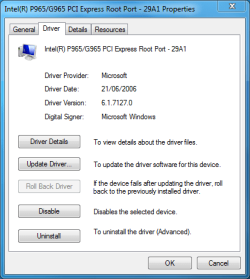
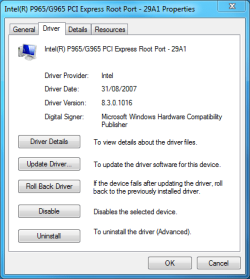
The setup.exe said it had installed successfully, however when i go to device manager it has not updated anything, so i have to manually install them one at a time, i always have to do it this way.
 

Attachments

  • before.png
    before.png
    13.6 KB · Views: 2,008
  • updated.PNG
    updated.PNG
    13.9 KB · Views: 1,554
Last edited:

My Computer My Computer

Computer type
PC/Desktop
Computer Manufacturer/Model Number
Self Build
OS
MS Windows 7 Professional 64-bit SP1
CPU
AMD FX(tm)-6100 Six-Core Processor Socket AM3+ (942)
Motherboard
ASUSTeK COMPUTER INC. SABERTOOTH 990FX (AM3r2)
Memory
8.00 GB Dual-Channel DDR3 @ 802MHz (11-11-11-36) 1.5Volts
Graphics Card(s)
NVIDIA GeForce GTX 560 Ti
Sound Card
Onboard Realtek HD
Monitor(s) Displays
shimian (1920x1080@60Hz)
Screen Resolution
1920*1080
Hard Drives
OCZ-AGIL ITY3 SATA Disk Device 120GB
PSU
Corsair TX 750
Case
Corsair
Cooling
WaterCooled
Keyboard
Microsoft Wired
Mouse
Logitech USB Optical TiltWheel Mouse
Internet Speed
Realtek PCIe GBE Family Controller 20MB*1MB
Antivirus
Avast
Browser
Firefox
Other Info
150GB Internal Hard Drive for Backing Up Important Files -
Hauppauge Nova-DT Dual DVB-T Tuner Device (+IR) -
USB PC Camera with Mic (SN9C105)
The setup.exe said it had installed, successfully, however when i go to device manager it has not updated anything, so i have to manually install them one at a time, i always have to do it this way.
thanks for your post. I just checked mine and they didn't install either even though they said they did. will follow your advice and install them individually via update driver....

thanks
 

My Computer My Computer

OS
Windows 7 RC 64bit
thanks for your post. I just checked mine and they didn't install either even though they said they did. will follow your advice and install them individually via update driver....

thanks

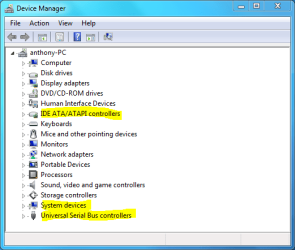
Your welcome, anything with Intel before it in device manager can be updated, usually in the -:

IDE ATA/ATAPI controllers
System devices
Universal serial bus controllers
 

Attachments

  • update.PNG
    update.PNG
    14.9 KB · Views: 1,732

My Computer My Computer

Computer type
PC/Desktop
Computer Manufacturer/Model Number
Self Build
OS
MS Windows 7 Professional 64-bit SP1
CPU
AMD FX(tm)-6100 Six-Core Processor Socket AM3+ (942)
Motherboard
ASUSTeK COMPUTER INC. SABERTOOTH 990FX (AM3r2)
Memory
8.00 GB Dual-Channel DDR3 @ 802MHz (11-11-11-36) 1.5Volts
Graphics Card(s)
NVIDIA GeForce GTX 560 Ti
Sound Card
Onboard Realtek HD
Monitor(s) Displays
shimian (1920x1080@60Hz)
Screen Resolution
1920*1080
Hard Drives
OCZ-AGIL ITY3 SATA Disk Device 120GB
PSU
Corsair TX 750
Case
Corsair
Cooling
WaterCooled
Keyboard
Microsoft Wired
Mouse
Logitech USB Optical TiltWheel Mouse
Internet Speed
Realtek PCIe GBE Family Controller 20MB*1MB
Antivirus
Avast
Browser
Firefox
Other Info
150GB Internal Hard Drive for Backing Up Important Files -
Hauppauge Nova-DT Dual DVB-T Tuner Device (+IR) -
USB PC Camera with Mic (SN9C105)
there is also 9.1.1.1012 on stationdrivers that im using. (with IMSM 8.9.0.1015)

Code:
*  Product: Intel(R) Chipset Device Software
*  Release: Production Candidate
*  Version: 9.1.1.1012
*  Target Chipset#: Intel(R) 5 Series/3400 Series Chipset
*  Date: April 20 2009

Just installed 7 RC1 x64 today, brand new. I want to install 9.1.1.1012. With the previous Intel Chipset drivers you could install from the command line with the "-overall" flag at the end, and it should overwrite all old drivers to the new ones included in the 9.1.1.1012 package.

Has anyone tried this and confirmed it works?
 

My Computer My Computer

OS
Windows 7 RC1 x64
Is there a real benefit to installing these drivers? I have on a few of my builds and don't notice a real-world difference. I certainly don't have any (obvious) issues with them. Someone fill me in?
 

My Computer My Computer

Computer type
PC/Desktop
Computer Manufacturer/Model Number
Custom Build/Mod
OS
Windows 7 Home Premium x64
CPU
Intel QX9650 Extreme 4.0 GHz
Motherboard
ASUS Rampage Extreme Rev2
Memory
8GB (4x2) Corsair Dominator DDR3
Graphics Card(s)
2x Radeon R390X [8GB]
Sound Card
SupremeFX X-Fi
Monitor(s) Displays
Dell 2408WFP 26" Panel
Screen Resolution
1920x1200
Hard Drives
4x WD 2TB (8TB+ Total)
2x Crucial SSD 128GB (RAID-0)
1x LG Blu-ray read/write
1x Phillips LightScribe DVD read/write
PSU
Corsair HX1000
Case
CoolerMaster - Cosmos S
Cooling
Custom Liquid - 320mm rad w/ 3x 80mm fans, CPU/NB/SB Blocks
Keyboard
Logitech Illuminater Pro
Mouse
Logitech
Internet Speed
Fractional T1 - 125Mbps
Antivirus
ESET Security Suite / Microsoft Security Essentials
Browser
Cyberfox Intel x64
Other Info
OC'd to 5.0GHz @ 44c under full load
Is there a real benefit to installing these drivers? I have on a few of my builds and don't notice a real-world difference. I certainly don't have any (obvious) issues with them. Someone fill me in?

nah i dont notice any difference as well, except that matrix storage manager. Im installing them from same reason, that im installing every win7 build and that is "must have latest version" :)
 

My Computer My Computer

Computer Manufacturer/Model Number
Custom
OS
Windows 7 SP1 x64 build 7601.21701
CPU
Intel Q9450 @3608mhz (8x451)
Motherboard
Asus Rampage Formula
Memory
6GB - 2x Corsair CM2X1024-8500C5D and 2x CM2X2048-8500C5D
Graphics Card(s)
Zotac nVidia GTX295
Sound Card
SoundMAX ADI1988B (X-FI MB)
Monitor(s) Displays
LG L227WTP & Samsung LE26R71B LCD TV
Screen Resolution
1680x1050 & 1360x768
Hard Drives
2x Seagate ST3500630NS in RAID0
PSU
Thermaltake Toughpower 750W
Case
Thermaltake
Cooling
Thermalright Ultra-120 Extreme and couple of fans
Keyboard
Logitech G15 v2
Mouse
Razer DeathAdder
Internet Speed
FTTH 50/50 (dualstack IPv4 & native IPv6)
thanks for your post. I just checked mine and they didn't install either even though they said they did. will follow your advice and install them individually via update driver....

thanks

Same here happens in XP/Vista and W7 OMG i never did look @ it :o
 

My Computer My Computer

Computer Manufacturer/Model Number
HP 6720s
OS
Microsoft Windows 7 Ultimate
CPU
Mobile Intel Celeron M 530, 1733 MHz (13 x 133)
Motherboard
Intel Crestline GLE960/GME965
Memory
2038 MB (DDR2-667 DDR2 SDRAM)
Graphics Card(s)
Intel GMA X3100
Sound Card
Analog Devices AD1981HD @ Intel 82801HBM ICH8M
Monitor(s) Displays
AU Optronics B154EW02 V7 [15.4" LCD]
Screen Resolution
1280 x 800
Hard Drives
TOSHIBA MK1246GSX ATA Device (120 GB, 5400 RPM, SATA-II)
Maxtor 3200 USB Device (372 GB, USB)
nah i dont notice any difference as well, except that matrix storage manager. Im installing them from same reason, that im installing every win7 build and that is "must have latest version" :)
same here and when I just updated to 7137 I just left it with MS drivers.
 

My Computer My Computer

OS
Windows 7 RC 64bit
Back
Top