intel core 2 quad q6600 kentfield g0 OVERClocking help

Wicca

New member
Local time
12:48 PM
Messages
546
my bios is locked i am lookung to clock 2.40ghz to 3.0ghz what tools will i need to do this last time i used clock gen but when i overclocked to 3.0ghz it locked up the computer so also i overclocked to 2.80ghz but my computer would not go into hibernate so what am i doing wrong
 

My Computer My Computer

At a glance

7intel 2 core quad Q6600 2.40 ghz3.00GB 350 mhz eachgeforce 8800gtx
Computer Manufacturer/Model Number
i power x8870
OS
7
CPU
intel 2 core quad Q6600 2.40 ghz
Memory
3.00GB 350 mhz each
Graphics Card(s)
geforce 8800gtx
Sound Card
realtek
Screen Resolution
1440by900
Hard Drives
5400rpm 2 of them
PSU
OCZ 600 watt power supply
Internet Speed
nvidia nforce networking controller 90kb/s
Other Info
total virtual memory is 7.88 GB
this is a 32-bit system
You haven't posted your RAM type.

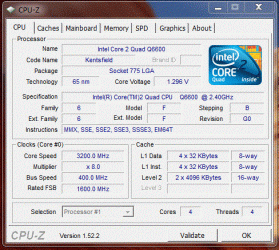
If you have DDR2-800 (PC-6400), then run the multiplier at x8, BUS at 400 yields core speed of 3.2GHz - keeps clocks nice (FSB-DRAM divider = 1:1) and makes the RAM very happy.

Q6600-cpu.GIF

Q6600-mem.GIF

Regards,
GEWB
 

My Computer My Computer

At a glance

Linux Mint / XP / Win7 Home, Pro, Ultimate / ...
Computer type
PC/Desktop
Computer Manufacturer/Model Number
(7 different computers booting up to 10 systems)
OS
Linux Mint / XP / Win7 Home, Pro, Ultimate / Win8.1 / Win10
Other Info
Four desktops, two laptops, one notebook and one tablet
I have a Q6600 with an Intel DP35DP motherboard. There is nothing in the BIOS that allows overclocking the CPU or memory.
 

My Computer My Computer

At a glance

Windows 10 64 bitIntel i7 6700K16GB Corsair DominatorIntel CPU Graphics
Computer type
PC/Desktop
Computer Manufacturer/Model Number
My Own Build
OS
Windows 10 64 bit
CPU
Intel i7 6700K
Motherboard
ASUS ROG Maximus VIII Hero
Memory
16GB Corsair Dominator
Graphics Card(s)
Intel CPU Graphics
Sound Card
RealTek
Monitor(s) Displays
27" Dell S2719dgf
Screen Resolution
2560X1440
Hard Drives
1 TB Samsung 850 EVO SSD for Win 10 Pro
500GB Samsung 850 EVO SSD for Win 10 Insider
2 TB drive for backup
PSU
EVGA Supernova 750G2
Case
BeQuiet Silent Base 600
Cooling
Deepcool Captain 120EX
Keyboard
Microsoft Wireless 2000
Mouse
Microsoft wireless
Internet Speed
100 MB/sec (Cable)
Antivirus
Microsoft Defender and Malwarebytes
Browser
Edge/Firefox
Other Info
Cakewalk (Sonar) by BandLab and Studio One 4.1 Pro recording studio software. MOTU 896Mk3 Hybrid recording interface, Frontier Tranzport wireless control unit, Behringer X-Touch Control Surface.
Five USB connected optical drives for CD Audio production using Nero BurningROM
I have a Q6600 with an Intel DP35DP motherboard. There is nothing in the BIOS that allows overclocking the CPU or memory.

Correct. (Can't get there from here.)

Regards,
GEWB
 

My Computer My Computer

At a glance

Linux Mint / XP / Win7 Home, Pro, Ultimate / ...
Computer type
PC/Desktop
Computer Manufacturer/Model Number
(7 different computers booting up to 10 systems)
OS
Linux Mint / XP / Win7 Home, Pro, Ultimate / Win8.1 / Win10
Other Info
Four desktops, two laptops, one notebook and one tablet
I know this thread is a little old but you can over clock this board via the bios, it's just indirect. You need to use a program called SetFsb. I get 2.83 GHz out of mine reliably, however many get 3.0 GHz and a few make 3.2 and even a few more make 3.4. That being said most can make 3GHz just using SetFSB. There is also the pin trick that just wires the CPU to 3GHz but my die was just a hair to slow so I couldn't use this approach and be reliable. Note with SetFSB if you go into the bios and reset it in any way you must rerun SetFSB because the new clock settings will be wiped out. Also set the fan to aggressive in thes bios prior to using SetFSB.
 

My Computer My Computer

At a glance

Windows 7 64 bit
OS
Windows 7 64 bit
Back
Top