Solved intel core 2 quad q6600 kentfield help temp

Wicca

New member
Local time
4:05 PM
Messages
546
my max temp on cpu stress test at 100 percent for all 4 cores is 60 c is that good or how good is that two of the cores is max temp is 60 and the other two cores is max temp is 55 c but having a max temp of 60 c is that very good i need some expert opinion
 

My Computer My Computer

At a glance

7intel 2 core quad Q6600 2.40 ghz3.00GB 350 mhz eachgeforce 8800gtx
Computer Manufacturer/Model Number
i power x8870
OS
7
CPU
intel 2 core quad Q6600 2.40 ghz
Memory
3.00GB 350 mhz each
Graphics Card(s)
geforce 8800gtx
Sound Card
realtek
Screen Resolution
1440by900
Hard Drives
5400rpm 2 of them
PSU
OCZ 600 watt power supply
Internet Speed
nvidia nforce networking controller 90kb/s
Other Info
total virtual memory is 7.88 GB
this is a 32-bit system
Yes its normal
 

My Computer My Computer

At a glance

Windows 10 Pro x64, Arch LinuxIntel Core 2 Quad Q8200 OC'd 3.08GHz8GB DDR2 900MhzMSI GT730 2GB GDDR5 (Kepler)
Computer type
PC/Desktop
Computer Manufacturer/Model Number
Custom Build
OS
Windows 10 Pro x64, Arch Linux
CPU
Intel Core 2 Quad Q8200 OC'd 3.08GHz
Motherboard
Asus Rampage formula LGA775
Memory
8GB DDR2 900Mhz
Graphics Card(s)
MSI GT730 2GB GDDR5 (Kepler)
Sound Card
Supreme FX2
Monitor(s) Displays
Samsung LS22F350 LED
Screen Resolution
1080P
Hard Drives
Kingston SSDNow UV400 120GB, 500GB Hitachi, 2TB Samsung, 500GB Seagate FreeAgent, 640GB Samsung, 160GB Toshiba (Arch)
PSU
AeroCool 500W Bronze
Cooling
Cooler Master V6 + 3X fans
Keyboard
Prolink keyboard
Mouse
Logitech M705
Internet Speed
1MiB/s
Browser
Chrome Beta
That is good. I get the same on my Q6600. Anything below 70C is completely uncritical.
 

My Computer My Computer

At a glance

Vista, Windows7, Mint Mate, Zorin, Windows 8from 1.6GHz Duo to i7
Computer Manufacturer/Model Number
HP, Dell, Gateway, Toshiba - 4 laptops and 2 desktops
OS
Vista, Windows7, Mint Mate, Zorin, Windows 8
CPU
from 1.6GHz Duo to i7
Monitor(s) Displays
2x HP w2207
Hard Drives
5x HDD, 7x SSD, 12x Externals
Keyboard
with trackball - no mices
Mouse
Trackball mice
Internet Speed
DSL 6000
I have idle temps around 50c and it's seems to be normal to have a difference between cores.

Ken
 

My Computer My Computer

At a glance

Win7 x64 Ultimate SP1Intel i7-26008 GigGeforce gt 520
Computer Manufacturer/Model Number
Dell Optiplex 980
OS
Win7 x64 Ultimate SP1
CPU
Intel i7-2600
Memory
8 Gig
Graphics Card(s)
Geforce gt 520
Monitor(s) Displays
LG & Acer
Screen Resolution
1920x1080
Internet Speed
Fios 45/35
Other Info
Windows Home Server
ok thanks i was wondering you all put my mind at ease
 

My Computer My Computer

At a glance

7intel 2 core quad Q6600 2.40 ghz3.00GB 350 mhz eachgeforce 8800gtx
Computer Manufacturer/Model Number
i power x8870
OS
7
CPU
intel 2 core quad Q6600 2.40 ghz
Memory
3.00GB 350 mhz each
Graphics Card(s)
geforce 8800gtx
Sound Card
realtek
Screen Resolution
1440by900
Hard Drives
5400rpm 2 of them
PSU
OCZ 600 watt power supply
Internet Speed
nvidia nforce networking controller 90kb/s
Other Info
total virtual memory is 7.88 GB
this is a 32-bit system
Windows 7 - Intel Core 2 Quad Q6600

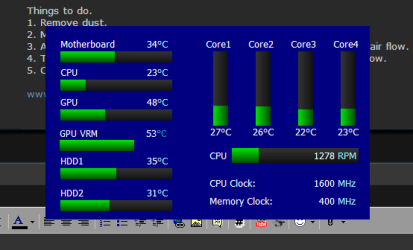
My processor ran at 70 °C
All I did was clean the fan on the CPU with a vacuum cleaner.
I also cleaned all other fans.

Now it runs at 40 °C

Things to do.
1. Remove dust.
2. Make all fans blow in the correct direction, with the case closed.
3. Also check that all panels are closed, holes can interfere with the air flow.
4. The wired should be cabled tied and not bunched up, blocking airflow.
5. Check the CPU thermal Paste.

www.dilowa.co.za
 

My Computer My Computer

At a glance

Windows 7 64-bitIntel Core2 Quad CPU Q6600 @ 2.40GHz4 GigGeForce 8400 GS
OS
Windows 7 64-bit
CPU
Intel Core2 Quad CPU Q6600 @ 2.40GHz
Motherboard
Socket 775 LGA
Memory
4 Gig
Graphics Card(s)
GeForce 8400 GS
Case
RadiMax
Thats a Q6600 as well,temps are on idle,they raise at full load to 32C
Q6600.PNG
 

My Computer My Computer

At a glance

Microsoft Windows 7 Ultimate 64-bit Service P...Intel(R) Core(TM)2 Quad Q 9550 @ 2.83 GHz4x1024 GB DDR2 Corsair PC2-6400 800 MhzMSI TwiFrozer II 1024MB GDDR5
Computer type
PC/Desktop
Computer Manufacturer/Model Number
Homebuilt,Quadcore processor on Asus MB
OS
Microsoft Windows 7 Ultimate 64-bit Service Pack 1
CPU
Intel(R) Core(TM)2 Quad Q 9550 @ 2.83 GHz
Motherboard
ASUS P5B-Deluxe Wi-Fi Edition
Memory
4x1024 GB DDR2 Corsair PC2-6400 800 Mhz
Graphics Card(s)
MSI TwiFrozer II 1024MB GDDR5
Sound Card
Realtek ALC883 @ Intel 82801HB ICH8 - High Def
Monitor(s) Displays
Asus VW195 [19" LCD]
Screen Resolution
1440x860 pixels
Hard Drives
OCZ Vertex Plus Series SATA II 2.5" SSD 128GB-

Westarn Digital SATA II 250GB
PSU
Corsair CX600W
Case
Custom built,cut and painted
Cooling
Xigmatek Gaia 2x120mm fan
Keyboard
MS Generic
Mouse
MS Optical 6000
Internet Speed
never enough
Antivirus
ESET Smart Security 6.0.306.0
I found a very good utility to check your PC temperature.
It is free and you can download it from
Speccy - System Information - Free Download

Regards,
Home

Overview
What's in your computer? If you're like most of us, you can probably name the processor (Intel or AMD, Celeron or Pentium), maybe how much RAM it has, and maybe how big the hard drive is.
When you go to a computer store and see all the bright shiny PCs laid out next to each other, most will have tags or stickers indicating the:
Processor brand and model
Hard drive size and speed
Amount of memory (RAM)
Graphics card
Operating system
Two or three years later, when it comes time to upgrade your computer, that tag or sticker may be long gone. Speccy was designed as a free electronic "what's inside" sticker for your PC.
Isn't this information in Windows?
Yes and no. Some of the basic information can be found by right-clicking My Computer and then clicking Properties. The General tab lists some statistics, and the Device Manager on the Hardware tab lists all of the hardware you've got installed. But it misses out lots of information that you need.
Speccy will give you detailed statistics on every piece of hardware in your computer. Including CPU, Motherboard, RAM, Graphics Cards, Hard Disks, Optical Drives, Audio support. Additionally Speccy adds the temperatures of your different components, so you can easily see if there's a problem!
Why do I need Speccy?
At first glance, Speccy may seem like an application for system administrators and power users. It certainly is, but Speccy can also help normal users, in everyday computing life.
If you need to add more memory to your system, for example, you can check how many memory slots your computer has and what memory's already installed. Then you can go out and buy the right type of memory to add on or replace what you've already got.
If you're going to be selling your PC, you can use Speccy to quickly list out the components. Or, if you're buying a PC, you can use Speccy to check that the computer has what the label says it has.
Also, Speccy comes in handy for support. If you're on the phone with technical support and they want to know what video card you have installed, there's no need to hunt around Windows. Speccy has all the information on one easy-to-understand screen.

 

My Computer My Computer

At a glance

Windows 7 64-bitIntel Core2 Quad CPU Q6600 @ 2.40GHz4 GigGeForce 8400 GS
OS
Windows 7 64-bit
CPU
Intel Core2 Quad CPU Q6600 @ 2.40GHz
Motherboard
Socket 775 LGA
Memory
4 Gig
Graphics Card(s)
GeForce 8400 GS
Case
RadiMax
Back
Top