Intel CPU - Diagnose

How to Diagnose an Intel CPU with Intel Processor Diagnostic Tool


   Information
The Intel Processor Diagnostic Tool (IPDT) is a free application from Intel Corporation that runs several diagnostic and performance tests on a wide variety of Intel CPU's. The results are summarised in a simple text format file that can be useful in understanding the capability's of your CPU, seeking help with a hardware issue, or even dealing directly with Intel as supplementary information if you are considering an RMA of the CPU.

This tutorial will show you how to:
  • Download and install IPDT to your computer
  • Run the quick (default) tests
  • Select & run full functional and burn-in tests
  • Setup & run customised tests
  • Review the IPDT test results
IPDT is a useful tool in your arsenal if you are troubleshooting a BSOD, or simply wanting to test the stability of a particular CPU overclock.

On an Intel Core i3-2330M 2.20GHz the quick tests take just over 4 minutes to complete. On faster or slower CPU's this time will vary, as will the time if the full functional, burn-in and custom tests are used instead.
   Note
IPDT supports the following family of Intel processors:
Intel® Atom™ Processor
Intel® Core™ Duo Processor
Intel® Core™ i3 Desktop Processor
Intel® Core™ i3 Mobile Processor
Intel® Core™ i5 Desktop Processor
Intel® Core™ i5 Mobile Processor
Intel® Core™ i7 Desktop Processor
Intel® Core™ i7 Mobile Processor
Intel® Core™ i7 Mobile Processor Extreme Edition
Intel® Core™ i7 Processor Extreme Edition
Intel® Core™ Solo Processor
Intel® Core™2 Duo Desktop Processor
Intel® Core™2 Duo Mobile Processor
Intel® Core™2 Extreme Mobile Processor
Intel® Core™2 Extreme Processor
Intel® Core™2 Quad Mobile Processor
Intel® Core™2 Quad Processor
Intel® Core™2 Solo Processor
Intel® Itanium® Processors
Intel® Pentium® 4 Processor Extreme Edition
Intel® Pentium® 4 Processors
Intel® Pentium® D Processor
Intel® Pentium® M Processor
Intel® Pentium® Processor Extreme Edition
Intel® Pentium® Processor for Desktop
Intel® Pentium® Processor for Mobile
Intel® Xeon® Processor
Intel® Xeon® Processor 3000 Sequence
Intel® Xeon® Processor 5000 Sequence
Intel® Xeon® Processor 6000 Sequence
Intel® Xeon® Processor 7000 Sequence
Intel® Xeon® Processor E3-1200 Product Family
Mobile Intel® Celeron® Processors
Mobile Intel® Pentium® 4 Processors - M


STEP ONE

Downloading IPDT


1. Download the IPDT executable file from this location:

For 32-bit versions of Windows:

Download
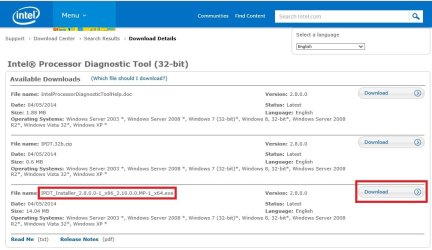


32-bit.jpg
For 64-bit versions of Windows:

Download


64-bit.jpg


STEP TWO

Installing IPDT


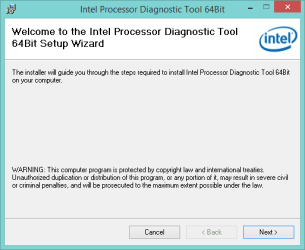
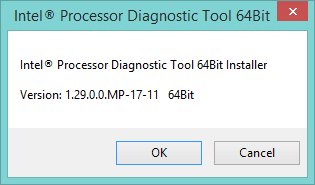
1. Locate and double-click the downloaded IPDT executable, and accept the UAC prompt. An information panel will be displayed showing the current version of IPDT - click OK to proceed with installation.
i1.png

i10.png


STEP THREE

Running IPDT


1. Locate the IPDT short-cut on your desktop, and double click it to run IPDT.
Shortcut.jpg
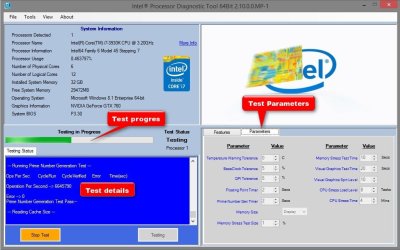
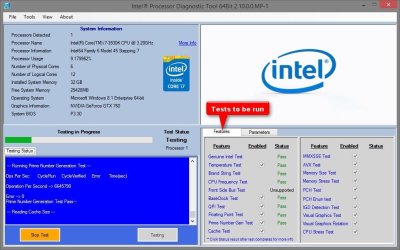
2. IPDT will open and immediately start a series of default tests (quick tests), as shown below. Alternate and custom user-defined tests can also be setup and run as explained later on.
Test1.jpg

Test2.jpg
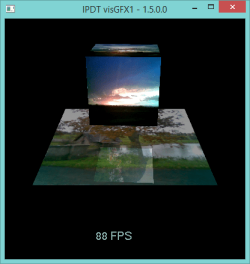
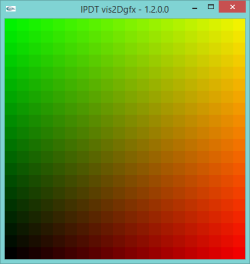
3. As the tests are executed, the text in the centre window will continue to scroll and the progress bar will move along. If the CPU supports integrated graphics, the during the test, additional windows will open to test the graphics capability of the CPU, as shown below.
zzzz.png i12_001.png
4. In addition, the video output will also flip orientation for a few seconds during the test : once upside down, and once on either side, and then finally return to the normal orientation. This is completely normal. If you use a dedicated video card, then the graphics tests will be skipped.

One of the tests that will be executed will place some load on/stress your CPU. During this test your cooling fans will increase in rotational speed and will be audibly louder. This is normal since the fans need to work a little harder to dissipate the heat generated by the CPU stress test.

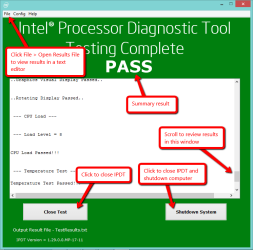
5. Finally, the test will complete and be replaced by a confirmation window summarising the test results. If all the tests pass, then the confirmation box is green.
ipdt_results.png

If any of the test fail, then the confirmation box is red.
ipdt_fail.png
6. The TestResults.txt file is saved in C:\Program Files\Intel Corporation\Intel Processor Diagnostic Tool 64Bit. I have attached the results from running IPDT on my system if you want to review the details of the test.

View attachment TestResults.txt

7. Some information that is immediately useful from the test is the temperature at which the CPU idles, and the temperature under load. In both cases, these are well below the maximum recommended temperature of the CPU and I can be confident that for these tests, the CPU cooling arrangement (thermal paste media and fan) is performing adequately.

Idle:
Code:
Temperature Test Passed!!!
Temperature = 34 degrees C below maximum.

Under load:
Code:
Temperature Test Passed!!!
Temperature = 19 degrees C below maximum.


STEP FOUR

Selecting and Running Alternate IPDT Tests


IPDT allows you to select from two additional predetermined tests, as well customising the tests that are executed. These might be useful for hardware enthusiasts that specialise in overclocking the CPU to maximise performance and want to test the stability of the overclock.
1. To select the predetermined tests, or to setup a custom test, locate the Configure IPDT option under the Windows start menu as shown below.
c1.png
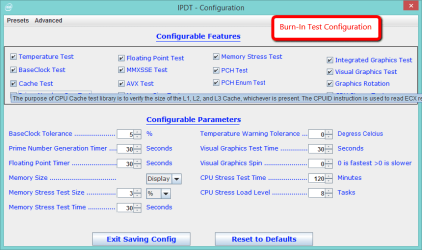
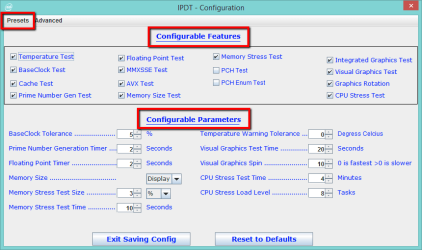
2. The IPDT configuration panel will open, as shown below.
c2.png
3. To create a custom test, simply remove the check box from the item in the Configurable Features section that you do not wish to run. When you do this, the appropriate parameters in the Configurable Parameters section will be removed automatically. Those that are left, are the parameters that can be configured/modified for the tests you wish to run.

4. When you click Exit Saving Config, the new configuration is automatically saved and becomes the default test when you run IPDT. Clicking the Reset to Defaults button will undo any changes you made, and reset the options to that for the quick test. Below is an example of a custom test.
C3.png
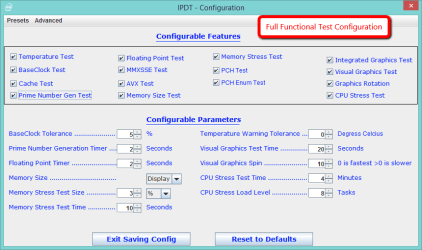
5. By selecting the Presets button, you can choose the options and parameters for the Full-Functional and Burn-In tests. When you click Exit Saving Config, the preset configuration you chose is automatically saved and becomes the default test when you run IPDT. These options are shown below.
ff.png
bi.png
Thats it. The Quick Tests are sufficient for the average computer user, whilst those troubleshooting BSOD's or overclocking will find the alternate and custom tests useful

   Information
You can find more detail about IPDT and the tests in the help manuals.

View attachment IntelProcessorDiagnosticToolHelp.pdf


Regards,
Golden

   Note
Thanks to Paul and Steve for testing the tutorial and supplying useful feedback and images to use here


Last edited by a moderator:
Hi MJF,
In the newly released version of IPDT there is a new method used for calculating the CPU Frequency. Previously we measured CPU frequency overs a 10 second period and reported. The new method reads CPU Frequency from the CPU registers and using baseclock ratio calculates the actual CPU running frequency. Obviously this can be affected by Turbo Boost, if it is enabled and running on your system.
You may download and use Intel Turbo Boost Technology Monitor to show the CPU Frequency dynamically on your system.
Download Intel Turbo Boost Technology Monitor here https://downloadcenter.intel.com/Detail_Desc.aspx?DwnldID=19105
 

My Computer

Computer type
PC/Desktop
OS
Windows 8 64bit
Thanks Gary,
I downloaded the monitor but I've got a bit of homework to do on Turbo Boost. My BIOS is generally set to "Normal mode" and I occasionally set it to the ASUS "Turbo mode" if running some number crunching. I'm guessing the Turbo Boost is different again.
 

My Computer

Computer type
PC/Desktop
Computer Manufacturer/Model Number
Own build
OS
Windows 7x64 Home Premium SP1
CPU
Intel i7 2600k
Motherboard
ASUS P8Z68 Deluxe
Memory
G.Skill Ripjaws (DDR3-1600) 2x4GB
Graphics Card(s)
Nvidia GeForce GTS 450; Intel HD Graphics 3000(GT2+)
Monitor(s) Displays
Dell Ultrasharp IPS panel U2311H, Samsung SyncMaster P2350
Screen Resolution
1920x1080
Hard Drives
Samsung 850 Pro SSD 256GB, Samsung SSD 840 120GB, Seagates 1TB Barracuda ST31000528AS x2
PSU
Seasonic M12II 520W
Case
Lian Li Lancool PC-K60
Cooling
Case: 1x120mm, 3x140mm CPU: Hyper 212+
Keyboard
Logitech MK520 (wireless)
Mouse
Logitech MK520
Internet Speed
6-7 Mbps
Antivirus
Norton Security Premium, Malwarebytes on 2 (MSE on 3rd PC)
Browser
FireFox
Other Info
Audio: Logitech Z523 2.1
Keep in mind that the Turbo Monitor is for processors released prior to June, 2013 and does not include 4th Gen processors. I'm not sure of the differences but the release notes specifically mention the exclusion. If you're getting strange numbers, that could be the reason. Slick piece of software though. :)
 

My Computer

Computer type
PC/Desktop
Computer Manufacturer/Model Number
Built 2/11/2011
OS
Windows 7 Pro-x64
CPU
i7-2600 3.4GHz - 3.8GHz Turbo
Motherboard
Intel DH67BL-B3
Memory
8Gb - 2x4GB, Muskin 991770 PC3-1333
Graphics Card(s)
Integrated Intel HD 2000
Sound Card
Integrated Intel 10.1 HD, RealTek ALC892
Monitor(s) Displays
Asus LCD VH222H, Haier HL24XSL2a
Screen Resolution
1920x1080, 1920x1080
Hard Drives
Crucial SSD C300-128Gb,
Western Digital WD5002AALX - 500Gb,
Western Digital WD7501AALS - 750Gb
PSU
Seasonic 650W 80+ Gold Modular
Case
Rosewill Defender
Cooling
Stock CPU, Four 120mm case fans, PCH fan added
Keyboard
Logitech EX100 Y-RBH94 Wireless
Mouse
Logitech EX100 M-RCE95 Wireless
Internet Speed
3.0/1.5 Mbs
Antivirus
Microsoft Security Essentials
Browser
Microsoft Internet Explorer 11
Other Info
Antec Veris Premier-Multimedia IR Station,
Cyber Accoustics-3602 Speakers,
AFT XM-5U Card Reader,
Hauppauge TV-HVR-2250,
Sony LX300 USB Turntable
Keep in mind that the Turbo Monitor is for processors released prior to June, 2013 and does not include 4th Gen processors.
I saw that and have run it with my i7 2600k. I get a bar chart graph that shows varying clock speeds but maybe I've missed something more significant.
In terms of a diagnostic tool the older IPDT seems more relevant to my 2nd gen CPU than the new one. The i7 2600k has been such a good strong performer and I plan to keep it awhile until it or the motherboard dies.
 

My Computer

Computer type
PC/Desktop
Computer Manufacturer/Model Number
Own build
OS
Windows 7x64 Home Premium SP1
CPU
Intel i7 2600k
Motherboard
ASUS P8Z68 Deluxe
Memory
G.Skill Ripjaws (DDR3-1600) 2x4GB
Graphics Card(s)
Nvidia GeForce GTS 450; Intel HD Graphics 3000(GT2+)
Monitor(s) Displays
Dell Ultrasharp IPS panel U2311H, Samsung SyncMaster P2350
Screen Resolution
1920x1080
Hard Drives
Samsung 850 Pro SSD 256GB, Samsung SSD 840 120GB, Seagates 1TB Barracuda ST31000528AS x2
PSU
Seasonic M12II 520W
Case
Lian Li Lancool PC-K60
Cooling
Case: 1x120mm, 3x140mm CPU: Hyper 212+
Keyboard
Logitech MK520 (wireless)
Mouse
Logitech MK520
Internet Speed
6-7 Mbps
Antivirus
Norton Security Premium, Malwarebytes on 2 (MSE on 3rd PC)
Browser
FireFox
Other Info
Audio: Logitech Z523 2.1
I have a straight-up 2600 and feel the same way. Coming off a Pentium 2x2 with spinners to a i7 with an SSD was a huge jump. I haven't seen enough of a move in performance to make another jump. I gave a lot of thought to it when the quad channel memory came out but that seems to have died. What's up with that? Or is it just Intel boards? I may look again when new memory comes out but I'll need to see 4.5+ in native processor speed for a real motivator. The 100Mhz jumps just don't do it for me.
 

My Computer

Computer type
PC/Desktop
Computer Manufacturer/Model Number
Built 2/11/2011
OS
Windows 7 Pro-x64
CPU
i7-2600 3.4GHz - 3.8GHz Turbo
Motherboard
Intel DH67BL-B3
Memory
8Gb - 2x4GB, Muskin 991770 PC3-1333
Graphics Card(s)
Integrated Intel HD 2000
Sound Card
Integrated Intel 10.1 HD, RealTek ALC892
Monitor(s) Displays
Asus LCD VH222H, Haier HL24XSL2a
Screen Resolution
1920x1080, 1920x1080
Hard Drives
Crucial SSD C300-128Gb,
Western Digital WD5002AALX - 500Gb,
Western Digital WD7501AALS - 750Gb
PSU
Seasonic 650W 80+ Gold Modular
Case
Rosewill Defender
Cooling
Stock CPU, Four 120mm case fans, PCH fan added
Keyboard
Logitech EX100 Y-RBH94 Wireless
Mouse
Logitech EX100 M-RCE95 Wireless
Internet Speed
3.0/1.5 Mbs
Antivirus
Microsoft Security Essentials
Browser
Microsoft Internet Explorer 11
Other Info
Antec Veris Premier-Multimedia IR Station,
Cyber Accoustics-3602 Speakers,
AFT XM-5U Card Reader,
Hauppauge TV-HVR-2250,
Sony LX300 USB Turntable
Boards and CPUs that support Quad-Channel (LGA2011) are fairly expensive. I suppose the next "big" jump will be with the introduction of DDR4 RAM. As I understand it will be available in 16GB sticks. :shock:
 

My Computer

Computer type
PC/Desktop
Computer Manufacturer/Model Number
Home Built Desktop By DataTech
OS
Windows 7 Ultimate X64 SP1
CPU
Intel i5-2550K, Differing ~4.4-4.8GHz No built in GPU
Motherboard
ASUS P8Z68-V PRO/GEN3
Memory
16GB G.Skill Sniper 1866MHz @ 2133MHz 2x8GB
Graphics Card(s)
ASUS GTX650TIB-DC2OC-2GD5, (650TI Boost)
Sound Card
Onboard Realtek 5-1
Monitor(s) Displays
Samsung P2570HD
Screen Resolution
1920x1080
Hard Drives
Samsung 840 Pro 256GB SSD for OS, 500GB Seagate Constellation (Enterprise drive) for Data
PSU
Corsair HX650W
Case
Inwin Dragon Rider
Cooling
Hyper 212 EVO w/two Noctua fans, push-pull, @1300 RPM
Keyboard
E-Z Eyes, bright yellow keys with large characters
Mouse
steelseries SENSEI Laser Pro Gaming
Internet Speed
48-51Mbs Mbs down, 11 Mbs up Xfinity Cable
Antivirus
Norton Internet Security 2013
Browser
IE 10, Opera, Pale Moon if needed
Other Info
4 case fans, LG BluRay-RE, ASUS DVD-RW, Mr. Fusion power supply, 1.21 gigawatts.
I have a suspect i7 3770. The Intel tests all pass. The CPU tests on the "UBCD" (Ultimate Boot CD) all pass.

I'm getting BCC 124 BSOD and WHEA errors (I have a thread in the BSOD section).

I know its the CPU as all the other hardware, including memory and motherboard have been changed.

Anyone know any other CPU diagnostics?
 

My Computer

Computer type
PC/Desktop
Computer Manufacturer/Model Number
My Own Build
OS
Windows 10 64 bit
CPU
Intel i7 6700K
Motherboard
ASUS ROG Maximus VIII Hero
Memory
16GB Corsair Dominator
Graphics Card(s)
Intel CPU Graphics
Sound Card
RealTek
Monitor(s) Displays
27" Dell S2719dgf
Screen Resolution
2560X1440
Hard Drives
1 TB Samsung 850 EVO SSD for Win 10 Pro
500GB Samsung 850 EVO SSD for Win 10 Insider
2 TB drive for backup
PSU
EVGA Supernova 750G2
Case
BeQuiet Silent Base 600
Cooling
Deepcool Captain 120EX
Keyboard
Microsoft Wireless 2000
Mouse
Microsoft wireless
Internet Speed
100 MB/sec (Cable)
Antivirus
Microsoft Defender and Malwarebytes
Browser
Edge/Firefox
Other Info
Cakewalk (Sonar) by BandLab and Studio One 4.1 Pro recording studio software. MOTU 896Mk3 Hybrid recording interface, Frontier Tranzport wireless control unit, Behringer X-Touch Control Surface.
Five USB connected optical drives for CD Audio production using Nero BurningROM

My Computer

Computer type
PC/Desktop
Computer Manufacturer/Model Number
Golden Mk. I.4
OS
Windows 10 Pro x64 ; Xubuntu x64
CPU
Intel i7 860 @ 2.80 GHz O/C'ed to 4.0GHz
Motherboard
Gigabyte P55A-UD3R Rev.1. Award BIOS F13
Memory
16GB Corsair Vengance DDR3 @ 661 MHz Dual Channel (9-9-9-24)
Graphics Card(s)
EVGA NVidia GTX 560 1024MB
Sound Card
Realtek Integrated
Monitor(s) Displays
Dual Samsung SyncMaster 2494HS
Screen Resolution
1920*1080 and 1920*1080
Hard Drives
1*Samsung 840 EVO 120GB SSD;
1*OCZ Vertex 2 60GB SSD;
2*Samsung F3 SpinPoint 1TB in RAID0;
1*Samsung F1 SpinPoint 1TB;
2*Western Digital 1TB External USB 3.0
1*Western Digital 500GB External USB 3.0
1*Seagate 500GB External USB 2.0
PSU
Thermaltake ToughPower QFan 750W
Case
Thermaltake Element S VK60001W2Z
Cooling
Corsair H60 Water Cooling, 2*230mm and 2*80mm case fans
Keyboard
Logitech G110
Mouse
Logitech MX518
Nice one Colin didn't know this one existed I only stumbled over the test in a Google for CPU tests now it is so much clearer what to do.

The Java stuff well I have to have it for my personal work info (payslips leave entitlements etc) and I have never had any problems - so far.
 

My Computer

Computer type
PC/Desktop
Computer Manufacturer/Model Number
Own build (new) Desk1 / Asus ROG Win 7 / Desk2 1st build
OS
Desk1 7 Home Prem / Desk2 10 Pro / Main lap Asus ROG 10 Pro 2 laptop Toshiba 7 Pro Asus P2520 7 & 10
CPU
Desk1 i5 3750K / Laptop i7 GTX 860M / Desk2 i5 2500
Motherboard
Desk1 Asus P877-V / Desk2 Gigabyte H67 UD3H / Laptop ?
Memory
Desk1 8GB (1866) / Desk2 16GB (1333) / Laptop 8Gb DDR3
Graphics Card(s)
Desk 1& 2NVidia GTX 650 & Laptops on board Intel
Sound Card
Desk 1 & 2 -XONAR DG Realtek High Def audio Laptop
Monitor(s) Displays
Desk 1 Benq HD 2450 / Desk2 Philips 24" / Laptop 17.5"
Screen Resolution
1920x1080 D1 & D2 & Laptop 1
Hard Drives
Desk1 Samsung 120GB 830 SSD
Asus ROG 256GB 850 Pro SSD
Desk2 Samsung 840 256 SSD
Toshiba 120GB EVO
PSU
Desk 1 Corsair HX 1050/ Laptop ? / Desk 2 Corsair HX 650
Case
Desk 1 Cooler HAF XM ? Toshiba laptop / Desk2 Coolermaster
Cooling
Fans on all Desk1 -2 Desk2 - all Coolermasters 5 Laptop ?
Keyboard
Desk 1 MS Sidewinder X6 Desk 2 MS Sidewinder X 4
Mouse
Desk 1&2 - Gigabyte MS 900 gamer - laptop - Logitec wireless
Internet Speed
ADSL2+
Other Info
One other Desktop (tester) and spare Toshba laptop both with SSD's
Running Kaspersky 2016 ISS on all machines config'd identically
Logitec audio stereo systems on each machine (x3)
Canon MG5250MFC
Router/modem TP-Link running WPA2SK
How to burn it to DVD as bootable dvd? I have a desktop computer that crashes with error WHEA... just before it is actually up and running. Reinstall win7 doesn't fix it.
 

My Computer

Computer type
Laptop
Computer Manufacturer/Model Number
ACER ASPIRE 5742G
OS
Microsoft Windows 7 Home Premium 64-bits 7601 Multiprocessor Free Service Pack 1
CPU
Intel(R) Core(TM) i3 CPU M 370 @ 2.40GHz
Motherboard
Acer Aspire 5742G
Memory
4,00 GB
Graphics Card(s)
ATI Mobility Radeon HD 5400 Series
Sound Card
(1) AMD High Definition Audio Device (2) Realtek High Defi
Screen Resolution
1366 x 768 x 32 bits (4294967296 colors) @ 60 Hz
Hard Drives
WDC WD5000BEVT-22ZAT0
How to burn it to DVD as bootable dvd? I have a desktop computer that crashes with error WHEA... just before it is actually up and running. Reinstall win7 doesn't fix it.

Hmm odd the reinstall hasn't helped eh? any chance of using another machine to do that?
 

My Computer

Computer type
PC/Desktop
Computer Manufacturer/Model Number
Own build (new) Desk1 / Asus ROG Win 7 / Desk2 1st build
OS
Desk1 7 Home Prem / Desk2 10 Pro / Main lap Asus ROG 10 Pro 2 laptop Toshiba 7 Pro Asus P2520 7 & 10
CPU
Desk1 i5 3750K / Laptop i7 GTX 860M / Desk2 i5 2500
Motherboard
Desk1 Asus P877-V / Desk2 Gigabyte H67 UD3H / Laptop ?
Memory
Desk1 8GB (1866) / Desk2 16GB (1333) / Laptop 8Gb DDR3
Graphics Card(s)
Desk 1& 2NVidia GTX 650 & Laptops on board Intel
Sound Card
Desk 1 & 2 -XONAR DG Realtek High Def audio Laptop
Monitor(s) Displays
Desk 1 Benq HD 2450 / Desk2 Philips 24" / Laptop 17.5"
Screen Resolution
1920x1080 D1 & D2 & Laptop 1
Hard Drives
Desk1 Samsung 120GB 830 SSD
Asus ROG 256GB 850 Pro SSD
Desk2 Samsung 840 256 SSD
Toshiba 120GB EVO
PSU
Desk 1 Corsair HX 1050/ Laptop ? / Desk 2 Corsair HX 650
Case
Desk 1 Cooler HAF XM ? Toshiba laptop / Desk2 Coolermaster
Cooling
Fans on all Desk1 -2 Desk2 - all Coolermasters 5 Laptop ?
Keyboard
Desk 1 MS Sidewinder X6 Desk 2 MS Sidewinder X 4
Mouse
Desk 1&2 - Gigabyte MS 900 gamer - laptop - Logitec wireless
Internet Speed
ADSL2+
Other Info
One other Desktop (tester) and spare Toshba laptop both with SSD's
Running Kaspersky 2016 ISS on all machines config'd identically
Logitec audio stereo systems on each machine (x3)
Canon MG5250MFC
Router/modem TP-Link running WPA2SK
Hmm odd the reinstall hasn't helped eh? any chance of using another machine to do that?
You don't understand I think. I want to boot from a dvd with that software on it to determine if cpu is still working fine. But where is the ISO to burn? I can only find a USBflash iso to burn. But that old machine cannot boot from usb.
 

My Computer

Computer type
Laptop
Computer Manufacturer/Model Number
ACER ASPIRE 5742G
OS
Microsoft Windows 7 Home Premium 64-bits 7601 Multiprocessor Free Service Pack 1
CPU
Intel(R) Core(TM) i3 CPU M 370 @ 2.40GHz
Motherboard
Acer Aspire 5742G
Memory
4,00 GB
Graphics Card(s)
ATI Mobility Radeon HD 5400 Series
Sound Card
(1) AMD High Definition Audio Device (2) Realtek High Defi
Screen Resolution
1366 x 768 x 32 bits (4294967296 colors) @ 60 Hz
Hard Drives
WDC WD5000BEVT-22ZAT0
You don't understand I think. I want to boot from a dvd with that software on it to determine if cpu is still working fine. But where is the ISO to burn? I can only find a USBflash iso to burn. But that old machine cannot boot from usb.
Sorry mate my bad I read that the wrong way I don't know why they are insisting on the USB drive. But still couldn't you just make the stick on another machine and then use it on your machine - basically what I was trying to get at?
 

My Computer

Computer type
PC/Desktop
Computer Manufacturer/Model Number
Own build (new) Desk1 / Asus ROG Win 7 / Desk2 1st build
OS
Desk1 7 Home Prem / Desk2 10 Pro / Main lap Asus ROG 10 Pro 2 laptop Toshiba 7 Pro Asus P2520 7 & 10
CPU
Desk1 i5 3750K / Laptop i7 GTX 860M / Desk2 i5 2500
Motherboard
Desk1 Asus P877-V / Desk2 Gigabyte H67 UD3H / Laptop ?
Memory
Desk1 8GB (1866) / Desk2 16GB (1333) / Laptop 8Gb DDR3
Graphics Card(s)
Desk 1& 2NVidia GTX 650 & Laptops on board Intel
Sound Card
Desk 1 & 2 -XONAR DG Realtek High Def audio Laptop
Monitor(s) Displays
Desk 1 Benq HD 2450 / Desk2 Philips 24" / Laptop 17.5"
Screen Resolution
1920x1080 D1 & D2 & Laptop 1
Hard Drives
Desk1 Samsung 120GB 830 SSD
Asus ROG 256GB 850 Pro SSD
Desk2 Samsung 840 256 SSD
Toshiba 120GB EVO
PSU
Desk 1 Corsair HX 1050/ Laptop ? / Desk 2 Corsair HX 650
Case
Desk 1 Cooler HAF XM ? Toshiba laptop / Desk2 Coolermaster
Cooling
Fans on all Desk1 -2 Desk2 - all Coolermasters 5 Laptop ?
Keyboard
Desk 1 MS Sidewinder X6 Desk 2 MS Sidewinder X 4
Mouse
Desk 1&2 - Gigabyte MS 900 gamer - laptop - Logitec wireless
Internet Speed
ADSL2+
Other Info
One other Desktop (tester) and spare Toshba laptop both with SSD's
Running Kaspersky 2016 ISS on all machines config'd identically
Logitec audio stereo systems on each machine (x3)
Canon MG5250MFC
Router/modem TP-Link running WPA2SK
Back
Top