Intel - Graphical Aero Glitches

peekj

New member
Local time
9:21 PM
Messages
30
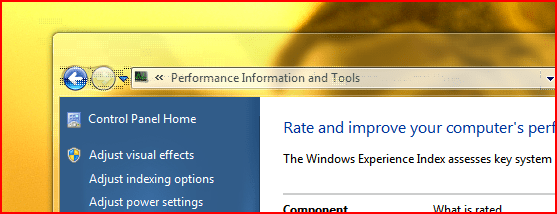
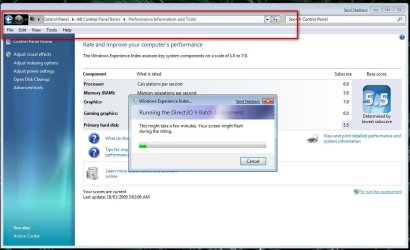
Has anyone else experienced this behaviour? (see screenshot)

It happens randomly, usually when a window is being opened, moved, or maximized, etc. It's fixed by restarting Aero.

I assume it's a graphic driver problem with my Mobile Intel(R) 45 Express Chipset Family (Microsoft Corporation - WDDM 1.1) card.

Just wondering if anyone else had this happen.

Oh, and it gets worse with time if I don't restart Aero...

Capture.png
 

My Computer

OS
Windows 7 RC
im having artifact problems too... and i think its the WDDM driver or the OS beta's fault... since its just a beta..
 

My Computer

OS
Windows 7
CPU
E5200
Motherboard
GA-G31M-S2L
Memory
2GB Kingston 6-6-6-18
Graphics Card(s)
Inno3d 9800GT 512MB
Hard Drives
80GB Barracuda
640GB Caviar
PSU
Gigabyte Superb 550P
Ok good, at least it's not just me :)
 

My Computer

OS
Windows 7 RC

My Computer

Computer Manufacturer/Model Number
* BFK Customs *
OS
W 7 64-bit Ultimate
CPU
Intel Q9550 Yorkfield
Motherboard
ASUS P5Q Pro
Memory
8GB Dominator 8500C5D
Graphics Card(s)
ATI : XFX 5870
Sound Card
Realtek HD Audio 7-1
Monitor(s) Displays
1x 47" LCD HDMI & 3x 26" LCD HDMI
Screen Resolution
1920x1080P & 1920x1200
Hard Drives
1x 80GB Intel X25-M G2 SSD : 1x 500GB & 1x 640GB WD Caviar Black(s)
PSU
Corsair 620HX
Case
Cooler Master RC-690
Cooling
Tuniq Tower 120, 2x 140mm and 3x 120mm case fans
Keyboard
Microsoft 500
Mouse
Razer Diamondback 3G
Internet Speed
14 Mb/s
Other Info
1x Koutech 3Gb/s SATA HDD Hot Swap Rack
Thanks Ted,

that thread doesn't have an answer for my problem though, since it's focused only on Nvidia. But I do agree that hopefully a driver update will fix it. For now I've turned Aero off since I'm tired of restarting it every 2 minutes ;)
 

My Computer

OS
Windows 7 RC
Hello.

Yeah I just used it for a reference. I should have been more specific about replacing the WDDM 1.1 driver; sorry.


Later :o Ted
 

My Computer

Computer Manufacturer/Model Number
* BFK Customs *
OS
W 7 64-bit Ultimate
CPU
Intel Q9550 Yorkfield
Motherboard
ASUS P5Q Pro
Memory
8GB Dominator 8500C5D
Graphics Card(s)
ATI : XFX 5870
Sound Card
Realtek HD Audio 7-1
Monitor(s) Displays
1x 47" LCD HDMI & 3x 26" LCD HDMI
Screen Resolution
1920x1080P & 1920x1200
Hard Drives
1x 80GB Intel X25-M G2 SSD : 1x 500GB & 1x 640GB WD Caviar Black(s)
PSU
Corsair 620HX
Case
Cooler Master RC-690
Cooling
Tuniq Tower 120, 2x 140mm and 3x 120mm case fans
Keyboard
Microsoft 500
Mouse
Razer Diamondback 3G
Internet Speed
14 Mb/s
Other Info
1x Koutech 3Gb/s SATA HDD Hot Swap Rack
I get this with an ati mobility radeon 9600/9700. It is the same if I am using mobilitymodders vista driver or microsofts win 7 driver.
 

Attachments

  • 2533d1231703542-windows-7-beta-aero-capture3.png
    2533d1231703542-windows-7-beta-aero-capture3.png
    27.1 KB · Views: 192

My Computer

OS
Windows 7
i have this b4 but i do 1 thing reinstal my driver and its ok now
 

My Computer

Computer Manufacturer/Model Number
nvidia
OS
win 7 active
CPU
E8400 core2d
Motherboard
evga nvidia nfoce 780i sli
Memory
sli nvidia 4g
Graphics Card(s)
all evga GTX 260 core216 @896mb & 9800 GTX @512mb multi card
Sound Card
realtec
Monitor(s) Displays
ADI microscan 20"
Screen Resolution
1280x1024
Hard Drives
2 WD 500g
PSU
VANTEC 600w
Case
ARMOR
Cooling
ZALMAN
Keyboard
microsoft
Mouse
microsoft
Internet Speed
512 dsl
Other Info
every thing under control right now with W7 ;)
Hello all.


There does seem to be problems with the MS WDDM 1.1 video driver. I'm also having issues with rendering in IE 8; even with the driver update for my video card.


Later :shock: Ted
 

My Computer

Computer Manufacturer/Model Number
* BFK Customs *
OS
W 7 64-bit Ultimate
CPU
Intel Q9550 Yorkfield
Motherboard
ASUS P5Q Pro
Memory
8GB Dominator 8500C5D
Graphics Card(s)
ATI : XFX 5870
Sound Card
Realtek HD Audio 7-1
Monitor(s) Displays
1x 47" LCD HDMI & 3x 26" LCD HDMI
Screen Resolution
1920x1080P & 1920x1200
Hard Drives
1x 80GB Intel X25-M G2 SSD : 1x 500GB & 1x 640GB WD Caviar Black(s)
PSU
Corsair 620HX
Case
Cooler Master RC-690
Cooling
Tuniq Tower 120, 2x 140mm and 3x 120mm case fans
Keyboard
Microsoft 500
Mouse
Razer Diamondback 3G
Internet Speed
14 Mb/s
Other Info
1x Koutech 3Gb/s SATA HDD Hot Swap Rack
Not having any problems with the MS WDDM 1.1 video driver here.

Welcome to the Seven Forums, folks. Enjoy.

Gary
 

My Computer

Computer Manufacturer/Model Number
Dell XPS420
OS
Vista Ult 64 bit Seven Ult RTM x64
CPU
Intel Core2 Quad Q6600 2.40 gigahertz
Memory
Crucial Ballistix 4x2GB PC2 6400
Graphics Card(s)
NVIDIA GeForce 8600 GTS 256 MB
Sound Card
Creative SB X-Fi audio
Monitor(s) Displays
HP w2207 + HPvs15
Screen Resolution
1680x1050 + 1024x768
Hard Drives
2-WD5000AAKS-500 GB
WD5000AAV-500 GB external
Keyboard
Microsoft Comfort Curve
Mouse
MX Revolution
Other Info
Wacom Intuos 2 Graphics Tablet
Experience Index=5.5
New Intel WDM 1.1 driver was released two days ago. Just downloading it now. Will post here if it fixed the artifacting.
 

My Computer

OS
Windows 7 RC
Yeah, not so much. Didn't fix it :(
 

My Computer

OS
Windows 7 RC
Don't want to jinx myself but it appears as though downgrading to the latest Vista driver for my graphics card makes it work fine...
 

My Computer

OS
Windows 7 RC
i got that on my start menu after playing COD:WAW then my comp just froze so i needed a restart.
 

My Computer

OS
Windows 7
CPU
E5200
Motherboard
GA-G31M-S2L
Memory
2GB Kingston 6-6-6-18
Graphics Card(s)
Inno3d 9800GT 512MB
Hard Drives
80GB Barracuda
640GB Caviar
PSU
Gigabyte Superb 550P
I get this with an ati mobility radeon 9600/9700. It is the same if I am using mobilitymodders vista driver or microsofts win 7 driver.

I have seen that as well but only when I'm refreshing the WEI score which is what I see you are doing also.

2009-01-25_194039.jpg
 

My Computer

Computer Manufacturer/Model Number
Home Brew
OS
Windows 7 Ultimate Vista Ultimate x64
CPU
Core 2 Duo E8500 3.16Ghz @ 3.8Ghz
Motherboard
eVGA 750i FTW
Memory
2x2Gigs Patriot PC2-6400 LL
Graphics Card(s)
Inno3D GeForce GTX260 216 SP
Monitor(s) Displays
ASUS VW222U 22" 2ms Response time
Screen Resolution
1680x1050
Hard Drives
SATA 150GB
SATA II 250GB
USB IDE 750GB Ext.
PSU
HYTEC 600W & Thermaltake 650W Toughpower Power Exp
Case
Thermaltake Armor LCS (Liquid Cooling System)
Cooling
Liquid Cooling System
Keyboard
Logitech G15 Gaming Keyboard
Mouse
Logitech G9 Gaming Mouse
anyone find a solution to this? this appears totally random, and i am forced to restart my system every 3 hours or so. i love windows 7 and that's bearable, but annoying.
 

My Computer

Computer Manufacturer/Model Number
Lenovo X200 Tablet
OS
Windows 7
CPU
Intel Core Duo L9400 (1.86 GHz + 1.86 GHz)
Graphics Card(s)
Mobile Intel 45 Express Chipset Family (WDDM 1.1)
Sound Card
Conexant High Definition SmartAudio 221
Screen Resolution
1280x800
Keyboard
USA
update: this glitch can be fixed by disabling and re-enabling Aero. I think this is probably a driver glitch, so we probably have to wait till the next release.
 

My Computer

Computer Manufacturer/Model Number
Lenovo X200 Tablet
OS
Windows 7
CPU
Intel Core Duo L9400 (1.86 GHz + 1.86 GHz)
Graphics Card(s)
Mobile Intel 45 Express Chipset Family (WDDM 1.1)
Sound Card
Conexant High Definition SmartAudio 221
Screen Resolution
1280x800
Keyboard
USA
Yes, restarting Aero works. I was able to fix my problem by downgrading to the latest Vista driver for my graphics card instead of the driver that came with Windows 7 beta.
 

My Computer

OS
Windows 7 RC
I've heard that Windows 7 has a new graphics driver and that the one in vista is a memory/resource hog.

Is that true? If so, I would rather live with the current glitch than reverto vista's slow response speed.

Thanks
 

My Computer

Computer Manufacturer/Model Number
Lenovo X200 Tablet
OS
Windows 7
CPU
Intel Core Duo L9400 (1.86 GHz + 1.86 GHz)
Graphics Card(s)
Mobile Intel 45 Express Chipset Family (WDDM 1.1)
Sound Card
Conexant High Definition SmartAudio 221
Screen Resolution
1280x800
Keyboard
USA
The Vista one has been working great for me so far but I suppose that may be different depending on what card you got.
 

My Computer

OS
Windows 7 RC
Back
Top