Intel - Graphical Aero Glitches

by using vista drivers do you mean going to your computer vendor's website and downloading their drivers?

or is there something you can do in windows 7 to enable vista compatibility or something?
 

My Computer

Computer Manufacturer/Model Number
Lenovo X200 Tablet
OS
Windows 7
CPU
Intel Core Duo L9400 (1.86 GHz + 1.86 GHz)
Graphics Card(s)
Mobile Intel 45 Express Chipset Family (WDDM 1.1)
Sound Card
Conexant High Definition SmartAudio 221
Screen Resolution
1280x800
Keyboard
USA
My computer vendor's drivers wouldn't install because they detected Windows 7 and said they weren't compatible. But I went to Intel's site and got the generic drivers and they work fine. It glitches every once in a while but it's very rare now.
 

My Computer

OS
Windows 7 RC
Mobile Intel(R) 45 Express Chipset Series Processor to DRAM Controller - 2A40

Sorry for the noob question. Can someone tell me where I can find the generic driver for that? Google and Intel's search engine yields no result.
 

My Computer

Computer Manufacturer/Model Number
Lenovo X200 Tablet
OS
Windows 7
CPU
Intel Core Duo L9400 (1.86 GHz + 1.86 GHz)
Graphics Card(s)
Mobile Intel 45 Express Chipset Family (WDDM 1.1)
Sound Card
Conexant High Definition SmartAudio 221
Screen Resolution
1280x800
Keyboard
USA
Hi all,

I'm getting glitches as well - weird lines in the title bar, the task bar flickers, and when it gets really bad, the text goes all blurry until I resize the screen (minimise/maximise). I disable/enable aero and that seems to have helped.

The drivers listed in this thread are no longer available - I've tried intel drivers, and get the same kind of problems.

Any ideas?
 

My Computer

Computer Manufacturer/Model Number
Toshiba Portege R600
OS
Windows 7
CPU
Intel Core 2 Duo U9400 1.4 Ghz
Memory
3gb
Graphics Card(s)
Intel 45 Express Chipset
Sound Card
Realtek high definition audio (with EC)
Monitor(s) Displays
1200x800 laptop screen, 19" 1200x1024 LCD panel (external)
Hard Drives
160Gb sata
I've just been living without Aero until new drivers come out...
 

My Computer

OS
Windows 7 RC
they dont support openGL aswell.
 

My Computer

Computer Manufacturer/Model Number
HP 6720s
OS
Microsoft Windows 7 Ultimate
CPU
Mobile Intel Celeron M 530, 1733 MHz (13 x 133)
Motherboard
Intel Crestline GLE960/GME965
Memory
2038 MB (DDR2-667 DDR2 SDRAM)
Graphics Card(s)
Intel GMA X3100
Sound Card
Analog Devices AD1981HD @ Intel 82801HBM ICH8M
Monitor(s) Displays
AU Optronics B154EW02 V7 [15.4" LCD]
Screen Resolution
1280 x 800
Hard Drives
TOSHIBA MK1246GSX ATA Device (120 GB, 5400 RPM, SATA-II)
Maxtor 3200 USB Device (372 GB, USB)
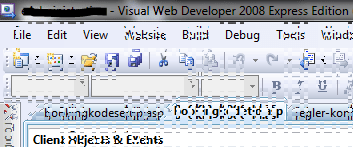
Has anyone else experienced this behaviour? (see screenshot)

It happens randomly, usually when a window is being opened, moved, or maximized, etc. It's fixed by restarting Aero.

I assume it's a graphic driver problem with my Mobile Intel(R) 45 Express Chipset Family (Microsoft Corporation - WDDM 1.1) card.

Just wondering if anyone else had this happen.

Oh, and it gets worse with time if I don't restart Aero...

Capture.png

I had the same error with build 7100. The intel driver was dated sometime in February 2009, I didn't take note of the version unfortunately.
It helps a little installing the Vista driver. Instead of the glitches, the screen goes black and then on again and I get a message saying that the driver crashed and was restarted. This happends every now and then at random times. I haven't figured out what triggers this.

Question is, isn't there a new driver from intel yet? Maybe some beta-hard-to-get-driver? :-)
 

My Computer

Computer Manufacturer/Model Number
ThinkPad T400
OS
Windows 7 7600
Memory
2 GB
Graphics Card(s)
Intel Series 4 Express
The driver just updated from Windows Update. This helped alot, but the problem still exists, for example when a program is "not responding" and I have also tickled Chrome into showing up this way.
 

Attachments

  • Capture.PNG
    Capture.PNG
    11.2 KB · Views: 116

My Computer

Computer Manufacturer/Model Number
ThinkPad T400
OS
Windows 7 7600
Memory
2 GB
Graphics Card(s)
Intel Series 4 Express
I've had the same happen with the WDDM 1.0 driver from Windows Update. I eventually has to download the Vista driver from Intel's website and install it with compatability mode for Vista. Windows will give a message stating that the driver is older than the 1 in use but just click yes, it worked like a charm for me.
 

My Computer

Computer Manufacturer/Model Number
Compaq Desktop
OS
Windows 7 Ultimate x64
CPU
AMD Sempron Dual Core
Memory
3GB
Graphics Card(s)
NVIDIA GeForce 6150SE nForce 430
Screen Resolution
1024x768
Hard Drives
150GB Sata
@Orbital Shark: You did not read my posts :-) Vista driver isn't good for me...
 

Attachments

  • Capture.PNG
    Capture.PNG
    38.6 KB · Views: 111

My Computer

Computer Manufacturer/Model Number
ThinkPad T400
OS
Windows 7 7600
Memory
2 GB
Graphics Card(s)
Intel Series 4 Express
I had the same problem here, even with vista drivers. I got graphical glitches all the time with the Seven drivers, and in some games with Vista ones. After testing several versions, I've found one that works all the time, no crashes and no glitches (for 3 days now), it's the version 7.15.10.1508 for Vista. I found it on a Driver CD that came with my friend's laptop. You can find it here:

Download Mobile Intel(R) 4 Series Express Chipset Family from RadarSync

Run the Vga\Vista\32bit(64bit)\Setup.exe with Vista Compatibility. ;)
 

My Computer

OS
Windows Seven RC1
Hi luccax, welcome to the forums.

Nice find, hopefully this'll help a few people out :D

Hope you enjoy your stay.


Jeff
 

My Computer

Computer Manufacturer/Model Number
Compaq Desktop
OS
Windows 7 Ultimate x64
CPU
AMD Sempron Dual Core
Memory
3GB
Graphics Card(s)
NVIDIA GeForce 6150SE nForce 430
Screen Resolution
1024x768
Hard Drives
150GB Sata
Has anyone else experienced this behaviour? (see screenshot)

It happens randomly, usually when a window is being opened, moved, or maximized, etc. It's fixed by restarting Aero.

I assume it's a graphic driver problem with my Mobile Intel(R) 45 Express Chipset Family (Microsoft Corporation - WDDM 1.1) card.

Just wondering if anyone else had this happen.

Oh, and it gets worse with time if I don't restart Aero...

Capture.png

I had the same error with build 7100. The intel driver was dated sometime in February 2009, I didn't take note of the version unfortunately.
It helps a little installing the Vista driver. Instead of the glitches, the screen goes black and then on again and I get a message saying that the driver crashed and was restarted. This happends every now and then at random times. I haven't figured out what triggers this.

Question is, isn't there a new driver from intel yet? Maybe some beta-hard-to-get-driver? :-)

Has anyone else experienced this behaviour? (see screenshot)

It happens randomly, usually when a window is being opened, moved, or maximized, etc. It's fixed by restarting Aero.

I assume it's a graphic driver problem with my Mobile Intel(R) 45 Express Chipset Family (Microsoft Corporation - WDDM 1.1) card.

Just wondering if anyone else had this happen.

Oh, and it gets worse with time if I don't restart Aero...

Capture.png


What you got is not a driver issue you got a main board fault possibly bga rework that is only going to get worse unforuntly for you as well this is not a simple or cheap repair this requirs specilist equiment "hot air soldering" bga re-flow the best thing i would say to do is take it down to a pc repair shop and they will have to send it away.
 

My Computer

OS
windows 7 ulitmate
erm hey i'm also having this problems with the pic problem...
Anyone know how to fix it??
 

Attachments

  • Untitled3.png
    Untitled3.png
    74.4 KB · Views: 58
Last edited:

My Computer

Computer Manufacturer/Model Number
PP3L
OS
Windows 7
CPU
Intel Pentium III Xeon, 2000 MHz
Motherboard
Dell Studio 1537
Memory
3.00 GB
Graphics Card(s)
Mobile Intel(R) 45 Express Chipset Family
Sound Card
High Definition Audio Controller [NoDb]
Monitor(s) Displays
Monitor Name Generic PnP Monitor [NoDB]
Screen Resolution
1280 x 800
Keyboard
HID Keyboard Device, Standard PS/2 Keyboard
Mouse
Logitech HID-compliant Optical Wheel Mouse
Internet Speed
52.0 Mbps
Back
Top