
Intel Graphics Media Accelerator Driver? A huge 37.1 GB!??!?

Okay I just uninstalled the driver and I don't feel like I'm actually using Windows 7 anymore. The way windows open, the taskbar displays, etc. are not in the way they used to be. How can I install another driver? Any link?

PS: I tried installing one for Windows 7 and an error message is displayed, "Your computer does not meet the minimum requirement to install this software"? What the heck :/

Why did you uninstall it?

You should have just let it be. We need some system specs to recommend a driver.

Make and model of your PC, Desktop or Laptop, etc.
 

My Computer My Computer

At a glance

Win 10 Pro x64Intel I5-2500K @3.3GHz16GB G.Skill Ripjaws X (4x4GB)EVGA GeForce 750 Ti SC 2GB
Computer type
PC/Desktop
Computer Manufacturer/Model Number
Self Built
OS
Win 10 Pro x64
CPU
Intel I5-2500K @3.3GHz
Motherboard
Asrock P67 Extreme4
Memory
16GB G.Skill Ripjaws X (4x4GB)
Graphics Card(s)
EVGA GeForce 750 Ti SC 2GB
Sound Card
ASUS Xonar DG 5.1 Channels 24-bit 96KHz PCI Interface Sound
Monitor(s) Displays
auria eq2367
Screen Resolution
1920 x 1080
Hard Drives
250GB Samsung 850 EVO SSD
1TB WD Blue
1TB Hitachi
PSU
SeaSonic X 650W 80 Plus Gold
Case
Corsair Obsidian 750D
Cooling
Corsair H60, Three 140mm case fans
Keyboard
Logitech Wireless Keyboard K520
Mouse
Logitech Wireless Mouse M310
Internet Speed
Wave Broadband ~ 100 dn 5 up
Antivirus
Windows Defender, Malwarebytes Premium
Browser
Edge, IE11, Chrome
Other Info
Laptop specs: HP g7-1365dx /
CPU: AMD A6-3420M APU with Radeon(tm) HD Graphics /
RAM: Crucial 8Gb (2x4Gb) /
SSD: Crucial M4-CT128M4SSD2 ATA Device/ FW 000F /
GFX: AMD Radeon HD 6520G /
OS: Windows 10 Pro x64
My Computer My Computer

At a glance

Win 10 Pro x64Intel I5-2500K @3.3GHz16GB G.Skill Ripjaws X (4x4GB)EVGA GeForce 750 Ti SC 2GB
Computer type
PC/Desktop
Computer Manufacturer/Model Number
Self Built
OS
Win 10 Pro x64
CPU
Intel I5-2500K @3.3GHz
Motherboard
Asrock P67 Extreme4
Memory
16GB G.Skill Ripjaws X (4x4GB)
Graphics Card(s)
EVGA GeForce 750 Ti SC 2GB
Sound Card
ASUS Xonar DG 5.1 Channels 24-bit 96KHz PCI Interface Sound
Monitor(s) Displays
auria eq2367
Screen Resolution
1920 x 1080
Hard Drives
250GB Samsung 850 EVO SSD
1TB WD Blue
1TB Hitachi
PSU
SeaSonic X 650W 80 Plus Gold
Case
Corsair Obsidian 750D
Cooling
Corsair H60, Three 140mm case fans
Keyboard
Logitech Wireless Keyboard K520
Mouse
Logitech Wireless Mouse M310
Internet Speed
Wave Broadband ~ 100 dn 5 up
Antivirus
Windows Defender, Malwarebytes Premium
Browser
Edge, IE11, Chrome
Other Info
Laptop specs: HP g7-1365dx /
CPU: AMD A6-3420M APU with Radeon(tm) HD Graphics /
RAM: Crucial 8Gb (2x4Gb) /
SSD: Crucial M4-CT128M4SSD2 ATA Device/ FW 000F /
GFX: AMD Radeon HD 6520G /
OS: Windows 10 Pro x64
I had made a restore point, a backup copy before uninstalling the software. Hope that can turn things back to normal if they get worse.

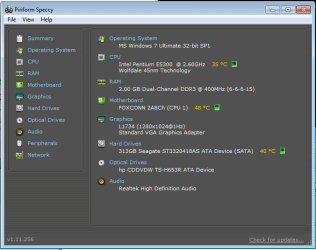
Thanks for the software, here's the summary:
 

Attachments

  • summary.png
    summary.png
    17.8 KB · Views: 96

My Computer My Computer

At a glance

Windows 7 Ultimate 32bit
OS
Windows 7 Ultimate 32bit
I had made a restore point, a backup copy before uninstalling the software. Hope that can turn things back to normal if they get worse.

Thanks for the software, here's the summary:

That's a start, can you tell me what brand your computer is and the model number?

Did you try the intel link I posted above?
 

My Computer My Computer

At a glance

Win 10 Pro x64Intel I5-2500K @3.3GHz16GB G.Skill Ripjaws X (4x4GB)EVGA GeForce 750 Ti SC 2GB
Computer type
PC/Desktop
Computer Manufacturer/Model Number
Self Built
OS
Win 10 Pro x64
CPU
Intel I5-2500K @3.3GHz
Motherboard
Asrock P67 Extreme4
Memory
16GB G.Skill Ripjaws X (4x4GB)
Graphics Card(s)
EVGA GeForce 750 Ti SC 2GB
Sound Card
ASUS Xonar DG 5.1 Channels 24-bit 96KHz PCI Interface Sound
Monitor(s) Displays
auria eq2367
Screen Resolution
1920 x 1080
Hard Drives
250GB Samsung 850 EVO SSD
1TB WD Blue
1TB Hitachi
PSU
SeaSonic X 650W 80 Plus Gold
Case
Corsair Obsidian 750D
Cooling
Corsair H60, Three 140mm case fans
Keyboard
Logitech Wireless Keyboard K520
Mouse
Logitech Wireless Mouse M310
Internet Speed
Wave Broadband ~ 100 dn 5 up
Antivirus
Windows Defender, Malwarebytes Premium
Browser
Edge, IE11, Chrome
Other Info
Laptop specs: HP g7-1365dx /
CPU: AMD A6-3420M APU with Radeon(tm) HD Graphics /
RAM: Crucial 8Gb (2x4Gb) /
SSD: Crucial M4-CT128M4SSD2 ATA Device/ FW 000F /
GFX: AMD Radeon HD 6520G /
OS: Windows 10 Pro x64
Okay mate, I have a solution to this problem as it was bugging me as well and its incredibly simple.

Obviously you have an intel graphics chip on the motherboard of you laptop so go to intels site: DIRECT LINK TO AUTODETECT

... Run the auto detect (say yes to all download prompts and if nothing happens refresh the page a couple of times)

Next to Graphics Driver it will likely say update available (note that Windows Update does not pick this up).

Click on the update to download the software...

Run it and restart....

Check your 'Uninstall program list'

Intel Graphics Media Accelerator Driver is now 74.2 Megs and makes sense...

Hope this helps everyone else
 

My Computer My Computer

At a glance

Windows 7 Home Premium
OS
Windows 7 Home Premium
ah sorry Derek, didn't see that post but yeah that solves it
 

My Computer My Computer

At a glance

Windows 7 Home Premium
OS
Windows 7 Home Premium

My Computer My Computer

At a glance

Win 10 Pro x64Intel I5-2500K @3.3GHz16GB G.Skill Ripjaws X (4x4GB)EVGA GeForce 750 Ti SC 2GB
Computer type
PC/Desktop
Computer Manufacturer/Model Number
Self Built
OS
Win 10 Pro x64
CPU
Intel I5-2500K @3.3GHz
Motherboard
Asrock P67 Extreme4
Memory
16GB G.Skill Ripjaws X (4x4GB)
Graphics Card(s)
EVGA GeForce 750 Ti SC 2GB
Sound Card
ASUS Xonar DG 5.1 Channels 24-bit 96KHz PCI Interface Sound
Monitor(s) Displays
auria eq2367
Screen Resolution
1920 x 1080
Hard Drives
250GB Samsung 850 EVO SSD
1TB WD Blue
1TB Hitachi
PSU
SeaSonic X 650W 80 Plus Gold
Case
Corsair Obsidian 750D
Cooling
Corsair H60, Three 140mm case fans
Keyboard
Logitech Wireless Keyboard K520
Mouse
Logitech Wireless Mouse M310
Internet Speed
Wave Broadband ~ 100 dn 5 up
Antivirus
Windows Defender, Malwarebytes Premium
Browser
Edge, IE11, Chrome
Other Info
Laptop specs: HP g7-1365dx /
CPU: AMD A6-3420M APU with Radeon(tm) HD Graphics /
RAM: Crucial 8Gb (2x4Gb) /
SSD: Crucial M4-CT128M4SSD2 ATA Device/ FW 000F /
GFX: AMD Radeon HD 6520G /
OS: Windows 10 Pro x64
Toshiba Satellite. Windows 7 upgrade same issue

I had a program that tells you what your biggest files/programs are and I too ran across this. I am wondering if someone ever figured this out??
If it truly makes a difference then I would rather not delete it as I like to play games via internet or offline. i've also been known to open a lot of windows and the graphics haven't seemed to freeze up ever. So, if this is what's the reason for the smoothness of display then as I said I don't want to get rid of it. But, I'd still like to know what is the justification for the 37 GB.. Seems way excessive. Just looking for info I guess as I'm a little confused and hoping someone has figured this out..
 

My Computer My Computer

At a glance

Windows 7 Home Premium 32bitIntel core duo Cpu T5800@ 2GHZ3GB Ram
OS
Windows 7 Home Premium 32bit
CPU
Intel core duo Cpu T5800@ 2GHZ
Memory
3GB Ram
I had a program that tells you what your biggest files/programs are and I too ran across this. I am wondering if someone ever figured this out??
If it truly makes a difference then I would rather not delete it as I like to play games via internet or offline. i've also been known to open a lot of windows and the graphics haven't seemed to freeze up ever. So, if this is what's the reason for the smoothness of display then as I said I don't want to get rid of it. But, I'd still like to know what is the justification for the 37 GB.. Seems way excessive. Just looking for info I guess as I'm a little confused and hoping someone has figured this out..

Welcome to the forum,

It is most likely being reported as 37GB even though it really isn't, I wouldn't worry about it if you're not having any problems.

You didn't find a 37GB file did you?
 

My Computer My Computer

At a glance

Win 10 Pro x64Intel I5-2500K @3.3GHz16GB G.Skill Ripjaws X (4x4GB)EVGA GeForce 750 Ti SC 2GB
Computer type
PC/Desktop
Computer Manufacturer/Model Number
Self Built
OS
Win 10 Pro x64
CPU
Intel I5-2500K @3.3GHz
Motherboard
Asrock P67 Extreme4
Memory
16GB G.Skill Ripjaws X (4x4GB)
Graphics Card(s)
EVGA GeForce 750 Ti SC 2GB
Sound Card
ASUS Xonar DG 5.1 Channels 24-bit 96KHz PCI Interface Sound
Monitor(s) Displays
auria eq2367
Screen Resolution
1920 x 1080
Hard Drives
250GB Samsung 850 EVO SSD
1TB WD Blue
1TB Hitachi
PSU
SeaSonic X 650W 80 Plus Gold
Case
Corsair Obsidian 750D
Cooling
Corsair H60, Three 140mm case fans
Keyboard
Logitech Wireless Keyboard K520
Mouse
Logitech Wireless Mouse M310
Internet Speed
Wave Broadband ~ 100 dn 5 up
Antivirus
Windows Defender, Malwarebytes Premium
Browser
Edge, IE11, Chrome
Other Info
Laptop specs: HP g7-1365dx /
CPU: AMD A6-3420M APU with Radeon(tm) HD Graphics /
RAM: Crucial 8Gb (2x4Gb) /
SSD: Crucial M4-CT128M4SSD2 ATA Device/ FW 000F /
GFX: AMD Radeon HD 6520G /
OS: Windows 10 Pro x64
I have the same problem. I have a Mobile Intel 4 Series Express Chipset drive, which really DOES take up 37GB. My Dell Inspiron 1545 has a 134GB HDD which I have to clean up constantly, because it gets full. 'My Dell' says programmes use 29% (38.2GB) of my HDD of which 37GB comes from the drive. When I went to the website mentioned before (Intel® Driver Update Utility for graphics drivers) it said this:

Product Detected Mobile Intel® 4 Series Express Chipset Family
Current Driver Installed 8.15.10.1808
A customized computer manufacturer driver is installed on your computer. The Intel Driver Update Utility is not able to update the driver. Installing a generic Intel driver instead of the customized computer manufacturer driver may cause technical issues. Contact your computer manufacturer for the latest driver for your computer.


I searched for driver updates manually and found a new one (mine is from 2010), which only takes up 40MB. However, I'm not sure if I should install it, because I apparently have some customized driver.
What do you think? Should I try it and if it doesn't work out just use system recovery?
 

My Computer My Computer

At a glance

Windows 7 Home Premium 64bitCeleron Dual-Core T3100 @ 1.90GHz (2CPUs)4096MB RAM, 134GB HDDMobile Intel 4 Series Express Chipset Family
Computer type
Laptop
Computer Manufacturer/Model Number
Dell Inspiron 1545
OS
Windows 7 Home Premium 64bit
CPU
Celeron Dual-Core T3100 @ 1.90GHz (2CPUs)
Memory
4096MB RAM, 134GB HDD
Graphics Card(s)
Mobile Intel 4 Series Express Chipset Family
Antivirus
Avast
Browser
Chrome
Back
Top