
Intel HD 4600 graphics causing problems, can I switch to Nvidia card?

LooseJuice

New member
Local time
9:19 AM
Messages
19
Location
United States
Since I got my new laptop, I've had an intermittent problem where the screen would go completely blank for about 1-2 seconds before coming back on. At times, when the screen comes back on, the Aero theme would be switched off and the basic theme would be running without any of my settings changing.

I actually made a previous post about this issue: http://www.sevenforums.com/graphic-cards/353985-screen-flashes-off-theme-switches-aero-basic.html.

So I figured I had a problem with my Nvidia card. I uninstalled the Nvidia drivers using driver sweeper and re-installed them, but the problem persisted. Now that my computer is toward the end of its warranty, I've been looking into this problem more deeply because I wanted to get it fixed under warranty IF it was a hardware problem. As it turns out, however, the integrated graphics on the processor are running the display, so I figure now that the problem is the Intel integrated graphics. So, my question is, in hopes of eliminating this problem once and for all, is there anyway I can switch all of the computer's graphics settings over the Nvidia chip? I've heard of people trying this and messing up by turning the Intel graphics off before switching to their graphics card and not being able to get their display to work at all, so I definitely want to do it right.

Here are my system specs if necessary:
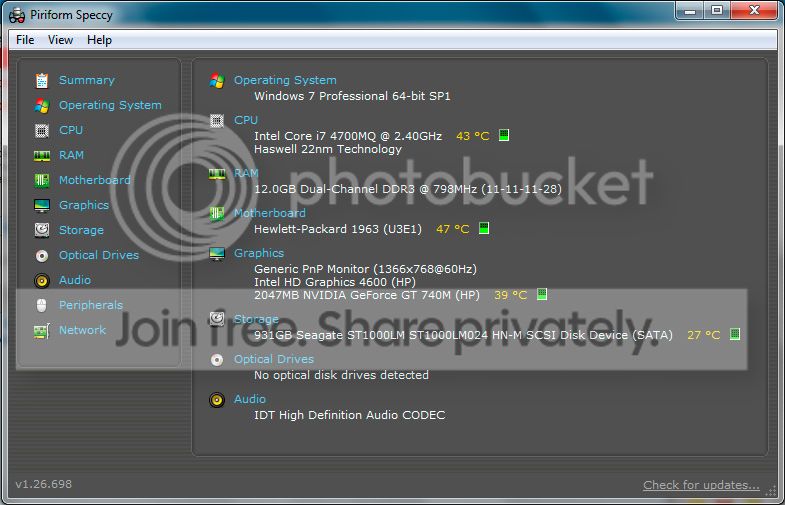
systemspecs.jpg


Thanks for your help!
 

My Computer My Computer

Computer type
Laptop
Computer Manufacturer/Model Number
HP Envy 15
OS
Windows 7 Professional 64-bit
CPU
Intel Core i7 4700
Memory
12 GB
Graphics Card(s)
Nvidia GeForce GT 740 GM
Hi .... What is the exact Model Number of your Laptop ? ....
 

My Computer My Computer

Computer Manufacturer/Model Number
W530-3630QM1
OS
windows 7 home 64bit
CPU
INTEL-CORE I7
Memory
16GB
Hard Drives
750GB
Browser
Chrome
HP Envy 15-j171nr.

I've been doing a little more research and it appears what I'm asking here might not be possible? Apparently all lower end laptop are designed to run BOTH integrated and discrete graphics, but not just one or the other.
 

My Computer My Computer

Computer type
Laptop
Computer Manufacturer/Model Number
HP Envy 15
OS
Windows 7 Professional 64-bit
CPU
Intel Core i7 4700
Memory
12 GB
Graphics Card(s)
Nvidia GeForce GT 740 GM
I believe that's a slightly different issue. It seems that issue occurs right after entering your password, meaning they stop at a black screen before even getting to their desktop. Mine occurs intermittently as I'm using the computer. The screen shuts off all together for maybe 1-2 seconds before coming back on. All of my programs are still running. My problem is like if, on a desktop computer, you were to just shut off the screen and turn it back on in quick succession. The computer is still running, but the screen is off. I'm really at a loss here. While this seems to be a very common problem, it doesn't seem like there are very many solutions.
 

My Computer My Computer

Computer type
Laptop
Computer Manufacturer/Model Number
HP Envy 15
OS
Windows 7 Professional 64-bit
CPU
Intel Core i7 4700
Memory
12 GB
Graphics Card(s)
Nvidia GeForce GT 740 GM
Are you using the Drivers from the HP Website ? And yes you are right some Models you can not switch the Graphics ...
 

My Computer My Computer

Computer Manufacturer/Model Number
W530-3630QM1
OS
windows 7 home 64bit
CPU
INTEL-CORE I7
Memory
16GB
Hard Drives
750GB
Browser
Chrome
I have downloaded and installed the Nvidia drivers from Nvidia and HP. I also tried upgrading the drivers for the Intel graphics from the Intel site BUT it gave me a warning saying that HP had installed a custom driver on my computer and using the stock Intel driver could cause problems. Since the latest update to the HP issued driver was in January of 2014, I did not update since that's before I even bought the computer.
 

My Computer My Computer

Computer type
Laptop
Computer Manufacturer/Model Number
HP Envy 15
OS
Windows 7 Professional 64-bit
CPU
Intel Core i7 4700
Memory
12 GB
Graphics Card(s)
Nvidia GeForce GT 740 GM
That is the problem with Switchable Graphics unless the Manufacturer provides Updates for the Drivers ... There is usually no other way you can Update them ... Are you using the Chipset Driver from the HP Website ? ...
 

My Computer My Computer

Computer Manufacturer/Model Number
W530-3630QM1
OS
windows 7 home 64bit
CPU
INTEL-CORE I7
Memory
16GB
Hard Drives
750GB
Browser
Chrome
Yes I am.
 

My Computer My Computer

Computer type
Laptop
Computer Manufacturer/Model Number
HP Envy 15
OS
Windows 7 Professional 64-bit
CPU
Intel Core i7 4700
Memory
12 GB
Graphics Card(s)
Nvidia GeForce GT 740 GM
The issue with switchable graphics is that the display is connected only to Intel HD 4600. Windows Desktop Manager is by default run on the GPU where the display is attached. Because of this you won't be able to set the Nvidia as default for everything. Anyways, millions of computer run on Intel HD 4600 and thousands run them with switchable graphics so I wouldn't think it's a simple driver issue. I would bet it's a combination of a specific Intel and Nvidia drivers.
 

My Computer My Computer

Computer type
Laptop
Computer Manufacturer/Model Number
Dell Optiplex SX270, Lenovo Z470
OS
Windows 7 Professional x64 SP1
CPU
Intel® Pentium® 4 @ 2.26 GHz, Intel Core i7-2670QM @ 2.20 GH
Motherboard
Dell, Lenovo
Memory
512MB Dual channel DDR SDRAM @ 400MHz 2.5-3-3-7, 8 GB DDR3
Graphics Card(s)
Intel 82865G, Nvidia GeForce 520M Graphics
Sound Card
SoundMax Integrated Audio, Integrated HD Audio
Monitor(s) Displays
LG W1952
Screen Resolution
1440x900, 1366 x 768
Hard Drives
40 GB 2.5" IDE 4200 RPM HDD, 500 GB 5400 RPM Sata 1.5 + 32 GB SSD
PSU
Dell 145 Watt, Lenovo 120 Watt Power Adapter
Case
Optiplex SX270 Small Form Factor, Laptop
Cooling
Dell Proprietary Air Cooling, Stock laptop cooling
Keyboard
Dell SK-8125 USB Keyboard
Mouse
Dell PS/2 2 button ball mouse with wheel scroll
Internet Speed
300 Mbit down / 20 Mbps up Time Warner Cable
Antivirus
MSE, Malwarebytes Scanner
Browser
Internet (Aizawa) Explorer 11
Other Info
Running Windows Server 2012 Datacenter on a virtual machine to run Metro Apps.
I would defenitly send it in before the warranty ends, don`t think twice about it.

I would have taken care of this after you first got it, don`t hesitate anymore.
 

My Computer My Computer

Computer type
PC/Desktop
Computer Manufacturer/Model Number
Skylake Special #666
OS
Windows 10 Pro x64
CPU
Intel Core i7 6700K
Motherboard
Asus Sabertooth Z170 Mark 1
Memory
GSkill TridentZ RGB 16GB 3600 16-16-16-36
Graphics Card(s)
EVGA GTX 980 Ti SC x2
Sound Card
Realtek High Definition
Monitor(s) Displays
AOC G2460PG
Screen Resolution
1920 x 1080 144Hz
Hard Drives
Samsung 860 Pro 256GB, Seagate Barracuda 4TB x2
PSU
EVGA 1000 P2, EVGA White Custom Braided Cables
Case
Corsair Vengeance C70 Gunmetal Black
Cooling
Corsair H100i v2, Corsair ML120 x2, Thermal Grizzly Kryonaut
Keyboard
Logitech G910 Orion Spectrum
Mouse
Logitech G700s
Internet Speed
Verizon Fios Quantum Gateway 75/75
Antivirus
Windows Defender, Malwarebytes Free 3.8.3
Browser
Chrome
Other Info
Corsair SP120 x4, LG Blu-ray Drive, Durabrand HT-395 100 Watt Dolby Digital Amp, Corsair H2100 Wireless 7.1 Headset
Back
Top