Solved "Intel HD graphics" update install crashed the computer

Damn. I wrote the disk by using Windows (I mean I didn't write the downloaded .ISO to disk). Is the repair disk created by Windows and downloaded version different? The last question before doing the fix, I hope...
 

My Computer

OS
Windows 7 Pro 32-bit
Damn. I wrote the disk by using Windows (I mean I didn't write the downloaded .ISO to disk). Is the repair disk created by Windows and downloaded version different? The last question before doing the fix, I hope...

Only 32bit or 64bit.
 

My Computer

OS
ME/XP/Vista/Win7
Okay, I just did the System Restore, like you say. Failed. It says, System Restore is failed, but when I launched the Windows it says everything is succesfull...

System restore failed. Computer's system files and settings weren't changed.

Information:

The unknown error occured, while the system restore: (0x8000ffff)


You can use System restore once again and select another system restore point. If you'll see this error message again, you can try advanced restore method. If you want to get more information, check What is restore?

In the Windows:


System restore completed sucessfully. System restored in 2011.05.20 23:34:00. No change made to your documents.

But I saw the same error messages again. And the system restore point was somewhere about 22:30 not 23:30. Something strange... :/
 

My Computer

OS
Windows 7 Pro 32-bit
Looking at picture 2, are you now at the desktop?
Yea, I was. Sorry, I didn't capture screenshots. I knew how to do that in Paint, but didn't know about "Snipping Tool". Thanks. :)
 

My Computer

OS
Windows 7 Pro 32-bit
I take it you are now all OK?
When updating your drivers, use the ASUS updater.
 

My Computer

OS
ME/XP/Vista/Win7
are now all OK?
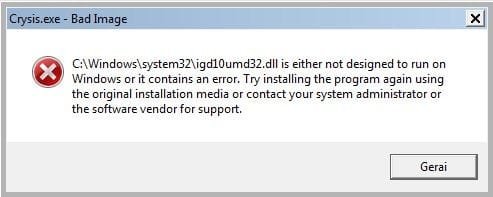
No. Anything changed after System Restore. I still have errors. When try to launch Crysis:
Igd10umd32.jpg
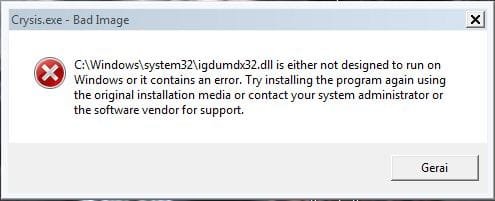
When press OK:
Igdumdx32.JPG
This doesn't go, till I press OK two times.
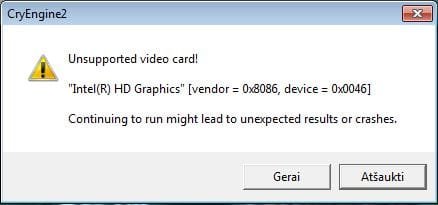
After table goes out:
Error.JPG
When press OK, the second table stands, till I press OK 6 times. Game doesn't launch.

Huh...
 

My Computer

OS
Windows 7 Pro 32-bit
Click Start and right-click Computer then click Properties.

Open Device Manager and double-click Display Adapters, then double-click your graphics adapter.

Click the Driver tab and click the Rollback Driver button to uninstall the updated driver and revert to the original one.

.

Try uninstalling the driver, & restart.
 

My Computer

OS
ME/XP/Vista/Win7
Cool! It works normally again! Thank you Theog and others for your help!
When updating your drivers, use the ASUS updater.
Ok, I will.
 

My Computer

OS
Windows 7 Pro 32-bit
Well done.:thumbsup:

I would run the ASUS updater, just make your drivers are up to date.

You are welcome.
 

My Computer

OS
ME/XP/Vista/Win7
q.gif
Quote: Originally Posted by theog
How to make ASUS Recovery DVD's. Page 18 in your manual.
or
Download manual from here;
ASUSTeK Computer Inc. - Notebooks- ASUS A52F


Be sure to make your Recovery disks.

http://www.sevenforums.com/tutorials...ery.html?ltr=S
http://www.sevenforums.com/tutorials...ge-backup.html
http://www.sevenforums.com/tutorials...tem-files.html
Ok. Thanks for the links.

bow.gif
 

My Computer

OS
Windows 7 Pro 32-bit
Ok, hello there again.

I'm very confused right now. Heh...

When updating your drivers, use the ASUS updater.
How to make ASUS Recovery DVD's. Page 18 in your manual.
or
Download manual from here;
ASUSTeK Computer Inc. - Notebooks- ASUS A52F

Should I install ASUS updater (How?) or/and write an ASUS recovery DVD ? I have read the manual, If you do the recovery for the PC, you lose important files (Music, images, etc.). Could there be the way to write my files (Music, images...) from "C:" drive to "D:" and then, I could succesfully use ASUS recovery DVD without any problems?


Thanks.


Gregaras
 

My Computer

OS
Windows 7 Pro 32-bit
Just tap F8 option and use "Directory Services Restore Mode"

Just tap F8 option and use "Directory Services Restore Mode"


Hello there.

I didn't find the category where to post the problem, so I post this here. But, okay, anyways, I have too tell my problem...

So, yesterday, I decided to update my "Intel HD Graphics Driver", so I went to official site, site "scanned" my computer for outdated version - so, It's outdated. And then I downloaded the update.

I opened the .EXE file. Everything went well, till It started to install. It didn't install the whole component and screen went black. Then, I saw the blue screen with white text, It looked like this:
win7bsod_01.jpg

Not my photo by the way...

And it lagged. PC didn't restart, anything. So I turned it off. Then, when It started I saw the screen like this:
vistanot.jpg

So, I clicked on "Launch Windows Normally". It showed me the same screen again, but It shut down. When I got this screen again and I clicked on "Launch Startup Repair (Recommended)". I got Windows 7 screen, then It showed me the table:
startuprepair2.jpg

I had to wait a lot of time, but It finished and It explained me, If problems are fixed, Windows will start normal, If it's not, It'll fix the problems again. I click "Finish" to restart and then It showed me the blue screen. I had to turn off my computer again. Then, before the Windows was preparing to launch, I pressed F8 to bring up this screen:
SafeMode_7.png

I selected "Last Known Good Configuration" and Windows launched normally. Cool! But, I still had error with Intel. It showed me a table about something, I can't remember, but It was really with Intel. I think a corrupted .DLL file. Then, I tried to test how everything works: Video, 3D. I turned on the video and I saw not a video, but only black screen. When, I went to YouTube and tried to watch a video in it. It didn't load.

So, then I restarted my computer, pressed F8 and clicked on "Safe Mode". A lot of text went down and when Windows succesfully lauched in very low resolution. And I went to install the update again. Everything installed normally. Then, It said to restart the computer and I did that. But, I got the blue screen again... ;p I turned off the computer and then I turned it on again, pressed F8 and went to "Last Good Known Configuration". Windows launched succesfully, It played videos (and from YouTube), but It didn't play 3D games. It shows the table:
C:\Windows\system32\igdumdx32.dll is either not designed to run on Windows or it contains an error. Try installing the program again using the original isntallation media or contact your system administrator or the software vendor for support.
Once I click ok, I get another table:

Please enable Direct3D acceleration. You can do this by starting dxdiag and enbabling Direct3D Acceleration in the Display1/2 tab after installing DirectX 8.1b (or later) and the latest drivers for you graphics card.
When I ran dxdiag.exe, the table appeared:
C:\Windows\System32\igd10umd32.dll is either not designed to run on Windows or it contains an error. Try installing the program again using the original installation media or contact your system administrator or the sofware vendor for support.
Then... :/
C:\Windows\System32\igdumdx32.dll is either not designed...
I went to "Display" tab and there's no "DirectDraw", "Direct3D" acceleration. It just shows none on the right. And It says, "No Problems Found".


Why did this happen? I just wanted to update graphics driver and I've got crashed my computer? :O How can back everything to places? Do I need to install new DirectX?


Please help, thanks in advance.

P.S. If you need more info, just write a post.

Gregaras

 

My Computer

Computer type
Laptop
Computer Manufacturer/Model Number
Acer
OS
Windows 7 Ultimate x32
Memory
3GB RAM
Hard Drives
320 GB
Antivirus
Avast Fress and Malwarebytes Premium
Browser
Mozilla
Back
Top