Solved intel ich7 family lpc interface controller 27b8

PauloAgojo277

Virus Helper ! >_<
Member
Local time
8:30 AM
Messages
66
Location
Philippines
Hi,

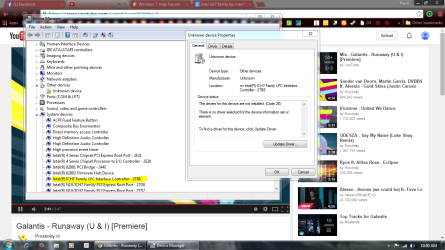
I have a problem with this unknown device.
But I see it my system device manager.

Help me Find this driver :cry:

Hope I can you can help me to fix it

Paulo
 

Attachments

  • Capture_40.PNG
    Capture_40.PNG
    109.1 KB · Views: 4

My Computer

Computer type
PC/Desktop
Computer Manufacturer/Model Number
AsusTEK Computer INC.
OS
Windows Ultimate 32-bit x86 Service-Pack-1
CPU
Intel Pentium Dual Core CPU E5400 @2.70 Ghz 2.70Ghz
Motherboard
Asus P5G41T-M LX3
Memory
2.00 GB Kingston RAM
Graphics Card(s)
Nvidia Geforce GT 630 2GB DDR3
Sound Card
RealTek Audio HD Manager
Monitor(s) Displays
ViewSonic V1616wSERIES
Screen Resolution
1366x768
Hard Drives
WDC WD1600AAJS-00WAA0 ATA Drive - Old Hard Drive = 120 GB
Hitachi HDS721050DLE630ATA Drive - New Hard Drive = 500 GB
PSU
I Think Hitachi PSU
Case
HiP Case w/ Power Supply
Cooling
Intel Fan - CPU - Integrated Fan - GPU - Chassis Fan -
Keyboard
Cruiser Keyboard
Mouse
iMega Plus Mouse
Internet Speed
1.9 Mbps Up :D And 1.0 Upload/s :D
Antivirus
avast! Antivirus
Browser
Mozilla FireFox - Google Chrome 28 - Opera - Safari
Other Info
Games: 2000 - 2008 - Some (2014)

avast! 2038 = Paid!
That must be a fairly old motherboard. The ICH7 chipset is pretty old. This "hardware" is the I/O Control Hub and the LPC portion handles legacy devices such as floppies. The drivers for the chipset would have been provided by the motherboard manufacturer on a floppy or disc. You might try the SFC Scannow command to make sure the driver isn't corrupt. Or you can try and let Windows find a driver by clicking on "Update Driver" but I doubt one will be found.

SFC Scannow Command: http://www.sevenforums.com/tutorials/1538-sfc-scannow-command-system-file-checker.html

Added:
I forgot to mention that Intel might have universal drivers for the chipset but these often don't implement special features of the motherboard. The best source for chipset drivers are from the motherboard manufacturer.
 
Last edited:

My Computer

Computer type
PC/Desktop
Computer Manufacturer/Model Number
Built 2/11/2011
OS
Windows 7 Pro-x64
CPU
i7-2600 3.4GHz - 3.8GHz Turbo
Motherboard
Intel DH67BL-B3
Memory
8Gb - 2x4GB, Muskin 991770 PC3-1333
Graphics Card(s)
Integrated Intel HD 2000
Sound Card
Integrated Intel 10.1 HD, RealTek ALC892
Monitor(s) Displays
Asus LCD VH222H, Haier HL24XSL2a
Screen Resolution
1920x1080, 1920x1080
Hard Drives
Crucial SSD C300-128Gb,
Western Digital WD5002AALX - 500Gb,
Western Digital WD7501AALS - 750Gb
PSU
Seasonic 650W 80+ Gold Modular
Case
Rosewill Defender
Cooling
Stock CPU, Four 120mm case fans, PCH fan added
Keyboard
Logitech EX100 Y-RBH94 Wireless
Mouse
Logitech EX100 M-RCE95 Wireless
Internet Speed
3.0/1.5 Mbs
Antivirus
Microsoft Security Essentials
Browser
Microsoft Internet Explorer 11
Other Info
Antec Veris Premier-Multimedia IR Station,
Cyber Accoustics-3602 Speakers,
AFT XM-5U Card Reader,
Hauppauge TV-HVR-2250,
Sony LX300 USB Turntable
Yeah it's a old motherboard so what can i do with it then :(
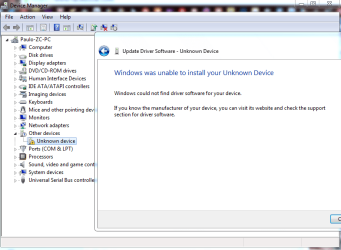
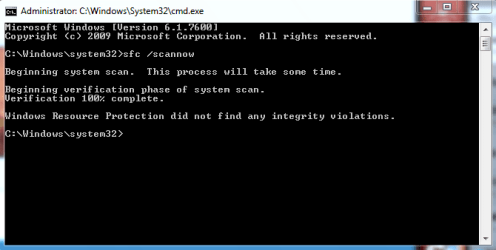
I Can't Update it.. and sfc is ok!
 

Attachments

  • Capture_41.PNG
    Capture_41.PNG
    29.3 KB · Views: 1
  • Capture_42.PNG
    Capture_42.PNG
    8.5 KB · Views: 11

My Computer

Computer type
PC/Desktop
Computer Manufacturer/Model Number
AsusTEK Computer INC.
OS
Windows Ultimate 32-bit x86 Service-Pack-1
CPU
Intel Pentium Dual Core CPU E5400 @2.70 Ghz 2.70Ghz
Motherboard
Asus P5G41T-M LX3
Memory
2.00 GB Kingston RAM
Graphics Card(s)
Nvidia Geforce GT 630 2GB DDR3
Sound Card
RealTek Audio HD Manager
Monitor(s) Displays
ViewSonic V1616wSERIES
Screen Resolution
1366x768
Hard Drives
WDC WD1600AAJS-00WAA0 ATA Drive - Old Hard Drive = 120 GB
Hitachi HDS721050DLE630ATA Drive - New Hard Drive = 500 GB
PSU
I Think Hitachi PSU
Case
HiP Case w/ Power Supply
Cooling
Intel Fan - CPU - Integrated Fan - GPU - Chassis Fan -
Keyboard
Cruiser Keyboard
Mouse
iMega Plus Mouse
Internet Speed
1.9 Mbps Up :D And 1.0 Upload/s :D
Antivirus
avast! Antivirus
Browser
Mozilla FireFox - Google Chrome 28 - Opera - Safari
Other Info
Games: 2000 - 2008 - Some (2014)

avast! 2038 = Paid!
Hi ... Is the issue you are having related to the Motherboard in your System Specs ? ...
 

My Computer

Computer Manufacturer/Model Number
W530-3630QM1
OS
windows 7 home 64bit
CPU
INTEL-CORE I7
Memory
16GB
Hard Drives
750GB
Browser
Chrome
Yes it is!
 

My Computer

Computer type
PC/Desktop
Computer Manufacturer/Model Number
AsusTEK Computer INC.
OS
Windows Ultimate 32-bit x86 Service-Pack-1
CPU
Intel Pentium Dual Core CPU E5400 @2.70 Ghz 2.70Ghz
Motherboard
Asus P5G41T-M LX3
Memory
2.00 GB Kingston RAM
Graphics Card(s)
Nvidia Geforce GT 630 2GB DDR3
Sound Card
RealTek Audio HD Manager
Monitor(s) Displays
ViewSonic V1616wSERIES
Screen Resolution
1366x768
Hard Drives
WDC WD1600AAJS-00WAA0 ATA Drive - Old Hard Drive = 120 GB
Hitachi HDS721050DLE630ATA Drive - New Hard Drive = 500 GB
PSU
I Think Hitachi PSU
Case
HiP Case w/ Power Supply
Cooling
Intel Fan - CPU - Integrated Fan - GPU - Chassis Fan -
Keyboard
Cruiser Keyboard
Mouse
iMega Plus Mouse
Internet Speed
1.9 Mbps Up :D And 1.0 Upload/s :D
Antivirus
avast! Antivirus
Browser
Mozilla FireFox - Google Chrome 28 - Opera - Safari
Other Info
Games: 2000 - 2008 - Some (2014)

avast! 2038 = Paid!
I just checked; it appears Asus still has the motherboard drivers available. I would check your BIOS version too. It most likely needs updated as well.

Motherboard - P5G41T-M LX3 - ASUS

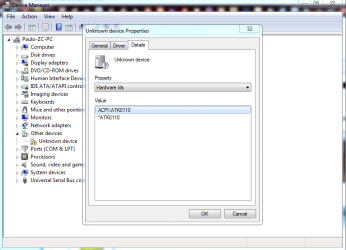
Right click on the "Unknown Device" in Device Manager and select Properties.
In the Properties window, click on the Details tab.
Under Property, click on the drop-down arrow and select Hardware Ids.
Copy and paste the data that appears under Value into your next message.
 

Attachments

  • Hardware IDs.JPG
    Hardware IDs.JPG
    75.3 KB · Views: 0

My Computer

Computer type
PC/Desktop
Computer Manufacturer/Model Number
Built 2/11/2011
OS
Windows 7 Pro-x64
CPU
i7-2600 3.4GHz - 3.8GHz Turbo
Motherboard
Intel DH67BL-B3
Memory
8Gb - 2x4GB, Muskin 991770 PC3-1333
Graphics Card(s)
Integrated Intel HD 2000
Sound Card
Integrated Intel 10.1 HD, RealTek ALC892
Monitor(s) Displays
Asus LCD VH222H, Haier HL24XSL2a
Screen Resolution
1920x1080, 1920x1080
Hard Drives
Crucial SSD C300-128Gb,
Western Digital WD5002AALX - 500Gb,
Western Digital WD7501AALS - 750Gb
PSU
Seasonic 650W 80+ Gold Modular
Case
Rosewill Defender
Cooling
Stock CPU, Four 120mm case fans, PCH fan added
Keyboard
Logitech EX100 Y-RBH94 Wireless
Mouse
Logitech EX100 M-RCE95 Wireless
Internet Speed
3.0/1.5 Mbs
Antivirus
Microsoft Security Essentials
Browser
Microsoft Internet Explorer 11
Other Info
Antec Veris Premier-Multimedia IR Station,
Cyber Accoustics-3602 Speakers,
AFT XM-5U Card Reader,
Hauppauge TV-HVR-2250,
Sony LX300 USB Turntable
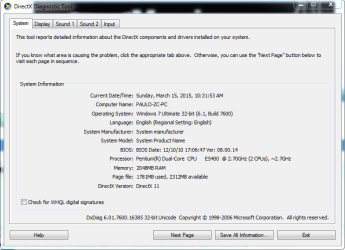
@carwiz so, here's my unknown device info and Bios info
ACPI\ATK0110
*ATK0110
@maxie already tried that but ain't working :(
 

Attachments

  • Capture_43.PNG
    Capture_43.PNG
    31.4 KB · Views: 0
  • Capture_44.PNG
    Capture_44.PNG
    20.5 KB · Views: 0

My Computer

Computer type
PC/Desktop
Computer Manufacturer/Model Number
AsusTEK Computer INC.
OS
Windows Ultimate 32-bit x86 Service-Pack-1
CPU
Intel Pentium Dual Core CPU E5400 @2.70 Ghz 2.70Ghz
Motherboard
Asus P5G41T-M LX3
Memory
2.00 GB Kingston RAM
Graphics Card(s)
Nvidia Geforce GT 630 2GB DDR3
Sound Card
RealTek Audio HD Manager
Monitor(s) Displays
ViewSonic V1616wSERIES
Screen Resolution
1366x768
Hard Drives
WDC WD1600AAJS-00WAA0 ATA Drive - Old Hard Drive = 120 GB
Hitachi HDS721050DLE630ATA Drive - New Hard Drive = 500 GB
PSU
I Think Hitachi PSU
Case
HiP Case w/ Power Supply
Cooling
Intel Fan - CPU - Integrated Fan - GPU - Chassis Fan -
Keyboard
Cruiser Keyboard
Mouse
iMega Plus Mouse
Internet Speed
1.9 Mbps Up :D And 1.0 Upload/s :D
Antivirus
avast! Antivirus
Browser
Mozilla FireFox - Google Chrome 28 - Opera - Safari
Other Info
Games: 2000 - 2008 - Some (2014)

avast! 2038 = Paid!
ACPI\ATK0110 appears to be the hardware interface for an Asus utility suite for overclocking the PC. It was for use with Windows XP and had a lot of problems. I doubt that it will work with Windows 7. Just delete the hardware entry if warning bothers you. Or you can download the utility suite from Asus and see if it installs. Personally, I wouldn't use it.
 

My Computer

Computer type
PC/Desktop
Computer Manufacturer/Model Number
Built 2/11/2011
OS
Windows 7 Pro-x64
CPU
i7-2600 3.4GHz - 3.8GHz Turbo
Motherboard
Intel DH67BL-B3
Memory
8Gb - 2x4GB, Muskin 991770 PC3-1333
Graphics Card(s)
Integrated Intel HD 2000
Sound Card
Integrated Intel 10.1 HD, RealTek ALC892
Monitor(s) Displays
Asus LCD VH222H, Haier HL24XSL2a
Screen Resolution
1920x1080, 1920x1080
Hard Drives
Crucial SSD C300-128Gb,
Western Digital WD5002AALX - 500Gb,
Western Digital WD7501AALS - 750Gb
PSU
Seasonic 650W 80+ Gold Modular
Case
Rosewill Defender
Cooling
Stock CPU, Four 120mm case fans, PCH fan added
Keyboard
Logitech EX100 Y-RBH94 Wireless
Mouse
Logitech EX100 M-RCE95 Wireless
Internet Speed
3.0/1.5 Mbs
Antivirus
Microsoft Security Essentials
Browser
Microsoft Internet Explorer 11
Other Info
Antec Veris Premier-Multimedia IR Station,
Cyber Accoustics-3602 Speakers,
AFT XM-5U Card Reader,
Hauppauge TV-HVR-2250,
Sony LX300 USB Turntable
Back
Top