Solved Intel R Network Adapter Not Present?

jodes

New member
Local time
1:59 AM
Messages
3
Hey there!

So, I recently installed Windows Home Edition 64x onto my computer. However, when I tried to install a driver so that I could access my internet again, it said that the Intel(R) Adapter was no longer to be found when my prior version did have it on the computer. I've been looking into trying different drivers and I've heard that depending on the type of motherboard you have, that has something to do with which ones you want to install. But because this computer was custom built by a friend I'm no longer in contact with, it makes finding out this information a little tricky. I'm just not half as computer savvy as they were. I collected this information based off of other tutorials if it would help any and attached it.

Any help would be greatly appreciated!
 

Attachments

My Computer

Computer type
PC/Desktop
Computer Manufacturer/Model Number
Custom Build
OS
Windows Home Premium 64 bit
Welcome to the forum,

I would like you to provide a couple other pieces of info, we need to know what motherboard you have, CPU-Z will give us that,

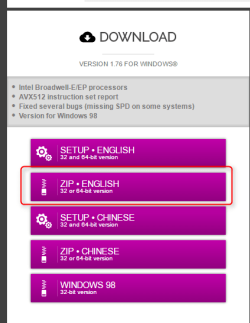
CPU-Z | Softwares | CPUID

2016-07-13_20h20_07.png

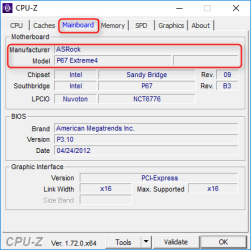
After you open it go to the mainboard tab like this,

2016-07-13_20h21_55.png

And either post a screenshot or tell us the manufacturer and model.

This file here will give us your hardware ID's,

http://www.sevenforums.com/tutorials/374583-system-information-file-create-windows.html#Part1

Just looking at the file you uploaded I see a lot of basic drivers from the installer, so you may need several updated.
 

My Computer

Computer type
PC/Desktop
Computer Manufacturer/Model Number
Self Built
OS
Win 10 Pro x64
CPU
Intel I5-2500K @3.3GHz
Motherboard
Asrock P67 Extreme4
Memory
16GB G.Skill Ripjaws X (4x4GB)
Graphics Card(s)
EVGA GeForce 750 Ti SC 2GB
Sound Card
ASUS Xonar DG 5.1 Channels 24-bit 96KHz PCI Interface Sound
Monitor(s) Displays
auria eq2367
Screen Resolution
1920 x 1080
Hard Drives
250GB Samsung 850 EVO SSD
1TB WD Blue
1TB Hitachi
PSU
SeaSonic X 650W 80 Plus Gold
Case
Corsair Obsidian 750D
Cooling
Corsair H60, Three 140mm case fans
Keyboard
Logitech Wireless Keyboard K520
Mouse
Logitech Wireless Mouse M310
Internet Speed
Wave Broadband ~ 100 dn 5 up
Antivirus
Windows Defender, Malwarebytes Premium
Browser
Edge, IE11, Chrome
Other Info
Laptop specs: HP g7-1365dx /
CPU: AMD A6-3420M APU with Radeon(tm) HD Graphics /
RAM: Crucial 8Gb (2x4Gb) /
SSD: Crucial M4-CT128M4SSD2 ATA Device/ FW 000F /
GFX: AMD Radeon HD 6520G /
OS: Windows 10 Pro x64
First off, thank you and thanks for getting back to me!

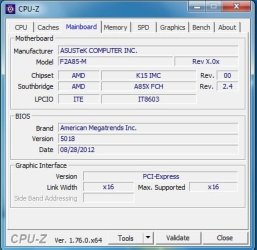
Here's the information you requested.
 

Attachments

  • screen.jpg
    screen.jpg
    29.9 KB · Views: 15
  • jodes.txt
    jodes.txt
    349.8 KB · Views: 2

My Computer

Computer type
PC/Desktop
Computer Manufacturer/Model Number
Custom Build
OS
Windows Home Premium 64 bit
You're welcome, I see nothing about an Intel network adapter in your file or on the specs of your motherboard.

You have two problem devices listed, one is a Realtek network adapter,

Code:
Ethernet Controller	PCI\VEN_10EC&DEV_8168&SUBSYS_85051043&REV_09\06000000684CE00000 The drivers for this device are not installed.	
SM Bus Controller	PCI\VEN_1022&DEV_780B&SUBSYS_85271043&REV_14\3&267A616A&0&A0	The drivers for this device are not installed.

The other is part of your chipset driver.

I would suggest you install the chipset first then the Ethernet controller.

If you go here,

https://www.asus.com/Motherboards/F2A85M/HelpDesk_Download/

Select Windows 7 64bit in the OS dropdown,

2016-07-14_19h00_15.png

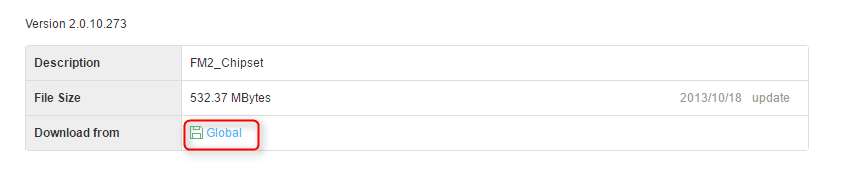
Under chipset download the second one down,

2016-07-14_19h03_00.png

Then under LAN, just download the top one,

2016-07-14_19h08_11.png

Once downloaded and unzipped you will see the setup.exe in each, you have to look inside the Realtek folder for that one though.

You may want to go back and get the Realtek audio driver too afterwards.
 

My Computer

Computer type
PC/Desktop
Computer Manufacturer/Model Number
Self Built
OS
Win 10 Pro x64
CPU
Intel I5-2500K @3.3GHz
Motherboard
Asrock P67 Extreme4
Memory
16GB G.Skill Ripjaws X (4x4GB)
Graphics Card(s)
EVGA GeForce 750 Ti SC 2GB
Sound Card
ASUS Xonar DG 5.1 Channels 24-bit 96KHz PCI Interface Sound
Monitor(s) Displays
auria eq2367
Screen Resolution
1920 x 1080
Hard Drives
250GB Samsung 850 EVO SSD
1TB WD Blue
1TB Hitachi
PSU
SeaSonic X 650W 80 Plus Gold
Case
Corsair Obsidian 750D
Cooling
Corsair H60, Three 140mm case fans
Keyboard
Logitech Wireless Keyboard K520
Mouse
Logitech Wireless Mouse M310
Internet Speed
Wave Broadband ~ 100 dn 5 up
Antivirus
Windows Defender, Malwarebytes Premium
Browser
Edge, IE11, Chrome
Other Info
Laptop specs: HP g7-1365dx /
CPU: AMD A6-3420M APU with Radeon(tm) HD Graphics /
RAM: Crucial 8Gb (2x4Gb) /
SSD: Crucial M4-CT128M4SSD2 ATA Device/ FW 000F /
GFX: AMD Radeon HD 6520G /
OS: Windows 10 Pro x64
Yeah, I suppose if I don't have either of those, that would create a major issue, wouldn't it.

Well, I've downloaded both the chipset and the LAN file. That seems to have done the trick! I'll take your recommendation and download the audio driver, too. Thank you so much for being patient with me and walking me through this. I really do appreciate the help!
 

My Computer

Computer type
PC/Desktop
Computer Manufacturer/Model Number
Custom Build
OS
Windows Home Premium 64 bit

My Computer

Computer type
PC/Desktop
Computer Manufacturer/Model Number
Self Built
OS
Win 10 Pro x64
CPU
Intel I5-2500K @3.3GHz
Motherboard
Asrock P67 Extreme4
Memory
16GB G.Skill Ripjaws X (4x4GB)
Graphics Card(s)
EVGA GeForce 750 Ti SC 2GB
Sound Card
ASUS Xonar DG 5.1 Channels 24-bit 96KHz PCI Interface Sound
Monitor(s) Displays
auria eq2367
Screen Resolution
1920 x 1080
Hard Drives
250GB Samsung 850 EVO SSD
1TB WD Blue
1TB Hitachi
PSU
SeaSonic X 650W 80 Plus Gold
Case
Corsair Obsidian 750D
Cooling
Corsair H60, Three 140mm case fans
Keyboard
Logitech Wireless Keyboard K520
Mouse
Logitech Wireless Mouse M310
Internet Speed
Wave Broadband ~ 100 dn 5 up
Antivirus
Windows Defender, Malwarebytes Premium
Browser
Edge, IE11, Chrome
Other Info
Laptop specs: HP g7-1365dx /
CPU: AMD A6-3420M APU with Radeon(tm) HD Graphics /
RAM: Crucial 8Gb (2x4Gb) /
SSD: Crucial M4-CT128M4SSD2 ATA Device/ FW 000F /
GFX: AMD Radeon HD 6520G /
OS: Windows 10 Pro x64
Back
Top