Intel says do a clean install so I have questions.

papagym

New member
Local time
6:57 AM
Messages
45
Location
Central Arizona
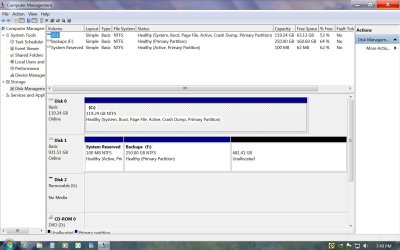
I'm getting ready to do a clean install, but before I do that I have questions. Windows 7 is currently installed on a 128 GB SSD (C:/). The 100MB SRP (Sys. Res. Parti.) and a Backup Partition (F:/) are on one of my HDD.

I have set (and tested) the SSD so I can boot from it without a HDD connected.

I have a second HDD if needed for temporary location for the following.
(both HDD are 1 TB so there are plenty of room)

Can I use the forum tutorial to delete SRP? When do I delete it? My (F:/)Partition has backup files, restore points, and system imaged backups on it. Can I leave it there safely and (format?) then extend the (F:/) Partition into the area where SRP was? Can I move the old users files all at once, which would include all of the folders under favorities and libraries? (yes, I may need a partition for them)

I'm planning to just have the SSD connecter for the clean install.
After the clean install is it still considered as clean if I move Programs and Users files to a HDD? What current tutorials should I use to move them?

I think I covered the bases but please fill me in if you think I massed a point
Thanks

Happy Fathers Day to all you Dads out there.
 

My Computer My Computer

At a glance

Windows 7 Ultimate x64Intel I7 2600k16 GB Corsair Vengence560 Ti
Computer Manufacturer/Model Number
Intel DZ68BC Home Built
OS
Windows 7 Ultimate x64
CPU
Intel I7 2600k
Motherboard
Intel DZ68BC
Memory
16 GB Corsair Vengence
Graphics Card(s)
560 Ti
Sound Card
onboard
Monitor(s) Displays
Samgung 23"
Hard Drives
SSD Crucial 128GB
Seagate 1TB Sata 3
WD 1TB Sata 3
PSU
OCZ 850W
Case
Lian-Le 7f
Cooling
Intel Std./CPU
Why do you want to delete the System Reserved partition? Just pre-partition the SSD to avoid having it issued in the first place. Use Step 2 here: SSD - HDD Optimize for Windows Reinstallation

It's best not to move your User folders to another HD because Win7 Backup Imaging will want to include them in the image since they are System files. In that case it's better to copy them to HD and then link them to the related Library - Include a Folder - Windows 7 Forums.

Be sure to unplug the HD during install to SSD. Afterwards you can boot Win7 on the HD using the one-time BIOS Boot menu key until you're ready to delete it in Disk Mgmt.
 
Greg's comment;
"Why do you want to delete the System Reserved partition? Just pre-partition the SSD to avoid having it issued in the first place. Use Step 2 here: SSD - HDD Optimize for Windows Reinstallation"

In his tutorial (step two) the bare foot kid makes two partitions 200MB & 100GB for the SRP and Windows 7 respectively. So if I do this with only my SSD connected (no HDD) I'll end up having two SRP's, Since there is one on my HDD from my origional install. The one I want to delete shown above. In step two item 3 he also states the the 200MB partition was made bigger to hold "Backup, Restore, and BitLocker" Putting progams there is a big mistake. My backup alone are almost 90 GB so I made a F:/ partition on the HDD to hold them< (see attachment) I store System images on F:/ too. While your looking at the attachment, please note that there is only about 62GB of room left on my 128 GB SSD (C:/) That why I want to move whatever I can off of C:/.

Your second paragraph is a little confusing, but I think your saying to copy the files to the HDD and use a link to point to them. If you make a link in C: to point to the HDD files I would think that you could delete the files in C:.that were copied leaving the link in its pace.. Can you point out a good tutorial to make the link? (by files I meaning folders,libraries etc.)

One last thing, what do I do about my programs. Reloading the 81 prograams that I now have on my system is going to be a real pain. Isn't there some program or way to move them to a temporary location then move them back after the clean install?

It seems like every one is using those two words (clean install) like it is a simple thing to do.

Thanks for your help! Jim
 

Attachments

  • current drv.jpg
    current drv.jpg
    165.8 KB · Views: 14

My Computer My Computer

At a glance

Windows 7 Ultimate x64Intel I7 2600k16 GB Corsair Vengence560 Ti
Computer Manufacturer/Model Number
Intel DZ68BC Home Built
OS
Windows 7 Ultimate x64
CPU
Intel I7 2600k
Motherboard
Intel DZ68BC
Memory
16 GB Corsair Vengence
Graphics Card(s)
560 Ti
Sound Card
onboard
Monitor(s) Displays
Samgung 23"
Hard Drives
SSD Crucial 128GB
Seagate 1TB Sata 3
WD 1TB Sata 3
PSU
OCZ 850W
Case
Lian-Le 7f
Cooling
Intel Std./CPU
clean install is easy. We have no magic wands, but we do have some excellent tutorials.

Listen to and follow the advice and procedures given to you by GregRocker, a recognized authority in this matter.
 

My Computer My Computer

At a glance

MS Windows 7 Ultimate SP1 64-bitAMD A10-4600M6.00 GB Dual-Channel DDR3 @ 798MHz (11-11-12-28)AMD Radeon HD 7660G
Computer Manufacturer/Model Number
Toshiba Satellite S875D-S7239 laptop
OS
MS Windows 7 Ultimate SP1 64-bit
CPU
AMD A10-4600M
Motherboard
AMD Pumori (Socket FT1)
Memory
6.00 GB Dual-Channel DDR3 @ 798MHz (11-11-12-28)
Graphics Card(s)
AMD Radeon HD 7660G
Sound Card
High Definition Audio Device
Monitor(s) Displays
Generic PnP Monitor (1600x900@60Hz)
Screen Resolution
1600x900@60Hz
Hard Drives
SSD 119GB Corsair CSSD-V128GB2 ATA Device
Keyboard
Standard PS/2 Keyboard
Mouse
HP Wireless Optical Mobile Mouse Model FHA-3410
Internet Speed
What the local pub, local coffee shop offers.
Other Info
Optical Drive:MATSHITA BD-CMB UJ160B ATA Device


Also have an Asus ha1002xp netbook with Win 7 Ultimate installed.
Use Step 2.1 commands in black box if you want a full SSD partition, Step 2.2 if you want to choose the partition size. This will rule out the SysReserved partition. But it's still a good idea to unplug all other SSD/HD's during install and choose your HD to boot via BIOS Boot Order or one-time BIOS Boot Menu.

The tutorial is there on how to link the User folders once copied to data partition to Libraries.

You must reinstall your programs. Take your time to watch for performance changes and keep a clean boot.

Follow the steps to get a perfect reinstall in Clean Reinstall - Factory OEM Windows 7
 
Thanks Greg,
The Windows 7 clean install was done two weeks ago, I also installted MS Office Home & Business this week. I've been monitoring my event viewer since. I'm still getting that pesky Event ID 56 (Driver PCI returning invalid ID for child device (FFFFFFFFFFFFFFFF00)) almost daily. I was getting some wierd numbers on my Renesas Electronics --Properties (Security Tab) under group and user names. But that problem is was fixed (Intel was concerned about both of these problems) I attached some screen shots. There were no errors so far today. Thanks for the help.
Jim
 

My Computer My Computer

At a glance

Windows 7 Ultimate x64Intel I7 2600k16 GB Corsair Vengence560 Ti
Computer Manufacturer/Model Number
Intel DZ68BC Home Built
OS
Windows 7 Ultimate x64
CPU
Intel I7 2600k
Motherboard
Intel DZ68BC
Memory
16 GB Corsair Vengence
Graphics Card(s)
560 Ti
Sound Card
onboard
Monitor(s) Displays
Samgung 23"
Hard Drives
SSD Crucial 128GB
Seagate 1TB Sata 3
WD 1TB Sata 3
PSU
OCZ 850W
Case
Lian-Le 7f
Cooling
Intel Std./CPU
Glad to help. Let us know if anything else comes up.

When ready you can mark the thread Solved at top.
 
Back
Top