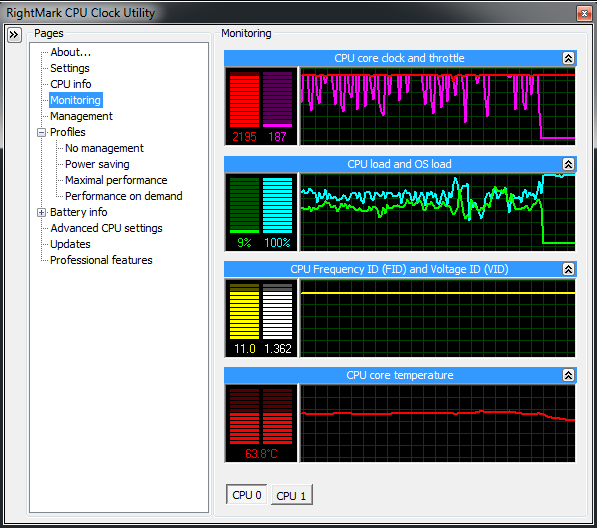
Hello, I've made a clean install of Windows 7 Ultimate a few days ago, and I started to encounter the following problem after 30-60 minutes:
It usually happens when I'm running a computer game (any game), I experience a sudden fps drop, even though before that, on maximum quality the game was running perfectly, becomes unenjoyable, quit the game. The CPU meter gadget shows 100%, and even after I close everything, browser, windows explorer, the best I get at idle is 70-80%, and if I try to open anything at all, it becomes stuck at 100% again. So I open task manager and go processes, put them in a descending order of processor usage, and see that they nowhere near add up to 100%, even though at the bottom the task manager says CPU usage is at 100%. Phyiscal memory is usually around 20-60%, no problems with that.
If I go to Performance tab, and click on resource monitor, I experience the same thing: the actual usage is nowhere near 100%, I can't see any processes that would explain for the performance drop, in fact the highest demanding process is the resource monitor itself.
The problem presists until I restart the computer, shutting down takes much longer now.
I've been trying to find a solution online for two whole days now, it's very frustrating.
It's a HP Compaq 8510w laptop with Windows 7 Ultimate x64 Build 7600
Intel Core 2 Duo T7500 (2.2 GHZ)
Hewlett-Packard 30C5 (Intel PM965 (Cresline-PM) + ICH8M-E)
4GB memory
nVidia Quadro FX 570M [HP]
Intel 82801HB ICH8 - High Definition Audio [B1]
I've tried several suggestions:
Disabling HDAC in Device Manager (High Definition Audio Controller)
Disabling Audio Enhancements in Sound>Speaker Properties
Installing the very newest drivers, including chipset drivers
Running programs in XP compatibility mode
Disabling the gadgets
I've no reason to think I've been infected by malicious software, I can't find any suspicious processes running.
Anything else I could try? This is driving me absolutely mad.
It usually happens when I'm running a computer game (any game), I experience a sudden fps drop, even though before that, on maximum quality the game was running perfectly, becomes unenjoyable, quit the game. The CPU meter gadget shows 100%, and even after I close everything, browser, windows explorer, the best I get at idle is 70-80%, and if I try to open anything at all, it becomes stuck at 100% again. So I open task manager and go processes, put them in a descending order of processor usage, and see that they nowhere near add up to 100%, even though at the bottom the task manager says CPU usage is at 100%. Phyiscal memory is usually around 20-60%, no problems with that.
If I go to Performance tab, and click on resource monitor, I experience the same thing: the actual usage is nowhere near 100%, I can't see any processes that would explain for the performance drop, in fact the highest demanding process is the resource monitor itself.
The problem presists until I restart the computer, shutting down takes much longer now.
I've been trying to find a solution online for two whole days now, it's very frustrating.
It's a HP Compaq 8510w laptop with Windows 7 Ultimate x64 Build 7600
Intel Core 2 Duo T7500 (2.2 GHZ)
Hewlett-Packard 30C5 (Intel PM965 (Cresline-PM) + ICH8M-E)
4GB memory
nVidia Quadro FX 570M [HP]
Intel 82801HB ICH8 - High Definition Audio [B1]
I've tried several suggestions:
Disabling HDAC in Device Manager (High Definition Audio Controller)
Disabling Audio Enhancements in Sound>Speaker Properties
Installing the very newest drivers, including chipset drivers
Running programs in XP compatibility mode
Disabling the gadgets
I've no reason to think I've been infected by malicious software, I can't find any suspicious processes running.
Anything else I could try? This is driving me absolutely mad.
My Computer
At a glance
Windows 7 ultimate x64
- OS
- Windows 7 ultimate x64