Dual Core Processor detected as 1 core

Madjedi

New member
Local time
12:26 AM
Messages
9
Location
Okanagan
Firstly, in task manager, there is only one core recognised (one cpu graph). I have no option to select "one graph, multiple cpus".

Secondly, in device manager, there is only 1 core with no option to select 2 or box for detect HAL.

Lastly BIOS doesn't detect more then 1.

I have processor box unchecked and have uninstalled my CPU from device manager in hopes a restard would re-detect it. I have also updated my mobo & vid card drivers from the site and updated my bios to the latest.

I just bought COD: Black Ops for $60 and it requires a dual core processor to play it:confused:, anything else I can try short of re-installing windows?
 

My Computer

Computer Manufacturer/Model Number
EVGA__
OS
windows 7 ultimate 32bit
CPU
Intel(R) Core(TM)2 Duo CPU E8500 @ 3.16GHz, ~3.2GHz
Motherboard
nForce 750i SLI
Memory
4096MB RAM
Graphics Card(s)
NVIDIA GeForce GTX 280
Monitor(s) Displays
SyncMaster T220/T220G,SyncMaster Magic T220/T220G(Analog)
Hard Drives
300 GB + 500 GB Sata
Case
Antec Gun Metal Black
just checking that you realise dual core will only show as single cpu?
 

My Computer

Computer Manufacturer/Model Number
HP dv6519tx
OS
Windows 7 Ultimate x64
CPU
1.80 GHz Intel Core 2 Duo processor T7100
Memory
3 gig ddr2
Graphics Card(s)
NVIDIA GeForce 8400M GS
Sound Card
Realtek High Definition Audio
Monitor(s) Displays
15.4” WXGA High Definition BrightView Widescreen
Screen Resolution
1280 x 800
Hard Drives
Hitachi 320 GB (5400 rpm)
PSU
90 W AC Power Adapter
Cooling
Kitchen plate under the lappy
Keyboard
101 key compatible
Mouse
Touch Pad with On/Off button and dedicated vertical Scroll
Internet Speed
Three Wireless internet prepaid using E160G USB dongle
just checking that you realise dual core will only show as single cpu?

If you mean within Windows, that's not true.

For example: Core I7. Four real cores, plus hyperthreading. Windows sees it as 8 processors, and shows 8 CPU Usage History plots in Device Manager.

It's possible to manually set a different HAL in older versions of Windows, but I don't know how to do it in Win7. Perhaps a repair install (upgrade in place) would autodetect the CPU properly, while maintaining most of your settings and installed programs. A clean install may be likelier to work.

Good luck.
 

My Computer

Computer Manufacturer/Model Number
homegrown
OS
Windows 7 Pro X64 SP1
CPU
Intel Core I7-3930k
Motherboard
Asus P9X79 Pro
Memory
16 GB Gskill DDR3-2133
Graphics Card(s)
eVGA GTX680
Sound Card
Creative X-Fi Titanium
Monitor(s) Displays
As PA246Q
Screen Resolution
1920 X 1200
Hard Drives
Corsair Force GT, 120 GB
WDC 1.5TB Caviar Black
PSU
PCP&C Silencer 750 Crossfire
Case
Silverstone FT02
Cooling
Noctua NH-D14
Keyboard
cheap Logitech USB
Mouse
Microsoft Intellimouse Explorer (old optical) USB
Internet Speed
6Mb cable
Other Info
Pioneer BDR-205
Samsung SH-203B
Monsoon 5.1 speakers
so are you saying my pc may be actually running both cores but only shows as one?
after much researching I determined that the problems I was having with Black Ops was caused by not having a dual-core minimum. But if it is running both cores then there should be no issue....I'm stumped.
 

My Computer

Computer Manufacturer/Model Number
EVGA__
OS
windows 7 ultimate 32bit
CPU
Intel(R) Core(TM)2 Duo CPU E8500 @ 3.16GHz, ~3.2GHz
Motherboard
nForce 750i SLI
Memory
4096MB RAM
Graphics Card(s)
NVIDIA GeForce GTX 280
Monitor(s) Displays
SyncMaster T220/T220G,SyncMaster Magic T220/T220G(Analog)
Hard Drives
300 GB + 500 GB Sata
Case
Antec Gun Metal Black
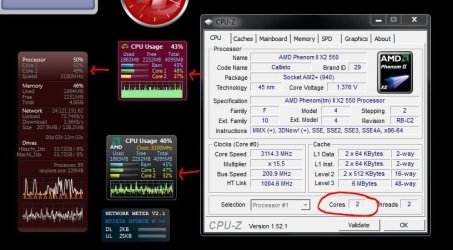
What do you see if you run CPU-Z or a CPU gadget ?
 

Attachments

  • Cpu_Cores_snip.JPG
    Cpu_Cores_snip.JPG
    73.2 KB · Views: 170

My Computer

Computer type
PC/Desktop
Computer Manufacturer/Model Number
Built them myself, Science Experiments !
OS
Win7 Enterprise, Win7 x86 (Ult 7600), Win7 x64 Ult 7600, TechNet RTM on AMD x64 (2.8Ghz)
CPU
AMD fx8350 4ghz, AMD-32 2400mhz, AMD-64 3200mhz, AMDx64 2.8G
Motherboard
SIS 755, ECS-K8M890M-M (Ult 7600), GigaByte & others
Memory
2gb, 4gb on the Ult 7600, 4gb on Technet RTM, 32gb on FX8350
Graphics Card(s)
Draw my own Graphics, several nVidia cards
Sound Card
on motherboard
Monitor(s) Displays
19" flat scr, 28" I-Inc widescr,22" Emprex Widescr, 23" Acer
Screen Resolution
1280 x 1024, 1440 x 900, 1920 x 1080
Hard Drives
6 pata Ide HD's & 2 Sata HD's
added 80gb external on Ult 7600 computer,
numerous extra 1tb, 2TB, 3Tb SATA HD's
A collection of ext HD Docks w/ HDs
PSU
430w, 550w, 600w, 700, 800, etc
Case
All Generic Full Towers
Cooling
Open Air & a few fans, some w/ colored LEDs
Keyboard
Compaq & Dell recycled from GoodWill
Mouse
Made in China Optical Wired Mouse
Internet Speed
Fast Cable InterNet
Antivirus
AVG Free on 24 different Desktops, NO Problems!
Browser
IE 8 is preferred, but use FireFox sometimes
Other Info
Linksys Routers, switches, & Hubs
Too Many USB Flash Drives to count, Biggest is 64GB !
Eight computers in my home network.
Sixteen computers at my business network.
Linked via TeamViewer !
Lots of old used spare computer parts everywhere!
1 core 1 thread with no option to select a second processor
 
Last edited:

My Computer

Computer Manufacturer/Model Number
EVGA__
OS
windows 7 ultimate 32bit
CPU
Intel(R) Core(TM)2 Duo CPU E8500 @ 3.16GHz, ~3.2GHz
Motherboard
nForce 750i SLI
Memory
4096MB RAM
Graphics Card(s)
NVIDIA GeForce GTX 280
Monitor(s) Displays
SyncMaster T220/T220G,SyncMaster Magic T220/T220G(Analog)
Hard Drives
300 GB + 500 GB Sata
Case
Antec Gun Metal Black
Try:
Task Manager\Performance tab: Click Menu item: View\CPU History\ One graph per CPU.

James
 

My Computer

OS
Win7U 64 RTM
CPU
Q9550
Motherboard
GA-EP45-UD3R
Memory
8GB Gskill
Graphics Card(s)
ASUS|EAH4850/HTDI/1GD3/A
Sound Card
xfi Plat
Monitor(s) Displays
Dell 2405fpw
Screen Resolution
1920x1200
Hard Drives
Seagate & WD sata Drives
PSU
Antec
Case
Antec
Keyboard
MS Natural Ergonomic 4000
Mouse
Logitech MX610 USB Cordless
yeah thats also in grey and cannot be clicked
 

My Computer

Computer Manufacturer/Model Number
EVGA__
OS
windows 7 ultimate 32bit
CPU
Intel(R) Core(TM)2 Duo CPU E8500 @ 3.16GHz, ~3.2GHz
Motherboard
nForce 750i SLI
Memory
4096MB RAM
Graphics Card(s)
NVIDIA GeForce GTX 280
Monitor(s) Displays
SyncMaster T220/T220G,SyncMaster Magic T220/T220G(Analog)
Hard Drives
300 GB + 500 GB Sata
Case
Antec Gun Metal Black
Whoops, should have read your OP more carefully. Given that it doesn't show in the BIOS, the task manager workaround is irrelevant. Can you give us a little more history? Is this a new install, new CPU? Are you running the latest bios? Yes, I see that you are.

James
 

My Computer

OS
Win7U 64 RTM
CPU
Q9550
Motherboard
GA-EP45-UD3R
Memory
8GB Gskill
Graphics Card(s)
ASUS|EAH4850/HTDI/1GD3/A
Sound Card
xfi Plat
Monitor(s) Displays
Dell 2405fpw
Screen Resolution
1920x1200
Hard Drives
Seagate & WD sata Drives
PSU
Antec
Case
Antec
Keyboard
MS Natural Ergonomic 4000
Mouse
Logitech MX610 USB Cordless
well to be honest with you I had the comp built and assembled at Memory Express and I couldn't tell you if it ever ran on both cores. I did recently install windows 7 on it, but Black Ops is the only game I am having problems with and I play higher end games then that.
 

My Computer

Computer Manufacturer/Model Number
EVGA__
OS
windows 7 ultimate 32bit
CPU
Intel(R) Core(TM)2 Duo CPU E8500 @ 3.16GHz, ~3.2GHz
Motherboard
nForce 750i SLI
Memory
4096MB RAM
Graphics Card(s)
NVIDIA GeForce GTX 280
Monitor(s) Displays
SyncMaster T220/T220G,SyncMaster Magic T220/T220G(Analog)
Hard Drives
300 GB + 500 GB Sata
Case
Antec Gun Metal Black
I assume your new bios has the default settings? Here is a link to what I think is the manual for your board:

http://www.evga.com/support/manuals/files/122-YW-E173.pdf

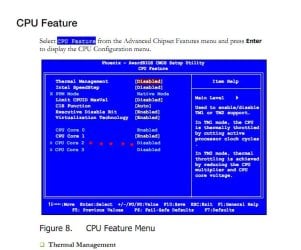
Search the pdf for 'CPU Feature'. A page on the CPU segment of the bios should appear. Is the 2nd core enabled? (see screen shot).

Edit: Heh! Ignore the dots leading to the third core...it's late. :)
 

Attachments

  • Dual Core Bios.JPG
    Dual Core Bios.JPG
    63.5 KB · Views: 156

My Computer

OS
Win7U 64 RTM
CPU
Q9550
Motherboard
GA-EP45-UD3R
Memory
8GB Gskill
Graphics Card(s)
ASUS|EAH4850/HTDI/1GD3/A
Sound Card
xfi Plat
Monitor(s) Displays
Dell 2405fpw
Screen Resolution
1920x1200
Hard Drives
Seagate & WD sata Drives
PSU
Antec
Case
Antec
Keyboard
MS Natural Ergonomic 4000
Mouse
Logitech MX610 USB Cordless
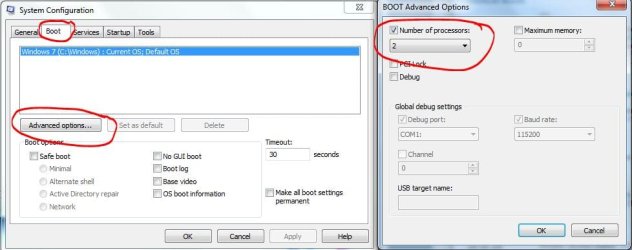
Start :ar: System Configuration :ar: Boot tab :ar: Advanced Options :ar: Number of processors
 

Attachments

  • System_config_Processors.JPG
    System_config_Processors.JPG
    50.9 KB · Views: 87

My Computer

Computer type
PC/Desktop
Computer Manufacturer/Model Number
Built them myself, Science Experiments !
OS
Win7 Enterprise, Win7 x86 (Ult 7600), Win7 x64 Ult 7600, TechNet RTM on AMD x64 (2.8Ghz)
CPU
AMD fx8350 4ghz, AMD-32 2400mhz, AMD-64 3200mhz, AMDx64 2.8G
Motherboard
SIS 755, ECS-K8M890M-M (Ult 7600), GigaByte & others
Memory
2gb, 4gb on the Ult 7600, 4gb on Technet RTM, 32gb on FX8350
Graphics Card(s)
Draw my own Graphics, several nVidia cards
Sound Card
on motherboard
Monitor(s) Displays
19" flat scr, 28" I-Inc widescr,22" Emprex Widescr, 23" Acer
Screen Resolution
1280 x 1024, 1440 x 900, 1920 x 1080
Hard Drives
6 pata Ide HD's & 2 Sata HD's
added 80gb external on Ult 7600 computer,
numerous extra 1tb, 2TB, 3Tb SATA HD's
A collection of ext HD Docks w/ HDs
PSU
430w, 550w, 600w, 700, 800, etc
Case
All Generic Full Towers
Cooling
Open Air & a few fans, some w/ colored LEDs
Keyboard
Compaq & Dell recycled from GoodWill
Mouse
Made in China Optical Wired Mouse
Internet Speed
Fast Cable InterNet
Antivirus
AVG Free on 24 different Desktops, NO Problems!
Browser
IE 8 is preferred, but use FireFox sometimes
Other Info
Linksys Routers, switches, & Hubs
Too Many USB Flash Drives to count, Biggest is 64GB !
Eight computers in my home network.
Sixteen computers at my business network.
Linked via TeamViewer !
Lots of old used spare computer parts everywhere!
Most BIOS for multi-core/processor boards have an option on one of the menus to enable ALL cores or just one. Have you looked through your BIOS and made sure that all is selected?
 

My Computer

Computer type
PC/Desktop
Computer Manufacturer/Model Number
Home built (GeneO industries)/Model 4
OS
Windows 10 Pro. EFI boot partition, full EFI boot
CPU
i7 4770k 4.4GHz (44-44-43-43 turbo) @ 1.248V
Motherboard
ASUS Maximus VI Hero
Memory
16GB (8GBx2) @2200 MHz G.skill Sniper 10-11-10-30-1, 1.6V
Graphics Card(s)
MSI GTX 970 Gaming 4G
Sound Card
Onboard SupremeFX Audio
Monitor(s) Displays
NEC Spectraview 2490WUXi-SV
Screen Resolution
1920 x 1200
Hard Drives
Samsung 850 Pro 256GB (OS), Samsung 2x 128GB 840 Pro SSD in RAID0, 3x WD Blue 6Gb/s 1TB RAID0, WD 2TB Black external USB 3.0, 2TB WD20EARS Green external USB 3.0, 2x 500GB Seagate and 1 750 GB external USB, 1x 350GB external USB3
PSU
Seasonic X-850 (2012 KM3 model)
Case
Fractal Design Define R4
Cooling
NH-D14, NF-F12, NF-A15; NF-P14, NF-P12,NF-A14, S12A PWM
Keyboard
Cooler Master Storm Quickfire Rapid - Brown
Mouse
Logitech G602
Internet Speed
126.4 Mb/s down, 24.3 Mb/s up
Other Info
USB 3.0 x8 , SATA III x8, eSATA, USB 2.0 x6. Samsung DVD R/W drive.

WEI: CPU 7.8, Memory 7.9, Graphics 7.9, Disk 7.9
I assume your new bios has the default settings? Here is a link to what I think is the manual for your board:

http://www.evga.com/support/manuals/files/122-YW-E173.pdf

Search the pdf for 'CPU Feature'. A page on the CPU segment of the bios should appear. Is the 2nd core enabled? (see screen shot).

Edit: Heh! Ignore the dots leading to the third core...it's late. :)


It is disabled in the pdf as well as actual BIOS with no option to enable
 

My Computer

Computer Manufacturer/Model Number
EVGA__
OS
windows 7 ultimate 32bit
CPU
Intel(R) Core(TM)2 Duo CPU E8500 @ 3.16GHz, ~3.2GHz
Motherboard
nForce 750i SLI
Memory
4096MB RAM
Graphics Card(s)
NVIDIA GeForce GTX 280
Monitor(s) Displays
SyncMaster T220/T220G,SyncMaster Magic T220/T220G(Analog)
Hard Drives
300 GB + 500 GB Sata
Case
Antec Gun Metal Black
Start :ar: System Configuration :ar: Boot tab :ar: Advanced Options :ar: Number of processors

# of processors is 1 with no option to select 2
 
Last edited:

My Computer

Computer Manufacturer/Model Number
EVGA__
OS
windows 7 ultimate 32bit
CPU
Intel(R) Core(TM)2 Duo CPU E8500 @ 3.16GHz, ~3.2GHz
Motherboard
nForce 750i SLI
Memory
4096MB RAM
Graphics Card(s)
NVIDIA GeForce GTX 280
Monitor(s) Displays
SyncMaster T220/T220G,SyncMaster Magic T220/T220G(Analog)
Hard Drives
300 GB + 500 GB Sata
Case
Antec Gun Metal Black
Most BIOS for multi-core/processor boards have an option on one of the menus to enable ALL cores or just one. Have you looked through your BIOS and made sure that all is selected?

yes, however I does not give me the option to select more then 1
 

My Computer

Computer Manufacturer/Model Number
EVGA__
OS
windows 7 ultimate 32bit
CPU
Intel(R) Core(TM)2 Duo CPU E8500 @ 3.16GHz, ~3.2GHz
Motherboard
nForce 750i SLI
Memory
4096MB RAM
Graphics Card(s)
NVIDIA GeForce GTX 280
Monitor(s) Displays
SyncMaster T220/T220G,SyncMaster Magic T220/T220G(Analog)
Hard Drives
300 GB + 500 GB Sata
Case
Antec Gun Metal Black
If the BIOS only sees one, there is nothing Windows can do. Either your CPU is busted or your Motherboard is busted, or the BIOS is busted. Either way the problem is outside of Windows. So you should be looking outside of Windows.
 

My Computer

Computer type
PC/Desktop
Computer Manufacturer/Model Number
Alienware Aurora ALX R4
OS
Windows 10 Pro (x64)
CPU
Intel Core i7-3930K (3.2GHz - 4.5GHz)
Motherboard
Alienware Aurora-R4 x79
Memory
4x Samsung 4GB PC3-12800 DDR3 (16GB 1600MHz)
Graphics Card(s)
Nvidia Geforce GTX 690
Sound Card
SteelSeries Siberia Elite
Monitor(s) Displays
Dell UltraSharp U3011
Screen Resolution
2560x1600
Hard Drives
Samsung 850 Pro 256 GB, Seagate 1TB Desktop Hybrid HDD, 2x Western Digital 4TB Green HDD
PSU
875W Some Dell PSU <.<
Case
Alienware Aurora ALX
Cooling
Custom Liquid Cooling (EK CPU & GPU blocks) dual EK 480RAD
Keyboard
Logitech G710+ Mechanical
Mouse
Logitech G700s
Internet Speed
Verizon Fios (50 mbps average)
Other Info
Server: Intel NUC D54250WYK: i5-4250U, 16GB, 256 GB mSATA, Windows Server 2012 R2
If the BIOS only sees one, there is nothing Windows can do. Either your CPU is busted or your Motherboard is busted, or the BIOS is busted. Either way the problem is outside of Windows. So you should be looking outside of Windows.

yeah figured that....thnx anyway guys
 

My Computer

Computer Manufacturer/Model Number
EVGA__
OS
windows 7 ultimate 32bit
CPU
Intel(R) Core(TM)2 Duo CPU E8500 @ 3.16GHz, ~3.2GHz
Motherboard
nForce 750i SLI
Memory
4096MB RAM
Graphics Card(s)
NVIDIA GeForce GTX 280
Monitor(s) Displays
SyncMaster T220/T220G,SyncMaster Magic T220/T220G(Analog)
Hard Drives
300 GB + 500 GB Sata
Case
Antec Gun Metal Black
The simplest way to diagnose it would be either to try your CPU in another (compatible) system or try a different Dual Core CPU in your system.

James
 

My Computer

OS
Win7U 64 RTM
CPU
Q9550
Motherboard
GA-EP45-UD3R
Memory
8GB Gskill
Graphics Card(s)
ASUS|EAH4850/HTDI/1GD3/A
Sound Card
xfi Plat
Monitor(s) Displays
Dell 2405fpw
Screen Resolution
1920x1200
Hard Drives
Seagate & WD sata Drives
PSU
Antec
Case
Antec
Keyboard
MS Natural Ergonomic 4000
Mouse
Logitech MX610 USB Cordless
Back
Top