
Intellipoint Software Incompatible With Win 7

ups4

New member
Local time
3:05 PM
Messages
6
Location
Sunrise, FL
I just installed Windows 7 Ultimate over my previous Vista Home Premium. I got a hardware compatibility warning before the install stating that a known issue with the MS Intellipoint software was detected.

This is the software that makes my (then) MS IntelliMouse Explorer fully functional with all the bells and whistles. The mouse works, but with basic functionality.

I researched the error code (1603) and determined that this was an "installation error"....duh. Researching this, I found several similar instances regarding this error, but none had any real resolution. I have since downloaded the Win 7 Intellipoint software from the MS site and get the same error code...and the installation is aborted.

I found several things to try in order to get the software to install.

1. Delete all temp files (%temp%).
2. Reinstall the latest MS .NET Framework
3. Install and run Windows Installer Cleanup to remove any old Intellipoint files. (None were found)
4. Checked to make sure Windows Installer Service was set to Auto and started....it was.
5. Tried the install using a "clean startup".

The only thing that was suggested that I didn't try was to uninstall Windows Installer and reinstall the latest version. I couldn't find it anywhere on my system. This in and of itself may be part of the problem?

None of the above ideas worked. I always got the "Incompatibility Notice" and error code 1603.

I have since purchased a new mouse, thinking if it said it was Windows 7 Certified, all would be good. NOPE....same problem when trying to install the software. The new mouse is a MS Natural Laser Mouse 6000.

Anybody have any other suggestions?

Paul
 

My Computer

Computer Manufacturer/Model Number
Dell Inspiron 530
OS
Windows 7 Ultimate 32 Bit
CPU
Genuine Intel(R) CPU 2140 @ 1.60GHz, Dual Core
Memory
4 GB
Monitor(s) Displays
Samsung Synchmaster 2233-22" LCD
Screen Resolution
1600x900x60Hz
Mouse
MS Natural Wireless Laser 6000
Internet Speed
Comcast 6Mb/2Mb
Hello Paul,

Have you already checked and used the latest drivers available at the link below from Microsoft?

Software Download

Hope this helps,
Shawn
 

My Computer

Computer type
PC/Desktop
Computer Manufacturer/Model Number
Self built custom
OS
64-bit Windows 11 Pro for Workstations
CPU
Intel i7-8700K OC'd to 5 GHz
Motherboard
ASUS ROG Maximus XI Formula Z390
Memory
64 GB (4x16GB) G.SKILL TridentZ RGB DDR4 3600 MHz
Graphics Card(s)
ASUS ROG-STRIX-GTX1080TI-O11G-GAMING
Sound Card
Integrated
Monitor(s) Displays
2 x Samsung Odyssey G7 27"
Screen Resolution
2560x1440
Hard Drives
1TB Samsung 990 PRO M.2,
4TB Samsung 990 PRO PRO M.2,
TerraMaster F8 SSD Plus NAS
PSU
Seasonic Prime Titanium 850W
Case
Thermaltake Core P3
Cooling
Corsair Hydro H115i
Keyboard
Logitech wireless K800
Mouse
Logitech MX Master 4
Internet Speed
2 Gb/s Download and 100 Mb/s Upload
Antivirus
Malwarebyte Anti-Malware Premium
Browser
Google Chrome
Other Info
Logitech Z625 speaker system,
Logitech BRIO 4K Pro webcam,
HP Color LaserJet Pro MFP M477fdn,
APC SMART-UPS RT 1000 XL - SURT1000XLI,
Galaxy S23 Plus phone
Hi Shawn.

Yes, sorry I should have mentioned that I've tried the driver download from the MS site, as well as the disk that came with the mouse. The download is a newer version, of course, but that didn't work either. Same error message.

I should also add that I did contact MS support by phone and the tech and I went through the exact same steps I listed in my original post....still no joy. The issue has been escalated for further troubleshooting...who knows if I'll ever hear back from them.

I believe there is something haywire with the Win 7 upgrade that I did. The upgrade went smoothly, but I've been getting some weird permission errors when trying to do things like delete the MS Intellipoint folder. Everything else seems to working fine. I ran System File Checker and it didn't find any problems.

Paul
 

My Computer

Computer Manufacturer/Model Number
Dell Inspiron 530
OS
Windows 7 Ultimate 32 Bit
CPU
Genuine Intel(R) CPU 2140 @ 1.60GHz, Dual Core
Memory
4 GB
Monitor(s) Displays
Samsung Synchmaster 2233-22" LCD
Screen Resolution
1600x900x60Hz
Mouse
MS Natural Wireless Laser 6000
Internet Speed
Comcast 6Mb/2Mb
Paul,

Unfortunately these type of strange issues may happen when doing a upgrade install instead of a clean install. You might consider doing a clean install of Windows 7 instead to root out any possible corruption or issues carried over from the Vista installation. :(
 

My Computer

Computer type
PC/Desktop
Computer Manufacturer/Model Number
Self built custom
OS
64-bit Windows 11 Pro for Workstations
CPU
Intel i7-8700K OC'd to 5 GHz
Motherboard
ASUS ROG Maximus XI Formula Z390
Memory
64 GB (4x16GB) G.SKILL TridentZ RGB DDR4 3600 MHz
Graphics Card(s)
ASUS ROG-STRIX-GTX1080TI-O11G-GAMING
Sound Card
Integrated
Monitor(s) Displays
2 x Samsung Odyssey G7 27"
Screen Resolution
2560x1440
Hard Drives
1TB Samsung 990 PRO M.2,
4TB Samsung 990 PRO PRO M.2,
TerraMaster F8 SSD Plus NAS
PSU
Seasonic Prime Titanium 850W
Case
Thermaltake Core P3
Cooling
Corsair Hydro H115i
Keyboard
Logitech wireless K800
Mouse
Logitech MX Master 4
Internet Speed
2 Gb/s Download and 100 Mb/s Upload
Antivirus
Malwarebyte Anti-Malware Premium
Browser
Google Chrome
Other Info
Logitech Z625 speaker system,
Logitech BRIO 4K Pro webcam,
HP Color LaserJet Pro MFP M477fdn,
APC SMART-UPS RT 1000 XL - SURT1000XLI,
Galaxy S23 Plus phone
I use all the latest intellipoint drivers with W7 Ultimate 64bit, no issues. I did a clean install, not an upgrade install. I do not think the drivers are incompatible.
 

My Computer

Computer Manufacturer/Model Number
DIY #3, #2
OS
W7 Ulti/64, XP Pro/32
CPU
INTEL i7 920 DO, Core2 Duo 6400
Motherboard
GIGABYTE EX58 UD3R-SLI, EP45-UD3R
Memory
KINGSTON DDR3 1333MHz, CORSAIR DDR2 800MHz
Graphics Card(s)
EVGA GTX 260 x2, 8800 GTX
Sound Card
REALTEK HD onboard, ditto
Monitor(s) Displays
SONY 40" BRAVIA LCD
Screen Resolution
1360 X 768
Hard Drives
OCZ VERTEX/RAID0 -3, Vertex 30GB
PSU
COOLERMASTER 900W, ENERMAX 850W
Case
COOLERMASTER HAF 932 x2
Cooling
stock
Keyboard
MS
Mouse
MS
Internet Speed
ADSL 3MB/768KBs
Other Info
amateur enthusiast
Thanks for that info Shawn.
I wasn't aware that the upgrade version could be used for a clean install. I had considered doing a re-install or re-upgrade to try and see if that would help, but I wasn't sure if I would lose all my Vista programs/settings and such.

One question...is it possible to do a "repair install" from the upgrade disk, thereby maintaining everything (except for broken items) on the drive as-is? Unfortunately I would need another weeks vacation to reinstall all my software and goodies that I had with my Vista system. I waited to do the Win 7 upgrade until I was on vacation this past week. Everything went quite smoothly except for the MS mouse issue.

The new mouse "works" for basic mousing activities, but I'm just PO'ed that I went out and spent $40 on a new mouse thinking that would fix the issue, and it turns out I could've kept my old mouse with the same problem. The problem is with me more than anything. I can't bear to have an issue like this unresolved :D. I will get to the bottom of it eventually. Thanks for your help, so far. I look forward to any additional ideas from anyone.
Paul
 

My Computer

Computer Manufacturer/Model Number
Dell Inspiron 530
OS
Windows 7 Ultimate 32 Bit
CPU
Genuine Intel(R) CPU 2140 @ 1.60GHz, Dual Core
Memory
4 GB
Monitor(s) Displays
Samsung Synchmaster 2233-22" LCD
Screen Resolution
1600x900x60Hz
Mouse
MS Natural Wireless Laser 6000
Internet Speed
Comcast 6Mb/2Mb
I use all the latest intellipoint drivers with W7 Ultimate 64bit, no issues. I did a clean install, not an upgrade install. I do not think the drivers are incompatible.
Yes, I agree, spyknee.

During my investigation into this, I've seen other people with the 64bit version tell me the same thing....no issues. The drivers are good, but I think there is some setting or other issue with my install (and others as well, judging by the number of complaints I've seen while researching this) that's keeping the compatibility issue a problem.

Paul
 

My Computer

Computer Manufacturer/Model Number
Dell Inspiron 530
OS
Windows 7 Ultimate 32 Bit
CPU
Genuine Intel(R) CPU 2140 @ 1.60GHz, Dual Core
Memory
4 GB
Monitor(s) Displays
Samsung Synchmaster 2233-22" LCD
Screen Resolution
1600x900x60Hz
Mouse
MS Natural Wireless Laser 6000
Internet Speed
Comcast 6Mb/2Mb
Thanks for that info Shawn.
I wasn't aware that the upgrade version could be used for a clean install. I had considered doing a re-install or re-upgrade to try and see if that would help, but I wasn't sure if I would lose all my Vista programs/settings and such.

One question...is it possible to do a "repair install" from the upgrade disk, thereby maintaining everything (except for broken items) on the drive as-is? Unfortunately I would need another weeks vacation to reinstall all my software and goodies that I had with my Vista system. I waited to do the Win 7 upgrade until I was on vacation this past week. Everything went quite smoothly except for the MS mouse issue.

The new mouse "works" for basic mousing activities, but I'm just PO'ed that I went out and spent $40 on a new mouse thinking that would fix the issue, and it turns out I could've kept my old mouse with the same problem. The problem is with me more than anything. I can't bear to have an issue like this unresolved :D. I will get to the bottom of it eventually. Thanks for your help, so far. I look forward to any additional ideas from anyone.

Paul

Unfortunately a repair install will not be able to fix issues from a upgraded installation though. Only from a clean install, or issues that didn't come from a upgrade install. :(
 

My Computer

Computer type
PC/Desktop
Computer Manufacturer/Model Number
Self built custom
OS
64-bit Windows 11 Pro for Workstations
CPU
Intel i7-8700K OC'd to 5 GHz
Motherboard
ASUS ROG Maximus XI Formula Z390
Memory
64 GB (4x16GB) G.SKILL TridentZ RGB DDR4 3600 MHz
Graphics Card(s)
ASUS ROG-STRIX-GTX1080TI-O11G-GAMING
Sound Card
Integrated
Monitor(s) Displays
2 x Samsung Odyssey G7 27"
Screen Resolution
2560x1440
Hard Drives
1TB Samsung 990 PRO M.2,
4TB Samsung 990 PRO PRO M.2,
TerraMaster F8 SSD Plus NAS
PSU
Seasonic Prime Titanium 850W
Case
Thermaltake Core P3
Cooling
Corsair Hydro H115i
Keyboard
Logitech wireless K800
Mouse
Logitech MX Master 4
Internet Speed
2 Gb/s Download and 100 Mb/s Upload
Antivirus
Malwarebyte Anti-Malware Premium
Browser
Google Chrome
Other Info
Logitech Z625 speaker system,
Logitech BRIO 4K Pro webcam,
HP Color LaserJet Pro MFP M477fdn,
APC SMART-UPS RT 1000 XL - SURT1000XLI,
Galaxy S23 Plus phone
Unfortunately a repair install will not be able to fix issues from a upgraded installation though. Only from a clean install, or issues that didn't come from a upgrade install. :(
Ahhhh, I see. Well then, I may just have to suck it up and do a clean install.

Either that, or live with the mouse the way it is.

Thanks for your input Shawn.

Paul
 

My Computer

Computer Manufacturer/Model Number
Dell Inspiron 530
OS
Windows 7 Ultimate 32 Bit
CPU
Genuine Intel(R) CPU 2140 @ 1.60GHz, Dual Core
Memory
4 GB
Monitor(s) Displays
Samsung Synchmaster 2233-22" LCD
Screen Resolution
1600x900x60Hz
Mouse
MS Natural Wireless Laser 6000
Internet Speed
Comcast 6Mb/2Mb
You're welcome Paul. Please let us know how it turns out if you do a clean install.
 

My Computer

Computer type
PC/Desktop
Computer Manufacturer/Model Number
Self built custom
OS
64-bit Windows 11 Pro for Workstations
CPU
Intel i7-8700K OC'd to 5 GHz
Motherboard
ASUS ROG Maximus XI Formula Z390
Memory
64 GB (4x16GB) G.SKILL TridentZ RGB DDR4 3600 MHz
Graphics Card(s)
ASUS ROG-STRIX-GTX1080TI-O11G-GAMING
Sound Card
Integrated
Monitor(s) Displays
2 x Samsung Odyssey G7 27"
Screen Resolution
2560x1440
Hard Drives
1TB Samsung 990 PRO M.2,
4TB Samsung 990 PRO PRO M.2,
TerraMaster F8 SSD Plus NAS
PSU
Seasonic Prime Titanium 850W
Case
Thermaltake Core P3
Cooling
Corsair Hydro H115i
Keyboard
Logitech wireless K800
Mouse
Logitech MX Master 4
Internet Speed
2 Gb/s Download and 100 Mb/s Upload
Antivirus
Malwarebyte Anti-Malware Premium
Browser
Google Chrome
Other Info
Logitech Z625 speaker system,
Logitech BRIO 4K Pro webcam,
HP Color LaserJet Pro MFP M477fdn,
APC SMART-UPS RT 1000 XL - SURT1000XLI,
Galaxy S23 Plus phone
Well, I thought I'd give everyone an update.

This problem has been resolved finally.
I downloaded/installed a program called Unlocker which unlocked the permission problem when trying to delete the old Intellipoint software. Once the old junk was gone, I was able to install the new Intellipoint software ver. 7.1 and it went perfectly. The mouse works fine with all the bells and whistles now.

Thanks to everyone for their suggestions and help.

Paul
 

My Computer

Computer Manufacturer/Model Number
Dell Inspiron 530
OS
Windows 7 Ultimate 32 Bit
CPU
Genuine Intel(R) CPU 2140 @ 1.60GHz, Dual Core
Memory
4 GB
Monitor(s) Displays
Samsung Synchmaster 2233-22" LCD
Screen Resolution
1600x900x60Hz
Mouse
MS Natural Wireless Laser 6000
Internet Speed
Comcast 6Mb/2Mb
Intellipoint/Intellitype Installation Error

I am having the exact same problem on a brand new machine, I am sure this was a clean install. I have tried all the same things with no luck and so fa,r I have no found anyone that has a resolution. There are no older versions of Intellipoint/type on installed on my machine. I have tried the 7.1 that came with the wireless desktop 3000 and installed version 8 from Microsoft.
 

My Computer

Computer Manufacturer/Model Number
Dell Inspiron 560
OS
Windows 7 Home Premium 64bit
CPU
Intel Pentium dual-core E5700 (3.0GHz, 2MB)
Memory
3GB DDR3 SDRAM 3X1GB
Graphics Card(s)
Integrated Intel Graphics Media Accelerator X4500
Monitor(s) Displays
Dell 20 Inch FPL, IN2020MF
Hard Drives
500GB NCQ Serial ATA Hard Drive (7200 RPM) w/ 16MB DataBurst Cache
Case
Slim Tower
I have no found anyone that has a resolution. There are no older versions of Intellipoint/type on installed on my machine. I have tried the 7.1 that came with the wireless desktop 3000 and installed version 8 from Microsoft.

Sorry but your statement is a little confusing.

Do you or don't you have Intellipoint installed? Which version? Since you have a 64-bit OS, you need the 64-bit software: Get it from Microsoft here - Microsoft Mouse and Keyboard Hardware - Download Software. They are for the Wireless 3000.

I have tried the 7.1 that came with the wireless desktop 3000 and installed version 8 from Microsoft.
 

My Computer

Computer type
PC/Desktop
Computer Manufacturer/Model Number
Custom built by me.
OS
Windows 10 Pro
CPU
Intel Core i7-4770K (3.5Ghz)
Motherboard
Gigabyte G1 Sniper 5 (F10 Bios)
Memory
32 gig Corsair Dominator Platinum (4x8Gig)
Graphics Card(s)
Sapphire Tri-X R9 Fury
Sound Card
Soundblaster ZXR
Monitor(s) Displays
NEC PA242W 24" LCD Monitor
Screen Resolution
1920 x 1200
Hard Drives
Primary - Samsung 850 Pro (512gig), Samsung 840 Pro (256gig), 2TB WD Caviar Black.
PSU
EVGA Supernova 1000 G2
Case
Cooler Master HAF X
Cooling
Corsair H100i with Corsair Air Series SP120 Quiet Fans
Keyboard
Logitech Wireless Wave
Mouse
Logitech Performance MX
Internet Speed
High Speed Cable
Antivirus
Norton Security
Browser
IE11
Other Info
Memory Timings - 1866MHz @ 9-9-9-27-1T @ 1.5 volts
Do you or don't you have Intellipoint installed? Which version? Since you have a 64-bit OS, you need the 64-bit software: Get it from Microsoft here - Microsoft Mouse and Keyboard Hardware - Download Software. They are for the Wireless 3000.

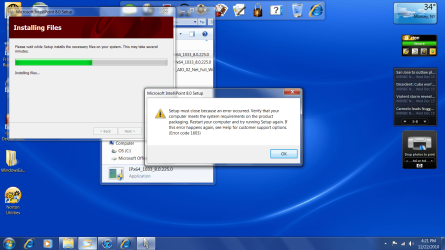
I have the 64bit intellipoint and intellitype softwtware downladed, but cannot get it to install. I have IPx64_1033_8.0.225.0 and ITPx64_1033_8.0.225.0. They both bomb with the following error code 1603.
 

My Computer

Computer Manufacturer/Model Number
Dell Inspiron 560
OS
Windows 7 Home Premium 64bit
CPU
Intel Pentium dual-core E5700 (3.0GHz, 2MB)
Memory
3GB DDR3 SDRAM 3X1GB
Graphics Card(s)
Integrated Intel Graphics Media Accelerator X4500
Monitor(s) Displays
Dell 20 Inch FPL, IN2020MF
Hard Drives
500GB NCQ Serial ATA Hard Drive (7200 RPM) w/ 16MB DataBurst Cache
Case
Slim Tower
Have you tried or seen this....

When you install the software, the "unable to install a required component" message appears

When you install the IntelliPoint software, you may receive a message saying that Setup was unable to install a required component. If Setup is unable to install the following components, follow the relevant instructions:
  • MSXML. On the installation CD, go to the Prereq\MSXML folder, open the folder for your processor type (32-bit or 64-bit), and then run the MSI file.
  • The MSXML update patch. On the installation CD, go to the Prereq\MSXML folder, open the folder for your processor type (32-bit or 64-bit), and then run the EXE file.
  • Windows Application Error Reporting. On the installation CD, go to the Prereq\Watson folder, open the folder for your processor type (32-bit or 64-bit), and then run the MSI file.
  • Windows Installer. On the installation CD, go to the Prereq\WindowsInstaller3.1v2\x86 folder, and then run the EXE file.
If you still receive an error, you may have a problem with the component itself that you must resolve before you can install your device software. For more information, see http://support.microsoft.com.

Microsoft IntelliPoint Readme and Release Notes
 

My Computer

Computer type
PC/Desktop
Computer Manufacturer/Model Number
Custom built by me.
OS
Windows 10 Pro
CPU
Intel Core i7-4770K (3.5Ghz)
Motherboard
Gigabyte G1 Sniper 5 (F10 Bios)
Memory
32 gig Corsair Dominator Platinum (4x8Gig)
Graphics Card(s)
Sapphire Tri-X R9 Fury
Sound Card
Soundblaster ZXR
Monitor(s) Displays
NEC PA242W 24" LCD Monitor
Screen Resolution
1920 x 1200
Hard Drives
Primary - Samsung 850 Pro (512gig), Samsung 840 Pro (256gig), 2TB WD Caviar Black.
PSU
EVGA Supernova 1000 G2
Case
Cooler Master HAF X
Cooling
Corsair H100i with Corsair Air Series SP120 Quiet Fans
Keyboard
Logitech Wireless Wave
Mouse
Logitech Performance MX
Internet Speed
High Speed Cable
Antivirus
Norton Security
Browser
IE11
Other Info
Memory Timings - 1866MHz @ 9-9-9-27-1T @ 1.5 volts
Yes, I saw that and had hoped my problem was solved. I went right down the list and still am stuck.
 

My Computer

Computer Manufacturer/Model Number
Dell Inspiron 560
OS
Windows 7 Home Premium 64bit
CPU
Intel Pentium dual-core E5700 (3.0GHz, 2MB)
Memory
3GB DDR3 SDRAM 3X1GB
Graphics Card(s)
Integrated Intel Graphics Media Accelerator X4500
Monitor(s) Displays
Dell 20 Inch FPL, IN2020MF
Hard Drives
500GB NCQ Serial ATA Hard Drive (7200 RPM) w/ 16MB DataBurst Cache
Case
Slim Tower
Can you post a screen shot of the error you're getting?
 

My Computer

Computer type
PC/Desktop
Computer Manufacturer/Model Number
Custom built by me.
OS
Windows 10 Pro
CPU
Intel Core i7-4770K (3.5Ghz)
Motherboard
Gigabyte G1 Sniper 5 (F10 Bios)
Memory
32 gig Corsair Dominator Platinum (4x8Gig)
Graphics Card(s)
Sapphire Tri-X R9 Fury
Sound Card
Soundblaster ZXR
Monitor(s) Displays
NEC PA242W 24" LCD Monitor
Screen Resolution
1920 x 1200
Hard Drives
Primary - Samsung 850 Pro (512gig), Samsung 840 Pro (256gig), 2TB WD Caviar Black.
PSU
EVGA Supernova 1000 G2
Case
Cooler Master HAF X
Cooling
Corsair H100i with Corsair Air Series SP120 Quiet Fans
Keyboard
Logitech Wireless Wave
Mouse
Logitech Performance MX
Internet Speed
High Speed Cable
Antivirus
Norton Security
Browser
IE11
Other Info
Memory Timings - 1866MHz @ 9-9-9-27-1T @ 1.5 volts
I attached the screen shot.

Thanks
 

Attachments

  • tbshotintelli.png
    tbshotintelli.png
    209 KB · Views: 77

My Computer

Computer Manufacturer/Model Number
Dell Inspiron 560
OS
Windows 7 Home Premium 64bit
CPU
Intel Pentium dual-core E5700 (3.0GHz, 2MB)
Memory
3GB DDR3 SDRAM 3X1GB
Graphics Card(s)
Integrated Intel Graphics Media Accelerator X4500
Monitor(s) Displays
Dell 20 Inch FPL, IN2020MF
Hard Drives
500GB NCQ Serial ATA Hard Drive (7200 RPM) w/ 16MB DataBurst Cache
Case
Slim Tower
OK, double check the Keyboard to make sure you're installing the on the correct model for the drivers.

If I'm not mistaken, when you install the drivers, you're asked to choose the keyboard/mouse you're using? If so, make sure you're choosing the right one.

ANd to be sure.... you said this was a Desktop 3000? Is the American of some other?
 

My Computer

Computer type
PC/Desktop
Computer Manufacturer/Model Number
Custom built by me.
OS
Windows 10 Pro
CPU
Intel Core i7-4770K (3.5Ghz)
Motherboard
Gigabyte G1 Sniper 5 (F10 Bios)
Memory
32 gig Corsair Dominator Platinum (4x8Gig)
Graphics Card(s)
Sapphire Tri-X R9 Fury
Sound Card
Soundblaster ZXR
Monitor(s) Displays
NEC PA242W 24" LCD Monitor
Screen Resolution
1920 x 1200
Hard Drives
Primary - Samsung 850 Pro (512gig), Samsung 840 Pro (256gig), 2TB WD Caviar Black.
PSU
EVGA Supernova 1000 G2
Case
Cooler Master HAF X
Cooling
Corsair H100i with Corsair Air Series SP120 Quiet Fans
Keyboard
Logitech Wireless Wave
Mouse
Logitech Performance MX
Internet Speed
High Speed Cable
Antivirus
Norton Security
Browser
IE11
Other Info
Memory Timings - 1866MHz @ 9-9-9-27-1T @ 1.5 volts
OHHHH!! i DO NOT like M$'s Wireless Desktops! yesterday i bought one (M$ Wireless Optical Desktop 2000) today, i went back to the store where i bought it for store credit.. didn't like it AT ALL! i couldn't move my keyboard to my lap because it doesn't work, same with the mouse.. i couldn't move the receptor too far away from my 5 level desk because the entire set didn't work.. ended up using the credit store to buy a USB Keyboard and a USB Laser Mouse... i'm happy again hehe

EDIT: Oh i didn't say what i came here to say.. hehe... IntelliPoint and IntelliType Pro are definitely a PITA to install, both programs gave me like 20 errors on Windows Update, ended up using M$'s HID Driver.. :)
 

My Computer

Computer type
PC/Desktop
OS
Windows
Back
Top