Intermittent but Extreme SSD Lag

tehtrout

New member
Local time
7:03 PM
Messages
6
I'm having a weird lag issue that is fairly random and hard to reproduce but very crippling when it happens. Despite a good amount of research I have yet to solve the issue. Any ideas are appreciated!

What: My computer becomes almost completely unresponsive and any process takes AGES to finish. Sometimes the program I'm currently using is fine but trying to do anything else, including ctrl+alt+delete, takes ~1 minute or more to respond. The hard drive indicator blinks on and off steadily but is primarily off (maybe 10% of the time its lit).

When: Tends to happen when installing software or unzipping many small files but does not happen during large file transfers (either to or from) or hard drive tests (where the drive shows good performance; ~120MBs reads).

Further details: This didn't start happening until I recently re-installed Windows 7. When it is happening if I open the resource monitor the disk queue length shoots up to ~50 and stays there until I manage to stop whatever is causing the issue.

Specs: 120GB Samsung SSD, 2.5Ghz Core 2 Duo, 3GB ram, Hybrid SLi (Laptop)


Thanks for any input!
 

My Computer My Computer

Computer Manufacturer/Model Number
Dell Studio XPS 13
OS
Windows 7 Ultimate x64
CPU
Intel Core2 Duo P8600 (2.4Ghz
Memory
3GB
Graphics Card(s)
NVIDIA 9400MG + 9200MGS (Hybrid SLi)
Monitor(s) Displays
acer
Screen Resolution
1920x1080
Hard Drives
Samsung SSD PB22-JS3 128GB
Keyboard
Logitech K320
Mouse
Logitech VX Nano

My Computer My Computer

Computer Manufacturer/Model Number
HP, Dell, Gateway, Toshiba - 4 laptops and 2 desktops
OS
Vista, Windows7, Mint Mate, Zorin, Windows 8
CPU
from 1.6GHz Duo to i7
Monitor(s) Displays
2x HP w2207
Hard Drives
5x HDD, 7x SSD, 12x Externals
Keyboard
with trackball - no mices
Mouse
Trackball mice
Internet Speed
DSL 6000
The alignment check came out just fine according to your link but the write access time is very high at ~6.2ms which I'm guessing is the issue. How should I proceed from here?
 

My Computer My Computer

Computer Manufacturer/Model Number
Dell Studio XPS 13
OS
Windows 7 Ultimate x64
CPU
Intel Core2 Duo P8600 (2.4Ghz
Memory
3GB
Graphics Card(s)
NVIDIA 9400MG + 9200MGS (Hybrid SLi)
Monitor(s) Displays
acer
Screen Resolution
1920x1080
Hard Drives
Samsung SSD PB22-JS3 128GB
Keyboard
Logitech K320
Mouse
Logitech VX Nano

My Computer My Computer

Computer Manufacturer/Model Number
HP, Dell, Gateway, Toshiba - 4 laptops and 2 desktops
OS
Vista, Windows7, Mint Mate, Zorin, Windows 8
CPU
from 1.6GHz Duo to i7
Monitor(s) Displays
2x HP w2207
Hard Drives
5x HDD, 7x SSD, 12x Externals
Keyboard
with trackball - no mices
Mouse
Trackball mice
Internet Speed
DSL 6000
Enabling AHCI seems to have worked. I got an installing hardware popup when Windows booted. Unfortunately it didn't fix the write performance issues. Probably a hardware failure? Its ~2.5 years old now (kinda wish they would do better than that!).

Thanks for all your help so far BTW!
 

My Computer My Computer

Computer Manufacturer/Model Number
Dell Studio XPS 13
OS
Windows 7 Ultimate x64
CPU
Intel Core2 Duo P8600 (2.4Ghz
Memory
3GB
Graphics Card(s)
NVIDIA 9400MG + 9200MGS (Hybrid SLi)
Monitor(s) Displays
acer
Screen Resolution
1920x1080
Hard Drives
Samsung SSD PB22-JS3 128GB
Keyboard
Logitech K320
Mouse
Logitech VX Nano
At least we made some progress. For the write performance you should check whether Trim is enabled. The command is: fsutil behavior query DisableDeleteNotify

If Command Prompt returns a 0 (zero), your drive supports TRIM and it is enabled.
If it returns 1 (one), the file system has disabled TRIM for your drive
 

My Computer My Computer

Computer Manufacturer/Model Number
HP, Dell, Gateway, Toshiba - 4 laptops and 2 desktops
OS
Vista, Windows7, Mint Mate, Zorin, Windows 8
CPU
from 1.6GHz Duo to i7
Monitor(s) Displays
2x HP w2207
Hard Drives
5x HDD, 7x SSD, 12x Externals
Keyboard
with trackball - no mices
Mouse
Trackball mice
Internet Speed
DSL 6000
It returned zero so TRIM is enabled.
 

My Computer My Computer

Computer Manufacturer/Model Number
Dell Studio XPS 13
OS
Windows 7 Ultimate x64
CPU
Intel Core2 Duo P8600 (2.4Ghz
Memory
3GB
Graphics Card(s)
NVIDIA 9400MG + 9200MGS (Hybrid SLi)
Monitor(s) Displays
acer
Screen Resolution
1920x1080
Hard Drives
Samsung SSD PB22-JS3 128GB
Keyboard
Logitech K320
Mouse
Logitech VX Nano
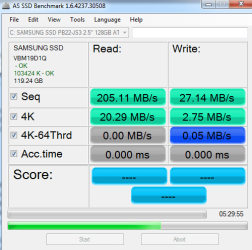
How bad is the write performance.
 

My Computer My Computer

Computer Manufacturer/Model Number
HP, Dell, Gateway, Toshiba - 4 laptops and 2 desktops
OS
Vista, Windows7, Mint Mate, Zorin, Windows 8
CPU
from 1.6GHz Duo to i7
Monitor(s) Displays
2x HP w2207
Hard Drives
5x HDD, 7x SSD, 12x Externals
Keyboard
with trackball - no mices
Mouse
Trackball mice
Internet Speed
DSL 6000
I attached a picture of the benchmark readouts from the program you suggested. I had to stop it at the point shown because my computer became unusable and it was clear it wasn't going anywhere quickly.
 

Attachments

  • SSD Benchmark.png
    SSD Benchmark.png
    16.4 KB · Views: 14

My Computer My Computer

Computer Manufacturer/Model Number
Dell Studio XPS 13
OS
Windows 7 Ultimate x64
CPU
Intel Core2 Duo P8600 (2.4Ghz
Memory
3GB
Graphics Card(s)
NVIDIA 9400MG + 9200MGS (Hybrid SLi)
Monitor(s) Displays
acer
Screen Resolution
1920x1080
Hard Drives
Samsung SSD PB22-JS3 128GB
Keyboard
Logitech K320
Mouse
Logitech VX Nano
Hmm, that is slow writes indeed. I don't know what else to suggest and where else to look. The only drastic measure you could take is to image the drive and then clean/wipe the SSD. After that restore the image.
 

My Computer My Computer

Computer Manufacturer/Model Number
HP, Dell, Gateway, Toshiba - 4 laptops and 2 desktops
OS
Vista, Windows7, Mint Mate, Zorin, Windows 8
CPU
from 1.6GHz Duo to i7
Monitor(s) Displays
2x HP w2207
Hard Drives
5x HDD, 7x SSD, 12x Externals
Keyboard
with trackball - no mices
Mouse
Trackball mice
Internet Speed
DSL 6000
Thanks for all the input. Perhaps at the end of the semester when I have some time I'll reformat and reinstall and see if that clears it up.
 

My Computer My Computer

Computer Manufacturer/Model Number
Dell Studio XPS 13
OS
Windows 7 Ultimate x64
CPU
Intel Core2 Duo P8600 (2.4Ghz
Memory
3GB
Graphics Card(s)
NVIDIA 9400MG + 9200MGS (Hybrid SLi)
Monitor(s) Displays
acer
Screen Resolution
1920x1080
Hard Drives
Samsung SSD PB22-JS3 128GB
Keyboard
Logitech K320
Mouse
Logitech VX Nano

My Computer My Computer

Computer Manufacturer/Model Number
HP, Dell, Gateway, Toshiba - 4 laptops and 2 desktops
OS
Vista, Windows7, Mint Mate, Zorin, Windows 8
CPU
from 1.6GHz Duo to i7
Monitor(s) Displays
2x HP w2207
Hard Drives
5x HDD, 7x SSD, 12x Externals
Keyboard
with trackball - no mices
Mouse
Trackball mice
Internet Speed
DSL 6000
Back
Top