intermittent issue with infrared receiver...

Kwyjibo73

New member
Local time
5:04 PM
Messages
7
Hello,

I have an Intel NUC (D54250WYK) running Windows 7 Pro 64-bit and has been working fine up until a few weeks ago, and the issue is intermittent making it difficult to troubleshoot.

Every 2-3 times when the NUC wakes up, my remote control is no longer able to control the system. A simple reboot resolves the issue for a day or two, but then it comes back. One thing in particular that I found odd, is that the remote control is actually able to wake up the PC, but once Windows is up and running again it no longer accepts commands from the remote.

I've completely removed the drivers and reinstalled but it hasn't corrected the issue. And none of my searches so far have yielded any solution to fix the problem.

The Infrared receiver on the NUC is "Nuvoton Consumer Infrared (CIR) Driver for Windows 7 for Intel NUC"
 

My Computer My Computer

At a glance

Win 7 64 bit
Computer type
PC/Desktop
OS
Win 7 64 bit
Hello and welcome Kwyjibo73 first up I think you should try these - I am not real sure of these little machines and am assuming the SSD is a normal one - forgive my ignorance.
http://www.sevenforums.com/tutorials/1538-sfc-scannow-command-system-file-checker.html
http://www.sevenforums.com/tutorials/433-disk-check.html < if necessary include the /f and /r in the command line as per Option2
Run these in safe mode and the sfc often best run for two to three runs – you can leave out the /r switch in ckdsk if you feel it not necessary
NB SFC best run for about three scans

MB I am not sure how one gets into safe mode but usually that is done by tapping F8 on power up
 

My Computer My Computer

At a glance

Desk1 7 Home Prem / Desk2 10 Pro / Main lap A...Desk1 i5 3750K / Laptop i7 GTX 860M / Desk2 i...Desk1 8GB (1866) / Desk2 16GB (1333) / Laptop...Desk 1& 2NVidia GTX 650 & Laptops on board Intel
Computer type
PC/Desktop
Computer Manufacturer/Model Number
Own build (new) Desk1 / Asus ROG Win 7 / Desk2 1st build
OS
Desk1 7 Home Prem / Desk2 10 Pro / Main lap Asus ROG 10 Pro 2 laptop Toshiba 7 Pro Asus P2520 7 & 10
CPU
Desk1 i5 3750K / Laptop i7 GTX 860M / Desk2 i5 2500
Motherboard
Desk1 Asus P877-V / Desk2 Gigabyte H67 UD3H / Laptop ?
Memory
Desk1 8GB (1866) / Desk2 16GB (1333) / Laptop 8Gb DDR3
Graphics Card(s)
Desk 1& 2NVidia GTX 650 & Laptops on board Intel
Sound Card
Desk 1 & 2 -XONAR DG Realtek High Def audio Laptop
Monitor(s) Displays
Desk 1 Benq HD 2450 / Desk2 Philips 24" / Laptop 17.5"
Screen Resolution
1920x1080 D1 & D2 & Laptop 1
Hard Drives
Desk1 Samsung 120GB 830 SSD
Asus ROG 256GB 850 Pro SSD
Desk2 Samsung 840 256 SSD
Toshiba 120GB EVO
PSU
Desk 1 Corsair HX 1050/ Laptop ? / Desk 2 Corsair HX 650
Case
Desk 1 Cooler HAF XM ? Toshiba laptop / Desk2 Coolermaster
Cooling
Fans on all Desk1 -2 Desk2 - all Coolermasters 5 Laptop ?
Keyboard
Desk 1 MS Sidewinder X6 Desk 2 MS Sidewinder X 4
Mouse
Desk 1&2 - Gigabyte MS 900 gamer - laptop - Logitec wireless
Internet Speed
ADSL2+
Other Info
One other Desktop (tester) and spare Toshba laptop both with SSD's
Running Kaspersky 2016 ISS on all machines config'd identically
Logitec audio stereo systems on each machine (x3)
Canon MG5250MFC
Router/modem TP-Link running WPA2SK
Did you try fresh batteries?
 

My Computer My Computer

At a glance

Windows 7 Profession 64-bitIntel Core i7-860 QuadMushkin 4x2Gb PC12800Gigabyte GTX260 896Mb
Computer Manufacturer/Model Number
BrightWorks Systems B4
OS
Windows 7 Profession 64-bit
CPU
Intel Core i7-860 Quad
Motherboard
Gigabyte P55-UD4P
Memory
Mushkin 4x2Gb PC12800
Graphics Card(s)
Gigabyte GTX260 896Mb
Sound Card
Integrated 7.1 HD Dolby
Monitor(s) Displays
2 Samsung 2220wm-HAS 22"
Screen Resolution
1680 x 1050 | 1680 x 1050
Hard Drives
WD HE 1Tb
PSU
Corsair TX-750W
Case
Ultra M998
Cooling
OEM
Keyboard
MS Wireless Comfort 5000
Mouse
MS Wireless 5000
Internet Speed
Cable and pretty darn fast
Thank you for the replies!

ICIT2LOL: Thanks for the suggestions. Unfortunately neither the System File Checker (sfc) nor Check Disk (chkdsk) found any problems with the system.

Itaregid: The issue isn't with the batteries or remote. It's a universal remote and continues to control my other devices without any problem, and it controls the HTPC once again after a reboot.
 

My Computer My Computer

At a glance

Win 7 64 bit
Computer type
PC/Desktop
OS
Win 7 64 bit
The thing is, you cannot assume the receiver for this device is just as sensitive as your other devices. Perhaps the antenna is oriented a different way too, or the device is getting interference the other devices are not sensitive to. It does not hurt to try a fresh set of batteries if for no other reason than to eliminate them from the equation.
 

My Computer My Computer

At a glance

Windows 7 Profession 64-bitIntel Core i7-860 QuadMushkin 4x2Gb PC12800Gigabyte GTX260 896Mb
Computer Manufacturer/Model Number
BrightWorks Systems B4
OS
Windows 7 Profession 64-bit
CPU
Intel Core i7-860 Quad
Motherboard
Gigabyte P55-UD4P
Memory
Mushkin 4x2Gb PC12800
Graphics Card(s)
Gigabyte GTX260 896Mb
Sound Card
Integrated 7.1 HD Dolby
Monitor(s) Displays
2 Samsung 2220wm-HAS 22"
Screen Resolution
1680 x 1050 | 1680 x 1050
Hard Drives
WD HE 1Tb
PSU
Corsair TX-750W
Case
Ultra M998
Cooling
OEM
Keyboard
MS Wireless Comfort 5000
Mouse
MS Wireless 5000
Internet Speed
Cable and pretty darn fast
I suppose it could even be the devices receiver too just a by the by how old is this device?

The other thing that may sound a but simple but has the device been dropped exposed to high temps - anything that could have damaged it etc?

I don't know if you feel about having a look inside the device to check for any signs of scorching on the board and even reseating the hard drive and RAM? From you saying intermittent also smacks of something maybe loose inside and that could be from something simple such as a dry joint on the board - I am not sure because I have never had one apart so I cannot say what the infrared receptor looks like - I do know that the devise that emits infrared actually looks like a black LED.

A couple of vids to show you how to look note how different the hard drives can be
https://www.youtube.com/watch?v=QvKAFMnNtPw

https://www.youtube.com/watch?v=6m2SPnOtnmM
 

My Computer My Computer

At a glance

Desk1 7 Home Prem / Desk2 10 Pro / Main lap A...Desk1 i5 3750K / Laptop i7 GTX 860M / Desk2 i...Desk1 8GB (1866) / Desk2 16GB (1333) / Laptop...Desk 1& 2NVidia GTX 650 & Laptops on board Intel
Computer type
PC/Desktop
Computer Manufacturer/Model Number
Own build (new) Desk1 / Asus ROG Win 7 / Desk2 1st build
OS
Desk1 7 Home Prem / Desk2 10 Pro / Main lap Asus ROG 10 Pro 2 laptop Toshiba 7 Pro Asus P2520 7 & 10
CPU
Desk1 i5 3750K / Laptop i7 GTX 860M / Desk2 i5 2500
Motherboard
Desk1 Asus P877-V / Desk2 Gigabyte H67 UD3H / Laptop ?
Memory
Desk1 8GB (1866) / Desk2 16GB (1333) / Laptop 8Gb DDR3
Graphics Card(s)
Desk 1& 2NVidia GTX 650 & Laptops on board Intel
Sound Card
Desk 1 & 2 -XONAR DG Realtek High Def audio Laptop
Monitor(s) Displays
Desk 1 Benq HD 2450 / Desk2 Philips 24" / Laptop 17.5"
Screen Resolution
1920x1080 D1 & D2 & Laptop 1
Hard Drives
Desk1 Samsung 120GB 830 SSD
Asus ROG 256GB 850 Pro SSD
Desk2 Samsung 840 256 SSD
Toshiba 120GB EVO
PSU
Desk 1 Corsair HX 1050/ Laptop ? / Desk 2 Corsair HX 650
Case
Desk 1 Cooler HAF XM ? Toshiba laptop / Desk2 Coolermaster
Cooling
Fans on all Desk1 -2 Desk2 - all Coolermasters 5 Laptop ?
Keyboard
Desk 1 MS Sidewinder X6 Desk 2 MS Sidewinder X 4
Mouse
Desk 1&2 - Gigabyte MS 900 gamer - laptop - Logitec wireless
Internet Speed
ADSL2+
Other Info
One other Desktop (tester) and spare Toshba laptop both with SSD's
Running Kaspersky 2016 ISS on all machines config'd identically
Logitec audio stereo systems on each machine (x3)
Canon MG5250MFC
Router/modem TP-Link running WPA2SK
Thanks again for both replies.

Itaregid:
Even though I was almost 100% positive the batteries in the remote were not at fault, I did change them. It did not improve the situation.

ICIT2LOL:
To answer your questions...
The NUC is 2 years old. No exposure to extreme temperatures, and has not been dropped. It's in a safe enough location to not have experienced any kind of physical damage.
I'm also more than comfortable working in the innards of computers, so I did open it up and reseated the RAM and hard drive. I also looked over the motherboard and couldn't see any visible signs of issues or damage.

While none of this rules out the potential for an actual hardware failure in the NUC, I'm still thinking this is an issue with Windows itself. I'm still hopeful to finding a solutions, but if not I may try reinstalling the OS.
 

My Computer My Computer

At a glance

Win 7 64 bit
Computer type
PC/Desktop
OS
Win 7 64 bit
Yes mate it is I think simply because it is ok after a reboot - seems like something is "slipping out of gear" at some stage and why I asked you to run the sfc and chkdsk because it could have been just a simple file corruption that could have been fixed by those scans.

Now it may even come down to a clean install too - by the by did you run any malware checks if not then run these please
SUPERAntiSpyware | Remove Malware | Remove Spyware - AntiMalware, AntiSpyware, AntiAdware!
Malwarebytes | Malwarebytes Anti-Malware Premium
AdwCleaner Download
ADW download from bleeping computer delete any rubbish found with the malware scans
(NB If you are running Kaspersky as the main AV then it might need disabling it when trying ADW because it does not like it at times)

For the reinstall do you have the activation key and/or install media (USB stick)? If you have the activation code then you can get the Windows ISO for whatever you are running and install form it but lets try those AV scans first. Plus there may even be a factory restore partition that you can use to get the device back to as it came out of the factory.
 

My Computer My Computer

At a glance

Desk1 7 Home Prem / Desk2 10 Pro / Main lap A...Desk1 i5 3750K / Laptop i7 GTX 860M / Desk2 i...Desk1 8GB (1866) / Desk2 16GB (1333) / Laptop...Desk 1& 2NVidia GTX 650 & Laptops on board Intel
Computer type
PC/Desktop
Computer Manufacturer/Model Number
Own build (new) Desk1 / Asus ROG Win 7 / Desk2 1st build
OS
Desk1 7 Home Prem / Desk2 10 Pro / Main lap Asus ROG 10 Pro 2 laptop Toshiba 7 Pro Asus P2520 7 & 10
CPU
Desk1 i5 3750K / Laptop i7 GTX 860M / Desk2 i5 2500
Motherboard
Desk1 Asus P877-V / Desk2 Gigabyte H67 UD3H / Laptop ?
Memory
Desk1 8GB (1866) / Desk2 16GB (1333) / Laptop 8Gb DDR3
Graphics Card(s)
Desk 1& 2NVidia GTX 650 & Laptops on board Intel
Sound Card
Desk 1 & 2 -XONAR DG Realtek High Def audio Laptop
Monitor(s) Displays
Desk 1 Benq HD 2450 / Desk2 Philips 24" / Laptop 17.5"
Screen Resolution
1920x1080 D1 & D2 & Laptop 1
Hard Drives
Desk1 Samsung 120GB 830 SSD
Asus ROG 256GB 850 Pro SSD
Desk2 Samsung 840 256 SSD
Toshiba 120GB EVO
PSU
Desk 1 Corsair HX 1050/ Laptop ? / Desk 2 Corsair HX 650
Case
Desk 1 Cooler HAF XM ? Toshiba laptop / Desk2 Coolermaster
Cooling
Fans on all Desk1 -2 Desk2 - all Coolermasters 5 Laptop ?
Keyboard
Desk 1 MS Sidewinder X6 Desk 2 MS Sidewinder X 4
Mouse
Desk 1&2 - Gigabyte MS 900 gamer - laptop - Logitec wireless
Internet Speed
ADSL2+
Other Info
One other Desktop (tester) and spare Toshba laptop both with SSD's
Running Kaspersky 2016 ISS on all machines config'd identically
Logitec audio stereo systems on each machine (x3)
Canon MG5250MFC
Router/modem TP-Link running WPA2SK
Does a mouse or keyboard connected to the same USB port wake the computer? If so I don't see where a clean install is needed.

You might try running sfc /scannow (note the space before the "/") and see if that resolves any issues.
 

My Computer My Computer

At a glance

Windows 7 Profession 64-bitIntel Core i7-860 QuadMushkin 4x2Gb PC12800Gigabyte GTX260 896Mb
Computer Manufacturer/Model Number
BrightWorks Systems B4
OS
Windows 7 Profession 64-bit
CPU
Intel Core i7-860 Quad
Motherboard
Gigabyte P55-UD4P
Memory
Mushkin 4x2Gb PC12800
Graphics Card(s)
Gigabyte GTX260 896Mb
Sound Card
Integrated 7.1 HD Dolby
Monitor(s) Displays
2 Samsung 2220wm-HAS 22"
Screen Resolution
1680 x 1050 | 1680 x 1050
Hard Drives
WD HE 1Tb
PSU
Corsair TX-750W
Case
Ultra M998
Cooling
OEM
Keyboard
MS Wireless Comfort 5000
Mouse
MS Wireless 5000
Internet Speed
Cable and pretty darn fast
Try a restore point prior to the fault,
Make a note of anything that will be changed/uninstalled
If the restore works, then install/check the list and make the changes 1 by 1, to see if anything has corrupted the remotes ability to talk to your comp.

Roy
 

My Computer My Computer

At a glance

W7 home premium 32bit/W7HP 64bit/w10 tp insid...E5300 dual core3gbNvidia Geforce 7100 Nforce 630i
Computer type
PC/Desktop
Computer Manufacturer/Model Number
medionl/Aspire 6930G/acer x55a
OS
W7 home premium 32bit/W7HP 64bit/w10 tp insider ring
CPU
E5300 dual core
Motherboard
medion MS7366
Memory
3gb
Graphics Card(s)
Nvidia Geforce 7100 Nforce 630i
Monitor(s) Displays
avixc
Internet Speed
n (isp resticted to 72)
Antivirus
mse/pands
Browser
palemoon
Other Info
Belkin Fd7050 n USB using Railink RT2870 drivers, more upto date
Yep Itegrad mate I posted those scans back in post#2 and the OP found not issues and the original issue was the remote not waking the device up so this is why I was thinking a clean install in case the remote "receiver" inside the device had lost it's driver. I don't know much about these things but do know that the infrared diode in the remote sends a signal in whatever code for any set action which the infrared diode in the device then passes on as what is required of the machine. A

good example would would be a TV remote controller one uses to change channels. Now just repeating myself I am thinking at the receiving device inside the NUC is either being blocked by a lack of a driver/firmware or whatever software is used - or worse still the circuitry for the remote to work has gone or is going belly up.

I think Roy's idea (he beat me to it ) may worth a try at least noting can be lost.

I have just been looking and found this amongst other hits Getting the IR receiver to work with Haswell NUCs - The NUC Blog
 

My Computer My Computer

At a glance

Desk1 7 Home Prem / Desk2 10 Pro / Main lap A...Desk1 i5 3750K / Laptop i7 GTX 860M / Desk2 i...Desk1 8GB (1866) / Desk2 16GB (1333) / Laptop...Desk 1& 2NVidia GTX 650 & Laptops on board Intel
Computer type
PC/Desktop
Computer Manufacturer/Model Number
Own build (new) Desk1 / Asus ROG Win 7 / Desk2 1st build
OS
Desk1 7 Home Prem / Desk2 10 Pro / Main lap Asus ROG 10 Pro 2 laptop Toshiba 7 Pro Asus P2520 7 & 10
CPU
Desk1 i5 3750K / Laptop i7 GTX 860M / Desk2 i5 2500
Motherboard
Desk1 Asus P877-V / Desk2 Gigabyte H67 UD3H / Laptop ?
Memory
Desk1 8GB (1866) / Desk2 16GB (1333) / Laptop 8Gb DDR3
Graphics Card(s)
Desk 1& 2NVidia GTX 650 & Laptops on board Intel
Sound Card
Desk 1 & 2 -XONAR DG Realtek High Def audio Laptop
Monitor(s) Displays
Desk 1 Benq HD 2450 / Desk2 Philips 24" / Laptop 17.5"
Screen Resolution
1920x1080 D1 & D2 & Laptop 1
Hard Drives
Desk1 Samsung 120GB 830 SSD
Asus ROG 256GB 850 Pro SSD
Desk2 Samsung 840 256 SSD
Toshiba 120GB EVO
PSU
Desk 1 Corsair HX 1050/ Laptop ? / Desk 2 Corsair HX 650
Case
Desk 1 Cooler HAF XM ? Toshiba laptop / Desk2 Coolermaster
Cooling
Fans on all Desk1 -2 Desk2 - all Coolermasters 5 Laptop ?
Keyboard
Desk 1 MS Sidewinder X6 Desk 2 MS Sidewinder X 4
Mouse
Desk 1&2 - Gigabyte MS 900 gamer - laptop - Logitec wireless
Internet Speed
ADSL2+
Other Info
One other Desktop (tester) and spare Toshba laptop both with SSD's
Running Kaspersky 2016 ISS on all machines config'd identically
Logitec audio stereo systems on each machine (x3)
Canon MG5250MFC
Router/modem TP-Link running WPA2SK
Oops! Sorry.
 

My Computer My Computer

At a glance

Windows 7 Profession 64-bitIntel Core i7-860 QuadMushkin 4x2Gb PC12800Gigabyte GTX260 896Mb
Computer Manufacturer/Model Number
BrightWorks Systems B4
OS
Windows 7 Profession 64-bit
CPU
Intel Core i7-860 Quad
Motherboard
Gigabyte P55-UD4P
Memory
Mushkin 4x2Gb PC12800
Graphics Card(s)
Gigabyte GTX260 896Mb
Sound Card
Integrated 7.1 HD Dolby
Monitor(s) Displays
2 Samsung 2220wm-HAS 22"
Screen Resolution
1680 x 1050 | 1680 x 1050
Hard Drives
WD HE 1Tb
PSU
Corsair TX-750W
Case
Ultra M998
Cooling
OEM
Keyboard
MS Wireless Comfort 5000
Mouse
MS Wireless 5000
Internet Speed
Cable and pretty darn fast
No worries mate I do it all the time;)
 

My Computer My Computer

At a glance

Desk1 7 Home Prem / Desk2 10 Pro / Main lap A...Desk1 i5 3750K / Laptop i7 GTX 860M / Desk2 i...Desk1 8GB (1866) / Desk2 16GB (1333) / Laptop...Desk 1& 2NVidia GTX 650 & Laptops on board Intel
Computer type
PC/Desktop
Computer Manufacturer/Model Number
Own build (new) Desk1 / Asus ROG Win 7 / Desk2 1st build
OS
Desk1 7 Home Prem / Desk2 10 Pro / Main lap Asus ROG 10 Pro 2 laptop Toshiba 7 Pro Asus P2520 7 & 10
CPU
Desk1 i5 3750K / Laptop i7 GTX 860M / Desk2 i5 2500
Motherboard
Desk1 Asus P877-V / Desk2 Gigabyte H67 UD3H / Laptop ?
Memory
Desk1 8GB (1866) / Desk2 16GB (1333) / Laptop 8Gb DDR3
Graphics Card(s)
Desk 1& 2NVidia GTX 650 & Laptops on board Intel
Sound Card
Desk 1 & 2 -XONAR DG Realtek High Def audio Laptop
Monitor(s) Displays
Desk 1 Benq HD 2450 / Desk2 Philips 24" / Laptop 17.5"
Screen Resolution
1920x1080 D1 & D2 & Laptop 1
Hard Drives
Desk1 Samsung 120GB 830 SSD
Asus ROG 256GB 850 Pro SSD
Desk2 Samsung 840 256 SSD
Toshiba 120GB EVO
PSU
Desk 1 Corsair HX 1050/ Laptop ? / Desk 2 Corsair HX 650
Case
Desk 1 Cooler HAF XM ? Toshiba laptop / Desk2 Coolermaster
Cooling
Fans on all Desk1 -2 Desk2 - all Coolermasters 5 Laptop ?
Keyboard
Desk 1 MS Sidewinder X6 Desk 2 MS Sidewinder X 4
Mouse
Desk 1&2 - Gigabyte MS 900 gamer - laptop - Logitec wireless
Internet Speed
ADSL2+
Other Info
One other Desktop (tester) and spare Toshba laptop both with SSD's
Running Kaspersky 2016 ISS on all machines config'd identically
Logitec audio stereo systems on each machine (x3)
Canon MG5250MFC
Router/modem TP-Link running WPA2SK
No worries mate I do it all the time
Do what?

Oh yeah, forget things! I forgot. ;)
 

My Computer My Computer

At a glance

Windows 7 Profession 64-bitIntel Core i7-860 QuadMushkin 4x2Gb PC12800Gigabyte GTX260 896Mb
Computer Manufacturer/Model Number
BrightWorks Systems B4
OS
Windows 7 Profession 64-bit
CPU
Intel Core i7-860 Quad
Motherboard
Gigabyte P55-UD4P
Memory
Mushkin 4x2Gb PC12800
Graphics Card(s)
Gigabyte GTX260 896Mb
Sound Card
Integrated 7.1 HD Dolby
Monitor(s) Displays
2 Samsung 2220wm-HAS 22"
Screen Resolution
1680 x 1050 | 1680 x 1050
Hard Drives
WD HE 1Tb
PSU
Corsair TX-750W
Case
Ultra M998
Cooling
OEM
Keyboard
MS Wireless Comfort 5000
Mouse
MS Wireless 5000
Internet Speed
Cable and pretty darn fast
I do keep the NUC reasonably secure in terms of virus protection, and am already a user of Malwarebytes. I hadn't heard of the other two packages you suggested but I may give them a try, but I'm thinking there would be some more abnormal behavior present if there was some type of infection.

As for restore points, this was something I was going to try but the earliest restore point available only goes back 1 month, whereas the issue with the infrared receiver goes back well beyond that.

I do have everything required to do a fresh install of the OS, but am hoping to avoid doing that because it seems to be overkill for what's currently only a minor inconvenience.
 

My Computer My Computer

At a glance

Win 7 64 bit
Computer type
PC/Desktop
OS
Win 7 64 bit
Ok mate try those scans they are ones that I use quite frequently and the ADW is good at rooting out some awkward to remove stuff.

Now did you go look and see if there are restore points further back?? If not see pic and try that.
 

Attachments

  • RESTORE.PNG
    RESTORE.PNG
    28.6 KB · Views: 0

My Computer My Computer

At a glance

Desk1 7 Home Prem / Desk2 10 Pro / Main lap A...Desk1 i5 3750K / Laptop i7 GTX 860M / Desk2 i...Desk1 8GB (1866) / Desk2 16GB (1333) / Laptop...Desk 1& 2NVidia GTX 650 & Laptops on board Intel
Computer type
PC/Desktop
Computer Manufacturer/Model Number
Own build (new) Desk1 / Asus ROG Win 7 / Desk2 1st build
OS
Desk1 7 Home Prem / Desk2 10 Pro / Main lap Asus ROG 10 Pro 2 laptop Toshiba 7 Pro Asus P2520 7 & 10
CPU
Desk1 i5 3750K / Laptop i7 GTX 860M / Desk2 i5 2500
Motherboard
Desk1 Asus P877-V / Desk2 Gigabyte H67 UD3H / Laptop ?
Memory
Desk1 8GB (1866) / Desk2 16GB (1333) / Laptop 8Gb DDR3
Graphics Card(s)
Desk 1& 2NVidia GTX 650 & Laptops on board Intel
Sound Card
Desk 1 & 2 -XONAR DG Realtek High Def audio Laptop
Monitor(s) Displays
Desk 1 Benq HD 2450 / Desk2 Philips 24" / Laptop 17.5"
Screen Resolution
1920x1080 D1 & D2 & Laptop 1
Hard Drives
Desk1 Samsung 120GB 830 SSD
Asus ROG 256GB 850 Pro SSD
Desk2 Samsung 840 256 SSD
Toshiba 120GB EVO
PSU
Desk 1 Corsair HX 1050/ Laptop ? / Desk 2 Corsair HX 650
Case
Desk 1 Cooler HAF XM ? Toshiba laptop / Desk2 Coolermaster
Cooling
Fans on all Desk1 -2 Desk2 - all Coolermasters 5 Laptop ?
Keyboard
Desk 1 MS Sidewinder X6 Desk 2 MS Sidewinder X 4
Mouse
Desk 1&2 - Gigabyte MS 900 gamer - laptop - Logitec wireless
Internet Speed
ADSL2+
Other Info
One other Desktop (tester) and spare Toshba laptop both with SSD's
Running Kaspersky 2016 ISS on all machines config'd identically
Logitec audio stereo systems on each machine (x3)
Canon MG5250MFC
Router/modem TP-Link running WPA2SK
Yes, I did use the option to show more Restore Points. The default view only showed one result, the "more" option showed several more, but none dating back to before this issue started.

I also ran the other two applications you suggested (ADW and SuperAntispyware). They found nothing but a bunch of cookies.
 

My Computer My Computer

At a glance

Win 7 64 bit
Computer type
PC/Desktop
OS
Win 7 64 bit
Hmm well that is a blow was rather hoping there would be more restore points and maybe the ADW at least would pick up some issue. :(

Now the other thing that has crossed my mind is the RAM and whether there may be a problem with it only because it holds all your system settings ready for use after power up - could it possibly be that it is faulty in some way.

This is the only test that ths forum recommends RAM - Test with Memtest86+ and it HAS to be run for at least 8 passes any less and you may as well not bother unless the errors come up before the 8 passes have finished then it can be stopped. If the RAM has errors then the only cure is to replace it - the RAM stick/s.

Now do you know how to find the RAM in that device if not there are plenty of YouTube vids on the subject this is a good one Review Unboxing Intel NUC DC3217BY i3 Media PC How to Install Memory RAM, SSD, WIFI Module - YouTube

Now the test does take some time to complete and if there are errors then you will need to find the right replacement RAM sticks ie speed capacity etc and always buy a well known brand.
I like Corsair, Crucial and Samsung RAM myself but others are quite good the choice is yours - if the RAM is bad,
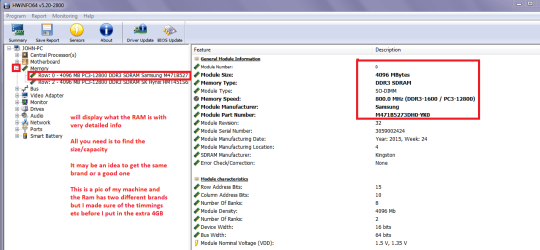
to find what you have in the device see this and run PART B: see pic
Using HW Info
PART A:
You can test the volts on the PSU with HW Info HWiNFO, HWiNFO32/64 - Download < download the right bit version and close the right hand window select Sensors and scroll down to the power section where you will see what the volts are doing see my pic. In my pic the section (Nuvoton) with VBATT as a dead give away you are in the section for the rail voltages. There are other section titles and one that pops up often is ITE (sometimes the usual one for Gigabyte boards)
Now the voltage on the different rails have to be within 5% =+/- of what is required or the machine will not work properly if at all.
Limits +/-
12v = 11.4 – 12.6v
5v = 4.74 – 5.25v
3.3v = 3.135 – 3.465v
The Power good signal voltage at pin 8 on the 24 pin plug (grey cable) should be the same as the 5v rail reading/s
See this for the rail voltage info
PSUs 101: A Detailed Look Into Power Supplies (Section 2.)
The original right hand window shows the machine running and is handy for that but for looking at the components in some detail close it and use the main left hand side panel
FOR OTHER COMPONENTS
PART B:
Open each small square with + in it on the section the components are in and then click on the individual component/s (it will highlight in blue) - in the right hand side will appear all sorts of details including brands speeds and other essential info that particular device. See pic for example.
 

Attachments

  • NUC.PNG
    NUC.PNG
    37.6 KB · Views: 0

My Computer My Computer

At a glance

Desk1 7 Home Prem / Desk2 10 Pro / Main lap A...Desk1 i5 3750K / Laptop i7 GTX 860M / Desk2 i...Desk1 8GB (1866) / Desk2 16GB (1333) / Laptop...Desk 1& 2NVidia GTX 650 & Laptops on board Intel
Computer type
PC/Desktop
Computer Manufacturer/Model Number
Own build (new) Desk1 / Asus ROG Win 7 / Desk2 1st build
OS
Desk1 7 Home Prem / Desk2 10 Pro / Main lap Asus ROG 10 Pro 2 laptop Toshiba 7 Pro Asus P2520 7 & 10
CPU
Desk1 i5 3750K / Laptop i7 GTX 860M / Desk2 i5 2500
Motherboard
Desk1 Asus P877-V / Desk2 Gigabyte H67 UD3H / Laptop ?
Memory
Desk1 8GB (1866) / Desk2 16GB (1333) / Laptop 8Gb DDR3
Graphics Card(s)
Desk 1& 2NVidia GTX 650 & Laptops on board Intel
Sound Card
Desk 1 & 2 -XONAR DG Realtek High Def audio Laptop
Monitor(s) Displays
Desk 1 Benq HD 2450 / Desk2 Philips 24" / Laptop 17.5"
Screen Resolution
1920x1080 D1 & D2 & Laptop 1
Hard Drives
Desk1 Samsung 120GB 830 SSD
Asus ROG 256GB 850 Pro SSD
Desk2 Samsung 840 256 SSD
Toshiba 120GB EVO
PSU
Desk 1 Corsair HX 1050/ Laptop ? / Desk 2 Corsair HX 650
Case
Desk 1 Cooler HAF XM ? Toshiba laptop / Desk2 Coolermaster
Cooling
Fans on all Desk1 -2 Desk2 - all Coolermasters 5 Laptop ?
Keyboard
Desk 1 MS Sidewinder X6 Desk 2 MS Sidewinder X 4
Mouse
Desk 1&2 - Gigabyte MS 900 gamer - laptop - Logitec wireless
Internet Speed
ADSL2+
Other Info
One other Desktop (tester) and spare Toshba laptop both with SSD's
Running Kaspersky 2016 ISS on all machines config'd identically
Logitec audio stereo systems on each machine (x3)
Canon MG5250MFC
Router/modem TP-Link running WPA2SK
Thanks again for all of the assistance.

I performed the RAM test and all is well in that regard.

Something odd though, the issue seems to be occurring less and less now. Originally it was every second or third time the NUC woke up that the remote wouldn't be able to control the unit. Now, it's been about a week without incident.
 

My Computer My Computer

At a glance

Win 7 64 bit
Computer type
PC/Desktop
OS
Win 7 64 bit
Hmm well must have touched a nerve somewhere I guess thing is finding which one:)

Am still suspicious about the infrared receiver diode and the driver for that receiver so can you try updating that first.

I did find this too which gives a an option or two Project NUC: Turn Intel's 4th Gen Mini PC Into the Ultimate TV Companion + Giveaway! - YouTube


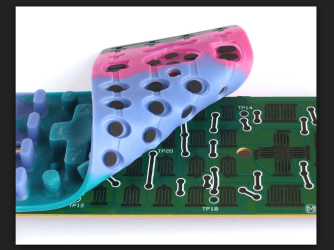
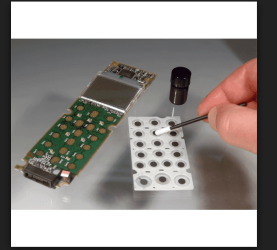
Edit I did myself this week take the remote handpiece apart for my DVD player because pushing the buttons was really a hit and miss affair and inside I found the key contacts for play fast forward etc had a sticky ooze for want of a better word - cleaned it off and the remote is faster than ever.
But that is your choice as I don't know what the handpiece you have is able to be taken apart or if you are happy to look but worth keeping in mind.
I have attached a few pics to show roughly what you might see
 

Attachments

  • REMOTE 1.PNG
    REMOTE 1.PNG
    178.9 KB · Views: 0
  • REMOTE 2.PNG
    REMOTE 2.PNG
    292.6 KB · Views: 0
  • REMOTE 4.PNG
    REMOTE 4.PNG
    91.6 KB · Views: 0

My Computer My Computer

At a glance

Desk1 7 Home Prem / Desk2 10 Pro / Main lap A...Desk1 i5 3750K / Laptop i7 GTX 860M / Desk2 i...Desk1 8GB (1866) / Desk2 16GB (1333) / Laptop...Desk 1& 2NVidia GTX 650 & Laptops on board Intel
Computer type
PC/Desktop
Computer Manufacturer/Model Number
Own build (new) Desk1 / Asus ROG Win 7 / Desk2 1st build
OS
Desk1 7 Home Prem / Desk2 10 Pro / Main lap Asus ROG 10 Pro 2 laptop Toshiba 7 Pro Asus P2520 7 & 10
CPU
Desk1 i5 3750K / Laptop i7 GTX 860M / Desk2 i5 2500
Motherboard
Desk1 Asus P877-V / Desk2 Gigabyte H67 UD3H / Laptop ?
Memory
Desk1 8GB (1866) / Desk2 16GB (1333) / Laptop 8Gb DDR3
Graphics Card(s)
Desk 1& 2NVidia GTX 650 & Laptops on board Intel
Sound Card
Desk 1 & 2 -XONAR DG Realtek High Def audio Laptop
Monitor(s) Displays
Desk 1 Benq HD 2450 / Desk2 Philips 24" / Laptop 17.5"
Screen Resolution
1920x1080 D1 & D2 & Laptop 1
Hard Drives
Desk1 Samsung 120GB 830 SSD
Asus ROG 256GB 850 Pro SSD
Desk2 Samsung 840 256 SSD
Toshiba 120GB EVO
PSU
Desk 1 Corsair HX 1050/ Laptop ? / Desk 2 Corsair HX 650
Case
Desk 1 Cooler HAF XM ? Toshiba laptop / Desk2 Coolermaster
Cooling
Fans on all Desk1 -2 Desk2 - all Coolermasters 5 Laptop ?
Keyboard
Desk 1 MS Sidewinder X6 Desk 2 MS Sidewinder X 4
Mouse
Desk 1&2 - Gigabyte MS 900 gamer - laptop - Logitec wireless
Internet Speed
ADSL2+
Other Info
One other Desktop (tester) and spare Toshba laptop both with SSD's
Running Kaspersky 2016 ISS on all machines config'd identically
Logitec audio stereo systems on each machine (x3)
Canon MG5250MFC
Router/modem TP-Link running WPA2SK
Back
Top