Solved Internal Hard Drive does not have a drive letter but used to.

BinaryMadman

New member
Local time
8:38 PM
Messages
5
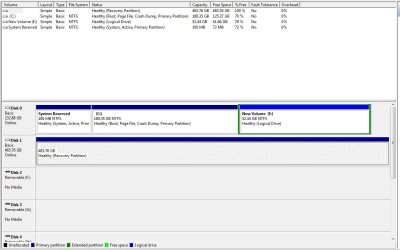
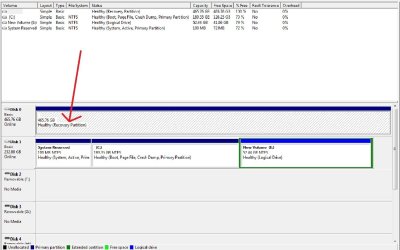
My brother bought a new internal 500GB hard drive a few months ago and saved all of our family photos to it. Well a few days ago he noticed it would not show up as a hard drive in 'My Computer'. If we go to 'Disk Management' the 500GB hard drive shows up without a drive letter and is marked as a Recovery Partition. Does this mean we lost all of our family photos that were on the hard drive? :(

If you need more information feel free to ask. I'll attach a photo of what i mean.
 

Attachments
  • RecoveryPartition.jpg
    RecoveryPartition.jpg
    93.8 KB · Views: 266
Last edited:

My Computer My Computer

At a glance

Window 7 Ultimate x64
OS
Window 7 Ultimate x64
Last edited by a moderator:

My Computer My Computer

At a glance

Windows 7 Ultimate X64 SP1Intel i5-2550K, Differing ~4.4-4.8GHz No buil...16GB G.Skill Sniper 1866MHz @ 2133MHz 2x8GBASUS GTX650TIB-DC2OC-2GD5, (650TI Boost)
Computer type
PC/Desktop
Computer Manufacturer/Model Number
Home Built Desktop By DataTech
OS
Windows 7 Ultimate X64 SP1
CPU
Intel i5-2550K, Differing ~4.4-4.8GHz No built in GPU
Motherboard
ASUS P8Z68-V PRO/GEN3
Memory
16GB G.Skill Sniper 1866MHz @ 2133MHz 2x8GB
Graphics Card(s)
ASUS GTX650TIB-DC2OC-2GD5, (650TI Boost)
Sound Card
Onboard Realtek 5-1
Monitor(s) Displays
Samsung P2570HD
Screen Resolution
1920x1080
Hard Drives
Samsung 840 Pro 256GB SSD for OS, 500GB Seagate Constellation (Enterprise drive) for Data
PSU
Corsair HX650W
Case
Inwin Dragon Rider
Cooling
Hyper 212 EVO w/two Noctua fans, push-pull, @1300 RPM
Keyboard
E-Z Eyes, bright yellow keys with large characters
Mouse
steelseries SENSEI Laser Pro Gaming
Internet Speed
48-51Mbs Mbs down, 11 Mbs up Xfinity Cable
Antivirus
Norton Internet Security 2013
Browser
IE 10, Opera, Pale Moon if needed
Other Info
4 case fans, LG BluRay-RE, ASUS DVD-RW, Mr. Fusion power supply, 1.21 gigawatts.
The boot partition doesn't necessarily need to be on the first disk as seen by the BIOS. There's no reason you couldn't have a storage drive on the first SATA port and the drive with the OS on the second port. The poster might try assigning a drive letter (Change Drive Letter and Paths) without moving anything physically.
 

My Computer My Computer

At a glance

Windows 7 Professional x64
OS
Windows 7 Professional x64
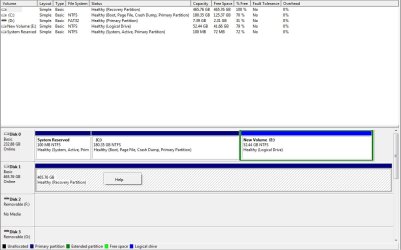
Ok, i swapped the wires and the 500GB drive is now disk 1 instead of disk 0. Its still showing up as a Recovery Partition with no drive letter. I attached a pic showing this.

Oh, and thanks for the warm welcome! :D

Edit: Quatrix, it doesn't let me assign drive letters to that hard drive.
 

Attachments

  • RecoveryPartition2.jpg
    RecoveryPartition2.jpg
    82.8 KB · Views: 142

My Computer My Computer

At a glance

Window 7 Ultimate x64
OS
Window 7 Ultimate x64

My Computer My Computer

At a glance

64-bit Windows 11 Pro for WorkstationsIntel i7-8700K OC'd to 5 GHz64 GB (4x16GB) G.SKILL TridentZ RGB DDR4 3600...ASUS ROG-STRIX-GTX1080TI-O11G-GAMING
Computer type
PC/Desktop
Computer Manufacturer/Model Number
Self built custom
OS
64-bit Windows 11 Pro for Workstations
CPU
Intel i7-8700K OC'd to 5 GHz
Motherboard
ASUS ROG Maximus XI Formula Z390
Memory
64 GB (4x16GB) G.SKILL TridentZ RGB DDR4 3600 MHz
Graphics Card(s)
ASUS ROG-STRIX-GTX1080TI-O11G-GAMING
Sound Card
Integrated
Monitor(s) Displays
2 x Samsung Odyssey G7 27"
Screen Resolution
2560x1440
Hard Drives
1TB Samsung 990 PRO M.2,
4TB Samsung 990 PRO PRO M.2,
TerraMaster F8 SSD Plus NAS
PSU
Seasonic Prime Titanium 850W
Case
Thermaltake Core P3
Cooling
Corsair Hydro H115i
Keyboard
Logitech wireless K800
Mouse
Logitech MX Master 4
Internet Speed
2 Gb/s Download and 100 Mb/s Upload
Antivirus
Malwarebyte Anti-Malware Premium
Browser
Google Chrome
Other Info
Logitech Z625 speaker system,
Logitech BRIO 4K Pro webcam,
HP Color LaserJet Pro MFP M477fdn,
APC SMART-UPS RT 1000 XL - SURT1000XLI,
Galaxy S23 Plus phone
Brink, yes i tried the tutorial mentioned by Britton30, they didn't work. The menu item for changing the drive letter doesn't show up when i right click the drive for some reason. The second option in the tutorial was to use the registry but that only applied to drives that already have a drive letter assigned, not for drives that don't have a drive letter yet (i think).
 

My Computer My Computer

At a glance

Window 7 Ultimate x64
OS
Window 7 Ultimate x64
Since you're good with screen shots, could you show the context menu when you right-click the drive? I've seen "Change Drive Letter and Paths" greyed out before but not completely missing. Does it show the "Explore" option?
 

My Computer My Computer

At a glance

Windows 7 Professional x64
OS
Windows 7 Professional x64
This is what shows up when i right click the drive from within disk management. Only the Help menu item shows up. It doesn't show the Explore option.

Edit: Does anyone know what a partition type of "Recovery Partition" mean? That's what the hard drive type is set to. I've never seen that type before.
 

Attachments

  • RecoveryPartition3.jpg
    RecoveryPartition3.jpg
    87 KB · Views: 163
Last edited:

My Computer My Computer

At a glance

Window 7 Ultimate x64
OS
Window 7 Ultimate x64
You'll find some info if you search Google for "windows 7 recovery partition". It's optional and usually 100 MB, which would normally be the one marked "System Reserved". I'm not sure how the other drive ended up as the recovery partition. I don't have one on my system and don't have any experience with those.
 

My Computer My Computer

At a glance

Windows 7 Professional x64
OS
Windows 7 Professional x64
BinaryMadman,

I find it interesting that Disk Management doesn't list a file type (ex: FAT32 or NTFS) for the drive (Disk 1), and that it's showing all available space as free.

You might see if using only doing step 7-18 with the free program Partition Wizard Home Edition in OPTION FOUR of the tutorial below to see if it may be able to recover this drive. At step 10, select your Disk 1 instead.

http://www.sevenforums.com/tutorials/26829-convert-dynamic-disk-basic-disk.html
 

My Computer My Computer

At a glance

64-bit Windows 11 Pro for WorkstationsIntel i7-8700K OC'd to 5 GHz64 GB (4x16GB) G.SKILL TridentZ RGB DDR4 3600...ASUS ROG-STRIX-GTX1080TI-O11G-GAMING
Computer type
PC/Desktop
Computer Manufacturer/Model Number
Self built custom
OS
64-bit Windows 11 Pro for Workstations
CPU
Intel i7-8700K OC'd to 5 GHz
Motherboard
ASUS ROG Maximus XI Formula Z390
Memory
64 GB (4x16GB) G.SKILL TridentZ RGB DDR4 3600 MHz
Graphics Card(s)
ASUS ROG-STRIX-GTX1080TI-O11G-GAMING
Sound Card
Integrated
Monitor(s) Displays
2 x Samsung Odyssey G7 27"
Screen Resolution
2560x1440
Hard Drives
1TB Samsung 990 PRO M.2,
4TB Samsung 990 PRO PRO M.2,
TerraMaster F8 SSD Plus NAS
PSU
Seasonic Prime Titanium 850W
Case
Thermaltake Core P3
Cooling
Corsair Hydro H115i
Keyboard
Logitech wireless K800
Mouse
Logitech MX Master 4
Internet Speed
2 Gb/s Download and 100 Mb/s Upload
Antivirus
Malwarebyte Anti-Malware Premium
Browser
Google Chrome
Other Info
Logitech Z625 speaker system,
Logitech BRIO 4K Pro webcam,
HP Color LaserJet Pro MFP M477fdn,
APC SMART-UPS RT 1000 XL - SURT1000XLI,
Galaxy S23 Plus phone
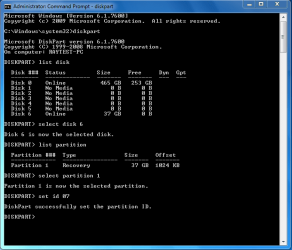
1) Open a Administrator Command Prompt
2) type DISKPART
3) type LIST DISK
4) type SELECT DISK # (the disk No)
5) type LIST PARTITION
6) type SELECT PARTITION 1
7) type SET ID 07

set id.PNG
 

My Computer My Computer

At a glance

ME/XP/Vista/Win7
OS
ME/XP/Vista/Win7
I have a seagate portable hardrive (1tb) but the problem it not showing up in the computer and when i go to the disk management and it was their but not initialized but when i try ti initial it the poup message appear and it say (The request could not be performed because of an I/O devices error

Thanks need your help plizee
 

My Computer My Computer

At a glance

WINDOWS 7INTEL CELEON
Computer Manufacturer/Model Number
TOSHIBA
OS
WINDOWS 7
CPU
INTEL CELEON
theog, that looks like it could have worked but stupid me i already formatted it through diskpart and it brought the drive back but lost the files. Then again it might have already been formatted since it showed it was empty when it should have shown it was half full. That was a bizarre problem, thanks for all the help with this. :)
 

My Computer My Computer

At a glance

Window 7 Ultimate x64
OS
Window 7 Ultimate x64
Back
Top