JimLucTKirkard
New member
- Local time
- 7:07 PM
- Messages
- 12
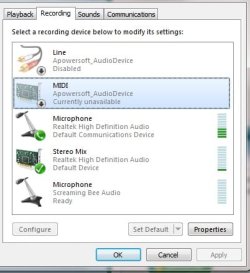
I'm on an Alienware m14x with Windows 7, and my internal mic hasn't worked for some time. I assumed it was just broken until earlier I noticed others having the same problem. It picks up internal noise from the laptop like the keys and when I click my wireless mouse that picks up as well. I've tried disabling all other mics (which pick up no sound) and all the formats in the advanced tab, but nothing works. It seems to be a fairly common problem, anyone know what to do? Here's a picture with the driver info.

I noticed in the properties there was no "audio boost". There were also other mics to select from, but this is the only one that picks up sound. I'm currently using my phone through the external port as a substitute with the microphone app, but it's inconvenient.
I noticed in the properties there was no "audio boost". There were also other mics to select from, but this is the only one that picks up sound. I'm currently using my phone through the external port as a substitute with the microphone app, but it's inconvenient.
My Computer
At a glance
Windows 7 Home Premium Service Pack 1Intel(R) Core(TM) i7-2820QM CPU @ 2.30GHz 2.3...8GBNVIDIA GeForce GT 555M
- Computer type
- Laptop
- Computer Manufacturer/Model Number
- Alienware m14x
- OS
- Windows 7 Home Premium Service Pack 1
- CPU
- Intel(R) Core(TM) i7-2820QM CPU @ 2.30GHz 2.30 Ghz
- Memory
- 8GB
- Graphics Card(s)
- NVIDIA GeForce GT 555M
- Hard Drives
- 750GB
- Antivirus
- AVG Free
- Browser
- Chrome