Internet Connection Sharing problems

Geekster

New member
Local time
10:43 AM
Messages
6
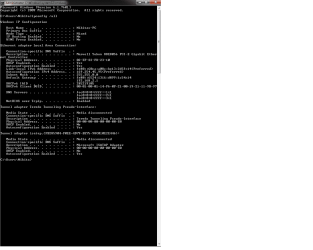
So I have a desktop running Win 7 Professional 64 bit, and a laptop leased by my fiancee running Win 7 Enterprise. Until yesterday I had internet connection sharing set-up using the laptops wi-fi, and an ethernet cable to the desktop. Well my fiancee took the laptop in to the school to have the users switched, now for no reason the connection between the laptop/destop comes up as unidentified network on the laptop, and no internet access on the desktop. I've tried everything from resetting my tpc/ip stuff to uninstalling the drivers. i need help, attatched is my ipconfig for the desktop and laptop, hopefully this helps resolve the issue. Thanks in advance, a frustrated geek.
 

Attachments
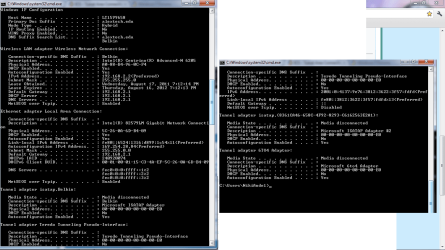
  • Laptop Ipconfig.png
    Laptop Ipconfig.png
    157.9 KB · Views: 11
  • Desktop Ipconfig.png
    Desktop Ipconfig.png
    66 KB · Views: 8
Last edited:

My Computer

OS
Windows 7 Enterprise 32bit, and Windows 7 Professional 64bit
Hi Geekster,
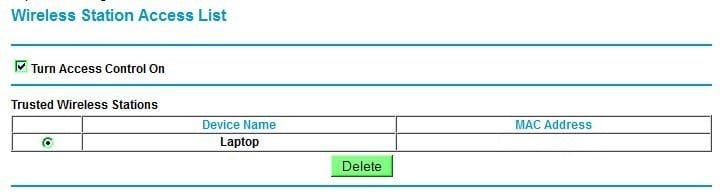
If you wire connect laptop to your router, access it's setup and set as trusted, it should work by using laptop's MAC address.

RR.JPG
 

My Computer

Computer Manufacturer/Model Number
Look in my Signature.
OS
Win7 H.Prem. 32bit+SP1
The ethernet cable goes straight from the laptop to the desktop, so the laptop is acting as the router I believe
 

My Computer

OS
Windows 7 Enterprise 32bit, and Windows 7 Professional 64bit
Only the desktop should be a wired connection to the router, unless it has a wireless adapter installed.
The Laptop can connect wire or wirelessly to the router.
 

My Computer

Computer Manufacturer/Model Number
Look in my Signature.
OS
Win7 H.Prem. 32bit+SP1
I dont have physical access to the wireless router, its an unsecured public network
 

My Computer

OS
Windows 7 Enterprise 32bit, and Windows 7 Professional 64bit
OK & good luck.
 

My Computer

Computer Manufacturer/Model Number
Look in my Signature.
OS
Win7 H.Prem. 32bit+SP1
are you kidding me?? Can we get someone who can actually help me on this thread
 

My Computer

OS
Windows 7 Enterprise 32bit, and Windows 7 Professional 64bit
Why not get a cheap wireless adapter for the desktop? Then you aren't dead in the water if the laptop is missing. ICS is junk and should have been removed from Windows long ago. For less than $20, you can get dedicated access to your desktop.
 

My Computer

OS
Windows 7 Ultimate x64 SP1
CPU
Intel Core i7-2600
Motherboard
Gigabyte GA-P67A-UD3P-B3
Memory
12 GB Patriot Extreme DDR3-1333
Graphics Card(s)
Nvidia GTX 470
Monitor(s) Displays
Dell UltraSharp 2209WA
Hard Drives
OCZ Agility3 240 GB, WD5001AALS, WD7501AALS
PSU
OCZ ModStream 700W
Case
CoolerMaster HAF 912 Advanced
Cooling
CoolerMaster Hyper 212 Plus
i understand that, but the connection speeds for the wireless usbs are less then desirable for gaming etc, plus now that i have this problem, I'd like to find a solution because its bugging the crap outta me and Id like to be able to fix it in the future.
 

My Computer

OS
Windows 7 Enterprise 32bit, and Windows 7 Professional 64bit
You're connected by wireless already, then shared through another computer. That adds plenty more lag than a direct connection to the router by a USB wireless adapter would have, especially a USB 2.0 device.

If gaming was your top priority, you'd find a way to get a wired connection to the router.
 

My Computer

OS
Windows 7 Ultimate x64 SP1
CPU
Intel Core i7-2600
Motherboard
Gigabyte GA-P67A-UD3P-B3
Memory
12 GB Patriot Extreme DDR3-1333
Graphics Card(s)
Nvidia GTX 470
Monitor(s) Displays
Dell UltraSharp 2209WA
Hard Drives
OCZ Agility3 240 GB, WD5001AALS, WD7501AALS
PSU
OCZ ModStream 700W
Case
CoolerMaster HAF 912 Advanced
Cooling
CoolerMaster Hyper 212 Plus
Back
Top