
Internet Connection Sharing to Nintendo DS

aimpacc

Banned
Local time
9:10 PM
Messages
19
im on a windows 7 computer and i just cant get my DS to connect to my computer for wifi. It need WEP encryption (must) and my comp is connected to the wireless router WPA2
~~~No, i do not want to change it~~~:eek:

so i go to network and sharing center, hosted ad-hoc in WEP with password, and after i press 'next' the ad-hoc is hosted...but the option that says 'turn on internet connection sharing' is not there.

problem is how can i get my nds to connect to my comp for nintendo WFC?
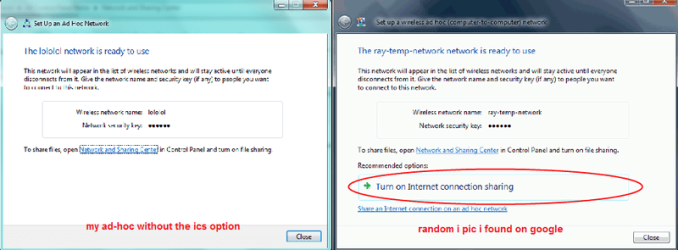
faili.png

other info:
- i used lan connection in another place and that option showed up for WPA2 (when i was connecting my ipod from comp).
- i plugged in the lan cable from my wireless router back here to my comp but it didnt show up for some reason:(
 

My Computer My Computer

Computer Manufacturer/Model Number
Acer 4736zg
OS
Windows 7 HP
CPU
Intel Pentium processor T4300
Memory
3
Graphics Card(s)
NVIDIA GF G105M
Screen Resolution
1366x768
Hard Drives
320GB HDD
Internet Speed
Slow
If i remember correctly, windows 7 does not create the required access point for your Nintendo DS to connect to. I recently have tried this myself with my Nintendo DS and it wouldn't work. Tried it as a WPA2 and WEP Open. I specifically did this for Pokemon Black and White.

However, i can connect if i change my whole router to WEP, which i have before and it worked great. I hear that WPA2 is much more secure so i changed it back to WPA2.
 

My Computer My Computer

Computer type
PC/Desktop
Computer Manufacturer/Model Number
HP
OS
Windows Seven Ultimate x64 SP1
CPU
Intel Core i7 x980 @ 3.33GHz
Memory
12.0 GB
Graphics Card(s)
Nvidia GeForce GTX 260
can the router host wpa2 and wep at the same time?

haha yea pokemon black.exactly
 

My Computer My Computer

Computer Manufacturer/Model Number
Acer 4736zg
OS
Windows 7 HP
CPU
Intel Pentium processor T4300
Memory
3
Graphics Card(s)
NVIDIA GF G105M
Screen Resolution
1366x768
Hard Drives
320GB HDD
Internet Speed
Slow
For the life of me now I can't remember how I connected mine, I have a DSi XL. I also have a DS Lite and I use a Nintendo Wi-Fi USB Connector with that on an XP machine.

I know I had a conversation with the Nintendo people about this and they said at present they don't have the drivers for it as a lot of people have the older software which is not compatible.

I can open my XL and wirelessly surf the net and be online at the Nintendo shop but when it comes to trying to bring in the weekly games on any of my Professor Layton games it doesn't work and like you I'm not prepared to mess about with the settings for security on the router.
 

My Computer My Computer

Computer type
PC/Desktop
Computer Manufacturer/Model Number
Acer Aspire XC-704 x64 bit/ Asus K55A Notebook PC/HP Envy x360 Convertible 15-bq0xx
OS
Windows 10 64bit/Windows 10 64bit/Windows 10 64bit
CPU
Intel Pentium J3710 @ 60GHz/Intel B820,1.7GHz/AMD A9 Radeon
Motherboard
Acer Aspire XC-704 (SOCKET 0)/Asus/HP 8312 (Socket FP4)
Memory
8.00GB DDR3 @ 1599MHz/8GB 2 x 4GB DDR3/8.00GB Dual-Channel
Graphics Card(s)
Intel HD Graphics/Intel/512MB ATI AMD Radeon R5 Graphics (HP
Sound Card
Realtek High Definition Audio/Onboard/AMD High Definition Au
Monitor(s) Displays
Acer LCD K222HQL /Asus 15.6/Generic PnP Monitor (1920x1080@6
Screen Resolution
1920x1080@59Hz/1366 x 768/1920x1080@60Hz
Hard Drives
1863GBWesternn Digital WDC/Asus/119GB SanDisk SD8SN8U-128G-1006 (SSD)
931GB Hitachi HGST HTS721010A9E630 (SATA)
Keyboard
Microsoft Natural Ergonomic Keyboard 4000 (UK)/Inbuilt/Inbui
Mouse
Microsoft Optical Wheel Mouse/Same plus Touchpad/Same + Pad
Internet Speed
Infinity 2 up to 76 Mbps
Antivirus
MSE/MSE/MSE and all 3 have MalwareBytes Premium
Browser
Edge, Firefox/Edge, Firefox/Edge, Firefox, Chrome
Other Info
Seagate Expansion 500GB External Desktop Drive
Seagate Expansion Portable Drives 500GB and 1TB
Epson XP-332 Wireless Printer
Back
Top