Solved Internet Connection

tommakawao

New member
Member
Local time
1:05 PM
Messages
45
Location
Maui, Hawaii
I deleted some files my computer that the performance program told me I didn't need. Now I can't connect to the internet. I spent several hours on the phone with A Norton tech (for a price). He wasn't able to help. The icons on my desktop that aren't related to the internet work fine. It's only the icons that are internet dependent that don't work.

The hard wire and wifi connections to the router/modem are all good. I unplugged and replugged the hard wire cable twice and even reversed the plugs. The wifi works on my lap top and on my wife's desk top.

The restore function didn't work either. Tried different restore points,

How do I get my internet back ?
 

My Computer

Computer type
PC/Desktop
OS
Windows Home Premiun, 64 bit
Hi tommakawao,

What performance program please?

Microsoft System Restore is unreliable, from my past experience!

Do you have a full disk image backup?

Always prudent to create a full disk image to an external hard drive prior to tweaking a computer. Please read the blue text in my footer.
We at Sevenforums recommend AOMEI Backupper Standard (free) or Macrium Reflect (free) for the more computer savvy individuals.

With that said, did you try system restore in safe mode?

How to do system restore in safe mode Windows 7?

  1. Start your computer, and press the F8 key repeatedly in about 1 second intervals. Faster or slower usually doesn't work.
  2. Select Safe Mode under the Advanced Boot Options.
  3. Click Start menu > All Programs > Accessories > System Tools > System Restore
Snick
 

My Computer

Computer type
PC/Desktop
Computer Manufacturer/Model Number
HP Desktop & Compaq Laptop
OS
Win 10 x64, Linux Lite, Win 7 x64, BlackArch, & Kali
Hard Drives
Samsung 850 Pro 256Gb,
Hitachi HDD 1Tb,
Crucial MX SSD 250Gb
Segate 3Tb USB 3.0 Ext. Backup HDD
Internet Speed
150Mbps dn, 20Mbps up
Antivirus
Avast Free, Malwarebytes Anti-Exploit & Anti-Ransomware
Browser
Firefox, Chrome, Opera, & VPN
What is the manufacture of the computer, make and model or the make and model of the motherboard if this is a custom build?

System Info - See Your System Specs

You'll most likely need the network driver (NIC).
 

My Computer

Computer type
PC/Desktop
OS
Windows 7 Ultimate x64
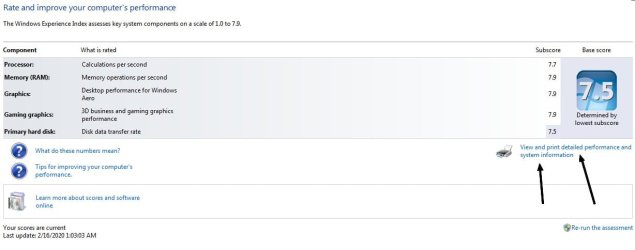
Another way to get system information in Windows 7 is to begin to type Performance Information and Tools in search under the Start orb and click the link shown here in the screenshot. Or if you have the My Computer icon on the desktop right click that and chose properties then go to Windows Experience Index.

Do the network adapters show up in the list there?
 

Attachments

  • hyujmkgu.jpg
    hyujmkgu.jpg
    82.4 KB · Views: 0

My Computer

Computer type
PC/Desktop
OS
Windows 7 Ultimate x64
Open a cmd prompt type
Ipconfig /all


Post results
 

My Computer

Computer type
PC/Desktop
OS
win 8 32 bit
Apparently OP was successful with System Restore in Safe Mode.
PMed me, & indicated problem solved!
 

My Computer

Computer type
PC/Desktop
Computer Manufacturer/Model Number
HP Desktop & Compaq Laptop
OS
Win 10 x64, Linux Lite, Win 7 x64, BlackArch, & Kali
Hard Drives
Samsung 850 Pro 256Gb,
Hitachi HDD 1Tb,
Crucial MX SSD 250Gb
Segate 3Tb USB 3.0 Ext. Backup HDD
Internet Speed
150Mbps dn, 20Mbps up
Antivirus
Avast Free, Malwarebytes Anti-Exploit & Anti-Ransomware
Browser
Firefox, Chrome, Opera, & VPN
Back
Top