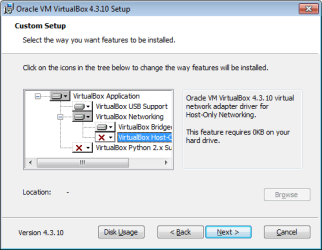
In this case it's most likely that the virtual box is actually causing the issue. I've seen this happen before quite a few times although I'm not entirely sure what the virtual box Ethernet connection is being used for?
As a test I would enable DHCP on the Ethernet connection then uninstall V box and test for reliable connectivity over a time period.
It may also be worth typing the gateway IP of 192.168.0.1 into the IPv4 static settings for the Default Gateway of the Ethernet connection since it doesn't seem to be picking it up for some reason. This may be because the static IP info isn't entered correctly.
Try using a different version of Virtual box if the test proves correct.
As a test I would enable DHCP on the Ethernet connection then uninstall V box and test for reliable connectivity over a time period.
It may also be worth typing the gateway IP of 192.168.0.1 into the IPv4 static settings for the Default Gateway of the Ethernet connection since it doesn't seem to be picking it up for some reason. This may be because the static IP info isn't entered correctly.
Try using a different version of Virtual box if the test proves correct.
My Computer
- Computer type
- PC/Desktop
- Computer Manufacturer/Model Number
- Home built
- OS
- Windows 7 Ult, Windows 8.1 Pro,
- CPU
- Q9650-4.275GHz, E8600 4.5GHz, E6750-3.8GHz
- Motherboard
- Evga 780i FTW
- Memory
- G.Skill PC2 9600 1200Mhz 5 5 5 15 2T
- Graphics Card(s)
- GTX480
- Sound Card
- Asus Xonar D2
- Monitor(s) Displays
- HannsG
- Screen Resolution
- 1680X1050
- Hard Drives
- GSkill Phoenix Pro 120GB SSD
- PSU
- ThermalTake Toughpower 1000Watt modular
- Case
- ThermalTake XaserV
- Cooling
- Xigmatek S1283
- Keyboard
- Logitech G15
- Mouse
- Logitech G9
- Internet Speed
- T1