Internet connectivity problems with VMware Player involving DHCP

Creasing

New member
Local time
3:18 PM
Messages
4
I recently successfully installed Windows 8 on my computer. After months and months of tireless research I finally found the root of the problem. I right clicked my wireless internet and went to network and sharing center. Below it shows a bench that said Unidentified network, and it had my VMware Network Adapter listed. I didnt understand why my internet would not work if it said it was on, but then i saw No Internet access. So the only thing i couldnt think of was my computer didn't trust VMWare to share internet with my Windows 8 Consumer Preview OS. I then clicked on VMware Network Adapter and selected the diagnose button. Windows Network Diagnostics popped up and said the following.


Windows Network Diagnostics
Issues found
DHCP is not enabled for "VMware Network Adapter VMnet"


Detected
Automatically update your network settings Completed


Issues found
Detection details
6
DHCP is not enabled for "VMware Network Adapter VMnet"Detected


I then thought, hey. I could just enable DHCP and i'd be in business. But of course i run into another problem, how do i enable DHCP? So I searched and didn't find an answer. I attempted to get my computer to fix the problem itsself but it would not fix it. Can anyone please tell me how to get this problem fixed so my VMware internet will work?
 
Last edited:

My Computer My Computer

Computer Manufacturer/Model Number
Hewlett Packard / HP
OS
Windows 7 Ultimate x64
Monitor(s) Displays
Omni

My Computer My Computer

Computer type
PC/Desktop
Computer Manufacturer/Model Number
Home made Desktop
OS
Windows 10 Pro. 64/ version 1709 Windows 7 Pro/64
CPU
Intel i7-6800K @ 4.3
Motherboard
ASUS X-99 Deluxe II
Memory
Corsair Platinum 16 gig @2400
Graphics Card(s)
EVGA GTX 1070 OC
Monitor(s) Displays
Asus 27" LED LCD/VE278Q
Screen Resolution
1920-1080 or 1280-720 HDMI
Hard Drives
INTEL SSD 730-240 Gb Sata 3.0/
PSU
EVGA Platium 1200W
Case
Phanteks Luxe Tempered Glass 8 fans/ one radiator
Cooling
XSPC/ Water Cooled CPU
Keyboard
Das 4 Professional
Mouse
Logitech M705/MX Anywhere 2-S
Internet Speed
100 mbits
Antivirus
Microsoft Security Essentials/ Malwarebytes Premium 3.0/ SAS
Browser
I.E. 11 default/Firefox/ ISP Time Warner Cable/Spectrum
Other Info
LG BluRay Burner/
Sound system-KLipsch-THX/
Icy Dock ssd Hot Swap bays.
I was still unable to find a helpful topic :(

this information might help:
Internet connection: Wireless
 

My Computer My Computer

Computer Manufacturer/Model Number
Hewlett Packard / HP
OS
Windows 7 Ultimate x64
Monitor(s) Displays
Omni
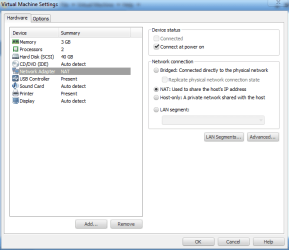
Have you tried these settings?

nat.PNG

This is what works for me on my Windows 8.

I have those same messages too if I run the diagnostics.
 

My Computer My Computer

Computer type
PC/Desktop
Computer Manufacturer/Model Number
Self Built
OS
Win 10 Pro x64
CPU
Intel I5-2500K @3.3GHz
Motherboard
Asrock P67 Extreme4
Memory
16GB G.Skill Ripjaws X (4x4GB)
Graphics Card(s)
EVGA GeForce 750 Ti SC 2GB
Sound Card
ASUS Xonar DG 5.1 Channels 24-bit 96KHz PCI Interface Sound
Monitor(s) Displays
auria eq2367
Screen Resolution
1920 x 1080
Hard Drives
250GB Samsung 850 EVO SSD
1TB WD Blue
1TB Hitachi
PSU
SeaSonic X 650W 80 Plus Gold
Case
Corsair Obsidian 750D
Cooling
Corsair H60, Three 140mm case fans
Keyboard
Logitech Wireless Keyboard K520
Mouse
Logitech Wireless Mouse M310
Internet Speed
Wave Broadband ~ 100 dn 5 up
Antivirus
Windows Defender, Malwarebytes Premium
Browser
Edge, IE11, Chrome
Other Info
Laptop specs: HP g7-1365dx /
CPU: AMD A6-3420M APU with Radeon(tm) HD Graphics /
RAM: Crucial 8Gb (2x4Gb) /
SSD: Crucial M4-CT128M4SSD2 ATA Device/ FW 000F /
GFX: AMD Radeon HD 6520G /
OS: Windows 10 Pro x64
Actually, I already did have NAT so that isnt it. I am so fed up with this internet connection i'm ready to do a teamviewer session. :confused:

If anyone is willing to help me through teamviewer i'd be very greatful.
 

My Computer My Computer

Computer Manufacturer/Model Number
Hewlett Packard / HP
OS
Windows 7 Ultimate x64
Monitor(s) Displays
Omni
I don't mind having a look through teamviewer for you, don't post your ID or password in here though, we'll have to work something out since you can't Private Message yet.

Edit: Check your PM.
 

My Computer My Computer

Computer type
PC/Desktop
Computer Manufacturer/Model Number
Self Built
OS
Win 10 Pro x64
CPU
Intel I5-2500K @3.3GHz
Motherboard
Asrock P67 Extreme4
Memory
16GB G.Skill Ripjaws X (4x4GB)
Graphics Card(s)
EVGA GeForce 750 Ti SC 2GB
Sound Card
ASUS Xonar DG 5.1 Channels 24-bit 96KHz PCI Interface Sound
Monitor(s) Displays
auria eq2367
Screen Resolution
1920 x 1080
Hard Drives
250GB Samsung 850 EVO SSD
1TB WD Blue
1TB Hitachi
PSU
SeaSonic X 650W 80 Plus Gold
Case
Corsair Obsidian 750D
Cooling
Corsair H60, Three 140mm case fans
Keyboard
Logitech Wireless Keyboard K520
Mouse
Logitech Wireless Mouse M310
Internet Speed
Wave Broadband ~ 100 dn 5 up
Antivirus
Windows Defender, Malwarebytes Premium
Browser
Edge, IE11, Chrome
Other Info
Laptop specs: HP g7-1365dx /
CPU: AMD A6-3420M APU with Radeon(tm) HD Graphics /
RAM: Crucial 8Gb (2x4Gb) /
SSD: Crucial M4-CT128M4SSD2 ATA Device/ FW 000F /
GFX: AMD Radeon HD 6520G /
OS: Windows 10 Pro x64
Did you guys find a solution

I just updated to Windows 8 and need to use VMware player for a class. Any solution to this problem or a walkthrough to get more specific with it?
 

My Computer My Computer

OS
Windows 8 64 bit
hope this helps

source: VMware Communities: How to enable DHCP for a vmnic?

I also had this problem and it drove me crazy. Finally I found some solution online. It's in the last reply (by rwatsh) in the given link above. I just typed in the following two lines in the vmware terminal and suddenly the network began to work. Saved my life!

ifconfig eth0 192.168.1.102 netmask 255.255.255.0 broadcast 192.168.1.255

dhclient eth0
 

My Computer My Computer

Computer type
PC/Desktop
OS
Windows 7 Home Premium 64bit
Back
Top