Internet Driver Problems

ToiletNinja

New member
Member
Local time
9:54 PM
Messages
47
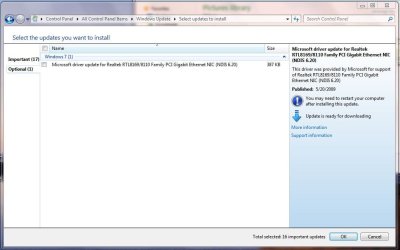
I have a problem with my computer. Whenever I start it, it does its thing, then it loads the hardware or something and it says Driver failure, press F1 to continue. I press F1 and windows loads up as usual, but with only one problem: No internet connection. None whatsoever. What I did was I went into control panel, then I went into Microsoft Update. In Microsoft Update, it lists " Microsoft Update for Realtek RTL8169/8110 Family PCI Gigabit NIC NDIS 6.20 " as an optional update. I but the little birdy check mark next to it and attempt to update it, It can't because of some other error, which I believe is caused by no internet connection, which is exactly what I am trying to solve. And so I go onto google and try to manually update the driver. I download it from another computer, copy it onto a flash drive, put it in my computer and attempt to update it from my computer. Another error appears which says something like that it couldn't locate a Realtek Ethernet Controller, if its in deep sleep mode, blah blah. Anywho... I believe the Drive Error at startup that I described to you (the reader) earlier is the very internet problem that I have. Anywho, Could anybody help me out with what to do [Something please that I have not attempted yet.] I'll list my specs: Windows 7 Home Premium 32-bit 2.5 GB RAM
 

My Computer

Computer type
PC/Desktop
Computer Manufacturer/Model Number
Custom Build
OS
Windows 7 Ultimate 64-bit
CPU
Intel i5-3570K Unlocked CPU [email protected]
Motherboard
ASRock Z77 Extreme4
Memory
G.SKILL Ripjaws X - Series 8GB DDR3 RAM
Sound Card
Unknown
Monitor(s) Displays
LG Flatron Wide, 24 inches
Screen Resolution
1680x1050
Hard Drives
Western Digital Caviar Black 1TB 7200rpm SATA
PSU
PC Power and Cooling Silencer MK. III 600w PSU
Case
Thermaltake Commander MS-I Snow Edition
Cooling
Some fans
Keyboard
USB Keyboard, nothing fancy
Mouse
USB Mouse
Internet Speed
28MB/s DOWN 5.8MB/s UP
Welcome to the Forums ToiletNinja (lol)
Please check if any error on DEvice Manager for your Ethernet controller (Network Adapter)
 

My Computer

Computer Manufacturer/Model Number
Wally, Innc.
OS
Windows 7 x64 finally!
CPU
AMD Athlon II X2 240
Motherboard
Biostar TA790GX XE
Memory
OCZ Platinum 4GB DDR2 1066 (will not work past 800MHz)
Graphics Card(s)
MSI R4670-MD1G Radeon HD 4670 1GB 128-bit GDDR3
Sound Card
ATI High Definition Audio Device Realtek ALC888
Monitor(s) Displays
HP w19e
Screen Resolution
1440x900
Hard Drives
Western Digital Caviar Green WD5000AADS 500GB SATA
Western Digital Caviar Blue WD5000AAKS 500GB SATA
PSU
Athena Power Micro ATX 400W
Case
HEC 6T 6T10BB Black MicroATX Mini Tower
Cooling
stock
Keyboard
wired, many keys
Mouse
HP wireless, 2 buttons, 1 wheel
Internet Speed
DSL 2Mb (recently getting 1.65M!)
Is your net controller onboard or card?
 

My Computer

OS
ME/XP/Vista/Win7
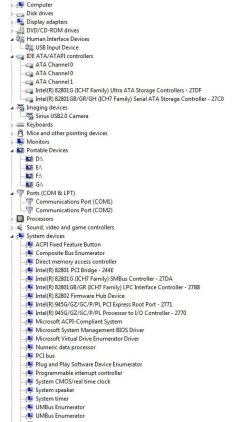
Thank you for lolling at my nick, and there seems to be no errors in device manager. In fact, I don't even think it lists any Network Adapters. Look at the attatchments.
 

Attachments

  • capshure.JPG
    capshure.JPG
    68.8 KB · Views: 22
  • captshure.JPG
    captshure.JPG
    61 KB · Views: 15

My Computer

Computer type
PC/Desktop
Computer Manufacturer/Model Number
Custom Build
OS
Windows 7 Ultimate 64-bit
CPU
Intel i5-3570K Unlocked CPU [email protected]
Motherboard
ASRock Z77 Extreme4
Memory
G.SKILL Ripjaws X - Series 8GB DDR3 RAM
Sound Card
Unknown
Monitor(s) Displays
LG Flatron Wide, 24 inches
Screen Resolution
1680x1050
Hard Drives
Western Digital Caviar Black 1TB 7200rpm SATA
PSU
PC Power and Cooling Silencer MK. III 600w PSU
Case
Thermaltake Commander MS-I Snow Edition
Cooling
Some fans
Keyboard
USB Keyboard, nothing fancy
Mouse
USB Mouse
Internet Speed
28MB/s DOWN 5.8MB/s UP
Where is your Network adapter??? It should be between Monitors and Portable Devices. It might be your hardware / BIOS is not recognizing your adapter, which is probably what the message at boot is saying.

Strange that Win7 wants to update the driver. Maybe it was working before?

Please check your BIOS and see if something like "onboard LAN controller" is enabled.

WE might need your motherboard model too.
 

My Computer

Computer Manufacturer/Model Number
Wally, Innc.
OS
Windows 7 x64 finally!
CPU
AMD Athlon II X2 240
Motherboard
Biostar TA790GX XE
Memory
OCZ Platinum 4GB DDR2 1066 (will not work past 800MHz)
Graphics Card(s)
MSI R4670-MD1G Radeon HD 4670 1GB 128-bit GDDR3
Sound Card
ATI High Definition Audio Device Realtek ALC888
Monitor(s) Displays
HP w19e
Screen Resolution
1440x900
Hard Drives
Western Digital Caviar Green WD5000AADS 500GB SATA
Western Digital Caviar Blue WD5000AAKS 500GB SATA
PSU
Athena Power Micro ATX 400W
Case
HEC 6T 6T10BB Black MicroATX Mini Tower
Cooling
stock
Keyboard
wired, many keys
Mouse
HP wireless, 2 buttons, 1 wheel
Internet Speed
DSL 2Mb (recently getting 1.65M!)
Where is your Network adapter??? It should be between Monitors and Portable Devices. It might be your hardware / BIOS is not recognizing your adapter, which is probably what the message at boot is saying.

Strange that Win7 wants to update the driver. Maybe it was working before?

Please check your BIOS and see if something like "onboard LAN controller" is enabled.

WE might need your motherboard model too.

Thanks a whole heaping bunch. I went onto my BIOS, and saw that my Onboard LAN controller, was in fact, disabled. I then proceeded to enable it, and normally start my computer. The error at the beginning still persists, but my internet works just fine. And all I wanted was my internet fixed. Now, i'm a bit more educated with computers. When I get older, I wish to seek a profession involving computer software, [programming, coding, etc.], somewhere in the video game profession, or computer hardware [1) Buy parts for computer 2) Put all parts correctly into place 3) Sell computer 4) Repeat] Thanks. Really.
 

My Computer

Computer type
PC/Desktop
Computer Manufacturer/Model Number
Custom Build
OS
Windows 7 Ultimate 64-bit
CPU
Intel i5-3570K Unlocked CPU [email protected]
Motherboard
ASRock Z77 Extreme4
Memory
G.SKILL Ripjaws X - Series 8GB DDR3 RAM
Sound Card
Unknown
Monitor(s) Displays
LG Flatron Wide, 24 inches
Screen Resolution
1680x1050
Hard Drives
Western Digital Caviar Black 1TB 7200rpm SATA
PSU
PC Power and Cooling Silencer MK. III 600w PSU
Case
Thermaltake Commander MS-I Snow Edition
Cooling
Some fans
Keyboard
USB Keyboard, nothing fancy
Mouse
USB Mouse
Internet Speed
28MB/s DOWN 5.8MB/s UP
You need to replace your CMOS battery.
 

My Computer

OS
ME/XP/Vista/Win7
I am glad it worked, thanks for the feedback
replace the battery as Theog suggested. If you still have a problem let us know, you might need to check your HD.
 

My Computer

Computer Manufacturer/Model Number
Wally, Innc.
OS
Windows 7 x64 finally!
CPU
AMD Athlon II X2 240
Motherboard
Biostar TA790GX XE
Memory
OCZ Platinum 4GB DDR2 1066 (will not work past 800MHz)
Graphics Card(s)
MSI R4670-MD1G Radeon HD 4670 1GB 128-bit GDDR3
Sound Card
ATI High Definition Audio Device Realtek ALC888
Monitor(s) Displays
HP w19e
Screen Resolution
1440x900
Hard Drives
Western Digital Caviar Green WD5000AADS 500GB SATA
Western Digital Caviar Blue WD5000AAKS 500GB SATA
PSU
Athena Power Micro ATX 400W
Case
HEC 6T 6T10BB Black MicroATX Mini Tower
Cooling
stock
Keyboard
wired, many keys
Mouse
HP wireless, 2 buttons, 1 wheel
Internet Speed
DSL 2Mb (recently getting 1.65M!)
Back
Top