- Local time
- 10:54 PM
- Messages
- 47
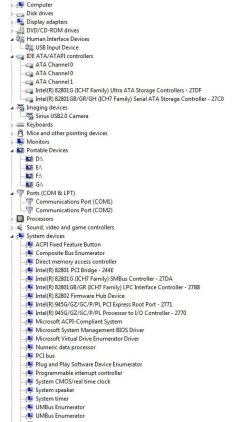
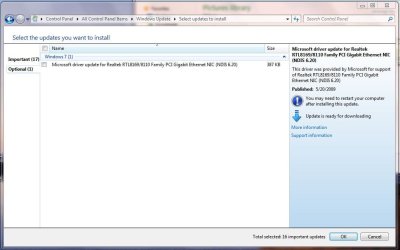
I have a problem with my computer. Whenever I start it, it does its thing, then it loads the hardware or something and it says Driver failure, press F1 to continue. I press F1 and windows loads up as usual, but with only one problem: No internet connection. None whatsoever. What I did was I went into control panel, then I went into Microsoft Update. In Microsoft Update, it lists " Microsoft Update for Realtek RTL8169/8110 Family PCI Gigabit NIC NDIS 6.20 " as an optional update. I but the little birdy check mark next to it and attempt to update it, It can't because of some other error, which I believe is caused by no internet connection, which is exactly what I am trying to solve. And so I go onto google and try to manually update the driver. I download it from another computer, copy it onto a flash drive, put it in my computer and attempt to update it from my computer. Another error appears which says something like that it couldn't locate a Realtek Ethernet Controller, if its in deep sleep mode, blah blah. Anywho... I believe the Drive Error at startup that I described to you (the reader) earlier is the very internet problem that I have. Anywho, Could anybody help me out with what to do [Something please that I have not attempted yet.] I'll list my specs: Windows 7 Home Premium 32-bit 2.5 GB RAM
My Computer
- Computer type
- PC/Desktop
- Computer Manufacturer/Model Number
- Custom Build
- OS
- Windows 7 Ultimate 64-bit
- CPU
- Intel i5-3570K Unlocked CPU [email protected]
- Motherboard
- ASRock Z77 Extreme4
- Memory
- G.SKILL Ripjaws X - Series 8GB DDR3 RAM
- Sound Card
- Unknown
- Monitor(s) Displays
- LG Flatron Wide, 24 inches
- Screen Resolution
- 1680x1050
- Hard Drives
- Western Digital Caviar Black 1TB 7200rpm SATA
- PSU
- PC Power and Cooling Silencer MK. III 600w PSU
- Case
- Thermaltake Commander MS-I Snow Edition
- Cooling
- Some fans
- Keyboard
- USB Keyboard, nothing fancy
- Mouse
- USB Mouse
- Internet Speed
- 28MB/s DOWN 5.8MB/s UP