Internet Explorer 8 helps you save time with Accelerato

z3r010

Administrator
Staff member
Local time
8:43 AM
Messages
53,501
Location
Douglas, Isle of Man
There’s been a great deal of more talk lately about browser performance. You may have seen some previous discussion about page load performance as you saw here in a video and whitepaper in March. Page load ensures that you get to where you want to go quickly. But page load time differences actually measure about the length it takes for a person to blink their eye once, making a win for any browser pretty inconsequential as far as time savings go.

However, Internet Explorer 8 today offers a feature that saves you time and clicks and lets you get things done more quickly: Accelerators. Accelerators optimize the browser experience by removing repetitive, time consuming actions and give people easy access to the online services they use most. You can discover new Accelerators for Internet Explorer 8 at the Internet Explorer 8 Add-ons Gallery.

With all the talk about performance, we wanted to see what features like Accelerators really meant for time savings when people use the web, so we created another video looking at common tasks people actually do in four browsers: Safari 4.0, Chrome 2.0 beta, Firefox 3.5 beta 99 and Internet Explorer 8. Please note, all tests were performed using the default installation settings for each browser. No additional add-ons or extensions were added. 

Here is a video that shows off how Accelerators in Internet Explorer 8 make your browsing experience quicker and easier:


Accelerators in IE8 Help Save Time!


aggbug.aspx

More...
 

My Computer My Computer

Computer type
PC/Desktop
OS
Windows 11
Shame its not an integral part of W7 RTM.... unless you want it to be :D.

To be honest i have not tried any accelerators at all with IE8, but after reading this i may well experiment.

Thanks for the Info Z3r010
 
But page load time differences actually measure about the length it takes for a person to blink their eye once, making a win for any browser pretty inconsequential as far as time savings go.

When I load a certain webpage in Internet Explorer 8, it takes around 5-7 seconds, the latter few of which are spent watching each element of the page load individually. Loading the same webpage in Firefox 3.5, on the same broadband connection, is close to instantaneous. I notice similar differences on every website I've ever tested.

So the quoted statement is correct, IF it takes you around 5 seconds to complete a blink.
 

My Computer My Computer

Computer Manufacturer/Model Number
Alienware X51
OS
Windows 7 Home Premium x64
CPU
Intel Core i7-2600 @3.40GHz
Memory
8.00GB DDR3
Graphics Card(s)
NVIDIA GeForce GTX 555 w/1.0GB RAM
Monitor(s) Displays
BenQ XL2420TX
Screen Resolution
1920x1080@120Hz
Hard Drives
1TB
PSU
330-watt
Keyboard
Logitech Wireless Illuminated Keyboard K800
Mouse
Razer Orochi
Internet Speed
Campus Internet
I'm finding accelerators to be a great tool that I'm using more all the time. Specially google's define. Very easy to use, highlight a word, click the blue arrow, all accelerators, define, a new tab opens with the definition of the word.

Just wish there was a way to organize its context menu. Can't seem to find any way to move items around so I can choose which are shown in the first menu so as not to have to go into "all accelerators".
 

My Computer My Computer

Computer Manufacturer/Model Number
POS
OS
OS3.5
CPU
celery
Motherboard
Good Question ...Unknown
Memory
memory never forgets
Graphics Card(s)
OB
Sound Card
OB
Monitor(s) Displays
HUGE
Screen Resolution
168000000x105000000
Hard Drives
full
PSU
OEM 65watt
Case
N/A
Cooling
OB
Keyboard
OB
Mouse
mouse
Internet Speed
1 Trillion MBps
Other Info
Still An Awesome Forum!
When I load a certain webpage in Internet Explorer 8, it takes around 5-7 seconds, the latter few of which are spent watching each element of the page load individually. Loading the same webpage in Firefox 3.5, on the same broadband connection, is close to instantaneous. I notice similar differences on every website I've ever tested.

So the quoted statement is correct, IF it takes you around 5 seconds to complete a blink.

What sites are you going to? IE8 and FF3.5 are both near instantaneous to me.
 

My Computer My Computer

Computer Manufacturer/Model Number
Intel WBIBX10J
OS
Linux (Debian, Android)
CPU
Intel Core i7 860
Motherboard
Intel DP55WB
Memory
2x 2GB Kingston DDR3-1333
Graphics Card(s)
AMD Radeon HD 5750
Sound Card
Realtek ALC888
Monitor(s) Displays
2x Dell Inc. E248WFP
Screen Resolution
3840x1200
Hard Drives
Intel X25-V
Samsung HD103SJ
PSU
Corsair CX400
Case
Silverstone GD05
Cooling
Stock
Keyboard
Dell Inc. Bluetooth Wireless
Internet Speed
30 Mbps
What sites are you going to? IE8 and FF3.5 are both near instantaneous to me.

I'm not going to disclose my entire browsing routine, but among the sites I've tested are WinCustomize, Weather.com, and these forums. Each one takes between 5-10 seconds on IE8, less than five seconds on FF 3.0, and almost instant on FF 3.5. The most drastic difference was on Weather.com, which went from about 7 seconds on IE8 to 1-2 on FF 3.5.
 

My Computer My Computer

Computer Manufacturer/Model Number
Alienware X51
OS
Windows 7 Home Premium x64
CPU
Intel Core i7-2600 @3.40GHz
Memory
8.00GB DDR3
Graphics Card(s)
NVIDIA GeForce GTX 555 w/1.0GB RAM
Monitor(s) Displays
BenQ XL2420TX
Screen Resolution
1920x1080@120Hz
Hard Drives
1TB
PSU
330-watt
Keyboard
Logitech Wireless Illuminated Keyboard K800
Mouse
Razer Orochi
Internet Speed
Campus Internet
I'm not going to disclose my entire browsing routine, but among the sites I've tested are WinCustomize, Weather.com, and these forums. Each one takes between 5-10 seconds on IE8, less than five seconds on FF 3.0, and almost instant on FF 3.5. The most drastic difference was on Weather.com, which went from about 7 seconds on IE8 to 1-2 on FF 3.5.

Is that with or without a cache dump and a page refresh? I can see where it would be quite quick if FF 3.5 were accessing a cache. The next question would be something along the lines of, "Why isn't IE also using cache?"
 

My Computer My Computer

Computer Manufacturer/Model Number
Cobbled together :)
OS
Win7 Ultimate, x64
CPU
i7 920, currently NOT OC
Motherboard
Asrock X58 Deluxe
Memory
OCZ Platinum 12GB (6 x 2GB) 240-Pin DDR3 SDRAM DDR3 1600
Graphics Card(s)
nvidia geforce 7600 gt
Sound Card
integrated
Monitor(s) Displays
Samsung SyncMaster 204t (dual monitors)
Screen Resolution
1600 x 1200
Hard Drives
WDC WD2000JS-00MHB0 ATA
WDC WD5000AAKS-65YGA0 ATA
PSU
750w
Cooling
Air, 4 120mm
Is that with or without a cache dump and a page refresh? I can see where it would be quite quick if FF 3.5 were accessing a cache. The next question would be something along the lines of, "Why isn't IE also using cache?"

It's not trying to pull the pages from a cache, and therefore does not require manual refresh. Every time I load a page in FF, it downloads it fresh from the server. I hate when you have it set to require a manual refresh to actually download the newest version of the webpage.
 

My Computer My Computer

Computer Manufacturer/Model Number
Alienware X51
OS
Windows 7 Home Premium x64
CPU
Intel Core i7-2600 @3.40GHz
Memory
8.00GB DDR3
Graphics Card(s)
NVIDIA GeForce GTX 555 w/1.0GB RAM
Monitor(s) Displays
BenQ XL2420TX
Screen Resolution
1920x1080@120Hz
Hard Drives
1TB
PSU
330-watt
Keyboard
Logitech Wireless Illuminated Keyboard K800
Mouse
Razer Orochi
Internet Speed
Campus Internet
why would anyone even need these accelerators if the browser was made/created/coded correctly to begin with? I didn't try any accelerators because I need recommendations from people that try and use them, or are guinea pigs/beta testors.. so, are they safe? do they mess up anything?

Just asking..
:huh:
 

My Computer My Computer

OS
WinXP
why would anyone even need these accelerators if the browser was made/created/coded correctly to begin with? I didn't try any accelerators because I need recommendations from people that try and use them, or are guinea pigs/beta testors.. so, are they safe? do they mess up anything?

Just asking..
:huh:

What???

It seems your under the impression that accelerators have to do with browsing performance, it doesn't. Its meant to speed up things you might want to do and save you time, by providing quick links, but nothing to do with the overall browser performance.

Web accelerators are more like tools, mainly in the form of links. If your using IE8 and left them on during setup, if you highlight a word or phrase on a webpage, clicking on the blue arrow box opens the accelerator context window. Theres a whole host of things to do like search, blog, define, maps, etc.

Check here for more info:
Internet Explorer 8: Features

Heres the gallery of accelerators:
Accelerators - Add-ons Gallery

Added:

Another place for more info:
http://windowshelp.microsoft.com/Windows/en-CA/help/fe9dd907-64c1-414e-8e51-0890dada5fde1033.mspx
 

My Computer My Computer

Computer Manufacturer/Model Number
POS
OS
OS3.5
CPU
celery
Motherboard
Good Question ...Unknown
Memory
memory never forgets
Graphics Card(s)
OB
Sound Card
OB
Monitor(s) Displays
HUGE
Screen Resolution
168000000x105000000
Hard Drives
full
PSU
OEM 65watt
Case
N/A
Cooling
OB
Keyboard
OB
Mouse
mouse
Internet Speed
1 Trillion MBps
Other Info
Still An Awesome Forum!
PULEEZE! Accelerators are for wimps :D. We don't need no stinkin accelerators ...

The reason they had to add accelerators is because they don't let you drag-n-drop directly into the search bar, the little #&%#$ ...
 

My Computer My Computer

Computer Manufacturer/Model Number
Custom workstation /// Lenovo X61t tablet notebook
OS
Windows 7 RTM x64
CPU
Core i7 980X @ 4.04GHz OC /// Core Duo L7500 @ 1.6GHz
Motherboard
Asus P6T6 WS Revolution ///
Memory
12GB G. Skill @ DDR-1600 OC /// 4GB
Graphics Card(s)
Saphire HD4870 Toxic 1GB /// Intel Mobile GMA X3100
Monitor(s) Displays
Dual Eizo 24" SX2461W /// 12"
Screen Resolution
1920x1200 /// 1400x1050
Hard Drives
Workstation:
5x 750GB Barracuda-11 on Areca ARC-1220;
4x 1.5TB Barracuda-11 on Intel ICH10R;
Volumes:
300GB RAID 0, 2.7TB RAID 10 on Intel;
100GB RAID 0, 1.4TB RAID 10 on Areca ///
Notebook: G.Skill Titan 256GB SSD
PSU
Tagan ITZ 1100
Case
GHS-1500 ///
Cooling
Thermalright IFX-14 + a slew of stealth fans ///
Keyboard
Logitech Edge ///
Mouse
Logitech Wireless Optical Trackball
Internet Speed
5Mbps down / 820Kbps up
Other Info
Main use: photography;
DVD Drive: L.G GGW-H20L Blu-Ray / DVD;
OC: QPI/DRAM @ 1.33v, CPU @ 1.293v, DRAM Bus @ 1.65v, CPU PLL @ 1.88v, CPU mult = 25x, BCLK = 160, DDR3-1604 @ 7-8-7-24
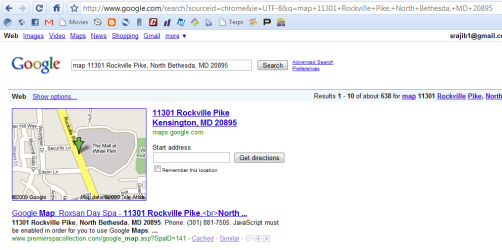
just watched the video that shows how many steps it takes to find the map and it is completely BS

i can map the address on firefox (using 3.6a1pre) or chrome in less than five steps; i haven't installed any add-ons or extensions either

just go to the address bar, and type "map whatever address"
 

Attachments

  • Capture.PNG
    Capture.PNG
    2.9 KB · Views: 6
  • Capture1.PNG
    Capture1.PNG
    33.6 KB · Views: 6

My Computer My Computer

OS
Windows 7
CPU
AMD Phenom 9950 Quad Core
Motherboard
Gigabyte GA-MA78GM-US2H
Memory
4gb
Graphics Card(s)
ATI Radeon HD 3200
Sound Card
Realtek HD Audio
Hard Drives
Seagate 500GB 32MB cache 7200 RPM 3.5" Barracuda
PSU
Stealth X Stream 500W
Case
Xion Solaris
Cooling
G-Power Lite Cooler (GH-PDU22-SC)
Internet Speed
20/5
I don't know about you guys, but I don't see any real use for the so-called accelerators. Just no use and occupying space when right clicking when browsing pages.
 

My Computer My Computer

Computer Manufacturer/Model Number
BrandSystem
OS
Windows 7 Enterprise x64 [dual boot with Windows Vista Enterprise w/SP2]
CPU
Intel Core 2 Quad Q6600
Motherboard
Gigabyte GA-P35-DQ6
Memory
8GB GeIL DDR2 800 [2GBx4]
Graphics Card(s)
ATI Radeon HD2600 PRO
Sound Card
Integrated Realtek ALC889A
Monitor(s) Displays
LG Flatron L1520B
Screen Resolution
1024x768
Hard Drives
Western Digital WD6400AAKS
PSU
Entac Earthwatts 380A
Case
CoolerMaster Ammo 533
Cooling
Thermalright Ultra-120 eXtreme
Keyboard
DELL Multimedia Keyboard SK-8135
Mouse
IBM Travel Mouse 31p7410 USB
I don't know about you guys, but I don't see any real use for the so-called accelerators. Just no use and occupying space when right clicking when browsing pages.

I politely disagree. Think they make short work of certain tasks.

For example, lets say you see a town name and you want to see where it is. All thats needed is to highlight the town name click the blue box (or right click) and choose "maps". It will open a new tab and show the location.

Same with the definition of a word and google define. You come across a word that your not sure what it means, you highlight it, right click and choose define. A new tab opens with the definition.

Lets say theres something that you want to check if its on You tube. With the you tube accelerator, you highlight and choose the you tube. With this, a thumbnail preview will open when you hover over the you tube link, then if you click it, it opens a new tab and goes to the search results on You tube.

Think because its new, one has to use them a bit to see there benefits. At first I didn't see the big deal with them, but now I use them all the time. It does reduce some steps and saves time. As much as MS claims, maybe not, but it does make it easier IMHO.

---

If you don't like them and never will use them, you can disable them to tidy up your right click menu. Although it appears that you must disable each one, one by one. Doesn't look like theres a all or nothing option to quickly remove them. Also, there is a post in that thread explaining how to get rid of the "blue icon box" from appearing.

http://www.sevenforums.com/tutorials/1020-internet-explorer-enable-disable-accelerator-add-ons.html

Have you checked for others that you might find useful:

Add-ons Gallery

I'm all for options & features. I'm glad to see them, and if I didn't, the option to remove them, well most of them, is there. Its all about choice and every body is entitled to there opinion. :)


Update:
You can turn off accelerators completely in the local computer policy editor.

Go to Local Computer Policy\Computer Configuration\Administrative Templates\Windows Componets\Internet Explorer\Accelerators\ select "Turn off Accelerators" and Enable it.

View attachment 17312
 
Last edited:

My Computer My Computer

Computer Manufacturer/Model Number
POS
OS
OS3.5
CPU
celery
Motherboard
Good Question ...Unknown
Memory
memory never forgets
Graphics Card(s)
OB
Sound Card
OB
Monitor(s) Displays
HUGE
Screen Resolution
168000000x105000000
Hard Drives
full
PSU
OEM 65watt
Case
N/A
Cooling
OB
Keyboard
OB
Mouse
mouse
Internet Speed
1 Trillion MBps
Other Info
Still An Awesome Forum!

My Computer My Computer

Computer Manufacturer/Model Number
Home Brew
OS
Windows 7 Ultimate Vista Ultimate x64
CPU
Core 2 Duo E8500 3.16Ghz @ 3.8Ghz
Motherboard
eVGA 750i FTW
Memory
2x2Gigs Patriot PC2-6400 LL
Graphics Card(s)
Inno3D GeForce GTX260 216 SP
Monitor(s) Displays
ASUS VW222U 22" 2ms Response time
Screen Resolution
1680x1050
Hard Drives
SATA 150GB
SATA II 250GB
USB IDE 750GB Ext.
PSU
HYTEC 600W & Thermaltake 650W Toughpower Power Exp
Case
Thermaltake Armor LCS (Liquid Cooling System)
Cooling
Liquid Cooling System
Keyboard
Logitech G15 Gaming Keyboard
Mouse
Logitech G9 Gaming Mouse
I politely disagree. Think they make short work of certain tasks.

.....

I'm all for options & features. I'm glad to see them, and if I didn't, the option to remove them, well most of them, is there. Its all about choice and every body is entitled to there opinion. :)


Update:
You can turn off accelerators completely in the local computer policy editor.

Go to Local Computer Policy\Computer Configuration\Administrative Templates\Windows Componets\Internet Explorer\Accelerators\ select "Turn off Accelerators" and Enable it.

View attachment 17312
Options are there as such, they work for some people and do not for others. You can also disable the accelerators in IE "Tools/Manage Add-Ons".
 

My Computer My Computer

Computer Manufacturer/Model Number
Custom workstation /// Lenovo X61t tablet notebook
OS
Windows 7 RTM x64
CPU
Core i7 980X @ 4.04GHz OC /// Core Duo L7500 @ 1.6GHz
Motherboard
Asus P6T6 WS Revolution ///
Memory
12GB G. Skill @ DDR-1600 OC /// 4GB
Graphics Card(s)
Saphire HD4870 Toxic 1GB /// Intel Mobile GMA X3100
Monitor(s) Displays
Dual Eizo 24" SX2461W /// 12"
Screen Resolution
1920x1200 /// 1400x1050
Hard Drives
Workstation:
5x 750GB Barracuda-11 on Areca ARC-1220;
4x 1.5TB Barracuda-11 on Intel ICH10R;
Volumes:
300GB RAID 0, 2.7TB RAID 10 on Intel;
100GB RAID 0, 1.4TB RAID 10 on Areca ///
Notebook: G.Skill Titan 256GB SSD
PSU
Tagan ITZ 1100
Case
GHS-1500 ///
Cooling
Thermalright IFX-14 + a slew of stealth fans ///
Keyboard
Logitech Edge ///
Mouse
Logitech Wireless Optical Trackball
Internet Speed
5Mbps down / 820Kbps up
Other Info
Main use: photography;
DVD Drive: L.G GGW-H20L Blu-Ray / DVD;
OC: QPI/DRAM @ 1.33v, CPU @ 1.293v, DRAM Bus @ 1.65v, CPU PLL @ 1.88v, CPU mult = 25x, BCLK = 160, DDR3-1604 @ 7-8-7-24
Back
Top