Internet Explorer 9 Available now!

Status
Not open for further replies.
I'm posting from it right now. It's working extremely well, has no issues with any plug-ins I had installed previously, and hasn't had any trouble interacting with my SharePoint sites, either.
 

My Computer My Computer

OS
Windows 7 Ultimate x64 SP1
CPU
Intel Core i7-2600
Motherboard
Gigabyte GA-P67A-UD3P-B3
Memory
12 GB Patriot Extreme DDR3-1333
Graphics Card(s)
Nvidia GTX 470
Monitor(s) Displays
Dell UltraSharp 2209WA
Hard Drives
OCZ Agility3 240 GB, WD5001AALS, WD7501AALS
PSU
OCZ ModStream 700W
Case
CoolerMaster HAF 912 Advanced
Cooling
CoolerMaster Hyper 212 Plus
Not without a registry hack probably. I don't think any release of IE for Window's 7 will ever allow this to happen.

IE 9 64 Bit still cannot be set as the default browser? :mad: :banghead:
 

My Computer My Computer

Computer Manufacturer/Model Number
HP DV6 1330sa
OS
Windows 7 Professional 64 Bit SP1
CPU
INTEL DUAL CORE 2.1Ghz
Motherboard
N/A
Memory
4GB DDR3
Graphics Card(s)
INTEL
Sound Card
LAPTOP
Monitor(s) Displays
2
Screen Resolution
3200x1080
Hard Drives
250GB
PSU
LAPTOP
Case
LAPTOP
Cooling
LAPTOP
Keyboard
SOLID YEAR 260U
Mouse
USB
Internet Speed
20 MB/S
The restart caught me by surprise, especially since it didn't 'fully' restart.


(No, I never used the RC)

The rendering engine for IE is used to display content for Explorer and the help system as possibly several other internal systems. Did you notice that the IE install completely shut down your desktop during install? :)

So yes, a restart is required to completely replace the old html renderer with the new one since parts of it are base OS components.
 

My Computer My Computer

Computer Manufacturer/Model Number
Scratch built
OS
Windows 7 x64 Ultimate
CPU
i7 960
Motherboard
Asus P6X58D
Memory
12 Gig Corsair Dominator
Graphics Card(s)
Nvidia 480
Sound Card
Maudio Delta 44 + breakout box
Monitor(s) Displays
Dell UltraSharp U2410 24in and Samsung 21 dual monitors
Screen Resolution
1920x1200 and 1280x1024
Hard Drives
Primary: Intel X-25M G2 160G SSD
Secondary: Segate baracuda 1.0 TB
HDs in AHCI mode.
PSU
Corasair TX850
Case
Cooler Master HAF
Cooling
Corsair H50
Keyboard
Logitech G15 + N52 game pad
Mouse
Logitech MX518
Internet Speed
15kbs down 4.5kbps up
Other Info
WEI 7.6
CPU & RAM 7.6
Graphics 7.9
Hard disk 7.7
So far IE9 RTM is working well in the limited testing I've been able to give it.

One thing they did not "fix" from the RC that will bother me forever is the popup at the bottom of the page. I get one with "This site has been modified to prevent cross site scripting" on like half the pages I visit and that notice is WAY too large and covers a good portion of the bottom of the page. :P

If they really wanted to CONSTANTLY be giving me "status" then they should have just implemented a status bar at the bottom that took up much less space, and the ability to hide it I don't care about it's cross site modification notices.
 

My Computer My Computer

Computer Manufacturer/Model Number
Scratch built
OS
Windows 7 x64 Ultimate
CPU
i7 960
Motherboard
Asus P6X58D
Memory
12 Gig Corsair Dominator
Graphics Card(s)
Nvidia 480
Sound Card
Maudio Delta 44 + breakout box
Monitor(s) Displays
Dell UltraSharp U2410 24in and Samsung 21 dual monitors
Screen Resolution
1920x1200 and 1280x1024
Hard Drives
Primary: Intel X-25M G2 160G SSD
Secondary: Segate baracuda 1.0 TB
HDs in AHCI mode.
PSU
Corasair TX850
Case
Cooler Master HAF
Cooling
Corsair H50
Keyboard
Logitech G15 + N52 game pad
Mouse
Logitech MX518
Internet Speed
15kbs down 4.5kbps up
Other Info
WEI 7.6
CPU & RAM 7.6
Graphics 7.9
Hard disk 7.7
The download went well for me over the RC version. However, now at idle, my machine is using a little more RAM then with the RC. I haven't been able to pinpoint the reason, but I see about 50mg's more then before and 4% higher readings in task manager.

I downloaded it so my machine is current, but I won't use it, as IE9 isn't even close to Chrome. It's not really a knock on IE9, but rather a compliment on just how good Chrome is.
 

My Computer My Computer

OS
Windows 7 Home Premium x64 SP1
A noticeable increase in speed on my Mini with an Atom and 2GB. A thumbs up in that category. The back button? A definite thumbs down. It may be a minor detail as far as function but it looks like crap from a visual standpoint. I can't believe this wasn't fixed for the final version.
 

My Computer My Computer

OS
Win 7 Professional and Windows 8 Professional
My IE9 install went something like this... :D

vhyz2x.png
 

My Computer My Computer

Computer Manufacturer/Model Number
Custom
OS
Windows 7 Ultimate 64bit
CPU
Intel Core i7 920
Motherboard
GA-EX58-UD3R Rev 1 F11 Bios
Memory
8 Gigs DDR3 RAM @ 1600mhz per stic
Graphics Card(s)
GTX 285
Sound Card
Realtek HD Audio
Monitor(s) Displays
Dell 19inch 16:10
Screen Resolution
1440x900
Hard Drives
Western Digital x2 500gig 7200rpm in Raid 0
PSU
OCZ Modular Extreme 700W PSU
Case
Antec 1200
Internet Speed
15mbps down 2 up
Other Info
Coolermaster V8 Cpu Cooler
I'm sure there are a few of us that are truely happy for you :rolleyes:
 

My Computer My Computer

Computer Manufacturer/Model Number
Compaq Desktop
OS
Windows 7 Ultimate x64
CPU
AMD Sempron Dual Core
Memory
3GB
Graphics Card(s)
NVIDIA GeForce 6150SE nForce 430
Screen Resolution
1024x768
Hard Drives
150GB Sata
So is this available via Windows Updates or will I have to download this manually?
No, in Windows Update he are always 2, 3 days of delay
 

My Computer My Computer

OS
Windows 7 pro 64 bit
Memory
2 Go
Graphics Card(s)
Nvidia
Mouse
Microsoft optical mouse
Can anyone tell me if it is possible to merge the min-max-close buttons with the address/tab bar, so that the UI is slimmer? I see no reason for those 3 buttons to for the UI to be so fat.
 

My Computer My Computer

Computer Manufacturer/Model Number
DIY
OS
W7x64 Pro, SuSe 12.1/** W7 x64 Pro, XP MCE
CPU
Phenom II 1090T w/Noctua NH-D14 /**4400+ X2 w/CM Hyper TX 3
Motherboard
ASRock 890FX Deluxe 4/**A8N-SLI
Memory
2 x 2GB Patriot PGS34g1600LLKA/**4x1GB Corsair VS
Graphics Card(s)
EVGA GTX460 SC/**EVGA 8800GTS
Sound Card
Asus Xonar D2X/**Xonar D1
Monitor(s) Displays
Acer X233H, Dell E152FPc /**LG M237-WD
Screen Resolution
1920x1080 & 1024x768/**1980x1080
Hard Drives
WDC 2TB, 1.5TB, 1TB, 500GB,Seagate 500GB , Maxtor 80GB /**500GB Seagate & WDC 1TB Black
PSU
CM RS600 w/ APC BX1000G/**Antec 500 TP w/ APC BX1000
Case
HAF922/**Antec 1040IIB
Cooling
3x200mm, 1x140 and 1x120mm/**5x80mm fans
Keyboard
Logitech Media USB/**Saitek Eclipse
Mouse
Cordless Trackman Wheel/**Ditto
Internet Speed
3.3Mbps
Other Info
SB 560 5.1 w/ Sennheiser RS140/**Creative T20 speakers, Dvico FusionHDTV7 Gold RT, Cisco E3000, HP 5510V AIO, Linksys E3000, Belkin F5U237 hub and **F5D8055 adapter
(** = 2nd rig)
Did you notice that the IE install completely shut down your desktop during install? :)

I did. It was installing in the background whilst I was in Opera and then suddenly MSE flashed red, Opera shut, explorer closed and restarted and I was miffed because I was just about to hit reply :p

It was no biggie - I was just curious at the time why some were having to completely restart the system while others like myself, did not.

Curiosity satisfied now :)
 

My Computer My Computer

Computer type
PC/Desktop
Computer Manufacturer/Model Number
Systems by SmartEyeball
OS
8 Pro x64
CPU
i7 3770K 4.6GHz
Motherboard
ASUS P8Z77 WS
Memory
16GB G.Skill Trident X 2666mhz
Graphics Card(s)
x2 EVGA 780 Ti Superclocked SLI
Sound Card
SB X-FI Surround 5.1 PRO USB / ATH-AD900 Headphones
Monitor(s) Displays
x3 Dell U2410 / 58" Samsung
Screen Resolution
5760*1200/ 1920*1200
Hard Drives
2x Intel 520 240GB (RAID 0) * 2x WD Caviar Blacks 2TB (RAID 0) * 2TB WD Caviar Black * Sony Optirac DVD
PSU
Silverstone Strider Evolution 1200W
Case
Thermaltake Level 10 GT Snow Edition
Cooling
Noctua NH-D14
Keyboard
Topre Realforce // Ducky Shine MX Black // Filco Ninja TKL
Mouse
Thermaltake Theron (Highly Recommended) + Razer Imperator
Antivirus
MSE
Browser
IE, FF, WaterFox
Other Info
GT Extreme V2 Sim Racing Cockpit + 40" LCD and K/B Mouse stand ▼
Fanatec CSR Elite Wheel + Clubsport V1 Pedals + CSR shifter/7G-H ▼Saitek X52 Pro ▼ TrackIR 5 Pro
Buttkicker v2 Seat Rumbler with Dedicated 5.1 and Sub Woofer attached to frame ▼
=
Bloody Big Grin
It is good news that those who have the IE9 RC will have it updated automatically.

How can I tell that mine has been updated?

Mine is showing version 9.08080.16413.
 

My Computer My Computer

Computer Manufacturer/Model Number
Deviantsystems
OS
Win7 Ultimate x64
CPU
Intel Core i7 950 (4x 3066 MHz with HT) Quad Core
Motherboard
Asus P6X58D-E
Memory
6GB DDR3 1333Mhz
Graphics Card(s)
Nvidia GTS 450 (1024MB GDDR5 | DX 11)
Sound Card
Intel HD Audio via Realtek ALC889 with 8-channel support
Monitor(s) Displays
Sony Bravia 32"
Screen Resolution
1080i, x1768x992
Hard Drives
2x WD 1TB 7200 RPM Sata
PSU
OCZ ModXStream Pro 600W 80+
Case
Lian Li PC-7FN
Cooling
Processor cooling: Scythe Big Shuriken SCBSK-1000
Keyboard
Microsoft Ergonomic
Mouse
Logitec Trackball
Did you notice that the IE install completely shut down your desktop during install? :)

I did. It was installing in the background whilst I was in Opera and then suddenly MSE flashed red, Opera shut, explorer closed and restarted and I was miffed because I was just about to hit reply :p

It was no biggie - I was just curious at the time why some were having to completely restart the system while others like myself, did not.

Curiosity satisfied now :)

Ha yeah, MSE screamed when it was shut down :D "Start me back up now!!"
 

My Computer My Computer

Computer Manufacturer/Model Number
Scratch built
OS
Windows 7 x64 Ultimate
CPU
i7 960
Motherboard
Asus P6X58D
Memory
12 Gig Corsair Dominator
Graphics Card(s)
Nvidia 480
Sound Card
Maudio Delta 44 + breakout box
Monitor(s) Displays
Dell UltraSharp U2410 24in and Samsung 21 dual monitors
Screen Resolution
1920x1200 and 1280x1024
Hard Drives
Primary: Intel X-25M G2 160G SSD
Secondary: Segate baracuda 1.0 TB
HDs in AHCI mode.
PSU
Corasair TX850
Case
Cooler Master HAF
Cooling
Corsair H50
Keyboard
Logitech G15 + N52 game pad
Mouse
Logitech MX518
Internet Speed
15kbs down 4.5kbps up
Other Info
WEI 7.6
CPU & RAM 7.6
Graphics 7.9
Hard disk 7.7
It is good news that those who have the IE9 RC will have it updated automatically.

How can I tell that mine has been updated?

Mine is showing version 9.08080.16413.

After the update mine is showing

Version 9.0.8112.16421
Update Versions: RTM (KB982861)
 

My Computer My Computer

Computer type
PC/Desktop
Computer Manufacturer/Model Number
Home Built
OS
Windows 10 Education 64 bit
CPU
AMD Phenom II X4 980 Black Edition Deneb 3.7GHz
Motherboard
Asus M4N68T-M V2 µATX Motherboard
Memory
8GB 4GBx2 Kingston PC10600 DDR3 1333 Memory
Graphics Card(s)
Zotac NVIDIA Geforce GT640 2 Gig DDR3 PCIe
Sound Card
VIA VT1708s High Definition Audio 8-channel Onboard
Monitor(s) Displays
22" LG E2242 1080p and 2 19" I-INC AG191D
Screen Resolution
1280x1024 - 1920x1080 - 1280x1024
Hard Drives
Crucial M100 256 GB SSD and 500 GB WD Blue SATA
PSU
Thermaltake TR 620
Case
Power Up Black ATX Mid-Tower Case
Cooling
Stock heatsink and fan
Keyboard
Logitech Wireless K350 Wave
Mouse
Logitech Wireless M570 Trackman Wheel
Internet Speed
80 Mbps Down 30 Mbps Up
Antivirus
Windows Defender
Browser
Internet Explorer 11
Other Info
HP DVD1040e Lightscribe - External USB2
Ha yeah, MSE screamed when it was shut down :D "Start me back up now!!"

Initially I didn't even know that's what it was doing - I saw a quick flash of red a second before everything shutdown on me :shock:

Mildly and momentarily disconcerting when you're not expecting it :)
 

My Computer My Computer

Computer type
PC/Desktop
Computer Manufacturer/Model Number
Systems by SmartEyeball
OS
8 Pro x64
CPU
i7 3770K 4.6GHz
Motherboard
ASUS P8Z77 WS
Memory
16GB G.Skill Trident X 2666mhz
Graphics Card(s)
x2 EVGA 780 Ti Superclocked SLI
Sound Card
SB X-FI Surround 5.1 PRO USB / ATH-AD900 Headphones
Monitor(s) Displays
x3 Dell U2410 / 58" Samsung
Screen Resolution
5760*1200/ 1920*1200
Hard Drives
2x Intel 520 240GB (RAID 0) * 2x WD Caviar Blacks 2TB (RAID 0) * 2TB WD Caviar Black * Sony Optirac DVD
PSU
Silverstone Strider Evolution 1200W
Case
Thermaltake Level 10 GT Snow Edition
Cooling
Noctua NH-D14
Keyboard
Topre Realforce // Ducky Shine MX Black // Filco Ninja TKL
Mouse
Thermaltake Theron (Highly Recommended) + Razer Imperator
Antivirus
MSE
Browser
IE, FF, WaterFox
Other Info
GT Extreme V2 Sim Racing Cockpit + 40" LCD and K/B Mouse stand ▼
Fanatec CSR Elite Wheel + Clubsport V1 Pedals + CSR shifter/7G-H ▼Saitek X52 Pro ▼ TrackIR 5 Pro
Buttkicker v2 Seat Rumbler with Dedicated 5.1 and Sub Woofer attached to frame ▼
=
Bloody Big Grin
Microsoft's one-year effort developing Internet Explorer 9 is coming to fruition as it readies its browser release tonight.

The new browser will be available for download at 9:00 p.m. Pacific time here. Those using the release candidate version of the browser will get an automatic update to the release-to-Web (RTW) version. IE 9 is being launched as part of the South by Southwest event currently taking place in Austin, Texas. Ryan Gavin, senior director of Internet Explorer business and marketing, talked about some of the highlights leading up to the launch in a phone chat on Friday.
RTW Improvements
Microsoft typically bakes in features by the time of its RTW releases. The development team assessed more than 17,000 comments in creating this final release, according to Microsoft officials. Gavin described some of the improvements that happened from the time of the release candidate to this final RTW product.
Source


DOWNLOAD:

Download Internet Explorer 9 - Microsoft Windows

See Also: http://www.sevenforums.com/browsers-mail/126587-latest-internet-explorer-9-release.html

Thanks for the information and the link. I have just installed it, and am playing with it at the moment, IE9 that is.
 

My Computer My Computer

Computer Manufacturer/Model Number
Self Build 64bit
OS
Vista Ult64, Win7600
CPU
Intel Core 2 Quad Q6600 @ 2400 MHz 64bit OS
Motherboard
Asus P5E3 Deluxe WiFi @p 64 bit OS
Memory
4096 MB DDR3-SDRAM
Graphics Card(s)
ATI Radeon HD 3870 Series x2 Crossfired
Sound Card
Realtek on board
Monitor(s) Displays
Samsung SyncMaster - 23 inches
Screen Resolution
1680x1050 pixels at 60 Hz in True Colors
Hard Drives
Hitachi (250 GB)/Samsung 750 GB. /Barracuda 160 GB.
My Book 1 TB external..
PSU
Cooler Master 1000w
Case
Cooler Master Cosmos 1000.
Cooling
Fans and fresh air,
Keyboard
Wireless
Mouse
Wireless
Internet Speed
Never fast enough
Other Info
I use a Magnum.
i am realy dissapointed, it is so slow, and it loads website slowly, and it use alot of RAM and makes my laptop noice much more then with IE9RC,

this is not a fast IE9final :( just dissapointed
 

My Computer My Computer

OS
7 Premium
It sounds like you have another issue there, because I'm not seeing it use any more RAM than IE8. It's worlds faster than the previous version. Fill out your system specs and we can go from there.
 

My Computer My Computer

OS
Windows 7 Ultimate x64 SP1
CPU
Intel Core i7-2600
Motherboard
Gigabyte GA-P67A-UD3P-B3
Memory
12 GB Patriot Extreme DDR3-1333
Graphics Card(s)
Nvidia GTX 470
Monitor(s) Displays
Dell UltraSharp 2209WA
Hard Drives
OCZ Agility3 240 GB, WD5001AALS, WD7501AALS
PSU
OCZ ModStream 700W
Case
CoolerMaster HAF 912 Advanced
Cooling
CoolerMaster Hyper 212 Plus
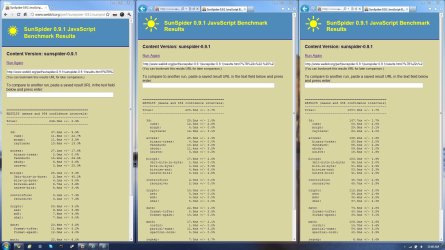
IE9 32-bit is noticeably faster than Chrome 10, my preferred browser of choice (although I would have no complaints using IE 7/8/9 on a daily basis). But, interestingly, IE9 64-bit is noticeably slower. Attached is a quick SunSpider test comparing the 3.

Also, sadly, IE9 doesn't have that "click" noise when clicking on links anymore, but it can easily be enabled under IE9's "Advanced" settings. Just check the box that reads "Play system sounds".

http://www.sevenforums.com/tutorial...wsing-internet-windows-explorer-turn-off.html

I'll be testing out IE9 some more, and I might just have to switch on over to IE9 :).
 

Attachments

  • Untitled-1.jpg
    Untitled-1.jpg
    244 KB · Views: 43
Last edited by a moderator:

My Computer My Computer

Computer type
PC/Desktop
Computer Manufacturer/Model Number
Custom build
OS
Windows 8 Professional x64
CPU
Intel Core i7-2600K @ 4.0GHz
Motherboard
MSI Z68A-GD80
Memory
8GB (2x4GB) G.SKILL Ripjaws X DDR3 1600
Graphics Card(s)
SAPPHIRE 7950
Monitor(s) Displays
Acer P244W
Screen Resolution
1920x1080
Hard Drives
120GB Kingston 3K HyperX SSD
1TB Seagate Barracuda HDD
PSU
Rosewill Xtreme 750W
Case
Enermax Hoplite ST (White)
Cooling
Cooler Master Hyper 212+
Keyboard
Microsoft Wireless Comfort Keyboard 5000
Mouse
GX-Gaming Maurus
Internet Speed
20/2
Browser
Google Chrome
Status
Not open for further replies.
Back
Top