
iankmcallister
New member
- Local time
- 12:24 AM
- Messages
- 1
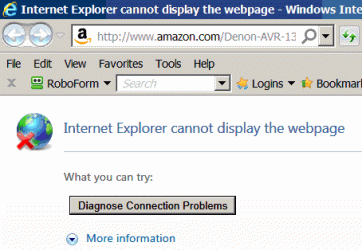
I keep getting the error message shown below for perfectly good sites.
Internet Explorer may be unable to display the Amazon site, but Firefox and Opera can handle it OK.
What's more, if I give IE enough opportunities, sooner or later it succeeds - once it succeeded on the seventeenth attempt, but it is more usual to succeed on the sixth or seventh attempt.
My guess is that there is a timeout that cuts in after about one second, but I can't find anything in IE setup to extend the waiting time for a response from the page.
I tried to install a tried and tested version of IE, but was told that it can't install because there is a later version which is built into the system.
Is there some way to make the browser wait a little longer before giving up?
Internet Explorer may be unable to display the Amazon site, but Firefox and Opera can handle it OK.
What's more, if I give IE enough opportunities, sooner or later it succeeds - once it succeeded on the seventeenth attempt, but it is more usual to succeed on the sixth or seventh attempt.
My guess is that there is a timeout that cuts in after about one second, but I can't find anything in IE setup to extend the waiting time for a response from the page.
I tried to install a tried and tested version of IE, but was told that it can't install because there is a later version which is built into the system.
Is there some way to make the browser wait a little longer before giving up?
Attachments
My Computer
At a glance
windows 7 Pro 64bit
- OS
- windows 7 Pro 64bit

