
Internet Explorer - Change Default Download Location

How to Change Default Download Location in IE9, IE10, and IE11


   Information
This will show you how to change the default download location that IE9, IE10, and IE11 saves to by default to be any folder that you select instead of the default C:\Users\(user-name)\Downloads folder.

   Note
In Windows 8, the IE10 Windows UI (Metro) version uses the same download location that you set for the IE10 desktop version below.


OPTION ONE

Change IE Default "Save" Download Location in Download Manager


1. Open IE9, IE10, or IE11.
NOTE: In Windows 8/8.1, you would open the desktop IE version, and not the modern IE version.

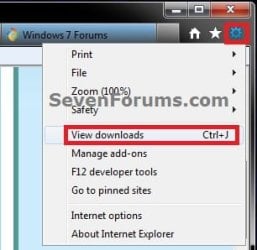
2. Click/tap on the gear icon in the upper right corner, then click/tap on View downloads. (see screenshot below)
NOTE: You could also press CTRL + J instead.
Step-1.jpg
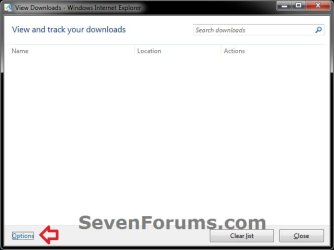
3. Click/tap on the Options link. (see screenshot below)
Step2.jpg
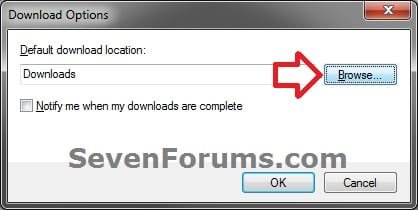
4. Click/tap on the Browse button. (see screenshot below)
Step_3.jpg
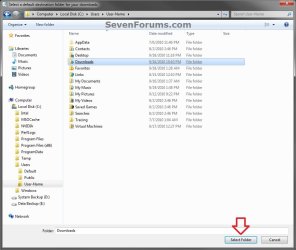
5. Navigate to and select (highlight) the folder that you want IE9 or IE10 to use as the default download location, then click/tap on the Select Folder button. (see screenshot below)
Step_4.jpg
6. Click/tap on OK. (see screenshot below step 4)

7. Click/tap on Close. (see screenshot below step 3)


OPTION TWO

Change Internet Explorer Default "Save" Download Location in Registry


1. Press the Windows + R keys to open the Run dialog, type regedit, and press Enter.

2. If prompted by UAC, then click/tap on Yes (Windows 7/8) or Continue (Vista).

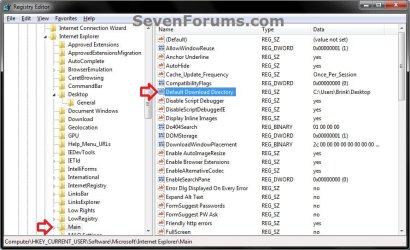
3. In regedit, navigate to the location below. (see screenshot below)
HKEY_CURRENT_USER\Software\Microsoft\Internet Explorer\Main
REG-1.jpg
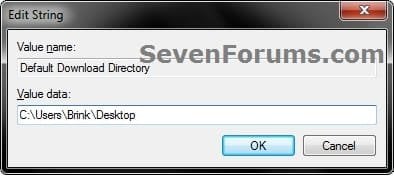
4. In the right pane of Main, double click/tap on Default Download Directory to modify it. (see screenshot above)

5. Type in the full path of the folder that you want IE9 or IE10 to save downloads to by default, and click/tap on OK. (see screenshot above)
REG-2.jpg
6. Close regedit.


OPTION THREE

To Manually Select a "Save as" Download Location in Internet Explorer


NOTE: This option is to Save as a file you want to download to any location no matter what you set the default Save location in Option One above.
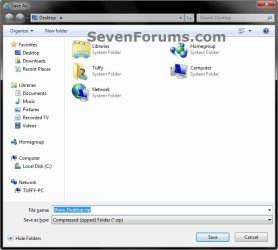
1. After you click/tap on the file's download link in IE9 oe IE10, click/tap on the drop down arrow on the Save button at the bottom of IE9 or IE10, and click/tap on Save as. (see screenshot below)
Save-As.jpg
2. Navigate to where you would like to save the file to, and click/tap on Save. (see screenshot below)
Save-As-2.jpg
That's it,
Shawn


Last edited:
Nice tutorial, it's not that easy to find.
 

My Computer

Computer type
PC/Desktop
Computer Manufacturer/Model Number
76~2.0
OS
Windows 7 Ult x64 - SP1/ Windows 8 Pro x64
CPU
Intel Core i5-3570K 4.6GHz
Motherboard
Gigabyte GA-Z77X UD3H, f18
Memory
8GB (2X4GB) DDR3 1600 Corsair Vengeance CL8 1.5v
Graphics Card(s)
Sapphire HD 7770 Vapor-X OC 1GB DDR5
Sound Card
Onboard VIA VT2021
Monitor(s) Displays
22" LCD Dell
Screen Resolution
1680x1050
Hard Drives
Samsung 840Pro 128GB SSD,
Seagate Barracuda 500GB SATA2 7200rpm 32MB cache, Seagate Barracuda 1TB SATA2 7200rpm 32MB cache,
PSU
Corsair HX650W
Case
Cooler Master Storm Scout
Cooling
Corsair H80 2x12cm Noctua NF P12 , 2x14cm case fans
Keyboard
Logitech Wave
Mouse
CM Sentinel
Internet Speed
Dismal
Antivirus
Avast
Browser
Opera Next
Other Info
Haswell laptop: HP Envy 17t-j, i7-4700MQ, GeForce 740M 2GB DDR3, 17.3" Full HD 1920x1080, 16GB RAM, Samsung 840 Pro 128GB, 1TB Hitachi 7200 HDD,
Desktop: eSATA ports,
External eSATA Seagate 500GB SATA2 7200rpm,
External WD USB 500GB
Thank you Dave. I agree, it sure was buried just a bit.
 

My Computer

Computer type
PC/Desktop
Computer Manufacturer/Model Number
Self built custom
OS
64-bit Windows 11 Pro for Workstations
CPU
Intel i7-8700K OC'd to 5 GHz
Motherboard
ASUS ROG Maximus XI Formula Z390
Memory
64 GB (4x16GB) G.SKILL TridentZ RGB DDR4 3600 MHz
Graphics Card(s)
ASUS ROG-STRIX-GTX1080TI-O11G-GAMING
Sound Card
Integrated
Monitor(s) Displays
2 x Samsung Odyssey G7 27"
Screen Resolution
2560x1440
Hard Drives
1TB Samsung 990 PRO M.2,
4TB Samsung 990 PRO PRO M.2,
TerraMaster F8 SSD Plus NAS
PSU
Seasonic Prime Titanium 850W
Case
Thermaltake Core P3
Cooling
Corsair Hydro H115i
Keyboard
Logitech wireless K800
Mouse
Logitech MX Master 4
Internet Speed
2 Gb/s Download and 100 Mb/s Upload
Antivirus
Malwarebyte Anti-Malware Premium
Browser
Google Chrome
Other Info
Logitech Z625 speaker system,
Logitech BRIO 4K Pro webcam,
HP Color LaserJet Pro MFP M477fdn,
APC SMART-UPS RT 1000 XL - SURT1000XLI,
Galaxy S23 Plus phone
I cannot see the "view downloads" window when i click on it?
 

My Computer

Computer Manufacturer/Model Number
Assembled by me
OS
Windows 7 Ultimate x64
CPU
AMD Phenom II X4 965 3.400 GHz
Motherboard
Asus M4A87TD AMD motherboard
Memory
Kingston DDR3 dual 4GB
Graphics Card(s)
Gigabyte GV-R5670OC-1GI
Sound Card
Asus motherboard onboard VIA VT1818 8-channel HD
Monitor(s) Displays
Samsung SyncMaster 2233BW
Hard Drives
Western Digital 1TB WD1002FAEX-00Z3AO
PSU
Thermaltake Toughpower 600 W
Case
Thermaltake Element V
Cooling
Air cooling by Thermaltake chassis fans
Nice tutorial, it's not that easy to find.


yup you are right Dave it's not at all easy to find..!!

thanx for this tut.. Shawn..!! :thumbsup:
 

My Computer

Computer Manufacturer/Model Number
Custom Built (by me)
OS
Windows 8 CP x64
CPU
Intel(R) Core(TM) i7 CPU 920 @ 2.97GHz
Motherboard
DX58SO
Memory
Corsair 6GB DDR3 (1333Mhz)
Graphics Card(s)
Nvidia GeForce 9800GT (1GB)
Sound Card
Creative Sound Blaster Audigy Value (24bit internal)
Monitor(s) Displays
22" Samsung SyncMaster B2230 (1920*1080)
Screen Resolution
1920*1080
Hard Drives
Seagate Barracuda 500gb
PSU
i ball 450W
Case
i ball (Work Horse)
Keyboard
Microsoft Wireless Keyboard 700 v2.0
Mouse
Microsoft Wireless Mouse 700 v2.0
Internet Speed
1MB
Doesn't work for me. In IE 9 64 bit nothing happens when I click View Downloads. In IE 9 32 bit IE crashes with a has stopped working prompt. :( Looks like there is something wrong with my IE 9 install. The download manager works OK so its not a big deal at the moment, I can live without that menu option.
 

My Computer

Computer type
PC/Desktop
Computer Manufacturer/Model Number
Home Built
OS
Windows 10 Education 64 bit
CPU
AMD Phenom II X4 980 Black Edition Deneb 3.7GHz
Motherboard
Asus M4N68T-M V2 µATX Motherboard
Memory
8GB 4GBx2 Kingston PC10600 DDR3 1333 Memory
Graphics Card(s)
Zotac NVIDIA Geforce GT640 2 Gig DDR3 PCIe
Sound Card
VIA VT1708s High Definition Audio 8-channel Onboard
Monitor(s) Displays
22" LG E2242 1080p and 2 19" I-INC AG191D
Screen Resolution
1280x1024 - 1920x1080 - 1280x1024
Hard Drives
Crucial M100 256 GB SSD and 500 GB WD Blue SATA
PSU
Thermaltake TR 620
Case
Power Up Black ATX Mid-Tower Case
Cooling
Stock heatsink and fan
Keyboard
Logitech Wireless K350 Wave
Mouse
Logitech Wireless M570 Trackman Wheel
Internet Speed
80 Mbps Down 30 Mbps Up
Antivirus
Windows Defender
Browser
Internet Explorer 11
Other Info
HP DVD1040e Lightscribe - External USB2
Nice update fella - I'd rep you, but I need to spread it around some more first.... +1
 

My Computer

Computer type
PC/Desktop
Computer Manufacturer/Model Number
CyberPower PC / Custom Intel X79 PC
OS
Windows 8.1 Professional x64
CPU
Intel Core i7-3930K 3.2 gHz Hex-Core (Turbo Boost 3.8 gHz)
Motherboard
ASUS P9X79 Pro (BIOS rev 4801)
Memory
8GB Corsair Vengeance DDR3-1600MHz 8-8-8-24
Graphics Card(s)
EVGA Superclocked GeForce GTX-580 1536MB
Sound Card
On-board 7.1 Realtek ALC898 HD Audio
Monitor(s) Displays
ASUS 27" 1080p MT276E
Screen Resolution
1920 x 1080
Hard Drives
Intel Cherryville 520 SSD 120GB (Main drive for OS)
WD Caviar Black 1TB 7200RPM 64MB Cache SATA 6
WD Caviar Blue 1TB 7200RPM 64MB Cache SATA 6
PSU
Corsair Professional Series AX850 80+ Gold
Case
Corsair Carbide 400R
Cooling
Corsair Hydro Series H60 / 9 x 120mm Thunderblade case fans
Keyboard
Microsoft Wireless Keyboard 3000 v2
Mouse
Microsoft Wireless Mouse 5000 - BlueTrack
Internet Speed
TWC Road Runner 30 Mbps
Antivirus
MS Security Essentials / Malwarebytes
Browser
IE 11
Other Info
LG Black 12X SATA BD-RW
Sony Optiarc Black 24X SATA DVD Burner
Logitech Web Cam Pro 9000
Panasonic 5.1 Surround System
Epson XP-310 Color Printer
Xbox One Controller
Xbox 360 PC Controller
I cannot see the "view downloads" window when i click on it?

Doesn't work for me. In IE 9 64 bit nothing happens when I click View Downloads. In IE 9 32 bit IE crashes with a has stopped working prompt. :( Looks like there is something wrong with my IE 9 install. The download manager works OK so its not a big deal at the moment, I can live without that menu option.

This tutorial was tested on both the 32-bit and 64-bit IE9, and it worked on both at least for me. You may have a bad add-on or something that is causing this. As a test, reset IE9 completely to see if it it may work properly afterwards.

IE9 is still a beta, so there most likely will be some bugs in it still that may have IE9 not work properly on some system setups. Hopefully the next IE9 release will work better for you. :(
 

My Computer

Computer type
PC/Desktop
Computer Manufacturer/Model Number
Self built custom
OS
64-bit Windows 11 Pro for Workstations
CPU
Intel i7-8700K OC'd to 5 GHz
Motherboard
ASUS ROG Maximus XI Formula Z390
Memory
64 GB (4x16GB) G.SKILL TridentZ RGB DDR4 3600 MHz
Graphics Card(s)
ASUS ROG-STRIX-GTX1080TI-O11G-GAMING
Sound Card
Integrated
Monitor(s) Displays
2 x Samsung Odyssey G7 27"
Screen Resolution
2560x1440
Hard Drives
1TB Samsung 990 PRO M.2,
4TB Samsung 990 PRO PRO M.2,
TerraMaster F8 SSD Plus NAS
PSU
Seasonic Prime Titanium 850W
Case
Thermaltake Core P3
Cooling
Corsair Hydro H115i
Keyboard
Logitech wireless K800
Mouse
Logitech MX Master 4
Internet Speed
2 Gb/s Download and 100 Mb/s Upload
Antivirus
Malwarebyte Anti-Malware Premium
Browser
Google Chrome
Other Info
Logitech Z625 speaker system,
Logitech BRIO 4K Pro webcam,
HP Color LaserJet Pro MFP M477fdn,
APC SMART-UPS RT 1000 XL - SURT1000XLI,
Galaxy S23 Plus phone
Reseting IE 9 32 bit to defaults didn't help. It actually mad things worse, now it crashes every time I open it. Looks like I'm going back to IE 8. :(
 

My Computer

Computer type
PC/Desktop
Computer Manufacturer/Model Number
Home Built
OS
Windows 10 Education 64 bit
CPU
AMD Phenom II X4 980 Black Edition Deneb 3.7GHz
Motherboard
Asus M4N68T-M V2 µATX Motherboard
Memory
8GB 4GBx2 Kingston PC10600 DDR3 1333 Memory
Graphics Card(s)
Zotac NVIDIA Geforce GT640 2 Gig DDR3 PCIe
Sound Card
VIA VT1708s High Definition Audio 8-channel Onboard
Monitor(s) Displays
22" LG E2242 1080p and 2 19" I-INC AG191D
Screen Resolution
1280x1024 - 1920x1080 - 1280x1024
Hard Drives
Crucial M100 256 GB SSD and 500 GB WD Blue SATA
PSU
Thermaltake TR 620
Case
Power Up Black ATX Mid-Tower Case
Cooling
Stock heatsink and fan
Keyboard
Logitech Wireless K350 Wave
Mouse
Logitech Wireless M570 Trackman Wheel
Internet Speed
80 Mbps Down 30 Mbps Up
Antivirus
Windows Defender
Browser
Internet Explorer 11
Other Info
HP DVD1040e Lightscribe - External USB2
That's no good. I suppose you could try uninstalling and reinstalling IE9 to see if it may have just been a bad installation.
 

My Computer

Computer type
PC/Desktop
Computer Manufacturer/Model Number
Self built custom
OS
64-bit Windows 11 Pro for Workstations
CPU
Intel i7-8700K OC'd to 5 GHz
Motherboard
ASUS ROG Maximus XI Formula Z390
Memory
64 GB (4x16GB) G.SKILL TridentZ RGB DDR4 3600 MHz
Graphics Card(s)
ASUS ROG-STRIX-GTX1080TI-O11G-GAMING
Sound Card
Integrated
Monitor(s) Displays
2 x Samsung Odyssey G7 27"
Screen Resolution
2560x1440
Hard Drives
1TB Samsung 990 PRO M.2,
4TB Samsung 990 PRO PRO M.2,
TerraMaster F8 SSD Plus NAS
PSU
Seasonic Prime Titanium 850W
Case
Thermaltake Core P3
Cooling
Corsair Hydro H115i
Keyboard
Logitech wireless K800
Mouse
Logitech MX Master 4
Internet Speed
2 Gb/s Download and 100 Mb/s Upload
Antivirus
Malwarebyte Anti-Malware Premium
Browser
Google Chrome
Other Info
Logitech Z625 speaker system,
Logitech BRIO 4K Pro webcam,
HP Color LaserJet Pro MFP M477fdn,
APC SMART-UPS RT 1000 XL - SURT1000XLI,
Galaxy S23 Plus phone
Reseting IE 9 32 bit to defaults didn't help. It actually mad things worse, now it crashes every time I open it. Looks like I'm going back to IE 8. :(

Hi
Mine did the same just did a system restore to the day before and back in business. Dont know what the problem was though.

Danny
 

My Computer

Computer Manufacturer/Model Number
acer aspire 5935g
OS
Windows 7 Home Premium x64 SP1
CPU
intel(R)core(TM)2 duo CPU T6600 @ 2.20GHz
Motherboard
intel gm45/gm47 revision 07
Memory
3 gb ddr3
Graphics Card(s)
ati radeon hd4570/512mb
Monitor(s) Displays
lop156wh2-tle1 15.3 flat
Screen Resolution
1366x768
Hard Drives
OCZ-Agility3 60gig ssd
320gig external hdd
500gig external hdd
Mouse
Optical
Internet Speed
30Mbps Down/30Mbps Up
I've uninstalled IE 9 and IE 8 seems to be OK. A couple of things happened after I did the reset in IE 9. I got prompted to enable two plugins, one was Research and the other one I can't remember, both were Microsoft. Then when my home page Google loaded I got a script error and there were two extra windows on the screen. One down the left side and one across the bottom. What was in them didn't make any sense to me and I closed them. I closed IE 9 32 bit and opened it again and Google loaded OK. I tried the view downloads again and it crashed like the first time only after that IE crashed every time I tried to open it. IE 9 x64 was OK though. I've uninstalled the Adobe flash beta too. I'm guessing if I had done a clean install of windows and then installed IE 9 beta with no third party add-ins that wouldn't happen. In a month or two I plan on buying a new SATA hard drive for this rig and will be doing a clean install. I'll likely try again then but for now I think I'll stay with IE 8.
 

My Computer

Computer type
PC/Desktop
Computer Manufacturer/Model Number
Home Built
OS
Windows 10 Education 64 bit
CPU
AMD Phenom II X4 980 Black Edition Deneb 3.7GHz
Motherboard
Asus M4N68T-M V2 µATX Motherboard
Memory
8GB 4GBx2 Kingston PC10600 DDR3 1333 Memory
Graphics Card(s)
Zotac NVIDIA Geforce GT640 2 Gig DDR3 PCIe
Sound Card
VIA VT1708s High Definition Audio 8-channel Onboard
Monitor(s) Displays
22" LG E2242 1080p and 2 19" I-INC AG191D
Screen Resolution
1280x1024 - 1920x1080 - 1280x1024
Hard Drives
Crucial M100 256 GB SSD and 500 GB WD Blue SATA
PSU
Thermaltake TR 620
Case
Power Up Black ATX Mid-Tower Case
Cooling
Stock heatsink and fan
Keyboard
Logitech Wireless K350 Wave
Mouse
Logitech Wireless M570 Trackman Wheel
Internet Speed
80 Mbps Down 30 Mbps Up
Antivirus
Windows Defender
Browser
Internet Explorer 11
Other Info
HP DVD1040e Lightscribe - External USB2
Hey Brink,

Just logged in to say thanks. It wasn't that easy to find. I was setting up my wife's newly formatted laptop and thought I'd organize her laptop nicely. :)

Thanks for the tip man.
 

My Computer

Computer type
PC/Desktop
Computer Manufacturer/Model Number
Custom Build
OS
Windows 7 Ultimate x64 Service Pack 1
CPU
AMD Athlon II x4 Propus 2.9 GHz
Motherboard
ASRock N68C-GS FX
Memory
2 x 4GB Corsair XMS 3 DDR3 -1600 CL9
Graphics Card(s)
AMD Radeon HD 5850 1GB GDDR5
Sound Card
On-board 6-Channel HD Audio
Monitor(s) Displays
18' LG Flatron E1942TC-BN on DVI, 18' Chimei 95ND on HDMI
Screen Resolution
1366 x 768 x 2
Hard Drives
1 x 500 GB Seagate
1 x 1 TB Western Digital Caviar Green
1 x 1 TB Hitachi Touro Mobile USB 3
PSU
Seasonic S12II 520W
Case
Generic with Cable Management
Cooling
Deep Cool Gammaxx 200
Keyboard
Dragonwar Desert Eagle
Mouse
Logitech B85
Internet Speed
5Mb/s DL, 0.9Mb/s UL
Antivirus
ESET Nod32
Browser
Google Chrome 64 Bit
Other Info
LG G4 H818P - Rooted with Xposed Framework
You're most welcome Oreo. :)
 

My Computer

Computer type
PC/Desktop
Computer Manufacturer/Model Number
Self built custom
OS
64-bit Windows 11 Pro for Workstations
CPU
Intel i7-8700K OC'd to 5 GHz
Motherboard
ASUS ROG Maximus XI Formula Z390
Memory
64 GB (4x16GB) G.SKILL TridentZ RGB DDR4 3600 MHz
Graphics Card(s)
ASUS ROG-STRIX-GTX1080TI-O11G-GAMING
Sound Card
Integrated
Monitor(s) Displays
2 x Samsung Odyssey G7 27"
Screen Resolution
2560x1440
Hard Drives
1TB Samsung 990 PRO M.2,
4TB Samsung 990 PRO PRO M.2,
TerraMaster F8 SSD Plus NAS
PSU
Seasonic Prime Titanium 850W
Case
Thermaltake Core P3
Cooling
Corsair Hydro H115i
Keyboard
Logitech wireless K800
Mouse
Logitech MX Master 4
Internet Speed
2 Gb/s Download and 100 Mb/s Upload
Antivirus
Malwarebyte Anti-Malware Premium
Browser
Google Chrome
Other Info
Logitech Z625 speaker system,
Logitech BRIO 4K Pro webcam,
HP Color LaserJet Pro MFP M477fdn,
APC SMART-UPS RT 1000 XL - SURT1000XLI,
Galaxy S23 Plus phone
Thanks for the info Brink :)
 

My Computer

Computer Manufacturer/Model Number
Custom Build
OS
Windows 7 Professional 64 bit SP 1
CPU
Intel(R) Core(TM) i5-2500 CPU 3.30GHz
Motherboard
Asus P8H61-MLE
Memory
4.00 GB DDR3 SDRAM
Graphics Card(s)
NVIDIA GeForce 9500 GT
Sound Card
High Definition Audio Codec:
Monitor(s) Displays
SyncMaster (1280x1024@60Hz)
Screen Resolution
1280x1024
Hard Drives
1465GB Western Digital WDC WD15EARS-00Z5B1 ATA Device (SATA)
977GB Western Digital WDC WD10EADS-00L5B1 ATA Device (SATA)
1863GB Western Digital WDC WD20EARX-00PASB0 ATA Device (SATA)
156GB Seagate ST3160813AS ATA Device (SATA)
PSU
Cooler Master eXtreme Power Plus 650W
Case
Cooler Master Elite 431 Plus
Keyboard
Razer Tarantula
Mouse
Razer Mamba
Other Info
Creative SBS A200 speaker
You're welcome Lee. :)
 

My Computer

Computer type
PC/Desktop
Computer Manufacturer/Model Number
Self built custom
OS
64-bit Windows 11 Pro for Workstations
CPU
Intel i7-8700K OC'd to 5 GHz
Motherboard
ASUS ROG Maximus XI Formula Z390
Memory
64 GB (4x16GB) G.SKILL TridentZ RGB DDR4 3600 MHz
Graphics Card(s)
ASUS ROG-STRIX-GTX1080TI-O11G-GAMING
Sound Card
Integrated
Monitor(s) Displays
2 x Samsung Odyssey G7 27"
Screen Resolution
2560x1440
Hard Drives
1TB Samsung 990 PRO M.2,
4TB Samsung 990 PRO PRO M.2,
TerraMaster F8 SSD Plus NAS
PSU
Seasonic Prime Titanium 850W
Case
Thermaltake Core P3
Cooling
Corsair Hydro H115i
Keyboard
Logitech wireless K800
Mouse
Logitech MX Master 4
Internet Speed
2 Gb/s Download and 100 Mb/s Upload
Antivirus
Malwarebyte Anti-Malware Premium
Browser
Google Chrome
Other Info
Logitech Z625 speaker system,
Logitech BRIO 4K Pro webcam,
HP Color LaserJet Pro MFP M477fdn,
APC SMART-UPS RT 1000 XL - SURT1000XLI,
Galaxy S23 Plus phone
This procedure did not work for me. What did work is:
1. Use Windows Explorer to go to the current location of the download folder. The default location is C:\Users\<user_name>\Downloads.
2. right-click the downloads folder and choose properties.
3. Select the Location Tab and then select move.
4. Browse to the new location.
5. Click Select Folder.
6. Click OK.
 

My Computer

Computer Manufacturer/Model Number
Me
OS
Windows 7 64-bit
CPU
Intel i7 2600K LGA1155 (3.4Gz)
Motherboard
Gigabyte Z68XP-UD3P
Memory
Corsair Vengeance 8GB (2x4GB)
Graphics Card(s)
Asus GTX570
Hard Drives
OCZ Vertex 3 120GB SATA III
WD Caviar 250GB SATA 2
PSU
Corsair HX850W
Case
Case, Lian-Li PC-60B

My Computer

Computer type
PC/Desktop
Computer Manufacturer/Model Number
Self built custom
OS
64-bit Windows 11 Pro for Workstations
CPU
Intel i7-8700K OC'd to 5 GHz
Motherboard
ASUS ROG Maximus XI Formula Z390
Memory
64 GB (4x16GB) G.SKILL TridentZ RGB DDR4 3600 MHz
Graphics Card(s)
ASUS ROG-STRIX-GTX1080TI-O11G-GAMING
Sound Card
Integrated
Monitor(s) Displays
2 x Samsung Odyssey G7 27"
Screen Resolution
2560x1440
Hard Drives
1TB Samsung 990 PRO M.2,
4TB Samsung 990 PRO PRO M.2,
TerraMaster F8 SSD Plus NAS
PSU
Seasonic Prime Titanium 850W
Case
Thermaltake Core P3
Cooling
Corsair Hydro H115i
Keyboard
Logitech wireless K800
Mouse
Logitech MX Master 4
Internet Speed
2 Gb/s Download and 100 Mb/s Upload
Antivirus
Malwarebyte Anti-Malware Premium
Browser
Google Chrome
Other Info
Logitech Z625 speaker system,
Logitech BRIO 4K Pro webcam,
HP Color LaserJet Pro MFP M477fdn,
APC SMART-UPS RT 1000 XL - SURT1000XLI,
Galaxy S23 Plus phone

My Computer

Computer Manufacturer/Model Number
Me
OS
Windows 7 64-bit
CPU
Intel i7 2600K LGA1155 (3.4Gz)
Motherboard
Gigabyte Z68XP-UD3P
Memory
Corsair Vengeance 8GB (2x4GB)
Graphics Card(s)
Asus GTX570
Hard Drives
OCZ Vertex 3 120GB SATA III
WD Caviar 250GB SATA 2
PSU
Corsair HX850W
Case
Case, Lian-Li PC-60B
Erik,

The link I gave was just for what you described you did in your post above to move that "Download" user folder. That's all.

It may not have worked before using the tutorial on the first page of this thread if the Download folder was not correct.
 

My Computer

Computer type
PC/Desktop
Computer Manufacturer/Model Number
Self built custom
OS
64-bit Windows 11 Pro for Workstations
CPU
Intel i7-8700K OC'd to 5 GHz
Motherboard
ASUS ROG Maximus XI Formula Z390
Memory
64 GB (4x16GB) G.SKILL TridentZ RGB DDR4 3600 MHz
Graphics Card(s)
ASUS ROG-STRIX-GTX1080TI-O11G-GAMING
Sound Card
Integrated
Monitor(s) Displays
2 x Samsung Odyssey G7 27"
Screen Resolution
2560x1440
Hard Drives
1TB Samsung 990 PRO M.2,
4TB Samsung 990 PRO PRO M.2,
TerraMaster F8 SSD Plus NAS
PSU
Seasonic Prime Titanium 850W
Case
Thermaltake Core P3
Cooling
Corsair Hydro H115i
Keyboard
Logitech wireless K800
Mouse
Logitech MX Master 4
Internet Speed
2 Gb/s Download and 100 Mb/s Upload
Antivirus
Malwarebyte Anti-Malware Premium
Browser
Google Chrome
Other Info
Logitech Z625 speaker system,
Logitech BRIO 4K Pro webcam,
HP Color LaserJet Pro MFP M477fdn,
APC SMART-UPS RT 1000 XL - SURT1000XLI,
Galaxy S23 Plus phone
Back
Top