Internet Explorer Favorites Center - Pin and Unpin to Left Side

How to Pin and Unpin"Favorites Center" to Left Side in IE9, IE10, and IE11


   Information
The Favorites Center in IE9, IE10, and IE11 allows you to quickly view your Favorites website links, Feeds, and viewed websites History.

By default, you can open the Favorites Center on the right side of IE9 and IE10 by clicking on the star.png icon at the top right corner.

This tutorial will show you how to pin and unpin the Favorites Center to the left side in IE9, IE10, and IE11.

When you pin the Favorites Center to the left, it will stay there even when you close and reopen IE9, IE10, or IE11. The Favorites Center will stay pinned to the left until you close it. Closing the Favorites Center on the left side will unpin it and reset it's position back to the right side the next time you open the Favorites Center using the star icon.

   Note

You can also open Favorites on the Menu bar in IE9, IE10, and IE11 to see your favorite websites.

Menu_bar.jpg

   Tip
If you like, you can also do either one of the below to have the Favorites Center open directly pinned to the left side.

  • Click on View (Menu bar) -> Explorer Bars -> (the option you want)
  • Press CTRL+SHIFT+I to open to Favorites in Favorites Center
  • Press CTRL+SHIFT+H to open to History in Favorites Center
  • Press CTRL+SHIFT+G to open to Feeds in Favorites Center

EXAMPLE: Favorites Center in IE9, IE10, and IE11
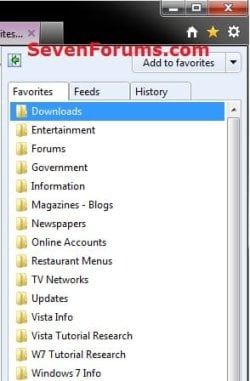
Favorites-Center.jpg


OPTION ONE

To Pin and Unpin Favorites Center in Internet Explorer

1. Open IE9, IE10, or IE11.
NOTE: In Windows 8, this would only apply to the IE10 or IE11 desktop version, and not the modern (metro) IE.

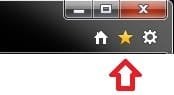
2. To Pin Favorites Center to the Left Side of IE9, IE10, or IE11 A) Click/tap on the star icon at the top right corner to open the Favorites Center. (see screenshot below) Star_button.jpg
B) Click/tap on the green arrow pointing to the left button. (see screenshot below) Pin.jpg
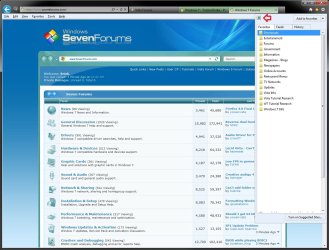
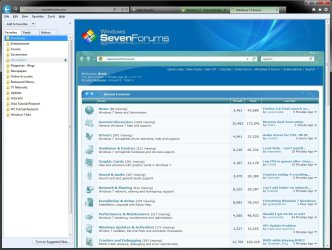
C) The Favorites Center will now be pinned to the left side of IE9, IE10, or IE11 until you unpin it. (see screenshot below)
NOTE: You can adjust the width of the pinned Favorites Center by moving the mouse pointer over the right border until it turns into a double arrow pointer, then left click and hold, and drag the right border to the left or right to adjust it's width. Release the left click when finished. Pinned.jpg
3. To Unpin Favorites Center from the Left Side of IE9, IE10, or IE11
NOTE: This is the default setting.
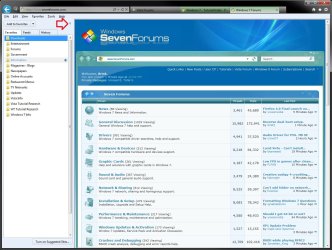
A) Click/tap on the X at the top right corner of the pinned Favorites Center. (see screenshot below) Unpin.jpg
OR

B) Click/tap on the star icon at the top right corner once to unpin the Favorites Center. (see screenshot below) Star_button.jpg
C) The Favorites Center will now be unpinned from the left side of IE9, IE10, or IE11.


OPTION TWO

To Pin and Unpin Favorites Center in IE using REG File


1. Do step 2 or 3 below for what you would like to do.

2. To Pin Favorites Center to the Left Side of IE9, IE10, or IE11
A) Click/tap on the Download button below to download the file below, and go to step 4 below.
Pin_Favorites_Center_in_IE.reg


Download

3. To Unpin Favorites Center from the Left Side of IE9, IE10, or IE11
NOTE: This is the default setting.
A) Click/tap on the Download button below to download the file below, and go to step 4 below.
Unpin_Favorites_Center_in_IE.reg


Download

4. Save the REG file to your desktop.

5. Double click/tap on the downloaded REG file to merge it.

6. Click/tap on Run, Yes (UAC), Yes, and OK when prompted to approve the merge.

7. If open, close and reopen Internet Explorer to apply.

8. When finished, you can delete the downloaded .reg file if you like.
That's it,
Shawn


Attachments

Last edited:
Hello Koasmax,

Yes, that would be correct.

I'm sorry, but there is currently no method known of to move the Star icon to the left side in IE9. :(
 

My Computer My Computer

At a glance

64-bit Windows 11 Pro for WorkstationsIntel i7-8700K OC'd to 5 GHz64 GB (4x16GB) G.SKILL TridentZ RGB DDR4 3600...ASUS ROG-STRIX-GTX1080TI-O11G-GAMING
Computer type
PC/Desktop
Computer Manufacturer/Model Number
Self built custom
OS
64-bit Windows 11 Pro for Workstations
CPU
Intel i7-8700K OC'd to 5 GHz
Motherboard
ASUS ROG Maximus XI Formula Z390
Memory
64 GB (4x16GB) G.SKILL TridentZ RGB DDR4 3600 MHz
Graphics Card(s)
ASUS ROG-STRIX-GTX1080TI-O11G-GAMING
Sound Card
Integrated
Monitor(s) Displays
2 x Samsung Odyssey G7 27"
Screen Resolution
2560x1440
Hard Drives
1TB Samsung 990 PRO M.2,
4TB Samsung 990 PRO PRO M.2,
TerraMaster F8 SSD Plus NAS
PSU
Seasonic Prime Titanium 850W
Case
Thermaltake Core P3
Cooling
Corsair Hydro H115i
Keyboard
Logitech wireless K800
Mouse
Logitech MX Master 4
Internet Speed
2 Gb/s Download and 100 Mb/s Upload
Antivirus
Malwarebyte Anti-Malware Premium
Browser
Google Chrome
Other Info
Logitech Z625 speaker system,
Logitech BRIO 4K Pro webcam,
HP Color LaserJet Pro MFP M477fdn,
APC SMART-UPS RT 1000 XL - SURT1000XLI,
Galaxy S23 Plus phone
Shawn - love your tutorials and have learned a lot from them, but with all due respect - this one isn't a fix. Like everyone else who reads it - I clicked the green arrow and the box moved over to the left, but to my surprise, when I closed and re-opened - it was back on the right!
After reading this thread I discovered that this is normal behaviour! Since most people won't keep favourites open all the time this just isn't worth doing until a real solution comes along.

Do MS do this kind of thing just to p**s people off ??
 

My Computer My Computer

At a glance

Windows 7 Home Premium X64 SP1Intel Core2 duo T66004gbNvidia GeForce GT 1gb
Computer Manufacturer/Model Number
Acer 7738G
OS
Windows 7 Home Premium X64 SP1
CPU
Intel Core2 duo T6600
Memory
4gb
Graphics Card(s)
Nvidia GeForce GT 1gb
Hard Drives
2 X 500 gb
Hello Ken,

I'm not sure why everyone is thinking this tutorial is a fix. The tutorial is just to help show how the new feature "Favorites Center" can be pinned to the left side in IE9 now vs how it was in IE8. The tutorial is mostly just for informative purposes instead. :)
 
Last edited:

My Computer My Computer

At a glance

64-bit Windows 11 Pro for WorkstationsIntel i7-8700K OC'd to 5 GHz64 GB (4x16GB) G.SKILL TridentZ RGB DDR4 3600...ASUS ROG-STRIX-GTX1080TI-O11G-GAMING
Computer type
PC/Desktop
Computer Manufacturer/Model Number
Self built custom
OS
64-bit Windows 11 Pro for Workstations
CPU
Intel i7-8700K OC'd to 5 GHz
Motherboard
ASUS ROG Maximus XI Formula Z390
Memory
64 GB (4x16GB) G.SKILL TridentZ RGB DDR4 3600 MHz
Graphics Card(s)
ASUS ROG-STRIX-GTX1080TI-O11G-GAMING
Sound Card
Integrated
Monitor(s) Displays
2 x Samsung Odyssey G7 27"
Screen Resolution
2560x1440
Hard Drives
1TB Samsung 990 PRO M.2,
4TB Samsung 990 PRO PRO M.2,
TerraMaster F8 SSD Plus NAS
PSU
Seasonic Prime Titanium 850W
Case
Thermaltake Core P3
Cooling
Corsair Hydro H115i
Keyboard
Logitech wireless K800
Mouse
Logitech MX Master 4
Internet Speed
2 Gb/s Download and 100 Mb/s Upload
Antivirus
Malwarebyte Anti-Malware Premium
Browser
Google Chrome
Other Info
Logitech Z625 speaker system,
Logitech BRIO 4K Pro webcam,
HP Color LaserJet Pro MFP M477fdn,
APC SMART-UPS RT 1000 XL - SURT1000XLI,
Galaxy S23 Plus phone
hi Brink,

Thank you for the tutorial :)

I had the same issue as nikev216 but I guess the tips said will have to do until a solution is found, this is what stopped me from using IE for years, its not as flexible as other browsers, what you see is what you get (mostly), but since I am here Im starting to use it again obviously :D.
 

My Computer My Computer

At a glance

Windows 7 Professional, 64biti7 920 @ 2.666 GB DDR3GALAX GTX 960
Computer type
PC/Desktop
Computer Manufacturer/Model Number
Custom build
OS
Windows 7 Professional, 64bit
CPU
i7 920 @ 2.66
Motherboard
EX58-UD3R
Memory
6 GB DDR3
Graphics Card(s)
GALAX GTX 960
Monitor(s) Displays
ASUS MK221H 22" widescreen
PSU
Antec 650W Earthwatts
Case
Thermaltake Element T
Cooling
Zalman CNPS9900 LED
Mouse
Logitech M205 Wireless
Internet Speed
2 mb/s
Antivirus
Avast! Antivirus
You're welcome Hatemf. :)
 

My Computer My Computer

At a glance

64-bit Windows 11 Pro for WorkstationsIntel i7-8700K OC'd to 5 GHz64 GB (4x16GB) G.SKILL TridentZ RGB DDR4 3600...ASUS ROG-STRIX-GTX1080TI-O11G-GAMING
Computer type
PC/Desktop
Computer Manufacturer/Model Number
Self built custom
OS
64-bit Windows 11 Pro for Workstations
CPU
Intel i7-8700K OC'd to 5 GHz
Motherboard
ASUS ROG Maximus XI Formula Z390
Memory
64 GB (4x16GB) G.SKILL TridentZ RGB DDR4 3600 MHz
Graphics Card(s)
ASUS ROG-STRIX-GTX1080TI-O11G-GAMING
Sound Card
Integrated
Monitor(s) Displays
2 x Samsung Odyssey G7 27"
Screen Resolution
2560x1440
Hard Drives
1TB Samsung 990 PRO M.2,
4TB Samsung 990 PRO PRO M.2,
TerraMaster F8 SSD Plus NAS
PSU
Seasonic Prime Titanium 850W
Case
Thermaltake Core P3
Cooling
Corsair Hydro H115i
Keyboard
Logitech wireless K800
Mouse
Logitech MX Master 4
Internet Speed
2 Gb/s Download and 100 Mb/s Upload
Antivirus
Malwarebyte Anti-Malware Premium
Browser
Google Chrome
Other Info
Logitech Z625 speaker system,
Logitech BRIO 4K Pro webcam,
HP Color LaserJet Pro MFP M477fdn,
APC SMART-UPS RT 1000 XL - SURT1000XLI,
Galaxy S23 Plus phone
What I will miss the most will be the search box. When "trimming the fat" so to speak to make IE 9 a faster browser the rearrangement took the Favorites button off of the tool bar and placed it on the main bar now the address/search combined.

Previously the address bar was a separate bar you could hide but also made it one more item. The new layout does more to consolidate things apparently intended to free up some resources at the same time. It can throw you off at first however and why guides like this can be an asset.
 

My Computers My Computers

  • At a glance

    W7 Ultimate x64/W10 Pro x64/W11 Pro Triple Bo...AMD Phenom II X4 975 Deneb 3.6ghz - 965 2nd r...Kingston Hyper X DDR3 1600 1.5v 16gb - Hyper ...MSI HD Radeon 5750 1gb - MSI HD Radeon 6450 o...
    Computer type
    PC/Desktop
    Computer Manufacturer/Model Number
    Custom builds = 2
    OS
    W7 Ultimate x64/W10 Pro x64/W11 Pro Triple Boot - Main PC W7 Remote PC Micro ATX W7 Pro x64/W11 Pro
    CPU
    AMD Phenom II X4 975 Deneb 3.6ghz - 965 2nd remote pc
    Motherboard
    Gigabyte GA-790XTA-UD4-Gigabyte GA-880GM-D2H remote pc
    Memory
    Kingston Hyper X DDR3 1600 1.5v 16gb - Hyper X Fury 8gb 2nd
    Graphics Card(s)
    MSI HD Radeon 5750 1gb - MSI HD Radeon 6450 on mini tower
    Sound Card
    Creative Labs X-Fi Xtreme Audio P - Realtek onooard 2nd case
    Monitor(s) Displays
    ASUS VW199T-P 19" HP 2082a Main-HP 2082a 20" remote pc
    Screen Resolution
    Asus 1440x900 - HP 1600x900
    Hard Drives
    WD Black 1TB HD per OS W7, W10, and pending W11 presently on 500gb OS Drive - Pending Triple 1TB HDs for Spanned Storage/backup volume
    Single 2TB external USB enclosure, single 1TB System 7 Host/Boot drive, Pending 8TB external HD for system image b
    PSU
    Corsair 750TX - primary / Corsair CX600 - second
    Case
    Antec 900-2 - SSD compatible / NZXT Vulcan mini tower
    Cooling
    Zalman CNPS9900A
    Keyboard
    AZIO L70 Backlit Letters Gaming - ONN Cordless/USB
    Mouse
    MSI DS200 Programmable, Logitech Cordless
    Internet Speed
    30mbps upgrade - primary hard wired - mini tower usb WiFi
    Antivirus
    GFI VIPRE Internet Security 2014 on W7 2016 beta on W10,
    Browser
    Cyberfox, WaterFox 64bit FF variants, FireFox x64, Pale Moon
    Other Info
    Accomdata fan cooled usb 2.0 PIDE/Sata II, III external enclosure.
    Sambient usb/eSata PATA/Sata II, III external enclosure.
  • At a glance

    W7 Pro x64/W11 ProAMD Deneb 3.6ghz - 965Kingston Hyper X Fury 8gbMSI HD Radeon 6450 DVI Output
    Computer type
    PC/Desktop
    System Manufacturer/Model Number
    CUSTOM ASSEMBLY
    OS
    W7 Pro x64/W11 Pro
    CPU
    AMD Deneb 3.6ghz - 965
    Motherboard
    Gigabyte GA-880GM-D2H remote pc
    Memory
    Kingston Hyper X Fury 8gb
    Graphics Card(s)
    MSI HD Radeon 6450 DVI Output
    Sound Card
    Realtek onooard Creative or Other separate PENDING
    Monitor(s) Displays
    VIZIO 32" LCD TV Separate LCD Pending
    Screen Resolution
    1600x1080
    Hard Drives
    WD 500GB OS Host/Boot WD Green 1TB Storage/Backup
    PSU
    Corsair 600W - THERMALTAKE 600W spare case
    Case
    NZXT Vulcan mini tower
    Cooling
    Twin 120mm Top Fans - 240mm Side Cover
    Keyboard
    ONN Cordless/USB Logitech Cordless
    Mouse
    ONN USB/Cordless - Logitech Cordless
    Internet Speed
    DSL 5G
    Browser
    MS Edge, FireFox, WaterFox x64, FireFox Nightly
    Other Info
    OS Testing-Remote Access to Main TeamViewer
Hello

I'm one of the few that keeps the Favorites Center open all the time (on the left side). My beef is that when I start EI 9, the Favorites Center Three is always closed. Is there a way to start EI 9 with the Favorite Center Three open?

Thanks for any suggestions.
 

My Computer My Computer

At a glance

Windows 7 Home Premium 64bit
OS
Windows 7 Home Premium 64bit
Hello Ivan, and welcome to Seven Forums.

When you pin the Favorites Center to the left, it will stay there as long as you don't close the Favorites Center. You can close and reopen IE9 and the Favorites Center will still be on the left. Closing the Favorites Center on the left side will reset it's position back to the right side the next time you open the Favorites Center.
 

My Computer My Computer

At a glance

64-bit Windows 11 Pro for WorkstationsIntel i7-8700K OC'd to 5 GHz64 GB (4x16GB) G.SKILL TridentZ RGB DDR4 3600...ASUS ROG-STRIX-GTX1080TI-O11G-GAMING
Computer type
PC/Desktop
Computer Manufacturer/Model Number
Self built custom
OS
64-bit Windows 11 Pro for Workstations
CPU
Intel i7-8700K OC'd to 5 GHz
Motherboard
ASUS ROG Maximus XI Formula Z390
Memory
64 GB (4x16GB) G.SKILL TridentZ RGB DDR4 3600 MHz
Graphics Card(s)
ASUS ROG-STRIX-GTX1080TI-O11G-GAMING
Sound Card
Integrated
Monitor(s) Displays
2 x Samsung Odyssey G7 27"
Screen Resolution
2560x1440
Hard Drives
1TB Samsung 990 PRO M.2,
4TB Samsung 990 PRO PRO M.2,
TerraMaster F8 SSD Plus NAS
PSU
Seasonic Prime Titanium 850W
Case
Thermaltake Core P3
Cooling
Corsair Hydro H115i
Keyboard
Logitech wireless K800
Mouse
Logitech MX Master 4
Internet Speed
2 Gb/s Download and 100 Mb/s Upload
Antivirus
Malwarebyte Anti-Malware Premium
Browser
Google Chrome
Other Info
Logitech Z625 speaker system,
Logitech BRIO 4K Pro webcam,
HP Color LaserJet Pro MFP M477fdn,
APC SMART-UPS RT 1000 XL - SURT1000XLI,
Galaxy S23 Plus phone
Thanks Brink.

Perhaps I was not clear with my question. I meant the "Tree" open. See attached files: Tree_1 is what I get when I start EI 9 and Tree_2 is what I would like to have instead.

Sorry for the confusion...
 

Attachments

  • Tree_1.png
    Tree_1.png
    2.4 KB · Views: 2,039
  • Tree_2.png
    Tree_2.png
    10.1 KB · Views: 604

My Computer My Computer

At a glance

Windows 7 Home Premium 64bit
OS
Windows 7 Home Premium 64bit
Ivan,

The only way that I know to do that is to place all of the folder that you do not want to be displayed in the Favorites Center when your open IE9 into a another folder so they are all now subfolders. When IE9 opens, only the main folders display unexpanded in the Favorites Center.
 

My Computer My Computer

At a glance

64-bit Windows 11 Pro for WorkstationsIntel i7-8700K OC'd to 5 GHz64 GB (4x16GB) G.SKILL TridentZ RGB DDR4 3600...ASUS ROG-STRIX-GTX1080TI-O11G-GAMING
Computer type
PC/Desktop
Computer Manufacturer/Model Number
Self built custom
OS
64-bit Windows 11 Pro for Workstations
CPU
Intel i7-8700K OC'd to 5 GHz
Motherboard
ASUS ROG Maximus XI Formula Z390
Memory
64 GB (4x16GB) G.SKILL TridentZ RGB DDR4 3600 MHz
Graphics Card(s)
ASUS ROG-STRIX-GTX1080TI-O11G-GAMING
Sound Card
Integrated
Monitor(s) Displays
2 x Samsung Odyssey G7 27"
Screen Resolution
2560x1440
Hard Drives
1TB Samsung 990 PRO M.2,
4TB Samsung 990 PRO PRO M.2,
TerraMaster F8 SSD Plus NAS
PSU
Seasonic Prime Titanium 850W
Case
Thermaltake Core P3
Cooling
Corsair Hydro H115i
Keyboard
Logitech wireless K800
Mouse
Logitech MX Master 4
Internet Speed
2 Gb/s Download and 100 Mb/s Upload
Antivirus
Malwarebyte Anti-Malware Premium
Browser
Google Chrome
Other Info
Logitech Z625 speaker system,
Logitech BRIO 4K Pro webcam,
HP Color LaserJet Pro MFP M477fdn,
APC SMART-UPS RT 1000 XL - SURT1000XLI,
Galaxy S23 Plus phone
OK. Thank you. I'll do that.
 

My Computer My Computer

At a glance

Windows 7 Home Premium 64bit
OS
Windows 7 Home Premium 64bit
You're welcome Ivan. :)
 

My Computer My Computer

At a glance

64-bit Windows 11 Pro for WorkstationsIntel i7-8700K OC'd to 5 GHz64 GB (4x16GB) G.SKILL TridentZ RGB DDR4 3600...ASUS ROG-STRIX-GTX1080TI-O11G-GAMING
Computer type
PC/Desktop
Computer Manufacturer/Model Number
Self built custom
OS
64-bit Windows 11 Pro for Workstations
CPU
Intel i7-8700K OC'd to 5 GHz
Motherboard
ASUS ROG Maximus XI Formula Z390
Memory
64 GB (4x16GB) G.SKILL TridentZ RGB DDR4 3600 MHz
Graphics Card(s)
ASUS ROG-STRIX-GTX1080TI-O11G-GAMING
Sound Card
Integrated
Monitor(s) Displays
2 x Samsung Odyssey G7 27"
Screen Resolution
2560x1440
Hard Drives
1TB Samsung 990 PRO M.2,
4TB Samsung 990 PRO PRO M.2,
TerraMaster F8 SSD Plus NAS
PSU
Seasonic Prime Titanium 850W
Case
Thermaltake Core P3
Cooling
Corsair Hydro H115i
Keyboard
Logitech wireless K800
Mouse
Logitech MX Master 4
Internet Speed
2 Gb/s Download and 100 Mb/s Upload
Antivirus
Malwarebyte Anti-Malware Premium
Browser
Google Chrome
Other Info
Logitech Z625 speaker system,
Logitech BRIO 4K Pro webcam,
HP Color LaserJet Pro MFP M477fdn,
APC SMART-UPS RT 1000 XL - SURT1000XLI,
Galaxy S23 Plus phone
Thanks very much for that, I was wondering if it had this very feature as I've just moved from using Google Chrome for a very long time.

EDIT: Oh bugger, I spoke too soon, you have to leave it open for it to stay there...

Still IE9 is a nice browser, I won't mind using it for a while. :)
 

My Computer My Computer

At a glance

Windows 7 Home Premium x64i7 5930KCorsair Dominator, DDR4 16GBEVGA GTX 980 SLI
OS
Windows 7 Home Premium x64
CPU
i7 5930K
Motherboard
Asus X99-A
Memory
Corsair Dominator, DDR4 16GB
Graphics Card(s)
EVGA GTX 980 SLI
Sound Card
Onboard Realtek HD
Monitor(s) Displays
Dell U3011
Screen Resolution
2560x1600 (16:10, as god intended)
Hard Drives
Samsung 850 EVO 1TB SSD (Boot OS)
2 x Hitachi 7K3000 2TB (Storage)
PSU
Seasonic 1250W
Case
Corsair 900D
Cooling
Corsair H110 280
Keyboard
Logitech Wireless Illuminated keyboard K800
Mouse
Loigitech M950 Performance
Internet Speed
ADSL 2+
Antivirus
MS SE
Browser
Chrome
Just my opinion. Moving things around on the tool bar is not an improvement. I wish Microsoft would of left those kind of things alone, we like them as they were. Make it faster and safer. Then we would be done with all these tweaks to fix it.
 

My Computer My Computer

At a glance

Windows 10 Pro. 64/ version 1709 Windows 7 Pr...Intel i7-6800K @ 4.3Corsair Platinum 16 gig @2400EVGA GTX 1070 OC
Computer type
PC/Desktop
Computer Manufacturer/Model Number
Home made Desktop
OS
Windows 10 Pro. 64/ version 1709 Windows 7 Pro/64
CPU
Intel i7-6800K @ 4.3
Motherboard
ASUS X-99 Deluxe II
Memory
Corsair Platinum 16 gig @2400
Graphics Card(s)
EVGA GTX 1070 OC
Monitor(s) Displays
Asus 27" LED LCD/VE278Q
Screen Resolution
1920-1080 or 1280-720 HDMI
Hard Drives
INTEL SSD 730-240 Gb Sata 3.0/
PSU
EVGA Platium 1200W
Case
Phanteks Luxe Tempered Glass 8 fans/ one radiator
Cooling
XSPC/ Water Cooled CPU
Keyboard
Das 4 Professional
Mouse
Logitech M705/MX Anywhere 2-S
Internet Speed
100 mbits
Antivirus
Microsoft Security Essentials/ Malwarebytes Premium 3.0/ SAS
Browser
I.E. 11 default/Firefox/ ISP Time Warner Cable/Spectrum
Other Info
LG BluRay Burner/
Sound system-KLipsch-THX/
Icy Dock ssd Hot Swap bays.
I have been scratching my head for weeks. Never thought of looking at the icons on the top right hand side.
Thanks for pointing out what I should have worked out myself.
 

My Computer My Computer

At a glance

windows 7 ultimate 642.4ghz Intel Core2 Quad Q6600 64 bit4096NVIDIA GeForce 9500GT
Computer Manufacturer/Model Number
gigabyte P35-DS3 Desktop
OS
windows 7 ultimate 64
CPU
2.4ghz Intel Core2 Quad Q6600 64 bit
Motherboard
P35-DS3
Memory
4096
Graphics Card(s)
NVIDIA GeForce 9500GT
Monitor(s) Displays
BenQ E2200HD 21.1inch
Hard Drives
1.5TB Sata Partioned C-150GB1500, D -1350GB
& 500GB drive
PSU
not sure
Case
not sure big black tall
Cooling
a few fans
I am left handed and left brained and I don't do change well :) I want to keep my Favorites Bar Tab on the Left of the Menu Bar as it was in IE8, so I can click on it and have it open or close. I dont' want to have to move it to the left everytime I want to use it, or keep it open when I don't need it. Is there a way to do this? I unloaded IE9 when it first came out for this very reason. I have already unloaded IE10 and gone back to IE8.

Do not know why developers make these types of changes and don't give you the option. It can't be that hard. Does anyone know if this is possible?
 

My Computer My Computer

At a glance

Windows 7 Home Premium 32bit
OS
Windows 7 Home Premium 32bit
Hello Kathy, and welcome to Seven Forums.

If you like, you can do either one of the below to have the Favorites Center open directly to the left side. :)
  • Click on View (Menu bar) -> Explorer Bars -> (the option you want)
  • Press CTRL+SHIFT+I to open to Favorites in Favorites Center
  • Press CTRL+SHIFT+H to open to History in Favorites Center
  • Press CTRL+SHIFT+G to open to Feeds in Favorites Center
Hope this helps, :)
Shawn
 

My Computer My Computer

At a glance

64-bit Windows 11 Pro for WorkstationsIntel i7-8700K OC'd to 5 GHz64 GB (4x16GB) G.SKILL TridentZ RGB DDR4 3600...ASUS ROG-STRIX-GTX1080TI-O11G-GAMING
Computer type
PC/Desktop
Computer Manufacturer/Model Number
Self built custom
OS
64-bit Windows 11 Pro for Workstations
CPU
Intel i7-8700K OC'd to 5 GHz
Motherboard
ASUS ROG Maximus XI Formula Z390
Memory
64 GB (4x16GB) G.SKILL TridentZ RGB DDR4 3600 MHz
Graphics Card(s)
ASUS ROG-STRIX-GTX1080TI-O11G-GAMING
Sound Card
Integrated
Monitor(s) Displays
2 x Samsung Odyssey G7 27"
Screen Resolution
2560x1440
Hard Drives
1TB Samsung 990 PRO M.2,
4TB Samsung 990 PRO PRO M.2,
TerraMaster F8 SSD Plus NAS
PSU
Seasonic Prime Titanium 850W
Case
Thermaltake Core P3
Cooling
Corsair Hydro H115i
Keyboard
Logitech wireless K800
Mouse
Logitech MX Master 4
Internet Speed
2 Gb/s Download and 100 Mb/s Upload
Antivirus
Malwarebyte Anti-Malware Premium
Browser
Google Chrome
Other Info
Logitech Z625 speaker system,
Logitech BRIO 4K Pro webcam,
HP Color LaserJet Pro MFP M477fdn,
APC SMART-UPS RT 1000 XL - SURT1000XLI,
Galaxy S23 Plus phone
IE 10 and Favorites Tab-Move Permanently to the Left

Thanks for replying to my question, Shawn. I have already removed IE10 from my computer. Before I download it again to test your suggestions, I have one question. Are your suggestions something I would have to do everytime I open IE10, or once I use one of them does the Favorites stay on the left side, where I can close the pane and open whenever I need it, as in IE8, or is this something that has to be done everytime I want to view The Favorites.

I am looking for a permanent solution before I download IE10 again.
 

My Computer My Computer

At a glance

Windows 7 Home Premium 32bit
OS
Windows 7 Home Premium 32bit
You're welcome Kathy,

This will work in IE9 for the Favorites Center as well.

When you pin the Favorites Center to the left side, it will stay pinned even after closing IE until you unpin it. :)
 

My Computer My Computer

At a glance

64-bit Windows 11 Pro for WorkstationsIntel i7-8700K OC'd to 5 GHz64 GB (4x16GB) G.SKILL TridentZ RGB DDR4 3600...ASUS ROG-STRIX-GTX1080TI-O11G-GAMING
Computer type
PC/Desktop
Computer Manufacturer/Model Number
Self built custom
OS
64-bit Windows 11 Pro for Workstations
CPU
Intel i7-8700K OC'd to 5 GHz
Motherboard
ASUS ROG Maximus XI Formula Z390
Memory
64 GB (4x16GB) G.SKILL TridentZ RGB DDR4 3600 MHz
Graphics Card(s)
ASUS ROG-STRIX-GTX1080TI-O11G-GAMING
Sound Card
Integrated
Monitor(s) Displays
2 x Samsung Odyssey G7 27"
Screen Resolution
2560x1440
Hard Drives
1TB Samsung 990 PRO M.2,
4TB Samsung 990 PRO PRO M.2,
TerraMaster F8 SSD Plus NAS
PSU
Seasonic Prime Titanium 850W
Case
Thermaltake Core P3
Cooling
Corsair Hydro H115i
Keyboard
Logitech wireless K800
Mouse
Logitech MX Master 4
Internet Speed
2 Gb/s Download and 100 Mb/s Upload
Antivirus
Malwarebyte Anti-Malware Premium
Browser
Google Chrome
Other Info
Logitech Z625 speaker system,
Logitech BRIO 4K Pro webcam,
HP Color LaserJet Pro MFP M477fdn,
APC SMART-UPS RT 1000 XL - SURT1000XLI,
Galaxy S23 Plus phone
Hi Shawn,

I may be wrong but I think what Kathy wants to do is each time she wants to access Favourites, for it always to open on the left hand side when she clicks the star (rather than go through the Explorer Bars option each time), even after she has closed the Favourites to see the webpage full size. If not, I do and I'd love to know if it is possible (and ideally, permanently move that star to the left too)!

This is what happened in Internet Explorer 8 but not 9. Now I have 10 I'm hopeful that ability has come back - has it?!

Thanks

Mark
 

My Computer My Computer

At a glance

Windows 7 Home
Computer type
PC/Desktop
OS
Windows 7 Home
Back
Top