Solved Internet Explorer help please.

scrooge

New member
Guru
VIP
Local time
1:19 AM
Messages
627
Capture.PNG

hello
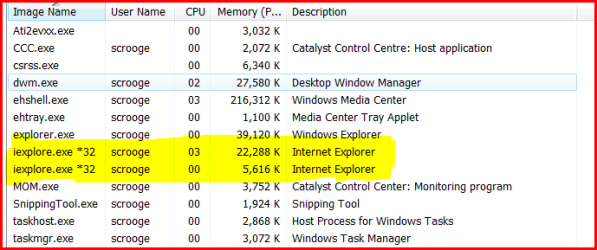
everytime i open (Internet Explorer) and look in task manager it's showing 2 pages open.
if i close Internet Explorer and check back in task manager again both are gone. i only
see 1 page open and i only close 1 page but it comes up as 2 in the task manager.
 

My Computer

Computer Manufacturer/Model Number
home build
OS
win 7 ( 64 bit)
CPU
Intel Core i7-870 Lynnfield 2.93GHz 8MB L3 Cache LGA 1156 95
Motherboard
ASUS P7P55 LX LGA 1156
Memory
G.SKILL Sniper Series 16GB (4 x 4GB) 240-Pin DDR3 SDRAM
Graphics Card(s)
ATI Radeon HD6800 Series
Sound Card
hdmi
Monitor(s) Displays
42" lg 3d tv
Screen Resolution
1920 x 1080
Hard Drives
1 ssd pci-e revodrive
4 seagate 1.5 tb
PSU
Rosewill BRONZE Series RBR1000-M 1000W Continuous@40°C, 80Pl
Case
CoolMaster 922
Cooling
CORSAIR CWCH60 Hydro Series H60 High Performance Liquid CPU
Keyboard
logtech
Mouse
logitect
Internet Speed
5 mbit
It's by design with IE8.

One process is for the program and one is for the tab loaded. This has to with the tab recovery feature they added which prevents the whole app from crashing based on one page allowing you to continue to use the other tabs.
 

My Computer

Computer Manufacturer/Model Number
Dell XPS M1210
OS
Windows Se7en Ultimate Beta x86 Build 7057
CPU
1.83Ghz Centrino Duo
Motherboard
MXC062 Dell Mainboard
Memory
4GB 2x2GB 677Mhz
Graphics Card(s)
256MB nVidia Gefroce Go7400
Sound Card
Intel High Definition
Monitor(s) Displays
12.1 LED Glossy
Screen Resolution
1280x800
Hard Drives
Hitachi 320GB 5400| SimpleDrive 1TB External USB2.0 |
Cooling
NextTech Laptop Cooling Pad. 15CFMx2 USB powered
Keyboard
Dell US Standard Full Size w/o Backlight
Mouse
Synaptics Touchpad/Logitech Notebook Mini
Internet Speed
10Mbps Down/512Kbps Up
Other Info
Eee 701 Original Netbook Overclocked to 1GHz
Windows XP SP3
1GB RAM
4GB SSD
16GB SDHC
Weedmonk is correct.
 

My Computer

Computer type
PC/Desktop
Computer Manufacturer/Model Number
Airbot 2.0
OS
Windows 7 Ultimate x64 SP1
CPU
Core i7 920 (D0) @ 4Ghz, *26c idle *65c full load on air
Motherboard
Asus P6X58D Premium - Sata 6Gb/s - USB 3.0
Memory
12GB DDR3 Corsair Dominator -CMD12GX3M6A1600C8 at 1600MHz
Graphics Card(s)
Zotac Geforce GTX 770
Sound Card
ASUS Xonar D2X
Monitor(s) Displays
1 LG 24" Flatron W2453V-PF 1 Samsung 24" P2450H both 2ms RT
Screen Resolution
1920x1080@60hz
Hard Drives
1 Samsung 250GB 840 Evo SSD
1 OCZ Vertex2 180GB SSD
1 TB Samsung Spinpoint F1 7200RPM 32MB cache
2 500GB WD Caviar Blacks 7200RPM 32MB cache (WD5001AALS)

Pioneer DVD Burner DVR-S18M
PSU
Corsair HX1000W
Case
Cooler Master HAF 932
Cooling
Case Fans *3 230mm, *1 140mm/CPU - *Tuniq Tower 120 Extreme
Keyboard
Logitech Wireless MK700
Mouse
Logitech Wireless MK700
Internet Speed
DL 15 Mbps UL 0.98 Mbps
Antivirus
None
Browser
Firefox Nightly
Other Info
Processor-7.7 *RAM- 7.9 *Graphics-7.9 *Gaming Graphics- 7.9 *SSD- 7.8 W.E.I final score= 7.7
*Phone- LG Nexus 5
thank you very much for your help . i thought it was a virus .
again thank you
scrooge
 

My Computer

Computer Manufacturer/Model Number
home build
OS
win 7 ( 64 bit)
CPU
Intel Core i7-870 Lynnfield 2.93GHz 8MB L3 Cache LGA 1156 95
Motherboard
ASUS P7P55 LX LGA 1156
Memory
G.SKILL Sniper Series 16GB (4 x 4GB) 240-Pin DDR3 SDRAM
Graphics Card(s)
ATI Radeon HD6800 Series
Sound Card
hdmi
Monitor(s) Displays
42" lg 3d tv
Screen Resolution
1920 x 1080
Hard Drives
1 ssd pci-e revodrive
4 seagate 1.5 tb
PSU
Rosewill BRONZE Series RBR1000-M 1000W Continuous@40°C, 80Pl
Case
CoolMaster 922
Cooling
CORSAIR CWCH60 Hydro Series H60 High Performance Liquid CPU
Keyboard
logtech
Mouse
logitect
Internet Speed
5 mbit
and what about the case, i am not running iexplorer (i have not started it yet) but iexplorer is running in the background?
i think that iexplorer does not close tabs, so it starts to recover them and gives the message about it several times. and if i look into the task manager, there are more than 3 iexplorer tasks running without using any of them.
i have not find out either they are crashing and running on the background after i had started iexlorer once druing the session or it starts with system start and running and recovering all the time in the background. i can only see and close them with the task manager.

how to fix this problem?
 

My Computer

OS
Windows 7 Pro (x64)
CPU
AMD Athlon 64 X2 4200+
Motherboard
MSI nForce K9N SLI Platinum
Memory
Kingston 2048 DDR2
Graphics Card(s)
XFX Nvidia Gforce 8600 GTS
Sound Card
HD Audio on board
Monitor(s) Displays
Samsung SyncMaster 943sn
Hard Drives
Maxtor 300GB SATA
Samsung 200GB IDE
PSU
450 W
Back
Top