
How to Open Recently Closed Tabs in IE9 and IE10
Information
This tutorial will show you how to open recently closed tabs again in IE9 and IE10.
Here's How:
1. While in IE9 or IE10, right click or press and hold on a open tab, and select Recently closed tabs. (see screenshot below)
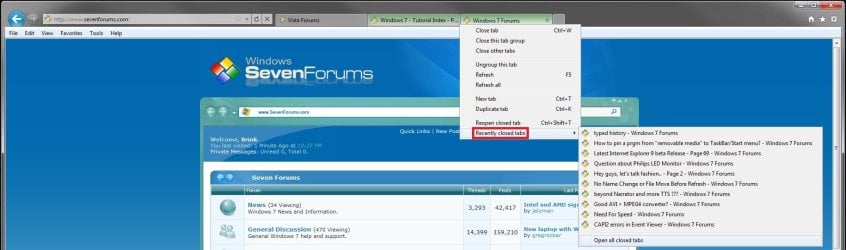
2. To Open a Specific Recently Closed Tab
A) Click/tap on the link of a recently closed tab that you want to open in a new tab again. (see screenshot above)
3. To Open All Recently Closed Tabs
A) Click/tap on the Open all closed tabs option. (see screenshot above)
NOTE: This will open all of the listed links for recently closed tabs above this option in new tabs.
That's it,
Shawn
Related Tutorials
- How to Drag and Drop the Tabs in IE9 and IE10
- How to Enable or Disable Internet Explorer Tabbed Browsing
- How to Turn "Show tabs on a separate row" On or Off in IE9 and IE10
- How to Reopen the Last Browsing Session in Internet Explorer
- How to Change What Page a "New Tab" Opens to in IE9 and IE10
- How to Turn the "Always close all tabs" Warning Message On or Off in Internet Explorer
Last edited:


