Internet Explorer processes left open

Use Clean boot,
http://www.sevenforums.com/tutorials/179159-troubleshoot-application-conflicts-performing-clean-startup.html
Click Start and type in the search box,
msconfig
Click on the suggestion on top or hit the Enter key,
Go to the Startup section and take some screen shots for a complete list,
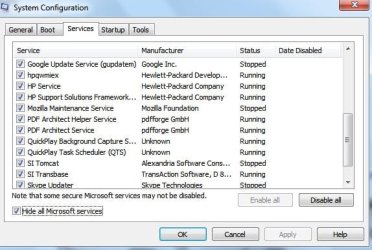
Go to the Services section and on the bottom left Check the box to Hide All Microsoft services,
Repeat the screen shots,

See the links above my signature on how to take and upload screen shots here,
Cheers.
 

My Computer

Computer type
PC/Desktop
Computer Manufacturer/Model Number
Custom assembled by me :}
OS
Win-7-Pro64bit 7-H-Prem-64bit
CPU
i7-5930K 2nd i9-9940x both water blocked VRM's too
Motherboard
ASUS SABERTOOTH X99 2nd ASUS x299 Apex
Memory
Trident-z 3200C14 2nd Trident-z 3600C16
Graphics Card(s)
EVGA 1080ti ftw3 2nd Titan Xp both water blocked
Sound Card
Built-in Realtek
Monitor(s) Displays
1-AOC G2460PG 24"G-Sync 144Hz/ 2nd 1-ASUS VG248QE 24" 144Hz
Screen Resolution
1920 x 1080 144Hz
Hard Drives
2-Samsung M.2 Evo & Evo Plus
2-Samsung 850 EVO 500GB SSD's/ 3-2.5 W.D. Black 1tb-&3-1tb/3-3.5 WD Black 1tb hdd's
PSU
EVGA SuperNOVA 1000-P2 2nd 1200-P2
Case
2-Corsair Obsidian Series 450D Black ATX Mid Tower
Cooling
Custom water loops
Keyboard
Logitech G710+/ 2nd Logitech G910
Mouse
2-RedDragon M901 Perdition 16400 dpi Gaming mouse = wired
Internet Speed
Comcast Ping 19ms 89.31mbps download speed 6.12mbps upload
Antivirus
Malwarebytes Pro/ Superantispyware Pro
Browser
FireFox & Pale moon
Other Info
2nd ASUS X299 Apex/Intel i9-9940x with Custom water loop/7H-Prem-x64/Corsair 450D case/Ram Trident-z 3600C16 4x8gb / Samsung970Evo plus 500gb SSD/Dual ssd EZ swap evo/PSU EVGA SuperNova 1200w-P2 80+Platinum/GPU Titan Xp /8-ML-140 on push-pull on 2-280GTX rads
Superfetch always caches the last running program as long as there is free RAM for caching. I have seen up to 6 times IE or other programs in cache. It does not clean up the old ones but goes round robin - first in, first out.
 

My Computer

Computer Manufacturer/Model Number
HP, Dell, Gateway, Toshiba - 4 laptops and 2 desktops
OS
Vista, Windows7, Mint Mate, Zorin, Windows 8
CPU
from 1.6GHz Duo to i7
Monitor(s) Displays
2x HP w2207
Hard Drives
5x HDD, 7x SSD, 12x Externals
Keyboard
with trackball - no mices
Mouse
Trackball mice
Internet Speed
DSL 6000
Use Clean boot,
http://www.sevenforums.com/tutorials/179159-troubleshoot-application-conflicts-performing-clean-startup.html
Click Start and type in the search box,
msconfig
Click on the suggestion on top or hit the Enter key,
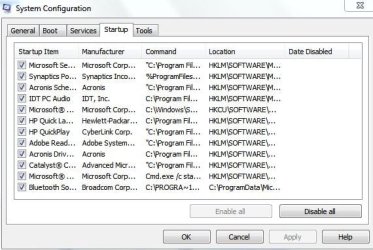
Go to the Startup section and take some screen shots for a complete list,
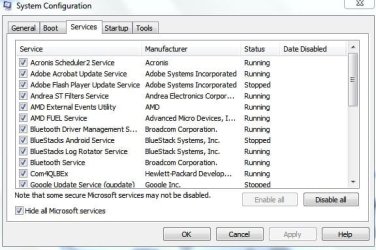
Go to the Services section and on the bottom left Check the box to Hide All Microsoft services,
Repeat the screen shots,

See the links above my signature on how to take and upload screen shots here,
Cheers.
After clean boot issue persists. Unless I close the iexplore processes left behind in Task Manager before reopening IE.
 

Attachments

  • ie msconfig.JPG
    ie msconfig.JPG
    51.2 KB · Views: 14
  • ieservices1.JPG
    ieservices1.JPG
    49.3 KB · Views: 14
  • ieservices2.JPG
    ieservices2.JPG
    49.1 KB · Views: 14
  • ieservices3.JPG
    ieservices3.JPG
    15.7 KB · Views: 14

My Computer

Computer type
PC/Desktop
Computer Manufacturer/Model Number
HP DV5 Laptop
OS
Microsoft Windows 7 Ultimate 64-bit 7601 Multiprocessor Free Service Pack 1
CPU
AMD Turion(tm) X2 Ultra Dual-Core Mobile ZM-80
Motherboard
Quanta 3600
Memory
3.00 GB
Graphics Card(s)
ATI Mobility Radeon HD 3400 Series
Sound Card
(1) AMD High Definition Audio Device (2) Bluetooth Hands-f
Screen Resolution
1280 x 800 x 32 bits (4294967296 colors) @ 59 Hz
Hard Drives
(1) ST1000LM024 HN-M101MBB ATA Device (2) JMCR SD/MMC SCSI Disk Device
I think you are chasing a red herring. It's not going to hurt your system, it uses no resources other than some otherwise unused RAM. Why are you worried about it.
 

My Computer

Computer Manufacturer/Model Number
HP, Dell, Gateway, Toshiba - 4 laptops and 2 desktops
OS
Vista, Windows7, Mint Mate, Zorin, Windows 8
CPU
from 1.6GHz Duo to i7
Monitor(s) Displays
2x HP w2207
Hard Drives
5x HDD, 7x SSD, 12x Externals
Keyboard
with trackball - no mices
Mouse
Trackball mice
Internet Speed
DSL 6000
I think you are chasing a red herring. It's not going to hurt your system, it uses no resources other than some otherwise unused RAM. Why are you worried about it.
It's not the processes left behind that I'm worried about. Except that they seem to be key to my problem, the reason I started this thread...Previous tabs not reopening when I restart IE.
 

My Computer

Computer type
PC/Desktop
Computer Manufacturer/Model Number
HP DV5 Laptop
OS
Microsoft Windows 7 Ultimate 64-bit 7601 Multiprocessor Free Service Pack 1
CPU
AMD Turion(tm) X2 Ultra Dual-Core Mobile ZM-80
Motherboard
Quanta 3600
Memory
3.00 GB
Graphics Card(s)
ATI Mobility Radeon HD 3400 Series
Sound Card
(1) AMD High Definition Audio Device (2) Bluetooth Hands-f
Screen Resolution
1280 x 800 x 32 bits (4294967296 colors) @ 59 Hz
Hard Drives
(1) ST1000LM024 HN-M101MBB ATA Device (2) JMCR SD/MMC SCSI Disk Device
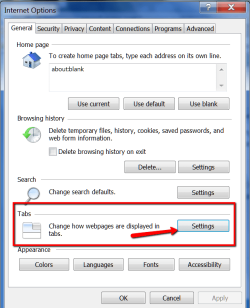
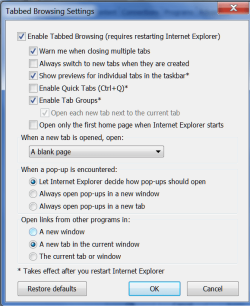
Maybe you want to play with those settings:

2014-12-20_1633_001.png
 

Attachments

  • 2014-12-20_1633.png
    2014-12-20_1633.png
    26.5 KB · Views: 0

My Computer

Computer Manufacturer/Model Number
HP, Dell, Gateway, Toshiba - 4 laptops and 2 desktops
OS
Vista, Windows7, Mint Mate, Zorin, Windows 8
CPU
from 1.6GHz Duo to i7
Monitor(s) Displays
2x HP w2207
Hard Drives
5x HDD, 7x SSD, 12x Externals
Keyboard
with trackball - no mices
Mouse
Trackball mice
Internet Speed
DSL 6000
I might add that I had this same issue since IE10. I've seen it reported in many forums quite often. Was hoping there was a fix by now.
 

My Computer

Computer type
PC/Desktop
Computer Manufacturer/Model Number
HP DV5 Laptop
OS
Microsoft Windows 7 Ultimate 64-bit 7601 Multiprocessor Free Service Pack 1
CPU
AMD Turion(tm) X2 Ultra Dual-Core Mobile ZM-80
Motherboard
Quanta 3600
Memory
3.00 GB
Graphics Card(s)
ATI Mobility Radeon HD 3400 Series
Sound Card
(1) AMD High Definition Audio Device (2) Bluetooth Hands-f
Screen Resolution
1280 x 800 x 32 bits (4294967296 colors) @ 59 Hz
Hard Drives
(1) ST1000LM024 HN-M101MBB ATA Device (2) JMCR SD/MMC SCSI Disk Device
Maybe you want to play with those settings:

View attachment 343658
Played with those. I would think it was settings related, the previous tabs would either never reopen or always reopen.
Could it be a coincidence that ending the iexplore processes before reopening IE makes the opening of previous tabs work correctly each and every time?
 

Attachments

  • ietabs.JPG
    ietabs.JPG
    39.5 KB · Views: 14

My Computer

Computer type
PC/Desktop
Computer Manufacturer/Model Number
HP DV5 Laptop
OS
Microsoft Windows 7 Ultimate 64-bit 7601 Multiprocessor Free Service Pack 1
CPU
AMD Turion(tm) X2 Ultra Dual-Core Mobile ZM-80
Motherboard
Quanta 3600
Memory
3.00 GB
Graphics Card(s)
ATI Mobility Radeon HD 3400 Series
Sound Card
(1) AMD High Definition Audio Device (2) Bluetooth Hands-f
Screen Resolution
1280 x 800 x 32 bits (4294967296 colors) @ 59 Hz
Hard Drives
(1) ST1000LM024 HN-M101MBB ATA Device (2) JMCR SD/MMC SCSI Disk Device
That would be a strange behavior - but anything is possible. I could imagine that it does not retrieve the last occurance from RAM. But I am only speculating.
 

My Computer

Computer Manufacturer/Model Number
HP, Dell, Gateway, Toshiba - 4 laptops and 2 desktops
OS
Vista, Windows7, Mint Mate, Zorin, Windows 8
CPU
from 1.6GHz Duo to i7
Monitor(s) Displays
2x HP w2207
Hard Drives
5x HDD, 7x SSD, 12x Externals
Keyboard
with trackball - no mices
Mouse
Trackball mice
Internet Speed
DSL 6000

My Computer

Computer type
PC/Desktop
Computer Manufacturer/Model Number
HP DV5 Laptop
OS
Microsoft Windows 7 Ultimate 64-bit 7601 Multiprocessor Free Service Pack 1
CPU
AMD Turion(tm) X2 Ultra Dual-Core Mobile ZM-80
Motherboard
Quanta 3600
Memory
3.00 GB
Graphics Card(s)
ATI Mobility Radeon HD 3400 Series
Sound Card
(1) AMD High Definition Audio Device (2) Bluetooth Hands-f
Screen Resolution
1280 x 800 x 32 bits (4294967296 colors) @ 59 Hz
Hard Drives
(1) ST1000LM024 HN-M101MBB ATA Device (2) JMCR SD/MMC SCSI Disk Device
You might go to the settings button again next to delete,
Then go to the Caches section and uncheck that option,
I imagine you can uncheck delete browser history on exit if you haven't already,
That is quite a few services going on with only 3 gigs of ram,
Cheers.
 

My Computer

Computer type
PC/Desktop
Computer Manufacturer/Model Number
Custom assembled by me :}
OS
Win-7-Pro64bit 7-H-Prem-64bit
CPU
i7-5930K 2nd i9-9940x both water blocked VRM's too
Motherboard
ASUS SABERTOOTH X99 2nd ASUS x299 Apex
Memory
Trident-z 3200C14 2nd Trident-z 3600C16
Graphics Card(s)
EVGA 1080ti ftw3 2nd Titan Xp both water blocked
Sound Card
Built-in Realtek
Monitor(s) Displays
1-AOC G2460PG 24"G-Sync 144Hz/ 2nd 1-ASUS VG248QE 24" 144Hz
Screen Resolution
1920 x 1080 144Hz
Hard Drives
2-Samsung M.2 Evo & Evo Plus
2-Samsung 850 EVO 500GB SSD's/ 3-2.5 W.D. Black 1tb-&3-1tb/3-3.5 WD Black 1tb hdd's
PSU
EVGA SuperNOVA 1000-P2 2nd 1200-P2
Case
2-Corsair Obsidian Series 450D Black ATX Mid Tower
Cooling
Custom water loops
Keyboard
Logitech G710+/ 2nd Logitech G910
Mouse
2-RedDragon M901 Perdition 16400 dpi Gaming mouse = wired
Internet Speed
Comcast Ping 19ms 89.31mbps download speed 6.12mbps upload
Antivirus
Malwarebytes Pro/ Superantispyware Pro
Browser
FireFox & Pale moon
Other Info
2nd ASUS X299 Apex/Intel i9-9940x with Custom water loop/7H-Prem-x64/Corsair 450D case/Ram Trident-z 3600C16 4x8gb / Samsung970Evo plus 500gb SSD/Dual ssd EZ swap evo/PSU EVGA SuperNova 1200w-P2 80+Platinum/GPU Titan Xp /8-ML-140 on push-pull on 2-280GTX rads
You might go to the settings button again next to delete,
Then go to the Caches section and uncheck that option,
I imagine you can uncheck delete browser history on exit if you haven't already,
That is quite a few services going on with only 3 gigs of ram,
Cheers.
Thanks, I had set things back already.
I'll try to pare down the services that I can but I don't have many programs installed. When I'm doing everything that I normally do, mostly a browser with 10-12 tabs and Windows Live email, according to task manager there is 2.00GB (67%) of RAM used, 1.00GB free.
You don't think that the RAM is causing the opening previous tab issue in Internet Explorer do you?
Have you got any other thoughts on how to get restore previous session working correctly?
 

My Computer

Computer type
PC/Desktop
Computer Manufacturer/Model Number
HP DV5 Laptop
OS
Microsoft Windows 7 Ultimate 64-bit 7601 Multiprocessor Free Service Pack 1
CPU
AMD Turion(tm) X2 Ultra Dual-Core Mobile ZM-80
Motherboard
Quanta 3600
Memory
3.00 GB
Graphics Card(s)
ATI Mobility Radeon HD 3400 Series
Sound Card
(1) AMD High Definition Audio Device (2) Bluetooth Hands-f
Screen Resolution
1280 x 800 x 32 bits (4294967296 colors) @ 59 Hz
Hard Drives
(1) ST1000LM024 HN-M101MBB ATA Device (2) JMCR SD/MMC SCSI Disk Device
You might go to the settings button again next to delete,
Then go to the Caches section and uncheck that option,
I imagine you can uncheck delete browser history on exit if you haven't already,
That is quite a few services going on with only 3 gigs of ram,
Cheers.
Hey, thanks for the advice, I disabled all the unneeded services that I can and memory use dropped from 2.0GB (67%) to 1.5GB (50%).
 

My Computer

Computer type
PC/Desktop
Computer Manufacturer/Model Number
HP DV5 Laptop
OS
Microsoft Windows 7 Ultimate 64-bit 7601 Multiprocessor Free Service Pack 1
CPU
AMD Turion(tm) X2 Ultra Dual-Core Mobile ZM-80
Motherboard
Quanta 3600
Memory
3.00 GB
Graphics Card(s)
ATI Mobility Radeon HD 3400 Series
Sound Card
(1) AMD High Definition Audio Device (2) Bluetooth Hands-f
Screen Resolution
1280 x 800 x 32 bits (4294967296 colors) @ 59 Hz
Hard Drives
(1) ST1000LM024 HN-M101MBB ATA Device (2) JMCR SD/MMC SCSI Disk Device
Hi good deal,
You might consider look at a ram upgrade
4gigs should be fine but with 7 ultimate and the services 6-8 would be better
Do you use all of the language packs and stuff in 7 ultimate ?

Either way I would look into the ram upgrade for being a long term solution
Cheers.

I'll just add I just did a full ram upgrade of all 8 gigs so they all matched for about 125u.s. at Crucial
You can probably get better deals possibly but it's not really a big expense
It's better to not mix ram sticks so I've heard :/
 

My Computer

Computer type
PC/Desktop
Computer Manufacturer/Model Number
Custom assembled by me :}
OS
Win-7-Pro64bit 7-H-Prem-64bit
CPU
i7-5930K 2nd i9-9940x both water blocked VRM's too
Motherboard
ASUS SABERTOOTH X99 2nd ASUS x299 Apex
Memory
Trident-z 3200C14 2nd Trident-z 3600C16
Graphics Card(s)
EVGA 1080ti ftw3 2nd Titan Xp both water blocked
Sound Card
Built-in Realtek
Monitor(s) Displays
1-AOC G2460PG 24"G-Sync 144Hz/ 2nd 1-ASUS VG248QE 24" 144Hz
Screen Resolution
1920 x 1080 144Hz
Hard Drives
2-Samsung M.2 Evo & Evo Plus
2-Samsung 850 EVO 500GB SSD's/ 3-2.5 W.D. Black 1tb-&3-1tb/3-3.5 WD Black 1tb hdd's
PSU
EVGA SuperNOVA 1000-P2 2nd 1200-P2
Case
2-Corsair Obsidian Series 450D Black ATX Mid Tower
Cooling
Custom water loops
Keyboard
Logitech G710+/ 2nd Logitech G910
Mouse
2-RedDragon M901 Perdition 16400 dpi Gaming mouse = wired
Internet Speed
Comcast Ping 19ms 89.31mbps download speed 6.12mbps upload
Antivirus
Malwarebytes Pro/ Superantispyware Pro
Browser
FireFox & Pale moon
Other Info
2nd ASUS X299 Apex/Intel i9-9940x with Custom water loop/7H-Prem-x64/Corsair 450D case/Ram Trident-z 3600C16 4x8gb / Samsung970Evo plus 500gb SSD/Dual ssd EZ swap evo/PSU EVGA SuperNova 1200w-P2 80+Platinum/GPU Titan Xp /8-ML-140 on push-pull on 2-280GTX rads
I don't have any language packs installed other than english.
I'm not sure this old laptop is worth the $$$ to upgrade the ram. I only use it for web browsing anyway. My desktop PC has 8GB.
Something I've never been able to get my head around though is, how adding more ram will improve performance when windows is only using 50% of the ram available now.
Here is another interesting thread I found about the tabs not reopening issue. Happens in windows 8 also.
IE11 - Startup Tabs - Restore Last Session Not Working - Microsoft Community
 

My Computer

Computer type
PC/Desktop
Computer Manufacturer/Model Number
HP DV5 Laptop
OS
Microsoft Windows 7 Ultimate 64-bit 7601 Multiprocessor Free Service Pack 1
CPU
AMD Turion(tm) X2 Ultra Dual-Core Mobile ZM-80
Motherboard
Quanta 3600
Memory
3.00 GB
Graphics Card(s)
ATI Mobility Radeon HD 3400 Series
Sound Card
(1) AMD High Definition Audio Device (2) Bluetooth Hands-f
Screen Resolution
1280 x 800 x 32 bits (4294967296 colors) @ 59 Hz
Hard Drives
(1) ST1000LM024 HN-M101MBB ATA Device (2) JMCR SD/MMC SCSI Disk Device
Hi,
You'd be surprised on how much 4 gigs will help windows in general which is usually the minimum most people would recommend for a 64 bit system,
For a 32 bit system 3 gigs is probably fine I have that in my laptop and is good,
It's much better now that I upgraded to a ssd in it,

But traditionally a 64 bit system would have a bit more ram :)
Cheers.
 

My Computer

Computer type
PC/Desktop
Computer Manufacturer/Model Number
Custom assembled by me :}
OS
Win-7-Pro64bit 7-H-Prem-64bit
CPU
i7-5930K 2nd i9-9940x both water blocked VRM's too
Motherboard
ASUS SABERTOOTH X99 2nd ASUS x299 Apex
Memory
Trident-z 3200C14 2nd Trident-z 3600C16
Graphics Card(s)
EVGA 1080ti ftw3 2nd Titan Xp both water blocked
Sound Card
Built-in Realtek
Monitor(s) Displays
1-AOC G2460PG 24"G-Sync 144Hz/ 2nd 1-ASUS VG248QE 24" 144Hz
Screen Resolution
1920 x 1080 144Hz
Hard Drives
2-Samsung M.2 Evo & Evo Plus
2-Samsung 850 EVO 500GB SSD's/ 3-2.5 W.D. Black 1tb-&3-1tb/3-3.5 WD Black 1tb hdd's
PSU
EVGA SuperNOVA 1000-P2 2nd 1200-P2
Case
2-Corsair Obsidian Series 450D Black ATX Mid Tower
Cooling
Custom water loops
Keyboard
Logitech G710+/ 2nd Logitech G910
Mouse
2-RedDragon M901 Perdition 16400 dpi Gaming mouse = wired
Internet Speed
Comcast Ping 19ms 89.31mbps download speed 6.12mbps upload
Antivirus
Malwarebytes Pro/ Superantispyware Pro
Browser
FireFox & Pale moon
Other Info
2nd ASUS X299 Apex/Intel i9-9940x with Custom water loop/7H-Prem-x64/Corsair 450D case/Ram Trident-z 3600C16 4x8gb / Samsung970Evo plus 500gb SSD/Dual ssd EZ swap evo/PSU EVGA SuperNova 1200w-P2 80+Platinum/GPU Titan Xp /8-ML-140 on push-pull on 2-280GTX rads
I gather there is not fix for this problem?
Another thing I noticed is the first time after a reset of internet explorer to default settings, the two iexplore processes are closed properly upon exiting IE. After that they are left open every time IE is exited and must be ended manually or the previous session tabs will not be restored.
 

My Computer

Computer type
PC/Desktop
Computer Manufacturer/Model Number
HP DV5 Laptop
OS
Microsoft Windows 7 Ultimate 64-bit 7601 Multiprocessor Free Service Pack 1
CPU
AMD Turion(tm) X2 Ultra Dual-Core Mobile ZM-80
Motherboard
Quanta 3600
Memory
3.00 GB
Graphics Card(s)
ATI Mobility Radeon HD 3400 Series
Sound Card
(1) AMD High Definition Audio Device (2) Bluetooth Hands-f
Screen Resolution
1280 x 800 x 32 bits (4294967296 colors) @ 59 Hz
Hard Drives
(1) ST1000LM024 HN-M101MBB ATA Device (2) JMCR SD/MMC SCSI Disk Device
I've started having this problem again myself. What does it mean when I go to end the process and it says it will result in an unstable system? I've included a screen grab.
 

Attachments

  • Task Manager grab.jpg
    Task Manager grab.jpg
    77.6 KB · Views: 0

My Computer

Computer type
PC/Desktop
Computer Manufacturer/Model Number
Puget Systems
OS
Windows 7 Home Premium 64bit
CPU
Intel core i5
Motherboard
ASUSTeK Computer INC. P8Z68-V PRO GEN3 (LGA1155)
Memory
8GB
Graphics Card(s)
AMD Radeo HD 7700 series
Sound Card
Realtek High Definition Audio
Monitor(s) Displays
Acer Al2002W
Screen Resolution
1680x1050
Hard Drives
500GB
298GB Western Digital WD 3200AAJ External
2794GB Western Digital WD My Book 1230
PSU
Antec TruePower New Series 650W
Case
Lancool C-K7B
Cooling
Cooler Master Hyper TX3
Antivirus
windows security essentials
Browser
IE10, Firefox

My Computer

Computer type
PC/Desktop
Computer Manufacturer/Model Number
Custom assembled by me :}
OS
Win-7-Pro64bit 7-H-Prem-64bit
CPU
i7-5930K 2nd i9-9940x both water blocked VRM's too
Motherboard
ASUS SABERTOOTH X99 2nd ASUS x299 Apex
Memory
Trident-z 3200C14 2nd Trident-z 3600C16
Graphics Card(s)
EVGA 1080ti ftw3 2nd Titan Xp both water blocked
Sound Card
Built-in Realtek
Monitor(s) Displays
1-AOC G2460PG 24"G-Sync 144Hz/ 2nd 1-ASUS VG248QE 24" 144Hz
Screen Resolution
1920 x 1080 144Hz
Hard Drives
2-Samsung M.2 Evo & Evo Plus
2-Samsung 850 EVO 500GB SSD's/ 3-2.5 W.D. Black 1tb-&3-1tb/3-3.5 WD Black 1tb hdd's
PSU
EVGA SuperNOVA 1000-P2 2nd 1200-P2
Case
2-Corsair Obsidian Series 450D Black ATX Mid Tower
Cooling
Custom water loops
Keyboard
Logitech G710+/ 2nd Logitech G910
Mouse
2-RedDragon M901 Perdition 16400 dpi Gaming mouse = wired
Internet Speed
Comcast Ping 19ms 89.31mbps download speed 6.12mbps upload
Antivirus
Malwarebytes Pro/ Superantispyware Pro
Browser
FireFox & Pale moon
Other Info
2nd ASUS X299 Apex/Intel i9-9940x with Custom water loop/7H-Prem-x64/Corsair 450D case/Ram Trident-z 3600C16 4x8gb / Samsung970Evo plus 500gb SSD/Dual ssd EZ swap evo/PSU EVGA SuperNova 1200w-P2 80+Platinum/GPU Titan Xp /8-ML-140 on push-pull on 2-280GTX rads

Back
Top