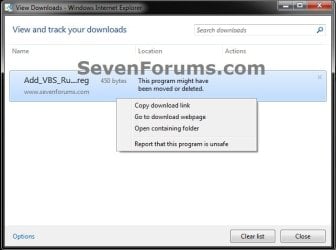
Internet Explorer - View and Track Downloads

How to View and Track Downloads in IE9, IE10, and IE11


   Information
This tutorial will show how to view and track your downloads using View Downloads in IE9, IE10, and IE11.


Here's How:
1. Open IE9, IE10, or IE11, and ......
NOTE: In Windows 8/8.1, you would open the desktop IE, and not the modern IE.
A) Press CTRL + J.

OR

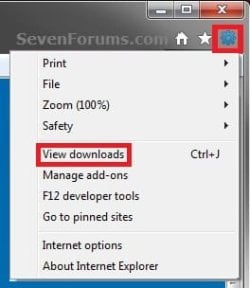
B) Click/tap on the gear icon (tools) in the upper right corner, then click/tap on View downloads. (see screenshot below)
Gear.jpg
OR

C) Once a download begins or finishes, click on the View Downloads button in the pop-up message bar at the bottom of IE. (see screenshot below)

Bottom_IE9.jpg
2. You will now see a list of all the files that you have downloaded in IE. Select a downloaded file and right click on it. (see screenshots below)
Example.jpg

Moved.jpg
3. Click/tap on the option that you want to do with the selected downloaded file. (see screenshots above)
NOTE: If an option is grayed out or missing, then it is not available for the selected downloaded file. This is usually do to the file being deleted or moved from the default download location.

  • Delete program - This will delete the downloaded file from the default download location if still there.
  • Copy download link - This will copy the website download link for the file to the clipboard so that you are able to paste it from the clipboard.
  • Go to download webpage - This will take you to the website's download page of the file in IE9.
  • Open containing folder - This will open the default download location folder in Windows Explorer only if the file is still there.
  • Report that this program is unsafe - Opens Internet Explorer SmartScreen Filter to Report a Unsafe Website.
  • Rerun security checks on this program - Scans the downloaded file again.
4. Repeat steps 2 and 3 for any other downloaded file if you like.

5. When finished, click/tap on Close. (see screenshots below step 2)
That's it,
Shawn


Last edited:
view & track downloads... unless you can't.

so I appreciate that if you do what the instructions say, you can track your downloads - unless they don't work
If I click "view downloads" on the tool menu - nothing happens
If I click "view downloads" during the download - nothing happens
if I use Ctrl-J - nothing happens

I have no idea where my downloads are going

if I type the title of the file into search - nothing is found for that file
 

My Computer My Computer

At a glance

windows 7 64bit professionalintel i7 1.73Ghz8mnvidia geforce
Computer Manufacturer/Model Number
HP dv6
OS
windows 7 64bit professional
CPU
intel i7 1.73Ghz
Memory
8m
Graphics Card(s)
nvidia geforce
Hello DW, and welcome to Seven Forums.

You might see if completely resetting IE9 may be able to help. If not, then you might see if uninstalling IE9 and reinstalling IE9 may help.

Hope this helps,
Shawn
 

My Computer My Computer

At a glance

64-bit Windows 11 Pro for WorkstationsIntel i7-8700K OC'd to 5 GHz64 GB (4x16GB) G.SKILL TridentZ RGB DDR4 3600...ASUS ROG-STRIX-GTX1080TI-O11G-GAMING
Computer type
PC/Desktop
Computer Manufacturer/Model Number
Self built custom
OS
64-bit Windows 11 Pro for Workstations
CPU
Intel i7-8700K OC'd to 5 GHz
Motherboard
ASUS ROG Maximus XI Formula Z390
Memory
64 GB (4x16GB) G.SKILL TridentZ RGB DDR4 3600 MHz
Graphics Card(s)
ASUS ROG-STRIX-GTX1080TI-O11G-GAMING
Sound Card
Integrated
Monitor(s) Displays
2 x Samsung Odyssey G7 27"
Screen Resolution
2560x1440
Hard Drives
1TB Samsung 990 PRO M.2,
4TB Samsung 990 PRO PRO M.2,
TerraMaster F8 SSD Plus NAS
PSU
Seasonic Prime Titanium 850W
Case
Thermaltake Core P3
Cooling
Corsair Hydro H115i
Keyboard
Logitech wireless K800
Mouse
Logitech MX Master 4
Internet Speed
2 Gb/s Download and 100 Mb/s Upload
Antivirus
Malwarebyte Anti-Malware Premium
Browser
Google Chrome
Other Info
Logitech Z625 speaker system,
Logitech BRIO 4K Pro webcam,
HP Color LaserJet Pro MFP M477fdn,
APC SMART-UPS RT 1000 XL - SURT1000XLI,
Galaxy S23 Plus phone
IE9

Thanx Shaun,

interestingly, IE9 32bit opens web pdf files just fine - 64bit makes them unavailable.
 

My Computer My Computer

At a glance

windows 7 64bit professionalintel i7 1.73Ghz8mnvidia geforce
Computer Manufacturer/Model Number
HP dv6
OS
windows 7 64bit professional
CPU
intel i7 1.73Ghz
Memory
8m
Graphics Card(s)
nvidia geforce
You're welcome DW.

Yeah, you may need to save the PDF file to the desktop if able to and open it from there instead in IE9 (64-bit).
 

My Computer My Computer

At a glance

64-bit Windows 11 Pro for WorkstationsIntel i7-8700K OC'd to 5 GHz64 GB (4x16GB) G.SKILL TridentZ RGB DDR4 3600...ASUS ROG-STRIX-GTX1080TI-O11G-GAMING
Computer type
PC/Desktop
Computer Manufacturer/Model Number
Self built custom
OS
64-bit Windows 11 Pro for Workstations
CPU
Intel i7-8700K OC'd to 5 GHz
Motherboard
ASUS ROG Maximus XI Formula Z390
Memory
64 GB (4x16GB) G.SKILL TridentZ RGB DDR4 3600 MHz
Graphics Card(s)
ASUS ROG-STRIX-GTX1080TI-O11G-GAMING
Sound Card
Integrated
Monitor(s) Displays
2 x Samsung Odyssey G7 27"
Screen Resolution
2560x1440
Hard Drives
1TB Samsung 990 PRO M.2,
4TB Samsung 990 PRO PRO M.2,
TerraMaster F8 SSD Plus NAS
PSU
Seasonic Prime Titanium 850W
Case
Thermaltake Core P3
Cooling
Corsair Hydro H115i
Keyboard
Logitech wireless K800
Mouse
Logitech MX Master 4
Internet Speed
2 Gb/s Download and 100 Mb/s Upload
Antivirus
Malwarebyte Anti-Malware Premium
Browser
Google Chrome
Other Info
Logitech Z625 speaker system,
Logitech BRIO 4K Pro webcam,
HP Color LaserJet Pro MFP M477fdn,
APC SMART-UPS RT 1000 XL - SURT1000XLI,
Galaxy S23 Plus phone
Shawn,
Thanx, some sites don't seem to let me "save as" otherwise I would. That's what prompted my attempt to discover why & where the files are "downloading" to. I'll do the reset after I catch up on business this morning.
 

My Computer My Computer

At a glance

windows 7 64bit professionalintel i7 1.73Ghz8mnvidia geforce
Computer Manufacturer/Model Number
HP dv6
OS
windows 7 64bit professional
CPU
intel i7 1.73Ghz
Memory
8m
Graphics Card(s)
nvidia geforce
Resetting IE9 (64-bit) will not do any good in this case though since there's not a 64-bit PDF viewer addon available that I know of. It only works in IE9 (32-bit), or other 32-bit browsers. :(
 

My Computer My Computer

At a glance

64-bit Windows 11 Pro for WorkstationsIntel i7-8700K OC'd to 5 GHz64 GB (4x16GB) G.SKILL TridentZ RGB DDR4 3600...ASUS ROG-STRIX-GTX1080TI-O11G-GAMING
Computer type
PC/Desktop
Computer Manufacturer/Model Number
Self built custom
OS
64-bit Windows 11 Pro for Workstations
CPU
Intel i7-8700K OC'd to 5 GHz
Motherboard
ASUS ROG Maximus XI Formula Z390
Memory
64 GB (4x16GB) G.SKILL TridentZ RGB DDR4 3600 MHz
Graphics Card(s)
ASUS ROG-STRIX-GTX1080TI-O11G-GAMING
Sound Card
Integrated
Monitor(s) Displays
2 x Samsung Odyssey G7 27"
Screen Resolution
2560x1440
Hard Drives
1TB Samsung 990 PRO M.2,
4TB Samsung 990 PRO PRO M.2,
TerraMaster F8 SSD Plus NAS
PSU
Seasonic Prime Titanium 850W
Case
Thermaltake Core P3
Cooling
Corsair Hydro H115i
Keyboard
Logitech wireless K800
Mouse
Logitech MX Master 4
Internet Speed
2 Gb/s Download and 100 Mb/s Upload
Antivirus
Malwarebyte Anti-Malware Premium
Browser
Google Chrome
Other Info
Logitech Z625 speaker system,
Logitech BRIO 4K Pro webcam,
HP Color LaserJet Pro MFP M477fdn,
APC SMART-UPS RT 1000 XL - SURT1000XLI,
Galaxy S23 Plus phone
Back
Top